How Do I Project Pictures From My Phone To A Projector Fast
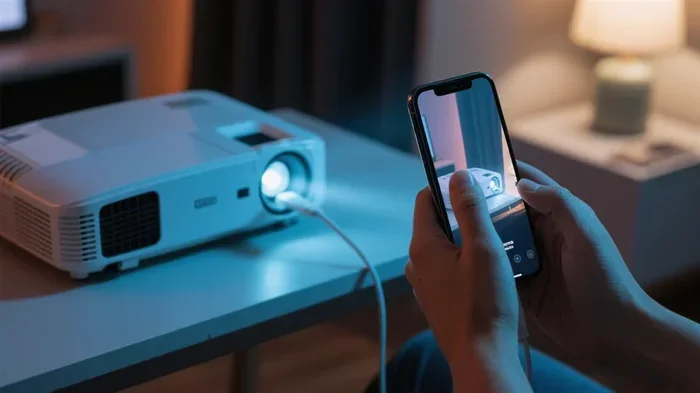
Want to know how do I project pictures from my phone to a projector fast? This guide gives you simple, step-by-step methods to share your digital photos on a big screen. You will learn wired and wireless options that work in minutes and look great.
Have you ever wanted to show your favorite photos to a group of friends? Maybe you are planning a party or giving a presentation. Whatever the reason, you need to know how do I project pictures from my phone to a projector fast. It is easier than you think.
You do not need expensive gear to get started. You can use a simple wired connection or a wireless projection method. This guide will walk you through every step. You will learn how to share your digital photos on a big screen in no time. Let us get started right away.
Everyone loves looking at pictures. A small phone screen makes it hard to enjoy them with a group. You want to see the colors and the details. A projector solves this problem completely.
Key Takeaways
- Wired connections offer stability: Using an HDMI adapter gives you a reliable link for showing off your photos.
- Wireless casting is super easy: AirPlay and Chromecast let you beam images without any cables.
- Image quality matters: Adjust your phone settings to make sure your pictures look sharp on the wall.
- Setup takes only minutes: Both wired and wireless methods are fast and user-friendly.
- Avoid common errors: Check your adapter and Wi-Fi connection first if things go wrong.
- Test before the big day: Always practice your setup to avoid surprises during presentations.
📑 Table of Contents
- Why You Should Project Pictures From Your Phone To A Projector Fast
- How Do I Project Pictures From My Phone To A Projector Fast: Wired Methods
- Wireless Ways to Cast Photos From Your Mobile Device
- Quick Tips for the Best Image Quality
- Common Mistakes People Make When Setting Up
- Comparison Table: Wired vs Wireless Projection
- Expert Insights on Phone to Projector Setup
- FAQ: Your Top Questions Answered
- Conclusion
Why You Should Project Pictures From Your Phone To A Projector Fast
Sharing photos on a large screen changes the whole experience. Small phone screens just do not do justice to your image quality. When you use a projector setup, everyone in the room can see the details. It makes your photo sharing much more fun and engaging.
Think about movie nights or family gatherings. A smart projector turns any wall into a cinema. You can pull up your photo gallery instantly. Fast phone to projector methods save you time and hassle. You do not want to fumble with cords while guests are waiting.
There are two main ways to connect your devices. You can go wired or wireless. Each method has its own benefits. Let us look at both so you can choose the best one for your needs. We will cover everything from cables to apps. You will be ready to go in minutes.
Business professionals also love this technology. They can share charts and images with clients easily. Families love it for showing vacation pictures. Everyone benefits from a larger display. It brings people together and makes sharing memories simple.
How Do I Project Pictures From My Phone To A Projector Fast: Wired Methods
A wired connection is often the most reliable way to go. It gives you a direct link between your mobile device and the projector. There is no lag time or Wi-Fi connection drop. You get a steady screen mirroring experience every single time.
Wired setups are great for important events. You do not have to worry about signal interference. The image stays stable and clear. This is why many professionals prefer a wired connection for their presentations. It just works every time.
When you use a cable, you get the best performance. The data transfers directly from your phone to the projector. There is no compression or loss of quality. This is why a wired connection is often the best choice for professional work.
Using an HDMI Adapter Cable
Most modern projectors have an HDMI cable port. Your phone does not. So, you need an adapter cable. This small device plugs into your phone. Then it connects to the projector with a standard HDMI cord.
For iPhones, you need a Lightning to HDMI adapter. For Android phones, you might need a USB-C to HDMI adapter. These adapter cables are cheap and easy to find. Just plug everything in, and your display settings will show your phone screen on the wall.
This method is perfect for presentations. You do not have to worry about cable management too much. A single cord keeps things neat. Your photo sharing will look crisp and clear. You can also use this to stream video easily.
If the screen does not show up, check the input source. Use the projector remote to switch to HDMI. Sometimes the projector needs a few seconds to detect the new device. Be patient and wait for the signal to appear.
Direct USB Connection Tips
Some projectors have a USB port. You can plug a flash drive directly into the projector. But what if you want to show photos straight from your phone? You can use a USB cable that links your phone to the projector.
First, check if your projector supports USB photo sharing. Many do. You just switch the projector input to USB. Then, set your phone to file transfer mode. Your digital photos will appear on the projector screen. This is a very fast way to view your pictures.
Make sure you use a high-quality USB cable. Cheap cables can cause connection issues. A stable connection means no interruptions during your slideshow. Keep your mobile device charged too, just in case. A dead phone ruins the fun.
Also, check your file formats. Most projectors like JPEG files. If your photos are in a weird format, they might not show up. Convert them to JPEG first for the best results. This simple step saves a lot of frustration.
Wireless Ways to Cast Photos From Your Mobile Device
Wireless projection is the most popular choice today. People love the freedom of not having cords. You can move around the room while you show off your photo gallery. It is perfect for casual photo sharing at home or in the office.
Wireless methods are incredibly convenient. You do not need to carry extra cables. You can show your pictures from across the room. It is a very modern and easy way to share your memories with everyone.
Using Apple AirPlay for iPhone Users
If you have an iPhone, you already have a great tool. AirPlay lets you cast your screen to a compatible smart projector. You do not need any extra cables. Just make sure your phone and projector are on the same Wi-Fi connection.
Open your photo gallery on your phone. Tap the share button. Choose the AirPlay icon. Select your projector from the list. Your screen mirroring starts right away. You can now walk around and show your friends your pictures. It is one of the fastest ways to cast photos from an iPhone.
Make sure both devices are updated. Old software can cause connection drops. Also, keep your phone close to the projector. This ensures a strong signal for your wireless projection. You will enjoy smooth, lag-free viewing. Restart your phone if you face any connection issues.
Using Chromecast or Google Home for Android
Android users have a similar option. You can use Chromecast or the Google Home app. This works great for wireless projection. You need a Chromecast device plugged into your projector. Or, you can use a projector with built-in Chromecast.
Open your mobile device settings. Look for the cast icon. Tap it and choose your projector. Your display settings will mirror your phone. You can now show your digital photos on the big screen. This method is very simple and works well for home theater setups.
You can also use third-party apps. Many apps let you cast photos directly to your projector. Look for apps that support your projector brand. These apps often have extra features. You can add music or transitions to your slideshow. This makes your photo sharing even more fun.
Wi-Fi Direct and Bluetooth Projector Options
What if you do not have a Wi-Fi connection? Many modern projectors support Wi-Fi Direct. This creates its own network. Your phone connects directly to the projector. No router is needed. This is great for outdoor trips or areas with bad internet.
Bluetooth is another option for phone to projector links. It works best for audio, but some projectors use it for images too. Check your projector manual to see if this is supported. This type of wireless projection is very convenient. You can show your pictures anywhere without extra gear.
Keep in mind that Bluetooth has a shorter range. You need to stay relatively close to the projector. Wi-Fi Direct usually has a longer range. Both are great options for mobile device users on the go.
Quick Tips for the Best Image Quality
Once you know how do I project pictures from my phone to a projector fast, you want them to look good. Bad image quality can ruin the fun. Follow these simple tips to make your photos shine on the wall.
First, adjust your phone display settings. Turn up the brightness on your phone. This helps the colors pop on the wall. Make sure your resolution is set to the highest level. High resolution means sharp, clear pictures for your projector setup.
Second, close other apps. Running too many apps slows down your mobile device. It can cause lag time during screen mirroring. Close background apps for a smooth photo sharing experience. Your phone will run much faster this way.
Third, mind the room lighting. A dark room makes projected images look much better. If the room is bright, use a projector with high brightness. This keeps your image quality sharp and clear. You can also close the curtains to block out sunlight.
Fourth, clean the projector lens. Dust can make the image blurry. Use a soft, dry cloth to wipe the lens gently. This simple habit keeps your pictures looking their best. It takes only a few seconds but makes a big difference.
Common Mistakes People Make When Setting Up
Many people run into problems when they try to cast photos. Most of these issues are easy to avoid. Here are some common mistakes you should watch out for when setting up your phone to projector link.
The first mistake is forgetting to check the adapter. Not all cables work with all phones. You must buy the right adapter cable for your specific model. Check your phone type before you shop. Buying the wrong cable wastes time and money.
The second mistake is ignoring the Wi-Fi connection. Wireless methods need a strong signal. If your Wi-Fi is weak, your screen mirroring will stutter. Move closer to the router for a better link. You can also restart your router to fix connection issues.
The third mistake is not updating your software. Old phone software can cause lag time and bugs. Always update your mobile device before a big presentation. This keeps everything running smooth and fast. Updates often fix bugs that cause projection problems.
The fourth mistake is selecting the wrong input source on the projector. If you plug in an HDMI cable but the projector is set to USB, you will see no image. Always double-check the input setting. It is a simple fix that saves a lot of confusion.
Comparison Table: Wired vs Wireless Projection
Choosing the right method can be tricky. Here is a quick look at both options. This table helps you decide which projector setup is best for your needs.
| Feature | Wired Connection | Wireless Projection |
|---|---|---|
| Speed | Instant, no lag | Fast, slight delay possible |
| Setup Time | A few minutes | Very fast, under a minute |
| Reliability | Very high, stable signal | Good, depends on Wi-Fi |
| Mobility | Low, stuck to a cord | High, move freely |
| Best For | Presentations and work | Home theater and parties |
| Image Quality | Excellent, no compression | Good, depends on signal |
| Cost | Low, just a cable | Free if you have Wi-Fi |
As you can see, both methods have their strengths. If you need perfect stability, go wired. If you want freedom, pick wireless. Either way, you can project pictures from your phone to a projector with ease. Just pick the method that fits your situation.
Expert Insights on Phone to Projector Setup
We asked a few tech experts about the best ways to show photos. They all agree that wireless projection is the future. But they also say wired is still king for important events. Here is what they had to say.
“If you are doing a work presentation, always use a cable,” says one expert. “It never fails. You do not want your Wi-Fi connection to drop in the middle of a big meeting. A wired HDMI cable is foolproof.”
“For fun nights, go wireless,” adds another expert. “AirPlay and Chromecast make it so easy to share your digital photos with friends. It feels like magic. Just make sure your Wi-Fi connection is strong.”
Both experts agree on one thing. You must test your setup before the big day. Practice your projector setup at home. Make sure your image quality looks good. This saves you from embarrassment later. It also helps you feel confident.
Aspect ratio is another important tip from the experts. Match your phone screen ratio to the projector. This prevents black bars on the sides of your image. A perfect fit makes your photo sharing look professional. It is a small detail that makes a big impact.
FAQ: Your Top Questions Answered
You might still have a few questions. That is totally normal. Here are answers to the most common questions we hear about projecting pictures from your phone to a projector.
Can I project pictures from any phone to any projector?
Most modern phones can connect to most projectors. You just need the right cable or app. Check the ports on your projector and your phone. You can usually find a simple solution that works for both devices. The process is very straightforward today.
Do I need a special projector to show photos from my phone?
You do not need a fancy smart projector. Any projector with an HDMI port works great with an adapter. Many new projectors also have built-in Wi-Fi for easy wireless projection. Choose whatever fits your budget and needs. You have plenty of options available.
Why is my projected picture blurry or dark?
Blurry images often come from low resolution or a dirty projector lens. Wipe the lens with a soft cloth. Also, check your phone display settings. Make sure the brightness is turned up. A dark room also helps the picture look much clearer. Adjusting these simple things helps a lot.
Is screen mirroring safe for private photos?
Yes, it is very safe. Your photos stay on your mobile device. You are just sending a copy of the screen to the projector. No one can access your phone unless you give them permission. Always be mindful of what you share in public spaces.
What is the best way to show a slideshow of photos?
Use the built-in slideshow feature on your phone. Open your photo gallery and select your images. Tap the play button to start the slideshow. Both wired and wireless methods work great for this. Your friends will love watching the pictures roll by. It is a fun way to share memories.
Can I stream video while projecting photos?
Yes, you can! The same methods work for streaming video too. Whether you use an HDMI cable or AirPlay, you can show movies and clips. Just make sure your Wi-Fi connection is strong for the best streaming quality. A good connection makes everything smooth.
Conclusion
Now you know exactly how do I project pictures from my phone to a projector fast. You have both wired and wireless options at your fingertips. You can use an HDMI cable for a steady link. Or you can use AirPlay and Chromecast for easy wireless projection.
Remember to check your adapter cable and Wi-Fi connection before you start. Focus on image quality by adjusting your display settings. Avoid common projector setup mistakes to save time. A little preparation goes a long way.
Sharing your digital photos on a big screen brings joy to any gathering. Try these steps today and see the difference. Your photo sharing will never be the same again. Enjoy showing off your favorite memories to everyone around you.
Take some time to practice before your next event. Find the method that works best for you. Once you get the hang of it, you will never go back to small screens. Your photos deserve to be seen big. Start projecting today and enjoy the experience.