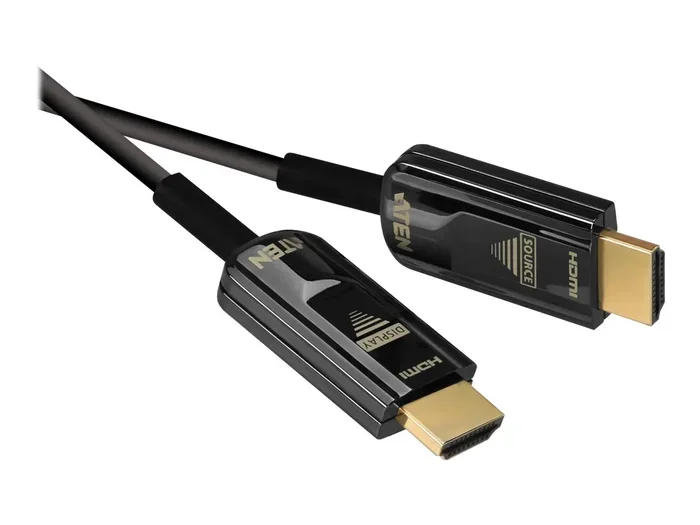
Can You Extend An Hdmi Cable Here Is Your Complete Guide
Yes, you can extend an HDMI cable using several methods, including extension cables, HDMI repeaters, and HDMI over Ethernet setups. The right choice depends on your distance needs, budget, and the resolution you want to maintain. This guide covers every option so you can pick the best solution for your setup.
Have you ever needed to stretch your HDMI cable across a room but found it just was not long enough? You are not alone. Many people run into this problem when setting up home theaters, gaming consoles, or office presentations. The good news is that you can extend an HDMI cable, and there are several reliable ways to do it.
Whether you need to reach a projector across a large conference room or connect a streaming box in another part of your house, extending an HDMI cable is totally doable. In this guide, we will walk you through every option, from simple extension cables to advanced HDMI over Ethernet setups. By the end, you will know exactly which method works best for your situation.
So let us dive right in and explore how to get solid HDMI connectivity over longer distances without losing signal quality.
Key Takeaways
- Multiple Extension Options Exist: You can use HDMI extension cables, repeaters, splitters, or HDMI over Ethernet to lengthen your connection.
- Signal Quality Matters: Longer HDMI runs can degrade your HDMI resolution, so choosing the right method is essential.
- HDMI Over Ethernet Is Great for Long Runs: This method can push HDMI signals up to 300 feet or more using CAT6 cable.
- Active Repeaters Boost Your Signal: An HDMI repeater refreshes the signal and helps maintain HDMI audio video quality over distance.
- Avoid Common Mistakes: Using cheap cables, ignoring HDMI certification, or exceeding recommended distances can cause signal loss.
- Check Your HDMI version Compatibility: Newer HDMI versions support higher bandwidth, which matters for 4K and beyond.
- Plan Your Setup Before Buying: Measure your HDMI distance and choose the right HDMI cable type and extender for your needs.
📑 Table of Contents
- What Is an HDMI Cable and Why Does Length Matter?
- Can You Extend an HDMI Cable? Yes, Here Are the Ways
- HDMI Extension Cables vs. HDMI Repeaters vs. HDMI Over Ethernet
- How to Choose the Right HDMI Extender for Your Setup
- Common HDMI Extension Mistakes to Avoid
- Expert Tips for the Best HDMI Signal Over Long Distances
- Frequently Asked Questions About Extending HDMI Cables
- Conclusion
What Is an HDMI Cable and Why Does Length Matter?
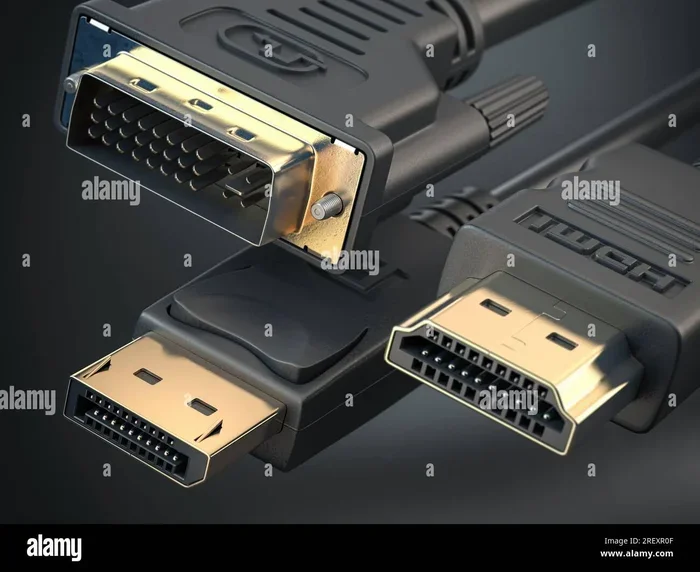
An HDMI cable carries both audio and video signals from one device to another. It is the standard connection for TVs, monitors, projectors, and gaming consoles. But like any cable, it has limits. The longer the cable, the weaker the signal can become.
Here is the basic idea. An HDMI signal travels through copper wires inside the cable. As the distance grows, the signal loses strength. This is called signal degradation. For short runs, under 15 feet, a standard HDMI cable works perfectly fine. But beyond that, you may start seeing problems.
How Far Can a Standard HDMI Cable Go?
Most HDMI cables work well up to about 15 to 25 feet. After that, you might notice flickering, a blank screen, or poor HDMI resolution. The exact limit depends on the HDMI cable quality and the HDMI version you are using.
- Standard HDMI (Version 1.4): Works well up to 15 feet for 1080p.
- High Speed HDMI (Version 2.0): Can handle 4K but may struggle past 25 feet.
- Premium High Speed HDMI (Version 2.1): Supports 8K and 4K at 120Hz but is more sensitive to distance.
If your HDMI distance exceeds these limits, you need an extension solution. That is where the options below come in.
Can You Extend an HDMI Cable? Yes, Here Are the Ways
The short answer is yes. You can extend an HDMI cable using several different methods. Each method has its own pros and cons. Let us look at the most popular options so you can decide what fits your setup best.
Option 1: HDMI Extension Cable
An HDMI extension cable is the simplest solution. It is a cable with an HDMI port on each end. You plug one end into your source device and the other end into your display. Then you connect the two with a short patch cable or use a single longer extension cable.
This method works great for adding 10 to 50 feet to your setup. The key is to buy a high-quality HDMI extension cable that matches your HDMI cable type. Cheap extension cables often introduce signal loss and reduce your HDMI resolution.
Quick Tip: Always buy an HDMI extension cable that is rated for the resolution you need. If you want 4K, make sure the cable supports 4K HDMI bandwidth.
Option 2: HDMI Repeater
An HDMI repeater is a small device that sits between two HDMI cables. It receives the HDMI signal, boosts it, and sends it along to the next cable. Think of it as a signal refresh station.
HDMI repeaters are perfect for runs between 50 and 100 feet. They do not require any extra cables or power in most cases. Some models even draw power from the HDMI port itself.
Here is how a basic setup works:
- Connect the first HDMI cable from your source device to the repeater input.
- Plug the repeater output into the second HDMI cable.
- Run the second cable to your TV or projector.
That is it. The repeater refreshes the HDMI signal and helps maintain strong HDMI audio video quality over longer HDMI distance runs.
Option 3: HDMI Over Ethernet
HDMI over Ethernet is one of the most powerful extension methods available. It uses CAT5e or CAT6 Ethernet cable to carry the HDMI signal over very long distances. You need a pair of HDMI extenders — one at the source end and one at the display end.
This method can push HDMI signals up to 300 feet or more. It is a popular choice for large venues, classrooms, and home theaters with long cable runs.
Quick Tip: Use CAT6 Ethernet cable for the best results with HDMI over Ethernet. It offers better shielding and supports higher bandwidth than CAT5e.
Option 4: HDMI Splitter or Switch
An HDMI splitter or HDMI switch can also help in certain situations. An HDMI splitter takes one input and sends it to multiple displays. An HDMI switch lets you connect multiple source devices to one display.
While these are not traditional extension tools, some models include built-in signal boosting that can help with moderate HDMI cable length increases.
HDMI Extension Cables vs. HDMI Repeaters vs. HDMI Over Ethernet
Not sure which method is right for you? Let us compare the three main options side by side.
| Feature | HDMI Extension Cable | HDMI Repeater | HDMI Over Ethernet |
|---|---|---|---|
| Max Distance | Up to 50 feet | Up to 100 feet | Up to 300+ feet |
| Ease of Setup | Very Easy | Easy | Moderate |
| Cost | Low | Medium | Medium to High |
| Signal Quality | Good for short runs | Very Good | Excellent with CAT6 |
| Power Required | No | Usually No | Yes (for extenders) |
| Best For | Short adds | Medium runs | Long runs |
As you can see, each method has its sweet spot. For quick fixes, an HDMI extension cable is your best bet. For medium distances, an HDMI repeater works great. For really long runs, HDMI over Ethernet is the way to go.
How to Choose the Right HDMI Extender for Your Setup
Choosing the right HDMI extender depends on a few key factors. Let us walk through what to consider before you buy.
Step 1: Measure Your HDMI Distance
First, measure the total distance from your source device to your display. Be generous with your measurement. It is always better to have a little extra cable than not enough.
Write down the distance and then match it to the right extension method. If you are under 25 feet, a simple HDMI extension cable might be all you need. If you are between 25 and 100 feet, consider an HDMI repeater. Beyond 100 feet, look at HDMI over Ethernet solutions.
Step 2: Check Your HDMI Resolution Needs
What resolution do you need? If you are watching 1080p content, most extension methods will work fine. But if you want 4K HDMI or even 8K, you need to be more careful.
Higher resolutions need more HDMI bandwidth. Cheap extension cables or repeaters may not handle the data load. Always check the product specs to make sure the extender supports your desired HDMI resolution.
- 1080p: Most extension methods work well.
- 4K at 30Hz: Works with most mid-range extenders.
- 4K at 60Hz or 8K: Requires premium HDMI cable quality and certified extenders.
Step 3: Look for HDMI Certification
Not all HDMI cables and extenders are created equal. Look for products that carry HDMI certification. Certified products have been tested to meet official HDMI standards. This means better HDMI connectivity and fewer headaches.
Expert Insight: “Always buy from reputable brands and check for HDMI certification. Cheap uncertified cables are the number one cause of signal problems in home setups,” says a senior AV technician with over 15 years of experience.
Step 4: Consider Your Environment
Where will your cables run? If they go through walls or ceilings, you want durable, well-shielded HDMI cable types. If the setup is temporary, a simple HDMI extension cable is perfect.
Also think about whether you need HDMI audio video pass-through for multiple devices. If so, an HDMI switch or splitter with extension capability might be your best bet.
Common HDMI Extension Mistakes to Avoid
Even with the right equipment, people make mistakes that cause HDMI signal problems. Here are the most common ones to watch out for.
Mistake 1: Using Cheap, Uncertified Cables
It is tempting to grab the cheapest HDMI extension cable on Amazon. But cheap cables often use thin copper or poor shielding. This leads to signal loss, especially over longer HDMI cable length runs. Always invest in HDMI cable quality that matches your needs.
Mistake 2: Exceeding Recommended Distance Limits
Every HDMI extender and cable has a maximum recommended distance. Going beyond that limit will cause signal degradation. If you need more distance, use an HDMI repeater or switch to HDMI over Ethernet instead of pushing a single cable too far.
Mistake 3: Ignoring HDMI Version Compatibility
Not all HDMI versions support the same features. If you are using a 4K HDMI display, make sure your cables and extenders support HDMI version 2.0 or higher. Using an older cable with a new device limits your HDMI bandwidth and HDMI resolution.
Mistake 4: Forgetting About Power Requirements
Some HDMI extenders need external power. If you plug in an extender and it does not work, check if it needs a power adapter. Many HDMI repeaters draw power from the HDMI port, but longer HDMI over Ethernet setups usually need a power outlet at both ends.
Common Mistakes Summary:
- Buying cheap, uncertified HDMI cables
- Exceeding the recommended HDMI distance for your cable or extender
- Using an old HDMI version cable with a new 4K or 8K device
- Forgetting to power your HDMI extender when required
- Not testing your setup before mounting cables permanently
Expert Tips for the Best HDMI Signal Over Long Distances
Want to get the best possible HDMI signal over an extended run? Here are some proven tips from AV professionals.
Use Quality Connectors and Gold-Plated Ports
Gold-plated HDMI ports resist corrosion and provide a cleaner connection. This small detail can make a big difference in HDMI connectivity over long distances.
Keep HDMI Cables Away from Power Cables
Running HDMI cables alongside power cables can cause electromagnetic interference. This interference can degrade your HDMI audio video signal. Keep them at least 6 inches apart or use shielded cables.
Test Before You Install
Always test your full HDMI extension setup before you mount anything on the wall or run cables through ceilings. Plug everything in, check the HDMI resolution, and listen for any audio issues. Fixing a problem on the desk is a lot easier than fixing one behind a wall.
Label Your Cables
If you have multiple HDMI cables running through a wall or conduit, label each one at both ends. This saves hours of confusion when you need to troubleshoot HDMI signal issues later.
Upgrade to the Latest HDMI Version When Possible
New HDMI versions bring better bandwidth, support for higher resolutions, and improved HDMI cable quality standards. If you are building a new setup, go with HDMI 2.1 cables and certified HDMI extenders to future-proof your system.
Quick Tip: Keep a spare HDMI extension cable and a small HDMI repeater in your tech kit. You never know when you will need to extend a connection at a moment’s notice.
Frequently Asked Questions About Extending HDMI Cables
Here are some of the most common questions people ask about HDMI cable extension and HDMI connectivity.
Can I Use Two HDMI Cables Connected Together to Extend the Length?
Yes, you can connect two HDMI cables together using a coupler or an HDMI extension cable. However, each connection point introduces a small amount of signal loss. For runs under 30 feet, this is usually fine. For longer distances, use an HDMI repeater or HDMI over Ethernet setup to maintain signal quality.
Does Extending an HDMI Cable Reduce Quality?
It can, but it depends on the method and the quality of your equipment. A cheap HDMI extension cable may reduce your HDMI resolution or cause flickering. A high-quality HDMI repeater or HDMI over Ethernet system will maintain excellent HDMI audio video quality even over long distances.
What Is the Maximum Length for an HDMI Cable Without an Extender?
A standard HDMI cable works reliably up to about 15 to 25 feet. Beyond that, signal degradation becomes a real risk. The exact limit depends on the HDMI cable quality, the HDMI version, and the resolution you are running. For 4K content, the effective limit is usually closer to 15 to 20 feet.
Can I Extend HDMI Through Walls?
Yes, you can extend HDMI cables through walls. For runs through walls, HDMI over Ethernet is often the best choice. You run a CAT6 cable through the wall and use HDMI extenders at each end. This method supports very long HDMI distance runs and keeps your HDMI connectivity strong.
Do HDMI Extenders Need Power?
Some do, and some do not. Many HDMI repeaters draw power directly from the HDMI port and do not need an external power source. However, HDMI over Ethernet extenders almost always need a power adapter at both the source and display ends. Always check the product specs before you buy.
Is HDMI Over Ethernet Better Than Using a Long HDMI Cable?
For runs over 50 feet, HDMI over Ethernet is generally better than a single long HDMI cable. Ethernet cable is cheaper, more flexible, and easier to run through walls and conduits. It also supports much longer distances while maintaining strong HDMI signal quality. For shorter runs under 25 feet, a quality long HDMI cable is simpler and works great.
Conclusion
Can you extend an HDMI cable? Absolutely. Whether you need a quick fix with an HDMI extension cable or a full HDMI over Ethernet setup for a large room, there is a solution that fits your needs. The key is to understand your distance, your resolution requirements, and your budget before you buy.
Remember to choose certified HDMI cable quality products, avoid common mistakes like using cheap uncertified cables, and always test your setup before making it permanent. With the right HDMI extender and a little planning, you can enjoy strong HDMI connectivity and crystal-clear HDMI audio video no matter how far apart your devices are.
Now that you know all the options, pick the method that works best for your setup and enjoy your extended HDMI connection with confidence.