Do I Need A Myq Gateway To Connect My Smart Garage Door
You might need a MyQ gateway if your garage door opener lacks built-in Wi-Fi. The Chamberlain MyQ gateway turns any compatible opener into a smart device you can control from your phone. This guide walks you through setup, compatibility, and whether the investment is worth it for your home.
You just bought a smart garage door opener. Or maybe you already have one. But now you see the word “gateway” everywhere, and you are wondering what it actually does. Do I need a MyQ gateway? The short answer is: it depends on your setup. But let us dig deeper so you can make the right call for your home.
A MyQ gateway acts like a bridge between your garage door and the internet. Without it, your opener might work fine with a remote control but stay dumb when it comes to smart features. With it, you get app control, alerts, and monitoring right from your phone. Sounds great, right? But not everyone needs one. Let us walk through everything step by step.
Key Takeaways
- Not all garage doors need a gateway: Many modern openers already have Wi-Fi built in.
- The MyQ gateway unlocks remote access: You can open and monitor your door from anywhere.
- Compatibility matters a lot: Check if your opener model works with the MyQ system first.
- Installation is simple: Most homeowners can set it up in under 30 minutes.
- It boosts home security: Get real-time alerts and activity logs for your garage.
- Cost vs. benefit is worth it: The gateway is affordable compared to a full smart home overhaul.
📑 Table of Contents
- What Is a MyQ Gateway and How Does It Work
- Do You Actually Need a MyQ Gateway
- MyQ Gateway Compatibility: What You Need to Know
- Setting Up Your MyQ Gateway: A Step-by-Step Guide
- Benefits of Using a MyQ Gateway for Your Smart Garage Door
- Common Mistakes People Make With MyQ Gateways
- MyQ Gateway vs. Built-In Wi-Fi Openers: Which Is Better
- Is the MyQ Gateway Worth the Investment
- Final Thoughts on MyQ Gateways and Smart Garage Doors
What Is a MyQ Gateway and How Does It Work
The Chamberlain MyQ gateway is a small device that connects to your garage door opener. It plugs into the opener’s control board and then links to your home Wi-Fi network. Once connected, it talks to the MyQ app on your smartphone. This means you can open, close, and check the status of your garage door from almost anywhere.
Think of it like a translator. Your garage door opener speaks one language. The MyQ app speaks another. The gateway helps them understand each other. It is a simple concept, but it makes a huge difference in how you interact with your garage door.
How the Gateway Connects to Your Network
The MyQ gateway uses your home Wi-Fi to send and receive data. It connects to the 2.4 GHz band, which is standard in most homes. Once paired, it communicates with Chamberlain’s cloud servers. From there, the MyQ app pulls the data and shows it to you in real time.
Here is what happens behind the scenes in simple terms:
- You tap “open” in the MyQ app.
- The app sends a signal to the Chamberlain cloud.
- The cloud forwards the command to your MyQ gateway.
- The gateway sends a signal to your garage door opener.
- The door opens, and the gateway sends confirmation back.
This whole process takes just a few seconds. It is smooth and reliable when your Wi-Fi connection is strong. If your signal is weak, you might notice delays. But more on that later.
Do You Actually Need a MyQ Gateway
This is the big question. And the answer is not a simple yes or no. It really comes down to what kind of garage door opener you have and what features you want.
Some openers come with built-in Wi-Fi. These models do not need a separate gateway. They connect directly to your home network and work with the MyQ app right out of the box. If you have one of these, you can skip the gateway entirely.
But if your opener is older or does not have Wi-Fi built in, the gateway becomes essential. It is the only way to add smart features to those models. Let us break this down further.
When You Do NOT Need a Gateway
You can skip the MyQ gateway if your garage door opener already has smart capabilities. Here are some signs that you do not need one:
- Your opener has built-in Wi-Fi connectivity.
- You can control it directly through the MyQ app without any extra hardware.
- Your opener model is listed as “MyQ-enabled” on the Chamberlain website.
- You already receive push notifications and alerts from your opener.
Many newer Chamberlain and LiftMaster models fall into this category. Models like the Chamberlain Whisper Drive 1000 and the LiftMaster 8550W come with Wi-Fi ready. If you bought your opener in the last few years, check the label or manual to see if it is smart-enabled.
When You DO Need a Gateway
You need a MyQ gateway if your opener lacks Wi-Fi and you want smart features. Here are the situations where a gateway makes sense:
- You have an older garage door opener without internet connectivity.
- You want to monitor your garage door remotely using a smartphone app.
- You want to receive alerts when the door opens or closes.
- You plan to integrate your garage door into a broader smart home system.
- You want to grant temporary access to family members or service providers.
The gateway breathes new life into older openers. Instead of replacing your entire opener, you just add the gateway. It is a cost-effective way to upgrade your garage door setup without a full overhaul.
MyQ Gateway Compatibility: What You Need to Know
Not every garage door opener works with the MyQ gateway. Compatibility is a key factor you need to check before buying. Chamberlain keeps a list of supported models on their website, and it is worth reviewing before you make a purchase.
Here are the main things to look for when checking compatibility:
- Opener brand and model: Chamberlain, LiftMaster, and Craftsman models are generally supported. Check the specific model number.
- Control board type: The gateway needs to connect to your opener’s control board. Some boards have a dedicated MyQ port.
- Power source: The gateway plugs into a nearby outlet. Make sure one is accessible near your opener.
- Wi-Fi requirements: Your home network must use the 2.4 GHz frequency band. Most routers do, but some newer ones default to 5 GHz.
Supported Opener Models
The MyQ gateway works with a wide range of Chamberlain and LiftMaster openers. Popular compatible models include the Chamberlain Chain Drive 1000, the LiftMaster 8300W, and the Craftsman 139.53985DM. If your model is not on this list, it does not mean it is incompatible. Check the MyQ compatibility page or contact Chamberlain support for confirmation.
What If Your Opener Is Not Compatible
If your opener does not work with the MyQ gateway, you have a few options. You could replace the opener with a smart-compatible model. Or you could look into third-party smart garage door controllers. Some universal devices work with multiple opener brands and add smart features without needing a proprietary gateway.
However, sticking with the MyQ ecosystem gives you the smoothest experience. The app is well-designed, the integration is seamless, and the support is solid. For most homeowners, the gateway is the best path to a smart garage door.
Setting Up Your MyQ Gateway: A Step-by-Step Guide
Setting up the MyQ gateway is straightforward. Most people finish the process in 15 to 30 minutes. You do not need advanced tech skills. Just follow these steps and you will be good to go.
What You Will Need Before Starting
Before you begin, gather the following items:
- Your MyQ gateway device
- Your garage door opener with a compatible control board
- A smartphone with the MyQ app installed
- Your home Wi-Fi network name and password
- A nearby electrical outlet
Step-by-Step Setup Process
- Plug in the gateway: Connect the MyQ gateway to a power outlet near your garage door opener.
- Connect to the opener: Attach the gateway to your opener’s control board using the provided cable. Look for the MyQ terminal on the board.
- Download the MyQ app: Install the Chamberlain MyQ app on your smartphone if you have not already.
- Create an account: Open the app and sign up for a Chamberlain account or log in to an existing one.
- Add the device: Follow the on-screen prompts to add your MyQ gateway to the app.
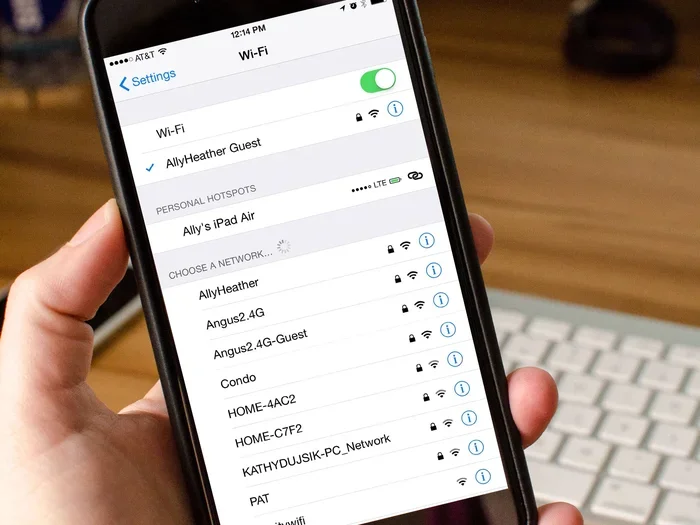
- Connect to Wi-Fi: Enter your home Wi-Fi credentials when prompted. Make sure you are using the 2.4 GHz network.
- Test the connection: Open and close your garage door through the app to confirm everything works.
That is it. Your garage door is now smart. You can control it from your phone, receive alerts, and monitor activity logs. The whole process is surprisingly simple and does not require any special tools or wiring skills.
Troubleshooting Common Setup Issues
Sometimes things do not go smoothly. Here are a few common issues and how to fix them:
- Gateway not connecting to Wi-Fi: Make sure you are using the 2.4 GHz band. Some routers separate 2.4 and 5 GHz networks. Check your network name.
- App not detecting the gateway: Move closer to the gateway and try again. Restart the app and your phone if needed.
- Door not responding to app commands: Check the cable connection between the gateway and the opener. Make sure the opener has power.
- Delayed responses: A weak Wi-Fi signal can cause delays. Consider moving your router closer to the garage or adding a Wi-Fi extender.
Benefits of Using a MyQ Gateway for Your Smart Garage Door
So you are sold on the idea of getting a MyQ gateway. But what exactly do you get? Let us look at the real-world benefits that make this device worth considering.
Remote Access and Control
The biggest benefit is remote access. You can open your garage door from anywhere with an internet connection. Forgot to close the door before leaving for vacation? No problem. Just open the app and close it. This peace of mind alone is worth the cost of the gateway for many homeowners.
Real-Time Alerts and Notifications
The MyQ gateway sends push notifications to your phone when your garage door opens or closes. You can also set up alerts for specific events. For example, you can get a notification if the door is left open for more than a certain amount of time. This adds a layer of home security that you did not have before.
Activity Logs and Monitoring
The MyQ app keeps a log of every open and close event. You can see when the door was used and by whom if you share access with family members. This is especially useful if you have teenagers or service people coming to your home regularly.
Integration with Smart Home Ecosystems
The MyQ gateway works with popular smart home platforms. You can connect it to Amazon Alexa, Google Assistant, and Apple HomeKit (with the right setup). This means you can voice-control your garage door. You can also create automation routines, like closing the door automatically when you arm your home security system.
Here are some practical smart home integrations you can set up:
- Say “Alexa, close the garage door” before bed.
- Have your garage door close automatically when your phone leaves home.
- Get a door open alert sent to your smart watch.
- Link garage door status to your home security dashboard.
Temporary and Guest Access
The MyQ app lets you share access with others. You can grant temporary access to dog walkers, house cleaners, or guests. They get their own login credentials, and you can revoke access anytime. This is far more secure and convenient than hiding a spare remote control.
Common Mistakes People Make With MyQ Gateways
Even though the setup is simple, there are a few mistakes that trip people up. Avoiding these can save you time and frustration.
Buying the Wrong Gateway Model
Chamberlain has updated their MyQ gateway over the years. Make sure you buy the latest model that supports your opener and the current MyQ app version. Older gateway models may not work with newer openers or may lack features like Wi-Fi 5 support.
Ignoring the 2.4 GHz Requirement
This is the number one issue people face. Many modern routers use dual-band technology with both 2.4 GHz and 5 GHz bands. The MyQ gateway only works with 2.4 GHz. If your phone is connected to 5 GHz during setup, the gateway will not be detected. Always make sure your phone is on the 2.4 GHz network when setting up the device.
Placing the Gateway Too Far From the Opener
The gateway needs to be physically connected to your opener’s control board. It also needs a power source nearby. If your garage is large or the opener is in a hard-to-reach spot, placement can be tricky. Plan your setup location before you start the installation.
Not Updating the Gateway Firmware
Like any smart device, the MyQ gateway receives firmware updates. These updates fix bugs, improve performance, and add new features. Check the app regularly for update notifications and install them when available. Skipping updates can lead to connectivity issues over time.
MyQ Gateway vs. Built-In Wi-Fi Openers: Which Is Better
Now that you understand the gateway, let us compare it against openers that have Wi-Fi built in. Both approaches get you to the same destination: a smart garage door. But the path is different.
| Feature | MyQ Gateway | Built-In Wi-Fi Opener |
|---|---|---|
| Works with older openers | Yes | No |
| Additional hardware needed | Yes | No |
| Setup complexity | Moderate | Simple |
| Cost | Lower upfront (no new opener) | Higher (new opener required) |
| Smart features | Full MyQ app support | Full MyQ app support |
| Future-proofing | Depends on opener age | Strong |
| Integration with smart home | Yes | Yes |
The right choice depends on your situation. If your current opener is in good shape and works well, adding a MyQ gateway is the smarter move. It saves you the cost of a new opener while still giving you all the smart features. But if your opener is old and unreliable, it might make more sense to invest in a new Wi-Fi-enabled model instead.
Either way, you end up with a smart garage door you can control from your phone. The gateway simply gives you a bridge to get there without replacing hardware.
Is the MyQ Gateway Worth the Investment
Let us talk about the price. The MyQ gateway typically costs between 30 and 60 dollars. Compared to a new smart garage door opener that can run 200 dollars or more, the gateway is a bargain. It gives you smart features without the hefty price tag.
But is it worth it for you? Consider these factors:
- How often do you forget whether you closed your garage door?
- Would remote access improve your daily routine?
- Do you want the security benefits of real-time alerts?
- Are you planning to build a broader smart home setup?
- How old is your current garage door opener?
If you answered yes to most of these questions, the MyQ gateway is a solid investment. It transforms your garage door from a simple mechanical device into a connected, intelligent part of your home. The convenience and peace of mind it provides are hard to put a price on.
On the other hand, if your opener is already smart and works well, the gateway is not necessary. You are already getting the features you need without any extra hardware.
Final Thoughts on MyQ Gateways and Smart Garage Doors
The question “Do I need a MyQ gateway” really comes down to your current setup and your goals. If you have an older opener and want smart features, the gateway is your best friend. If you already have a Wi-Fi-enabled opener, you can skip it entirely.
The MyQ ecosystem is well-designed and easy to use. The gateway is affordable, simple to set up, and delivers real value. It turns your garage door into a smart home device that you can control, monitor, and integrate with your broader home automation setup.
Take a few minutes to check your opener’s compatibility. Look at the model number, check the Chamberlain website, and decide if the gateway makes sense for you. It is a small investment that can make a big difference in how you interact with your home every day.
Smart home technology is all about convenience and control. The MyQ gateway gives you both. And once you experience the ease of opening your garage door from your couch or getting an alert while you are at work, you will wonder how you ever lived without it.
Frequently Asked Questions
Can I use the MyQ gateway with any garage door opener?
The MyQ gateway works with most Chamberlain, LiftMaster, and Craftsman openers made after 2011. However, you should always check the compatibility list before purchasing. Some older or specialty models may not be supported.
How much does the MyQ gateway cost?
The MyQ gateway typically costs between 30 and 60 dollars. Prices vary depending on the model and where you purchase it. It is a budget-friendly way to add smart features to your existing garage door opener.
Do I need a Wi-Fi connection for the MyQ gateway to work?
Yes, the MyQ gateway requires a stable Wi-Fi connection to communicate with the MyQ app. It uses the 2.4 GHz frequency band. Without Wi-Fi, you cannot control your garage door remotely or receive alerts.
Can I control my garage door without the gateway if I have a smart opener?
If your garage door opener has built-in Wi-Fi and is MyQ-enabled, you do not need the gateway. These openers connect directly to your Wi-Fi network and work with the MyQ app right out of the box.
Is the MyQ gateway difficult to install?
No, the installation is very straightforward. You plug in the gateway, connect it to your opener’s control board, and follow the prompts in the MyQ app. Most homeowners complete the setup in under 30 minutes without any special tools.
Can I integrate the MyQ gateway with Alexa or Google Assistant?
Yes, the MyQ gateway works with both Amazon Alexa and Google Assistant. You can voice-control your garage door after linking your MyQ account to the smart assistant. This makes it easy to open or close your door using simple voice commands.
=== CONCLUSION ===
The MyQ gateway is a simple but powerful device that brings smart capabilities to your garage door opener. Whether you need one depends on your current setup. If your opener lacks built-in Wi-Fi, the gateway is the easiest and most affordable way to add remote control, alerts, and monitoring to your garage door.
Check your opener’s compatibility, follow the setup steps, and enjoy the convenience of a connected garage door. The small investment pays off quickly in peace of mind and day-to-day convenience. Take control of your garage door today and experience what a smart home truly feels like.