Can Dell Laptops Use Universal Chargers Effectively
Yes, most Dell laptops can use universal chargers, but compatibility depends on the connector type, voltage, and wattage. Using the right universal charger can save money and keep your Dell powered on the go. Always match the specs to avoid damaging your device.
Have you ever found yourself in a situation where your Dell charger went missing or broke right before an important deadline? It is a frustrating experience. You start searching for a replacement and wonder, can Dell laptops use universal chargers? The short answer is yes. But there is more to it than just plugging in a random charger and hoping for the best.
Many Dell users turn to universal chargers because they are cheaper, more convenient, or easier to find. However, not all universal chargers are created equal. Some work perfectly. Others can cause problems ranging from slow charging to serious hardware damage. This guide will walk you through everything you need to know about using a universal charger with Dell laptops. We will cover compatibility, safety, how to choose the right one, and much more.
Whether you own a Dell Inspiron, a sleek Dell XPS, or a powerful Dell Latitude, this article has you covered. By the end, you will know exactly what to look for and how to charge your Dell safely without the original Dell power adapter.
Key Takeaways
- Universal chargers work with many Dell models: Most Dell laptops can accept a universal charger if the specs match.
- Check voltage and wattage first: Using the wrong voltage can damage your Dell battery or motherboard.
- Connector type matters: Dell uses different barrel jack sizes, so pick the right tip for your model.
- USB-C charging is changing the game: Newer Dell laptops like the XPS line support USB-C PD charging.
- Third-party chargers are safe if certified: Look for UL or CE certification to ensure quality and safety.
- OEM Dell chargers remain the safest option: They guarantee perfect compatibility and warranty protection.
- Follow simple safety tips: Avoid cheap knockoffs and always monitor your laptop while charging.
📑 Table of Contents
- What Is a Universal Charger and How Does It Work?
- Which Dell Laptops Support Universal Chargers?
- How to Choose the Right Universal Charger for Your Dell
- Benefits and Risks of Using Universal Chargers with Dell Laptops
- Step-by-Step Guide to Using a Universal Charger with Dell
- Expert Tips for Safe and Effective Charging
- Common Mistakes People Make When Using Universal Chargers
- Frequently Asked Questions
- Final Thoughts
What Is a Universal Charger and How Does It Work?
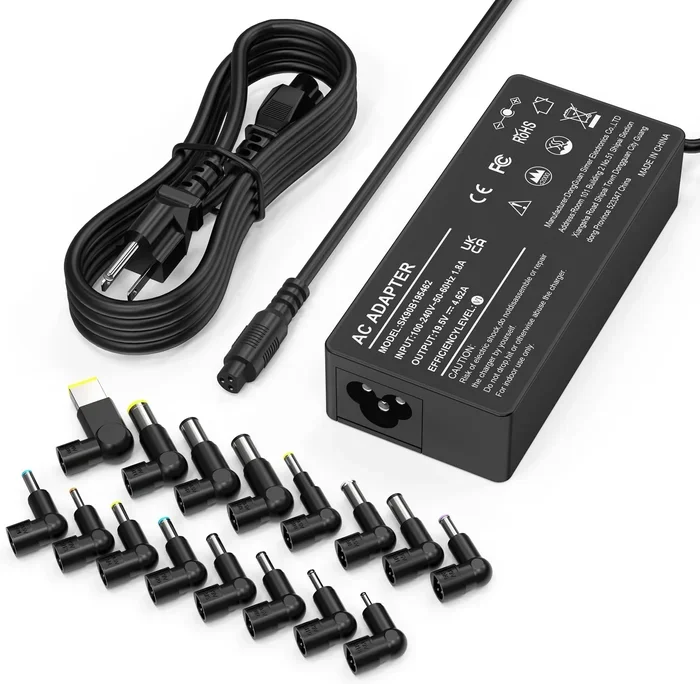
A universal laptop charger is a power adapter that works with multiple laptop brands and models. Unlike an OEM Dell charger that only fits Dell devices, a universal charger comes with interchangeable tips and adjustable settings. This makes it a flexible option for people who own multiple laptops or need a backup charger.
Most universal chargers include a set of barrel jack tips. You swap the tip to match the charging port on your laptop. Some universal chargers also support USB-C delivery, which adds even more flexibility. The idea is simple. You buy one charger, and it can power several devices.
But here is the catch. A universal charger must match the voltage and wattage requirements of your Dell laptop. If it does not, you could run into trouble. Let us break down what those numbers mean.
Understanding Voltage and Wattage
Voltage is the electrical pressure that pushes power into your laptop. Dell laptops typically run on 19.5 volts, but some models use 12V or 20V. Wattage is the total power the charger delivers. Most Dell laptops need between 45W and 130W depending on the model and usage.
If you use a charger with too low a wattage, your Dell may charge slowly or not at all. If the voltage is wrong, you risk frying the internal components. This is why checking your Dell laptop’s power requirements before buying any third-party charger is so important.
Which Dell Laptops Support Universal Chargers?
The good news is that most Dell laptops can use a universal charger. Dell has used the same basic DC barrel jack charging design for many years. This means a universal charger with the right tip can work across a wide range of models. However, newer Dell laptops are starting to shift toward USB-C charging, which changes the picture.
Dell Inspiron Series
The Dell Inspiron line is one of the most popular consumer laptop series. Models like the Inspiron 15 3000, 15 5000, and 17 7000 all use the standard Dell DC barrel jack. A universal charger with the correct 7.4mm x 5.0mm or 7.9mm x 5.0mm tip will work with most Inspiron models. These laptops typically need 45W to 65W, making them easy to power with a universal Dell power adapter alternative.
Dell XPS Series
The Dell XPS series is a bit different. Newer models like the XPS 13 and XPS 15 often come with USB-C charging support. This means you can use a USB-C universal charger that supports Power Delivery (PD). However, older XPS models still use the traditional barrel jack. Always check your specific model before assuming compatibility.
Dell Latitude and Precision Series
Dell Latitude and Precision laptops are built for business and professional use. These machines often need higher wattage, sometimes up to 130W. The good news is that many universal chargers on the market now offer 90W to 130W options. Just make sure the connector tip matches and the voltage is correct. Dell docking station users should also check if the universal charger can handle the extra power draw when connected to a dock.
How to Choose the Right Universal Charger for Your Dell
Buying a universal charger is not as simple as picking the cheapest option off the shelf. You need to match a few key specs to your Dell laptop. Here is how to do it right.
Step 1: Check Your Dell Laptop’s Power Requirements
Flip your Dell laptop over or look at the bottom label. You will find the input voltage and wattage listed there. You can also check the original Dell charger itself. Write down the voltage (V) and wattage (W). These numbers are your roadmap for finding the right charger.
For example, if your Dell Inspiron says 19.5V and 65W on the label, you need a universal charger that can deliver at least 19.5V and 65W. Going higher in wattage is usually fine because the laptop only draws what it needs. Going lower is a problem.
Step 2: Pick the Right Connector Tip
Dell uses several different barrel jack sizes. The most common ones are 7.4mm x 5.0mm and 7.9mm x 5.0mm. Some older Dell models use a 6.5mm x 4.4mm tip. Universal chargers usually come with a set of tips. Make sure the one you need is included with the charger you buy.
If you are not sure which tip you need, look up your Dell model number online. The Dell charger connector size is easy to find with a quick search. Using the wrong tip can damage your charging port, so do not guess.
Step 3: Look for Safety Certifications
Not all universal chargers are made the same way. Some are built with quality components and safety features. Others are cheap knockoffs that could overheat or short-circuit. Look for chargers that carry UL, CE, or FCC certifications. These marks tell you the charger has been tested and meets safety standards.
A certified third-party charger is much safer than an uncertified one. Do not skip this step just to save a few dollars. Your Dell laptop is a significant investment.
Step 4: Consider USB-C Power Delivery Options
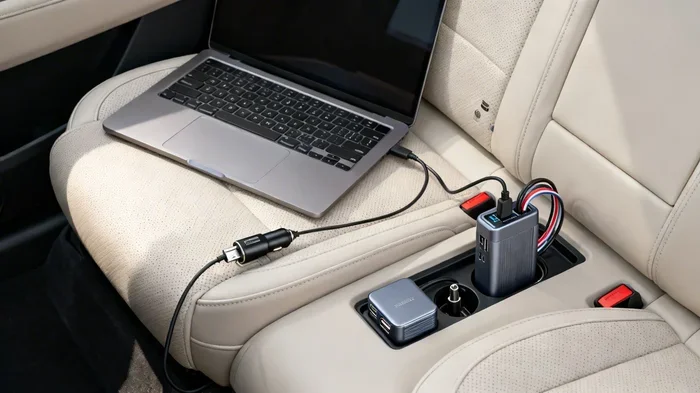
If your Dell laptop supports USB-C charging, you have even more options. Many modern universal chargers now offer USB-C PD ports. These chargers can deliver up to 100W or more through a single USB-C cable. This is a great option for Dell XPS and newer Latitude models.
With USB-C PD, you do not need to worry about barrel jack tips at all. Just use a compatible USB-C cable and a charger that supports the right voltage profile. This is one of the biggest changes in laptop charging in recent years.
Benefits and Risks of Using Universal Chargers with Dell Laptops
Using a universal charger with your Dell laptop comes with both advantages and potential downsides. Let us look at both sides so you can make an informed decision.
The Benefits
- Cost savings: Universal chargers are often much cheaper than buying an OEM Dell replacement charger.
- Convenience: One charger can power multiple laptops from different brands.
- Availability: Universal chargers are widely available online and in stores.
- Backup option: They make great emergency chargers when your original Dell adapter breaks or gets lost.
- Travel-friendly: A single universal charger can handle all your devices on the road.
The Risks
- Compatibility issues: Using the wrong tip or wrong voltage can cause charging problems.
- Battery damage: A poorly matched charger may not charge your Dell battery properly over time.
- Warranty concerns: Using a non-OEM charger might void your Dell warranty in some cases.
- Overheating: Cheap universal chargers can overheat, especially under heavy load.
- Slow charging: A charger with too low a wattage will charge your Dell very slowly or not at all.
The key is to weigh these risks against the benefits. If you choose a quality universal charger and match the specs correctly, the risks are minimal.
Step-by-Step Guide to Using a Universal Charger with Dell
Now that you know what to look for, let us walk through the process of using a universal charger with your Dell laptop. Follow these steps carefully to ensure safe and effective charging.
Step 1: Power Off Your Dell Laptop
Before connecting any charger, it is a good idea to power off your Dell laptop. This reduces the risk of electrical issues during the initial connection. While it is not always required, it is a safe habit to build.
Step 2: Attach the Correct Connector Tip
Select the barrel jack tip that matches your Dell model. Push it firmly onto the universal charger cable until it clicks into place. Make sure it fits snugly and does not wobble. A loose connection can cause sparking or inconsistent charging.
Step 3: Set the Correct Voltage
If your universal charger has a voltage selector switch, set it to match your Dell laptop’s requirements. Most Dell models need 19.5V. Double-check this before plugging anything into your laptop.
Step 4: Plug In and Power On
Connect the universal charger to a wall outlet. Then plug the tip into your Dell laptop’s charging port. You should see the charging light turn on. If it does not, check the connection and try again.
Step 5: Monitor the Charging Process
For the first few minutes, keep an eye on your Dell laptop. Check for any unusual heat, sounds, or smells. If everything looks and feels normal, you are good to go. If anything seems off, unplug the charger immediately and double-check your settings.
Expert Tips for Safe and Effective Charging
Using a universal charger does not mean you have to take chances. Follow these expert tips to get the best results and keep your Dell laptop safe.
Always Use the Right Wattage
Never use a charger with a lower wattage than what your Dell laptop requires. If your Dell needs 65W, use a charger rated for at least 65W. A higher wattage charger is fine because the laptop controls how much power it draws.
Keep the Connector Clean
Dust and debris can build up inside the charging port over time. This can cause poor contact and intermittent charging. Use a soft brush or compressed air to clean the port regularly.
Avoid Using the Charger in Hot Environments
Heat is the enemy of electronics. Do not charge your Dell laptop on a bed, couch, or other soft surface that blocks airflow. Use a hard, flat surface to allow proper ventilation.
Unplug When Fully Charged
While modern Dell laptops have battery management systems, it is still a good practice to unplug the charger once the battery reaches 100%. This helps extend the overall lifespan of your Dell battery.
Keep the Original Dell Charger When Possible
If you still have your original Dell charger, keep it as a backup. OEM Dell chargers are designed specifically for your laptop and offer the best compatibility and safety. A universal charger is great for travel or emergencies, but the OEM charger should be your go-to option whenever possible.
Check for Firmware Updates
Dell occasionally releases firmware updates that improve battery charging behavior. Check Dell’s support website for updates related to your specific model. These updates can sometimes fix charging issues with third-party or universal chargers.
Common Mistakes People Make When Using Universal Chargers
Even with the best intentions, people make mistakes when switching to a universal charger for Dell. Here are the most common ones and how to avoid them.
Mistake 1: Ignoring the Voltage Setting
This is the biggest mistake people make. If your universal charger has a voltage switch and you set it to the wrong voltage, you could seriously damage your Dell laptop. Always set it to the correct voltage before plugging it in.
Mistake 2: Using a Loose or Wrong Tip
A connector tip that does not fit properly can cause sparking, inconsistent charging, or even a short circuit. Always use the tip that matches your Dell model exactly.
Mistake 3: Buying the Cheapest Option
It is tempting to grab the cheapest universal charger you can find. But cheap chargers often lack safety features and may deliver unstable power. Invest in a quality charger from a reputable brand.
Mistake 4: Assuming All USB-C Chargers Work the Same
Not all USB-C chargers support Power Delivery. If your Dell laptop uses USB-C charging, make sure the charger you buy supports PD and the correct voltage profile. A basic USB-C phone charger will not work for most Dell laptops.
Mistake 5: Overlooking the Ground Pin
Some Dell barrel jacks have a third pin for grounding. Cheap universal chargers may not include this pin. While it might still work in some cases, it is better to use a charger that matches all the pins in your Dell connector for optimal safety.
Frequently Asked Questions
Will a universal charger damage my Dell laptop?
It will not damage your Dell laptop if you use the correct voltage, wattage, and connector tip. However, using the wrong specs can cause overheating, slow charging, or even permanent damage. Always match the charger to your Dell’s requirements before plugging it in.
Can I use any USB-C charger with my Dell laptop?
Only if your Dell laptop supports USB-C Power Delivery. Newer models like the Dell XPS 13 and XPS 15 do support USB-C PD charging. Make sure the USB-C charger can deliver at least the same wattage as your original Dell charger for best results.
Does using a universal charger void my Dell warranty?
This depends on Dell’s policy and the reason for any damage. If a universal charger causes harm to your Dell laptop, the warranty claim may be denied. Check your warranty terms or contact Dell support to confirm before using a third-party charger.
What wattage universal charger do I need for my Dell?
Check the label on your Dell laptop or the original charger for the wattage requirement. Most Dell Inspiron models need 45W to 65W, while XPS and Precision models may need 90W to 130W. Choose a universal charger that meets or exceeds that wattage.
Are universal chargers safe to leave plugged in overnight?
Most quality universal chargers are safe to leave plugged in overnight. They have built-in safety features that stop charging once the battery is full. However, always use a certified charger and avoid leaving any charger in areas with poor ventilation.
Can I use a universal charger with a Dell Latitude docking station?
Yes, but make sure the universal charger can handle the combined power draw of your Dell laptop and the docking station. Docks can add extra power requirements. Check the wattage needs of both devices before relying on a universal charger with a dock.
Final Thoughts
So, can Dell laptops use universal chargers effectively? The answer is a clear yes. With the right charger, the correct tip, and matching voltage and wattage, a universal charger can be a reliable and affordable alternative to the original Dell power adapter. Whether you need a backup charger, a travel companion, or a replacement for a lost Dell charger, a universal charger can do the job well.
The key is to take the time to match the specs. Know your Dell model’s power requirements. Choose a certified universal charger with the right connector tip. And always prioritize safety over price. A few extra dollars spent on a quality charger can save you from costly repairs down the road.
Universal chargers are a practical solution for most Dell users. They offer flexibility, convenience, and peace of mind. Just remember to follow the tips in this guide, and you will be able to charge your Dell laptop safely and effectively no matter where you are. Keep your Dell powered up and ready for anything life throws at you.