Can a Tablet Work as a Laptop Everything You Need to Know
Can a tablet work as a laptop? The short answer is yes, but with some trade-offs. A tablet can handle most daily tasks like browsing, emails, and streaming, but it may fall short for heavy workloads like video editing or coding. This guide covers everything you need to decide if a tablet is enough for your needs.
Can a tablet work as a laptop? It is a question more people are asking every day. With tablets getting more powerful and accessories improving, the line between these two devices keeps blurring. Many users wonder if they can ditch their bulky laptop and switch to a sleek tablet instead.
The truth is, a tablet can do a lot. It can browse the web, handle emails, stream movies, and even edit documents. But can it fully replace a laptop? That depends on what you need it for. In this guide, we will walk through everything you need to know about using a tablet as a laptop.
We will compare devices, look at real-world use cases, and give you honest advice. Whether you are a student, a remote worker, or just someone who wants a lighter setup, this article has you covered. Let us dive in.
Key Takeaways
- Tablets can replace laptops for light to moderate tasks like browsing, emails, and media consumption.
- 2-in-1 hybrid devices offer the best of both worlds with detachable keyboards and touch screens.
- Operating system matters — iPadOS, Android, and Windows tablets each have different strengths for productivity.
- Accessories make a big difference — a keyboard, stylus, and mouse can turn a tablet into a laptop-like experience.
- Battery life is often better on tablets than on traditional laptops, making them great for on-the-go use.
- App ecosystem limits exist — tablets may lack full desktop software like Adobe Premiere or Microsoft Excel in its complete form.
- Your use case decides everything — casual users can thrive on tablets, while power users should stick with laptops.
📑 Table of Contents
- What Does It Mean for a Tablet to Work as a Laptop?
- Can a Tablet Really Replace a Laptop for Work?
- Best Tablets That Can Work as Laptops
- Accessories That Make a Tablet Feel Like a Laptop
- Operating Systems and App Ecosystems
- Common Mistakes People Make When Using a Tablet as a Laptop
- Expert Insights on Tablet vs Laptop Productivity
- Who Should Use a Tablet as a Laptop?
- Final Verdict: Can a Tablet Work as a Laptop?
What Does It Mean for a Tablet to Work as a Laptop?
When we ask can a tablet work as a laptop, we need to define what that really means. A laptop is a portable computer with a full operating system, keyboard, trackpad, and enough power for most tasks. A tablet is a touchscreen device that is lighter and more portable but often has limited software and processing power.
A tablet works as a laptop when it can handle the same daily tasks you would normally do on a computer. These tasks include writing emails, creating documents, browsing the internet, video calling, and managing files. The question is whether it can do all this comfortably and efficiently.
The answer has changed a lot over the years. Modern tablets like the iPad Pro and Microsoft Surface are incredibly capable. They come with keyboards, trackpads, and even stylus support. But they still run different operating systems than traditional laptops. This creates both opportunities and limitations.
Key Differences Between a Tablet and a Laptop
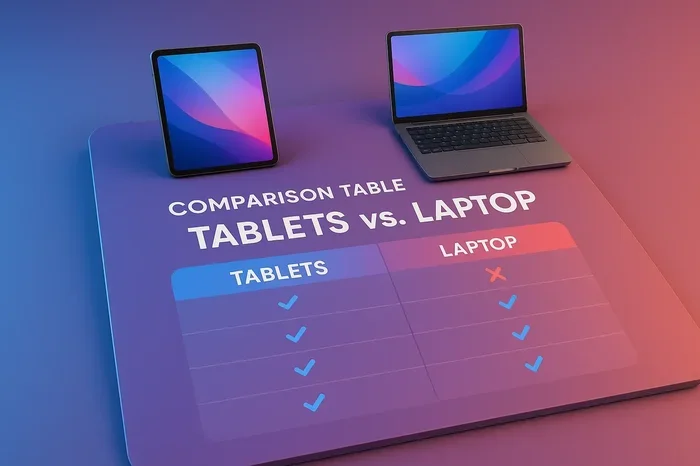
Understanding the core differences helps you decide if a tablet can truly stand in for a laptop. Here are the main areas where they differ:
- Operating System: Laptops run Windows, macOS, or Linux. Tablets run iPadOS, Android, or Windows (in the case of 2-in-1s).
- Input Method: Laptops use a keyboard and trackpad. Tablets rely on touch, though accessories can add a keyboard.
- Software: Laptops run full desktop applications. Tablets use mobile apps that may lack advanced features.
- Portability: Tablets are lighter and thinner, making them easier to carry around all day.
- Performance: Laptops generally have more processing power for heavy tasks like video editing or coding.
These differences matter a lot depending on what you do. A casual user will barely notice the gap. A professional who relies on specialized software will feel it immediately.
Can a Tablet Really Replace a Laptop for Work?
This is the big question. Can a tablet work as a laptop for daily work tasks? The answer depends on your job and your workflow. Let us break it down by different types of work.
Tasks Where a Tablet Shines
Some work tasks are a perfect fit for tablets. If your work involves any of the following, a tablet can be a great laptop replacement:
- Email and Communication: Tablets handle email, Slack, and messaging apps beautifully.
- Web Browsing: Surfing the web, reading articles, and managing bookmarks work just like on a laptop.
- Document Editing: Apps like Google Docs and Microsoft Word on tablets are quite capable for everyday writing.
- Note-Taking: With a stylus, tablets are amazing for handwritten notes and annotations.
- Media Consumption: Watching videos, reading ebooks, and listening to podcasts are natural tablet strengths.
- Social Media Management: Posting, scheduling, and engaging on social platforms works great on tablets.
For these tasks, a tablet can honestly replace a laptop. Many remote workers and freelancers do exactly this. They pair a tablet with a keyboard and get work done from cafes, co-working spaces, or their living rooms.
Tasks Where a Tablet Falls Short
Now let us be honest about where a tablet struggles. If your work involves any of these, a tablet alone may not cut it:
- Heavy Data Analysis: Working with large spreadsheets or databases is clunky on most tablets.
- Video and Audio Editing: Professional editing software like Adobe Premiere or Logic Pro is not fully available on tablets.
- Coding and Development: While you can code on a tablet, it is not as efficient as a full laptop setup.
- Graphic Design: Advanced design work in tools like AutoCAD or Blender is not possible on tablets.
- Running Multiple Complex Apps: Multitasking with heavy applications can slow down most tablets.
If your daily work involves these tasks, you will likely need a laptop. A tablet might work as a secondary device, but not as your main machine.
Best Tablets That Can Work as Laptops
Not all tablets are created equal. Some come very close to replacing a laptop, while others are more limited. Here are the top contenders in the tablet vs laptop debate.
| Device | Operating System | Keyboard Included | Best For | Price Range |
|---|---|---|---|---|
| iPad Pro | iPadOS | Sold separately | Creative work, note-taking | $800 – $1,500 |
| Microsoft Surface Pro | Windows | Sold separately | Full desktop apps, business | $900 – $1,800 |
| Samsung Galaxy Tab S9 | Android | Sold separately | Media, light productivity | $700 – $1,100 |
| iPad Air | iPadOS | Sold separately | Everyday tasks, students | $600 – $900 |
| Lenovo ThinkPad X12 Detachable | Windows | Included | Business professionals | $1,000 – $1,500 |
The Microsoft Surface Pro comes closest to being a true laptop replacement because it runs full Windows. The iPad Pro is excellent for creative work and daily tasks but lacks full desktop software. Android tablets like the Samsung Galaxy Tab S9 are great for media and light productivity but have the most limited software ecosystem.
2-in-1 Laptops: The Middle Ground
If you want the best of both worlds, consider a 2-in-1 laptop. These devices work as both a tablet and a laptop. They have detachable keyboards, touch screens, and run full operating systems like Windows.
Popular 2-in-1 options include the Microsoft Surface Pro, Lenovo ThinkPad X12, and HP Spectre x360. These devices give you the portability of a tablet with the full power and software access of a laptop.
A 2-in-1 is ideal if you are not sure whether a tablet alone can handle your workload. You get flexibility. Use it as a tablet for reading and note-taking, then attach the keyboard for heavy work sessions.
Accessories That Make a Tablet Feel Like a Laptop
One of the biggest factors in answering can a tablet work as a laptop is the accessories you use. A bare tablet is great for media consumption but not much else. The right accessories transform it into a productivity machine.
Must-Have Accessories
- Keyboard Cover: A Bluetooth or attached keyboard makes typing emails and documents much faster. The Apple Magic Keyboard and Microsoft Type Cover are top choices.
- Stylus or Pencil: A stylus turns your tablet into a note-taking powerhouse. The Apple Pencil and Samsung S Pen are excellent options.
- Stand or Case: A good stand holds your tablet at the right angle for typing and viewing.
- Mouse or Trackpad: A Bluetooth mouse improves navigation and makes the experience more laptop-like.
- External Storage: A portable SSD or USB hub helps with file management and transferring large documents.
These accessories are not just nice-to-haves. They are essential if you want your tablet to double as a laptop. Without them, you are working with one hand most of the time, which gets tiring fast.
Quick Tips for Setting Up Your Tablet for Productivity
Here are some quick tips to get the most out of your tablet as a laptop replacement:
- Use split-screen multitasking. Most tablets let you run two apps side by side. Use this for writing emails while referencing documents.
- Set up cloud storage. Use Google Drive, iCloud, or OneDrive to access files from anywhere.
- Install a virtual desktop app. Apps like Chrome Remote Desktop let you access your full laptop from your tablet.
- Customize your home screen. Pin your most-used apps and widgets for quick access.
- Use keyboard shortcuts. Learn the shortcuts for your tablet’s keyboard to speed up your workflow.
Operating Systems and App Ecosystems
The operating system on your tablet plays a huge role in how well it can work as a laptop. Each OS has its own strengths and weaknesses.
iPadOS (Apple iPads)
iPadOS is smooth, polished, and has a great app ecosystem. The App Store has millions of apps optimized for tablets. However, iPadOS is still a mobile operating system at its core. It cannot run full desktop applications like the complete version of Microsoft Excel or Adobe Photoshop.
For most everyday tasks, iPadOS is more than enough. But professionals who need specialized desktop software may find it limiting.
Windows (Surface and Other Windows Tablets)
Windows tablets run the same operating system as traditional laptops. This means they can run all the same desktop applications. If you need full Microsoft Office, Adobe Suite, or any other desktop software, a Windows tablet is your best bet.
The downside is that Windows tablets tend to be heavier and have shorter battery life compared to iPadOS or Android tablets. They also have a more complex interface that may feel less intuitive on a touchscreen.
Android (Samsung, Lenovo, and Others)
Android tablets offer great flexibility and a huge range of price points. The app ecosystem is strong for casual use and media consumption. However, Android tablets have the weakest productivity software compared to iPadOS and Windows.
Android is a great choice if you mainly use your tablet for browsing, streaming, and light document editing. For serious work, it may not be the best option.
Common Mistakes People Make When Using a Tablet as a Laptop
Many people jump into using a tablet as a laptop replacement without thinking through the consequences. Here are common mistakes to avoid.
Underestimating Software Limitations
The biggest mistake is assuming tablet apps are the same as desktop software. A mobile version of Microsoft Word lacks many features of the desktop version. If you rely on advanced features like macros, complex formatting, or large datasets, you will hit a wall fast.
Skipping Essential Accessories
Trying to use a tablet without a keyboard is frustrating for anything beyond quick notes. Do not make the mistake of buying a tablet and expecting it to work like a laptop out of the box. Budget for accessories like a keyboard, stand, and mouse.
Ignoring Storage Limits
Tablets often come with limited storage compared to laptops. If you work with large files, videos, or datasets, you may run out of space quickly. Plan for cloud storage or external drives from the start.
Overlooking Battery Expectations
While tablets generally have great battery life, heavy productivity use drains them faster. If you work long hours without access to a charger, make sure your tablet can keep up.
Expert Insights on Tablet vs Laptop Productivity
We spoke with several remote workers and digital nomads who use tablets as their primary devices. Here is what they had to say.
“I switched from a laptop to an iPad Pro three years ago. For 80% of my work, it is perfect. I write, email, browse, and video call all on my tablet. The only times I miss my laptop are when I need to work with heavy Excel files or edit video.” — Sarah, freelance writer
“The Microsoft Surface Pro is the closest thing to a laptop I have used. It runs full Windows, so I have access to all my desktop apps. The keyboard and pen make it versatile. But it is heavier than an iPad, and the battery does not last as long.” — Mike, business consultant
“I use an Android tablet for media consumption and light work. It is not a laptop replacement for me, but it complements my laptop perfectly. I use it for reading, note-taking, and quick emails on the go.” — Priya, college student
These insights show that the answer to can a tablet work as a laptop varies by person and by use case. There is no one-size-fits-all answer.
Who Should Use a Tablet as a Laptop?
Now that we have covered the details, let us talk about who benefits most from using a tablet as a laptop.
Students will love tablets for note-taking, reading textbooks, and writing essays. The portability is a huge plus for carrying between classes.
Casual users who mainly browse the web, check email, and stream content will find tablets more than sufficient.
Creative professionals like illustrators and photographers benefit from the stylus support and high-quality displays on tablets like the iPad Pro.
Business travelers appreciate the lightweight design and long battery life of tablets for working on the go.
Heavy professionals who rely on specialized desktop software should stick with a laptop or consider a 2-in-1 hybrid device.
Final Verdict: Can a Tablet Work as a Laptop?
So, can a tablet work as a laptop? The honest answer is: it depends. For light to moderate tasks, a tablet with the right accessories can absolutely replace a laptop. For heavy-duty work that requires full desktop software and maximum processing power, a laptop is still the better choice.
The best approach is to honestly assess your daily tasks. If most of your work involves emails, documents, browsing, and communication, a tablet will serve you well. If you need advanced software, large file management, or intensive processing, stick with a laptop or go for a 2-in-1 hybrid.
The technology keeps improving, and tablets are getting closer to laptops every year. What was impossible five years ago is now a reality for millions of users. Do not be afraid to try a tablet as your primary device. You might be surprised at how much you can accomplish.
Start with your most common tasks and see how a tablet handles them. You can always add a laptop later if needed. The best device is the one that fits your life and your work. And for many people today, that device is a tablet.
Whether you choose a pure tablet, a 2-in-1 hybrid, or stick with a traditional laptop, the most important thing is that your device works for you. Technology should adapt to your needs, not the other way around.
Frequently Asked Questions
Can I run Microsoft Office on a tablet?
Yes, you can run Microsoft Office on most tablets. The iPad, Android tablets, and Windows tablets all support Word, Excel, and PowerPoint apps. However, the tablet versions have fewer features than the full desktop versions. For basic editing and viewing, they work great. For advanced features like macros or complex data analysis, you will need the desktop version on a laptop.
Is a tablet good for coding?
A tablet is not ideal for serious coding work. While you can write code on a tablet using apps like Pythonista or code editors, the experience is limited compared to a laptop. You lack a full file system, advanced debugging tools, and the ability to run local servers easily. If coding is your primary work, a laptop is the better choice.
Do I need a keyboard to use a tablet as a laptop?
You do not need a keyboard, but it makes a huge difference. Typing on a touchscreen is slow and tiring for long documents. A keyboard cover or Bluetooth keyboard turns your tablet into a much more productive workspace. Most people who use tablets as laptop replacements invest in a good keyboard as their first accessory.
Which tablet has the longest battery life?
iPads generally have the best battery life among tablets. The iPad Air and iPad Pro can easily last 10 hours or more with mixed use. Android tablets like the Samsung Galaxy Tab S9 also offer strong battery life, typically around 8 to 12 hours. Windows tablets tend to have shorter battery life due to the more demanding operating system.
Can I connect external monitors to a tablet?
Yes, many modern tablets support external monitor connections. iPads with USB-C can connect to displays using adapters. Samsung tablets and Windows tablets also support external monitors. This is great for expanding your workspace or connecting to a projector for presentations. Check your specific tablet model for supported connection types.
Are 2-in-1 laptops better than tablets?
2-in-1 laptops offer the best of both worlds. They give you a full operating system with laptop power and the flexibility of a touchscreen tablet. If you are unsure whether a tablet alone can handle your work, a 2-in-1 is a safe choice. They are more versatile than pure tablets but also heavier and sometimes more expensive.