Can You Print From Your Phone At Walmart Without Hassle
Yes, you can absolutely print from your phone at Walmart using their easy in-store and online printing services. Whether you need Walmart photo printing from your phone or want to print documents from phone, Walmart makes it simple and affordable. This guide walks you through every method, cost, and tip so you can get your prints fast without any trouble.
Key Takeaways
- Walmart offers multiple ways to print from your phone, including the Walmart app, website, and in-store self-service kiosks.
- Walmart photo printing from phone is one of the most popular services, with options for 4×6, 5×7, and larger sizes.
- Printing costs at Walmart are very affordable, starting at just a few cents per page for documents and around $0.25 per photo.
- You do not need a computer to print at Walmart. Your smartphone handles everything wirelessly or through email and USB.
- Common mistakes to avoid include low-resolution images, wrong paper sizes, and missing payment methods at checkout.
- Walmart Photo Center and self-service kiosks make the process quick, with most orders ready in under 30 minutes.
📑 Table of Contents
- Can You Print From Your Phone At Walmart? The Short Answer Is Yes
- How Walmart Phone Printing Works
- Step-by-Step Guide to Print From Your Phone At Walmart
- Walmart Photo Printing From Your Phone: What You Need to Know
- Printing Costs and Options at Walmart
- Pros and Cons of Walmart Mobile Printing
- Tips for the Best Printing Experience at Walmart
- Conclusion: Print From Your Phone At Walmart With Confidence
Can You Print From Your Phone At Walmart? The Short Answer Is Yes
If you have ever stood in front of your computer wishing you could just print from your phone at Walmart, you are not alone. Millions of people want mobile printing without the hassle of transferring files to a laptop or desktop. The good news is that Walmart has made smartphone printing incredibly easy. You can print photos, documents, and more straight from your phone.
Walmart offers several methods to get your prints done. You can use the Walmart app printing feature, visit the Walmart Photo Center, or use a self-service kiosk in-store. Each method is designed to be fast and user-friendly. Whether you need instant print copies of a birthday party or a stack of digital printing pages for work, Walmart has you covered.
Many people ask, “Can I really print documents from phone at Walmart?” The answer is a confident yes. Wireless printing at Walmart works with both iPhone and Android devices. You do not need any special equipment. Just your phone, a Walmart account, and a few minutes of your time.
Walmart printing options have expanded a lot over the past few years. What used to require a trip to a copy shop or a home printer now happens at your fingertips. Let us dive into exactly how this works and what you need to know before you print.
How Walmart Phone Printing Works
The Basics of Mobile Printing at Walmart
Mobile printing at Walmart is simple. You use your phone to send a file to Walmart’s printing system. The file can be a photo, a PDF, a Word document, or even an image from your social media. Walmart receives the file and prints it on their professional-grade printers.
The process relies on cloud printing technology. This means your file travels through the internet to Walmart’s servers. From there, it goes to a printer in your chosen store. You do not need cables, Bluetooth, or any direct connection between your phone and the printer. It all happens through the Walmart app printing platform or the website.
Here is why this matters. Wireless printing saves you time. You can start a print job while shopping for groceries. By the time you reach the Photo Center, your order may already be ready. This kind of self-service printing is a game-changer for busy people.
Devices and Compatibility
Almost any modern smartphone works with Walmart mobile printing. Whether you use an iPhone running the latest iOS or an Android phone from Samsung, Google, or another brand, you are good to go. The Walmart app is available for free on both the Apple App Store and Google Play Store.
You do not need a specific phone model or operating system version. As long as your phone can access the internet and send files, it can work with Walmart print service. Even older smartphones that can browse the web can upload files through the Walmart website.
Some people wonder about Bluetooth printing at Walmart. The truth is, Walmart does not use direct Bluetooth connections for most printing jobs. Instead, everything goes through the cloud. This is actually better because you do not need to pair your phone with any device in the store.
Step-by-Step Guide to Print From Your Phone At Walmart
Method 1: Using the Walmart App
The easiest way to print from your phone at Walmart is through the Walmart app. Here is how to do it step by step.
- Download the Walmart app from your phone’s app store if you have not already.
- Sign in to your Walmart account or create a free one.
- Tap the “Photo” or “Print” section in the app menu.
- Select the photos or documents you want to print from your phone’s gallery.
- Choose your print size and quantity. For photos, popular sizes are 4×6, 5×7, and 8×10.
- Pick a Walmart store for pickup or choose home delivery.
- Complete payment using your saved payment method.
- Wait for confirmation that your order is ready.
Most Walmart Photo Center orders are ready within 30 minutes to a few hours. If you choose home delivery, your prints will arrive in a few business days. This method is perfect for print photos from phone without leaving your house.
Method 2: Using the Walmart Website
If you prefer not to use the app, you can print directly from your phone’s web browser. The Walmart website has a dedicated photo printing section.
- Open your browser and go to Walmart’s photo printing page.
- Sign in to your Walmart account.
- Upload your files from your phone’s storage or cloud services.
- Select print options like size, quantity, and paper type.
- Choose pickup or delivery and complete payment.
This method works great for print documents from phone like resumes, forms, or boarding passes. You can upload PDFs and images directly from your phone’s file manager.
Method 3: Using In-Store Self-Service Kiosks
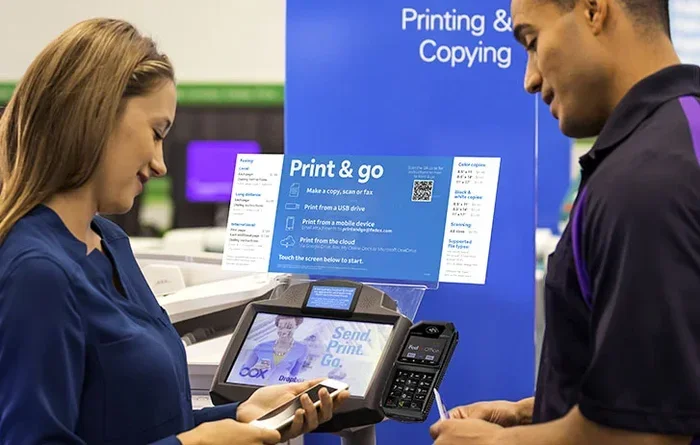
Walmart stores have self-service printing kiosks in many locations. These kiosks let you print directly from a USB drive or by scanning a QR code. You can also email files to the kiosk.
To use this method, upload your files to a cloud service like Google Drive or Dropbox from your phone. Then, at the Walmart kiosk, scan the QR code or insert a USB drive. Select your print options and pay at the kiosk. This is a great option if you want instant print results right there in the store.
Walmart Photo Printing From Your Phone: What You Need to Know
Photo Sizes and Quality
When you print photos from phone at Walmart, you have several size options. The most common sizes are 4×6 inches, 5×7 inches, and 8×10 inches. Walmart also offers larger sizes like 11×14 and 16×20 for posters and canvas prints.
Walmart printing cost for photos starts at around $0.25 per 4×6 print. A 5×7 print costs about $0.35, and an 8×10 runs around $0.75. These prices are very competitive compared to other printing services. If you print in bulk, you may save even more.
For the best mobile printing quality, make sure your photos have high resolution. A photo taken with a modern smartphone usually has more than enough detail for standard print sizes. Avoid zooming in too much or using heavily compressed images from social media.
Paper Types and Finishes
Walmart offers different paper options for your digital printing jobs. Standard glossy paper gives photos a shiny, vibrant look. Matte paper reduces glare and gives a more professional feel. Luster paper is a middle ground between glossy and matte.
For documents, regular plain paper works perfectly. If you are printing phone to printer jobs like flyers or posters, you may want to choose a heavier paper stock. These options are available when you select your print preferences in the app or on the website.
Turnaround Time
One of the best things about Walmart print service is speed. In-store pickup orders are often ready in 30 minutes or less. If you go during a busy time, it may take a bit longer, but rarely more than two hours.
Home delivery orders typically ship within one to two business days. Walmart also offers free pickup for online orders, so you can grab your prints on your next store visit. This flexibility makes print at store services very convenient.
Printing Costs and Options at Walmart
Document Printing Prices
If you need to print documents from phone, Walmart keeps costs low. Black and white pages typically cost around $0.05 to $0.10 per page. Color pages run about $0.25 to $0.50 each, depending on the store and paper size.
These prices are much cheaper than most print shops or office supply stores. For students, freelancers, or anyone who needs phone printing on a budget, Walmart is an excellent choice.
Photo Printing Price Breakdown
Here is a quick look at typical Walmart printing cost for photos:
- 4×6 photo: $0.25 per print
- 5×7 photo: $0.35 per print
- 8×10 photo: $0.75 per print
- 11×14 photo: $1.50 to $2.00 per print
- Canvas print: Starting around $15 to $30 depending on size
Prices may vary slightly by location and current promotions. Walmart often runs deals on photo prints, especially during holidays. Signing up for Walmart+ can also give you discounts on printing services.
Subscription and Bulk Options
Walmart offers subscription plans for frequent printers. These plans give you a set number of prints per month at a discounted rate. If you print photos from phone regularly, a subscription can save you a lot of money.
Bulk printing is also available for events like weddings, parties, or business conferences. Contact your local Walmart Photo Center for bulk pricing details. They can often offer better rates for large orders.
Pros and Cons of Walmart Mobile Printing
Advantages of Printing at Walmart
- Affordable pricing compared to most competitors.
- Convenient locations with thousands of stores nationwide.
- Easy to use app and website for mobile printing.
- Fast turnaround for in-store pickup orders.
- No special equipment needed at home.
- Multiple file format support including JPEG, PNG, PDF, and more.
- Quality prints using professional-grade equipment.
Limitations to Keep in Mind
- Store hours may limit when you can pick up prints.
- Not all Walmart stores have Photo Centers or kiosks.
- Home delivery takes time compared to instant in-store pickup.
- File size limits apply when uploading through the app.
- Customer support for printing issues may be limited at some locations.
Tips for the Best Printing Experience at Walmart
Quick Tips for Great Prints
- Use high-resolution images for the sharpest Walmart photo printing results. Photos taken on your phone’s main camera are ideal.
- Check the file format before uploading. JPEG and PNG work best for photos. PDF works best for documents.
- Preview your order before paying. Make sure the crop, size, and quantity are correct.
- Print a test copy if you are unsure about colors or layout.
- Go during off-peak hours for faster in-store pickup. Early mornings and weekdays are usually quieter.
- Save your payment method in the Walmart app for faster checkout.
- Use Walmart+ for potential discounts and free shipping on delivery orders.
Common Mistakes to Avoid
Many people run into issues when they print from their phone at Walmart. Here are the most common mistakes and how to avoid them.
Mistake 1: Using low-resolution photos. If your image is blurry or pixelated on screen, it will look even worse printed. Always use the highest quality version of your photo.
Mistake 2: Ignoring aspect ratio. If your photo’s proportions do not match the print size, it may get cropped. Check the aspect ratio before selecting your print size.
Mistake 3: Forgetting to select pickup location. If you do not choose a store for in-store pickup, your order may be delayed or sent to the wrong location.
Mistake 4: Not checking payment details. Make sure your payment method is up to date in the app to avoid checkout errors.
Mistake 5: Uploading the wrong file. Double-check that you selected the correct photo or document before confirming your order. It happens more often than you think.
Expert Insights on Smartphone Printing
Walmart printing options have evolved significantly. Industry experts say that mobile printing is the future of retail printing services. Walmart has invested heavily in their self-service printing infrastructure to meet growing demand.
According to retail analysts, the convenience of phone to printer services at stores like Walmart has reduced the need for home printers. Many consumers now prefer to print only when they need it, saving money on ink and paper.
The Walmart Photo Center remains one of the most popular in-store printing services in the country. With over 4,700 stores offering photo printing, access is nearly universal for most Americans. This makes Walmart mobile printing a reliable and accessible option for almost everyone.
Conclusion: Print From Your Phone At Walmart With Confidence
Can you print from your phone at Walmart without any hassle? Absolutely. Walmart has built a seamless mobile printing experience that works for almost everyone. Whether you use the app, the website, or an in-store kiosk, getting your prints is fast and affordable.
From Walmart photo printing to print documents from phone, the options are clear and straightforward. The costs are low, the quality is solid, and the process is designed to be simple. You do not need to be tech-savvy to get great results.
Next time you need prints, pull out your phone and try Walmart print service for yourself. With Walmart app printing, self-service printing kiosks, and multiple size and paper options, there is no reason not to give it a try. Your photos and documents will look great, and you will save time and money in the process.
Start exploring your Walmart printing options today. A few taps on your phone is all it takes to turn digital memories into physical prints you can hold, share, and frame.
Frequently Asked Questions
Can I print from my iPhone at Walmart?
Yes, you can print from your iPhone at Walmart. The Walmart app works with iOS devices and supports mobile printing from any iPhone with internet access. You can upload photos and documents directly from your phone’s gallery.
How much does it cost to print from your phone at Walmart?
Walmart printing cost is very affordable. Photos start at $0.25 for a 4×6 print, and black-and-white documents cost around $0.05 to $0.10 per page. Color documents cost a bit more, usually under $0.50 per page.
How long does it take to print at Walmart from my phone?
Most in-store orders are ready within 30 minutes to two hours. Home delivery orders typically arrive within one to two business days. Instant print pickup at the Walmart Photo Center is the fastest option available.
Do I need a Walmart account to print from my phone?
Yes, you need a free Walmart account to use Walmart app printing or the website printing feature. Creating an account takes just a few minutes and allows you to save payment methods and track your orders.
Can I print PDFs from my phone at Walmart?
Yes, Walmart supports PDF files for print documents from phone jobs. You can upload PDFs through the app or website and select your preferred print size and quantity. PDFs work great for resumes, forms, and other text-heavy documents.
What file formats does Walmart accept for phone printing?
Walmart accepts common formats like JPEG, PNG, and PDF for mobile printing. Photos in JPEG format work best. For documents, PDF is the recommended format. Make sure your files are under the size limit set by the app or website.