Do Apple Take Back Old Macs And How Much Are They Worth
Do Apple Take Back Old Macs? Yes, Apple offers a trade-in program that lets you swap your old Mac for credit, gift cards, or eco-friendly recycling. The Apple Trade In process is simple, and your old Mac could be worth anywhere from $50 to over $1,000 depending on the model and condition. Whether you want to upgrade or just clear out clutter, Apple makes it easy to get value back from your old device.
Have you ever wondered, do Apple take back old Macs? The answer is a clear yes. Apple has a well-known trade-in program that lets you send in your old Mac and get something in return. Whether you are looking to upgrade to a newer model or simply want to clear out an old device, Apple gives you options. You can receive Apple Store credit, a gift card, or even have your old Mac recycled for free. This guide covers everything you need to know about trading in your old Mac, how much it is worth, and the best way to get the most value.
The Apple Trade In program has been around for years and continues to grow. More and more people are choosing to trade in their old devices instead of letting them sit in a drawer. Apple makes the process easy, and you do not need to be a tech expert to do it. In this article, we will walk you through every step. You will learn how to check your Mac’s value, what Apple looks for, and how to avoid common mistakes. By the end, you will feel confident about trading in your old Mac.
Key Takeaways
- Apple does accept old Macs through their official trade-in and recycling programs.
- Your Mac’s value depends on the model, year, condition, and specs.
- Apple Trade In gives you credit toward a new purchase or an Apple gift card.
- Even broken Macs can be recycled for free through Apple.
- Third-party buyers may pay more than Apple for some older models.
- The trade-in process is fast and can be done online or in-store.
- Always back up your data before sending your Mac back to Apple.
📑 Table of Contents
- Do Apple Take Back Old Macs? Here Is How It Works
- How Much Is Your Old Mac Worth?
- Apple Trade-In vs. Third-Party Buyers
- Apple Recycling Program for Old or Broken Macs
- Step-by-Step: How to Trade In Your Old Mac
- Common Mistakes to Avoid When Trading In Your Mac
- Expert Insights on Getting the Most From Your Old Mac
- Key Takeaways
- Conclusion
Do Apple Take Back Old Macs? Here Is How It Works
Apple offers a program called Apple Trade In that accepts old Mac computers. You can trade in any Mac, from an old MacBook Air to a vintage Mac Pro. Apple evaluates your device and offers you credit or a gift card in return. If your Mac is too old or damaged to have any trade-in value, Apple will still recycle it for free. This is part of Apple’s broader Apple product recycling effort, which aims to reduce electronic waste.
What Kinds of Macs Does Apple Accept?
Apple accepts a wide range of Mac models. Here is a quick list of what they typically take:
- MacBook (original and later models)
- MacBook Air (all generations)
- MacBook Pro (all generations)
- iMac (all models)
- Mac Mini (all generations)
- Mac Pro (all models)
- Mac Studio (all models)
Even if your Mac is from many years ago, Apple may still accept it. The value might be low or zero, but you will not be turned away. Apple also accepts MacBook accessories like chargers and cases in some cases.
How the Apple Trade-In Process Works
The Apple trade-in process is simple and takes just a few minutes online. You start by visiting Apple’s trade-in page on their website. You answer a few questions about your Mac. These questions include the model, year, condition, and whether it powers on. Based on your answers, Apple gives you an estimated value. You then ship your Mac to Apple for free. Once they receive and inspect it, they send you your Apple trade-in credit or gift card.
If you prefer to do it in person, you can visit any Apple Store near you. An Apple specialist will evaluate your Mac on the spot. You can get your credit right away if you are purchasing a new device. This is a great option if you want instant results and do not want to wait for shipping.
How Much Is Your Old Mac Worth?
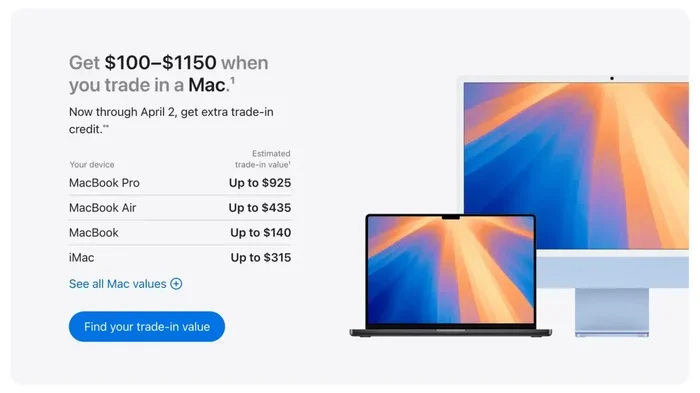
This is the question most people want answered. Do Apple take back old Macs and pay you? Yes, but the amount varies a lot. Your Mac’s trade-in value depends on several key factors. Let us break them down so you know what to expect.
Factors That Determine Your Mac’s Trade-In Value
Several things affect how much Apple will offer for your old Mac:
- Model and generation: Newer models are worth more. A MacBook Pro M1 is worth more than a MacBook Pro from 2012.
- Condition: A Mac that works well with no damage gets a higher value. Scratches, dents, and cracks lower the price.
- Storage capacity: More storage means more value. A 512GB Mac is worth more than a 128GB one.
- Memory (RAM): Higher RAM adds value, especially for creative professionals.
- Battery health: If the battery holds a charge well, the value goes up.
- Whether it powers on: A working Mac is always worth more than one that does not turn on.
Trade-In Value vs. Resale Value
It is important to understand that Apple trade-in value is usually lower than what you could get selling your Mac yourself. Apple builds their offer to make a profit when they resell or refurbish your device. However, the convenience of trading in through Apple is hard to beat. You do not need to list your Mac, take photos, or deal with buyers.
If you want the most money, selling your Mac on a third-party platform like eBay or Swappa might be better. But if you want speed and simplicity, Apple Trade In is the way to go.
| Factor | Higher Value | Lower Value |
|---|---|---|
| Model Age | Newer models (2020+) | Older models (2012 and earlier) |
| Condition | Like new, no damage | Scratched, dented, or broken |
| Storage | 256GB or more | 128GB or less |
| Battery | Good health (80%+) | Poor health (below 80%) |
| Functionality | Powers on and works fully | Does not power on |
Apple Trade-In vs. Third-Party Buyers
When you are ready to sell old Mac, you have more options than just Apple. Let us compare the main choices so you can decide what works best for you.
Trading In Through Apple
Apple Trade In is the safest and most convenient option. You get a guaranteed offer, free shipping, and fast payment. The trade-in credit can be used toward a new MacBook Pro, iMac, or any other Apple product. You can also choose an Apple gift card instead. The downside is that Apple usually offers less money than third-party buyers.
Selling to Third-Party Buyers
Websites like Swappa, eBay, and Gazelle let you sell your Mac directly to another person. You can often get more money this way. But there are downsides. You need to list your Mac, answer questions from buyers, and ship the device yourself. There is also the risk of scams or returns. If you are not comfortable with selling online, Apple Trade In is the better choice.
Selling Locally
You can also sell your Mac on local platforms like Facebook Marketplace or Craigslist. This lets you meet the buyer in person and get cash on the spot. However, this takes more effort and comes with safety concerns. Always meet in a public place and bring a friend if you go this route.
Apple Recycling Program for Old or Broken Macs
What if your Mac is too old or broken to trade in? Do Apple take back old Macs even if they do not work? Yes, they do. Apple has a free Apple recycling program that accepts devices in any condition. This is a great option if your Mac is damaged, won’t turn on, or is too outdated to have any trade-in value.
How Apple Recycles Old Macs
Apple uses a responsible recycling process. When you send in your old Mac, Apple carefully disassembles it. Valuable materials like aluminum, copper, and rare earth elements are recovered and reused. This helps reduce the need for mining new materials. Apple also ensures that harmful substances are disposed of safely.
You can recycle your Mac through the Apple Trade In program even if it has no value. Apple will send you a free shipping label. Just pack up your Mac and drop it off at a carrier location. There is no cost to you, and you are helping the environment.
Why Recycling Matters
Electronic waste is a growing problem worldwide. Old computers contain materials that can harm the environment if not disposed of properly. By choosing to recycle your old Mac through Apple, you are making a positive choice. Apple has committed to using recycled materials in their new products whenever possible. Your old Mac could become part of a brand-new device one day.
Step-by-Step: How to Trade In Your Old Mac
Ready to trade in your old Mac? Here is a simple step-by-step guide to walk you through the Apple trade-in process.
Step 1: Back Up Your Data
Before you do anything else, back up all your files. Use Time Machine or iCloud to save your photos, documents, and apps. You do not want to lose anything important. Once your Mac is wiped, the data cannot be recovered.
Step 2: Sign Out of Your Accounts
Sign out of iCloud, iMessage, and any other Apple services on your Mac. This is important for security reasons. It also ensures the new owner can set up the device as their own.
Step 3: Check Your Mac’s Value
Go to Apple’s trade-in page and answer the questions about your Mac. Apple will give you an estimated value. Write this down so you know what to expect. Keep in mind that the final offer may change slightly after Apple inspects the device.
Step 4: Ship Your Mac to Apple
If you are happy with the offer, Apple will send you a free shipping box and label. Pack your Mac carefully and drop it off at a carrier location. The whole process is designed to be as easy as possible.
Step 5: Receive Your Credit or Gift Card
Once Apple receives and inspects your Mac, they will send you your payment. You can choose Apple Store credit or an Apple gift card. The credit is applied to your Apple account and can be used right away.
Quick Tips for a Smooth Trade-In
- Clean your Mac before sending it. A clean device often gets a better evaluation.
- Include all original accessories if possible. Chargers and cables add value.
- Be honest about the condition. Apple will inspect the device and adjust the offer if needed.
- Trade in during a new product launch. Apple sometimes offers bonus credit during these times.
Common Mistakes to Avoid When Trading In Your Mac
Trading in your Mac is easy, but there are a few mistakes you should avoid. These simple errors can cost you money or cause headaches.
- Forgetting to back up your data: Once your Mac is wiped, there is no going back. Always save your files first.
- Not resetting the Mac: You should erase all content and settings before sending your Mac in. This protects your privacy.
- Accepting the first offer without checking: Compare Apple’s offer with other trade-in programs. Sometimes other companies pay more.
- Waiting too long: Mac values drop over time. The longer you wait, the less your old Mac is worth.
- Ignoring the condition: If your Mac has a cracked screen, be upfront about it. Apple will find out anyway.
- Not checking eligibility: Some trade-in offers require you to purchase a new device. Make sure you understand the terms.
Avoiding these mistakes helps you get the best Mac trade-in value and a smooth experience. Take your time, do your research, and you will be happy with the result.
Expert Insights on Getting the Most From Your Old Mac
We spoke with several tech experts about the best ways to maximize your return when trading in an old Mac. Here is what they had to say:
Timing matters a lot. If you are planning to buy a new Mac, trade in your old one at the same time. Apple often gives the best deals when you bundle the trade-in with a purchase. You also avoid the hassle of selling your old Mac separately.
Consider the refurbished market. Apple sells Apple certified refurbished Macs at lower prices. If you are not in a rush to upgrade, buying a refurbished Mac can save you hundreds of dollars. And when you are ready to upgrade again, you can trade in that refurbished Mac too.
Do not overlook accessories. If you have a good Mac charger, case, or other accessories, consider selling them separately. These items often have value on their own and can add to your total return.
Keep your receipts. If you still have the original box and paperwork, hold onto them. These items can make your Mac more attractive to buyers and sometimes increase the trade-in value.
Check Apple’s education pricing. If you are a student or teacher, Apple offers special education discounts. You may get more credit toward a new purchase than the standard trade-in offer.
Key Takeaways
- Apple does accept old Macs through their trade-in and recycling programs.
- Your Mac’s value depends on the model, year, condition, and specs.
- Apple Trade In gives you credit toward a new purchase or an Apple gift card.
- Even broken Macs can be recycled for free through Apple.
- Third-party buyers may pay more than Apple for some older models.
- The trade-in process is fast and can be done online or in-store.
- Always back up your data before sending your Mac back to Apple.
Conclusion
So, do Apple take back old Macs? Absolutely. Apple makes it easy to trade in your old Mac, no matter the model or condition. Whether your Mac is still working or completely broken, you have options. You can get Apple Store credit, a gift card, or simply recycle your device responsibly.
The Apple Trade In program offers convenience and simplicity. You do not need to worry about finding a buyer or dealing with shipping risks. Apple handles everything from start to finish. And if you want the most money possible, selling your Mac through a third-party platform is worth considering.
No matter which route you choose, the most important step is to act soon. Old Mac value drops over time, so the sooner you trade in or sell your device, the better. Back up your data, reset your Mac, and get started today. You will be surprised at how much your old Mac is still worth.
Take a few minutes right now to check your Mac’s trade-in value on Apple’s website. It is free, takes no time at all, and could put some extra credit toward your next purchase. Do Apple take back old Macs? Yes, and they are ready to help you get started.
Frequently Asked Questions
Do Apple Take Back Old Macs for Free?
Yes, Apple accepts old Macs for free through their trade-in and recycling programs. You do not pay anything to send in your device. If your Mac has trade-in value, you receive credit or a gift card. If it does not, Apple still recycles it at no cost to you.
How Long Does the Apple Trade-In Process Take?
The online trade-in process usually takes about 1 to 2 weeks from start to finish. You submit your device details, receive an estimated offer, ship your Mac, and then wait for Apple to inspect it. Once inspected, your payment is processed quickly.
Can I Trade In a Mac That Does Not Turn On?
Yes, you can trade in a Mac that does not power on. Apple will still evaluate it, but the trade-in value will likely be lower or zero. Even if your Mac has no trade-in value, Apple will recycle it for free.
Is Apple Trade-In Credit the Same as Apple Store Credit?
Yes, Apple Trade-In credit works just like Apple Store credit. You can use it toward any purchase on Apple’s website or in an Apple Store. This includes Macs, iPhones, iPads, accessories, and more. You can also choose to receive an Apple gift card instead.
What Happens to My Data When I Trade In My Mac?
You should erase all data from your Mac before trading it in. Apple recommends using the erase process in macOS Recovery. Once your Mac is received by Apple, they handle the device responsibly. But always make sure your personal data is removed first for your own security.
Can I Trade In a MacBook Air and MacBook Pro Together?
Yes, Apple allows you to trade in multiple devices at once. You can trade in a MacBook Air and a MacBook Pro in the same transaction. Each device will be evaluated separately, and you will receive credit for both. This is a great way to clear out multiple old devices at once.