How Can I Watch Movies On A Plane While In The Air
Watching movies on a plane is easier than you think, whether your airline offers seatback screens or you prefer to download content before you fly. This guide covers every method to watch movies on a plane, from offline apps to in-flight WiFi streaming, so you never have to endure a boring flight again. You will learn the best devices, top apps, and pro tips to make your next trip entertaining.
There is nothing worse than settling into your seat on a long flight and realizing you have nothing to watch. Hours stretch ahead of you, and the boredom starts to creep in fast. If you have ever wondered how can I watch movies on a plane, you are in the right place.
The good news is that watching movies during a flight has never been simpler. Airlines have stepped up their in-flight entertainment systems, and your own devices can become powerful entertainment hubs. Whether you are on a short domestic hop or a long haul flight across the ocean, there is a way to keep yourself entertained.
This guide will walk you through every method, tool, and tip you need to watch movies on a plane like a pro. We will cover airline screens, offline downloads, streaming with WiFi, the best devices to bring, and plenty of practical advice. By the end, you will know exactly how to set up a great movie experience at 35,000 feet.
Key Takeaways
- Download Before You Fly: Pre-downloading movies is the most reliable way to enjoy entertainment without needing WiFi.
- Use Airline Entertainment Systems: Most modern airlines offer seatback screens with a wide selection of movies and TV shows.
- Best Apps for Offline Viewing: Netflix, Disney+, and Amazon Prime all let you download content ahead of time.
- Invest in Good Headphones: Noise-cancelling headphones make a huge difference in airplane cabin noise.
- Watch Your Battery Life: Bring a portable charger to keep your device powered through long flights.
- Enable Flight Mode: Always switch your device to airplane mode before takeoff and landing.
📑 Table of Contents
How Airline Entertainment Systems Work
Most airlines today offer some form of in-flight entertainment. These systems have improved a lot over the past decade. Let us break down the two main types you will encounter.
Seatback Screens
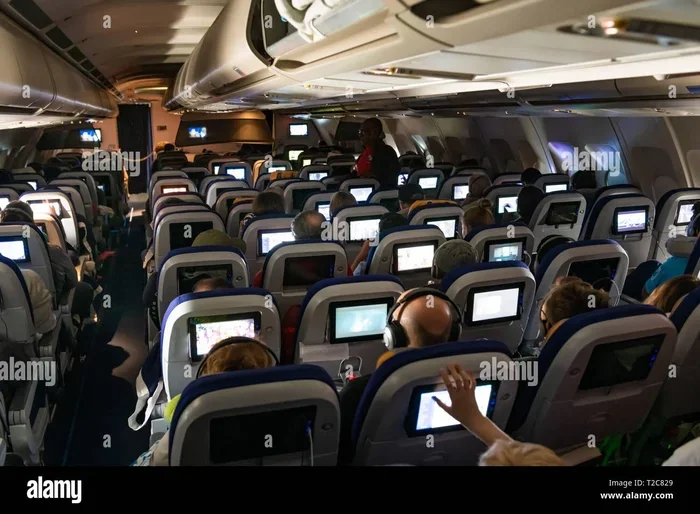
Many airlines still use personal screens built into the back of every seat. These seatback screens give you access to a library of movies, TV shows, and music. You can usually browse by genre, new releases, or popular picks.
The selection varies by airline. Some carriers offer hundreds of options, while others keep it smaller. The quality of the picture and sound is generally solid. The best part is that you do not need to worry about WiFi or battery life. The screen is built into the seat, and the audio comes through a headphone jack on the armrest.
Here are some airlines known for great seatback entertainment:
- Delta Air Lines offers a large library on most domestic and international flights.
- United Airlines provides seatback screens on most widebody aircraft.
- Emirates and Singapore Airlines are famous for their premium entertainment systems.
- American Airlines has updated many of its fleets with new screens.
Bring Your Own Device (BYOD) Streaming
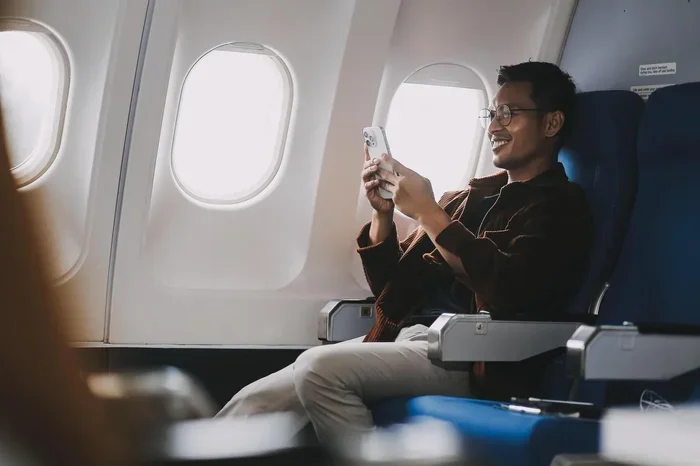
Some airlines no longer install seatback screens. Instead, they offer a bring your own device system. You connect to the airline’s WiFi or a dedicated streaming network, and you can watch movies and shows on your own phone, tablet, or laptop.
Airlines like JetBlue, Southwest, and Delta have moved toward this model on many routes. They often provide free streaming access to their own entertainment app. All you need is your device and a pair of headphones.
Download Movies Before Your Flight
This is the most reliable method for watching movies on a plane. Downloading movies for offline viewing means you do not need WiFi at all. You simply save the content to your device before you leave home.
Best Apps for Offline Movie Downloads
Several popular streaming services let you download content directly to your phone or tablet. Here is a look at the top options:
- Netflix: Netflix has a massive download library. You can save movies and shows to watch later. Downloads expire after a set period, so plan accordingly.
- Disney+: Disney+ offers a great selection of movies and shows you can download. It works well for family travel too.
- Amazon Prime Video: Prime members can download thousands of titles. The app is easy to use and works smoothly offline.
- Apple TV+: Apple users can download content directly through the Apple TV app. It integrates well with iPhones and iPads.
- Hulu: Hulu allows downloads on mobile devices. The selection is smaller than Netflix, but it still has good options.
How to Download Movies the Right Way
Downloading movies the smart way can save you a lot of trouble. Follow these steps for the best results:
- Check your storage space. Movies can take up a lot of room. A single HD movie may need 3 to 5 GB. Make sure your device has enough space before you start.
- Use WiFi at home. Download everything over your home network. Do not rely on airport WiFi for large downloads.
- Download the night before. Give yourself plenty of time. Last-minute downloads can fail or take too long.
- Test your downloads. Play a few seconds of each downloaded movie to make sure it works before you leave.
- Charge your device fully. A full battery gives you the best movie-watching experience.
Storage Tips for Movie Lovers
If you watch a lot of movies, storage can become a real issue. Here are some quick tips to manage it:
- Use a portable hard drive or SD card to expand your device storage.
- Delete movies after you watch them to free up space.
- Choose standard definition over HD when storage is tight. SD files are much smaller.
- Consider a tablet with 128 GB or more if you travel often.
Using WiFi to Stream Movies Mid-Flight
More airlines are offering airplane WiFi these days. This opens up the possibility of streaming movies while flying. But it is not always as simple as it is at home.
How In-Flight WiFi Works
In-flight WiFi connects your device to the internet through satellite or ground-based towers. The connection speed varies a lot depending on the airline and the type of WiFi they use.
There are two main types of airplane WiFi:
- Ground-based WiFi: This uses cell towers on the ground. It works well over land but drops out over oceans.
- Satellite WiFi: This connects to satellites in space. It works everywhere, including over oceans, but can be slower and more expensive.
Can You Stream Movies with In-Flight WiFi?
The short answer is yes, but with some caveats. Many airlines offer free streaming through their own entertainment apps. Delta, for example, lets you stream live TV and movies for free on their app. Other airlines charge for WiFi, and streaming at full quality may eat up your data fast.
Here are some tips for streaming movies on airplane WiFi:
- Lower the video quality. Standard definition uses less data and buffers less than HD.
- Start your movie early. WiFi can be slow during busy times. Start your movie as soon as you get connected.
- Pause to buffer. If the connection is weak, pause the movie and let it load for a few minutes before continuing.
- Check your airline’s WiFi plan. Some airlines offer free streaming but charge for general internet use. Know what you are paying for.
Best Devices for Watching Movies on a Plane
The device you use to watch movies on a plane matters a lot. You want something lightweight, with a good screen and long battery life. Let us look at the best options.
Tablets
Tablets are the most popular choice for in-flight entertainment. They are light, have great screens, and are easy to hold for hours. The iPad and Samsung Galaxy Tab are top picks. Both offer bright displays and excellent speakers.
If you want a budget option, the Amazon Fire HD tablets are surprisingly good for movie watching. They are affordable and work well with Amazon Prime Video downloads.
Laptops
A laptop gives you a bigger screen and a full keyboard. It is a great choice if you also need to work during your flight. The MacBook Air and Dell XPS are lightweight and have excellent battery life. You can watch movies on them for hours without needing a charge.
Smartphones
Your phone works in a pinch, but the small screen can get tiring on a long flight. If you do use your phone, consider a portable phone holder that clips to the seatback. This makes it much more comfortable to watch.
Portable Media Players
Some travelers still love dedicated portable media players. Devices like the SanDisk Ultra or Sony Walkman are small, lightweight, and built just for watching and listening to media. They do not drain your phone battery, and they are very simple to use.
Tips for the Best Movie-Watching Experience on a Plane
Watching movies on a plane is a bit different from watching at home. The cabin is noisy, the lighting changes, and you are sitting in a tight space. A few smart choices can make a big difference.
Invest in Noise-Cancelling Headphones
This is the single best upgrade you can make. Airplane cabins are loud, and regular headphones do a poor job of blocking out engine noise. Noise-cancelling headphones like the Sony WH-1000XM5 or Bose QuietComfort series dramatically improve your listening experience. They also help you focus on the movie instead of the hum of the engines.
Manage Your Device Battery
Nothing kills a good movie session faster than a dead battery. Here is how to keep your device powered:
- Bring a portable charger. A small power bank can give your device one or two extra full charges.
- Lower your screen brightness. This saves a surprising amount of battery.
- Close background apps. Apps running in the background drain power even when you are not using them.
- Use battery saver mode. Most devices have a power-saving option that extends battery life.
Choose Your Seat Wisely
Your seat can affect your movie-watching experience more than you think. Window seats give you a wall to lean against, which makes it easier to hold a tablet or phone. Extra-legroom seats give you more space to stretch out and get comfortable.
If you are traveling with a companion, consider booking two seats in the same row so you can share the screen or each watch something different.
Pack a Travel Entertainment Kit
A small kit packed with the right essentials makes every flight better. Here is what to include:
- A pair of noise-cancelling headphones
- A portable charger or power bank
- A phone or tablet stand
- Extra charging cables
- Downloaded movies and shows
- A lightweight blanket for comfort
Common Mistakes to Avoid
Even experienced travelers make mistakes when setting up their in-flight entertainment. Here are some common pitfalls to watch out for.
Forgetting to Download Content
This is the number one mistake. You assume the airplane WiFi will be fast enough to stream, but it often is not. Always download your content before you board. Do not rely on in-flight WiFi for your entertainment.
Not Enabling Flight Mode
You must switch your device to flight mode before takeoff. If you forget, the crew will ask you to do it. More importantly, having WiFi or cellular data on during flight can drain your battery quickly. Flight mode saves power and keeps you compliant with airline rules.
Running Out of Storage
Downloading several movies can eat up your storage fast. Check your available space before you start downloading. If you are low on room, delete old files or apps you no longer need.
Ignoring Headphone Compatibility
Some airline seatback screens use special headphone jacks. Bring the right adapter if needed. For your own device, make sure your headphones work with your phone or tablet. Many newer devices no longer have a headphone jack, so a Bluetooth or USB-C pair may be necessary.
Expert Insights
Frequent travelers and tech experts agree on a few key principles for the best in-flight movie experience. Here is what the pros recommend.
Download everything the night before your flight. Do not wait until you are at the airport. Airport WiFi is often slow and unreliable. Getting your content ready at home removes all the stress.
Use a VPN for secure streaming. If you do stream on airplane WiFi, a VPN adds a layer of security. Public WiFi networks on planes can be vulnerable, and a VPN protects your data.
Keep your downloads organized. Create a dedicated folder for downloaded movies and shows. This makes it easy to find what you want without scrolling through a cluttered library.
Test your setup before you travel. Play a downloaded movie from start to finish on your device. Make sure the audio works, the video plays smoothly, and the file is not corrupted.
Conclusion
Watching movies on a plane is no longer a luxury. It is a basic part of modern travel, and with the right setup, you can turn even the longest flight into an enjoyable experience. Whether you rely on airline entertainment systems, download movies for offline viewing, or stream over airplane WiFi, there is a method that works for you.
The key is preparation. Download your content ahead of time, bring the right device and headphones, and manage your battery wisely. Follow the tips in this guide, and you will never have to sit through a boring flight again. Watch movies on a plane with confidence and enjoy every minute of your journey.
Now that you know exactly how to set up your in-flight entertainment, your next trip is going to be a lot more enjoyable. Pack your headphones, charge your device, and get ready for a great movie experience at 35,000 feet.
Frequently Asked Questions
Can I watch movies on a plane without WiFi?
Yes, absolutely. The best way to watch movies without WiFi is to download them before your flight. Apps like Netflix, Disney+, and Amazon Prime all let you save content offline. Just make sure you download everything while connected to home WiFi and that your device has enough storage space.
Do all airlines offer in-flight entertainment?
Most major airlines offer some form of in-flight entertainment, but the quality and type vary. Some provide seatback screens, while others use a bring your own device system. Budget airlines may offer fewer options, so check with your carrier before you fly.
What is the best device for watching movies on a plane?
Tablets like the iPad or Samsung Galaxy Tab are the most popular choice because of their lightweight design and great screens. Laptops work well if you need a bigger display, and smartphones are fine for shorter flights. Portable media players are also a solid option for dedicated movie watchers.
How much storage do I need to download movies?
A single HD movie typically requires 3 to 5 GB of storage. If you plan to download 5 to 10 movies, aim for at least 50 GB of free space. Using standard definition instead of HD can significantly reduce the storage needed.
Can I use Bluetooth headphones on a plane?
Most airlines allow Bluetooth headphones during the flight. However, you must still enable flight mode on your device, which disables cellular and WiFi connections. Bluetooth usually works fine in flight mode. Always check your specific airline’s policy before you travel.
How can I save battery while watching movies on a plane?
Lower your screen brightness, close background apps, and use battery saver mode. Bringing a portable charger or power bank is the best backup plan. Also, switching to flight mode helps conserve battery since your device is not searching for a cellular signal.