How Do I Program My Hughes Hrmc 15 Remote Control Guide
This guide walks you through exactly how to program your Hughes HRMC 15 remote control in simple, clear steps. You will learn universal codes, device pairing methods, and common fixes when things go wrong. By the end, you will have full control over your TV, cable box, and audio devices from one remote.
So you just got a Hughes HRMC 15 remote control and you want to set it up. Maybe you are tired of juggling five different remotes for your TV, sound system, and cable box. Or maybe you just moved into a new place and need to get everything working fast. Whatever the reason, you are in the right place.
Programming the Hughes HRMC 15 remote is easier than most people think. You do not need to be a tech expert. You do not need any special tools. All you need is a little patience and this guide. We will walk you through every single step, from finding the right codes to fixing common problems. By the time you finish reading, your remote will be fully programmed and ready to go.
Let us be honest. Remote controls can be frustrating. You press a button and nothing happens. The volume works but the channel does not. You try a code from the manual and it does not match your device. These problems are normal, and they are fixable. This guide gives you everything you need to know about remote control programming for the Hughes HRMC 15. We keep it simple, practical, and straight to the point.
Key Takeaways
- Easy Setup: Programming the Hughes HRMC 15 remote is straightforward once you know the right steps and codes.
- Universal Compatibility: This remote works with most TVs, cable boxes, and audio devices using standard IR codes.
- Troubleshooting Included: We cover the most common problems and their quick fixes.
- Expert Tips: Discover pro tips that make your remote work better and last longer.
- No Special Tools Needed: You only need your remote, the device, and a few minutes of time.
📑 Table of Contents
What Is the Hughes HRMC 15 Remote Control?
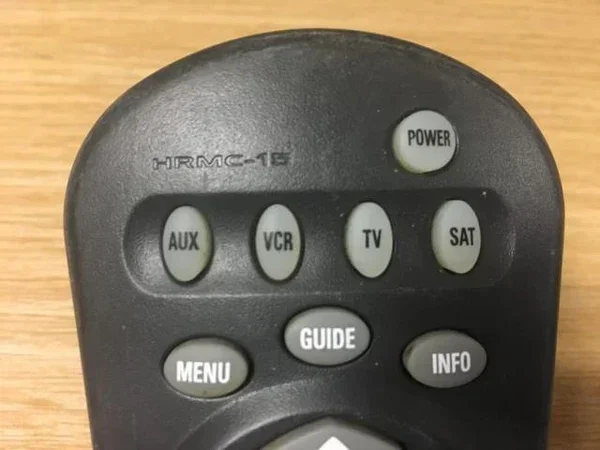
The Hughes HRMC 15 is a satellite TV remote designed to work with Hughes DirecTV receivers. It is a compact device that lets you control your TV, receiver, and sometimes even your audio equipment. The remote uses infrared signals, commonly called IR signals, to send commands to your devices.
Here is what makes the Hughes HRMC 15 special:
- Compact design: It is small and lightweight, so it fits comfortably in your hand.
- Backlit buttons: The buttons glow in the dark, which helps late-night viewing.
- Universal code support: It can be programmed to work with many different TV brands.
- DirecTV integration: It works seamlessly with Hughes DirecTV set-top boxes.
- Simple layout: The buttons are arranged logically, so you find what you need fast.
Many people call this a Hughes receiver remote because it comes bundled with the Hughes satellite receiver. It replaces the need for multiple remotes in your living room. Once you program it correctly, one remote handles everything.
How Does the HRMC 15 Communicate?
The remote sends out invisible light pulses from an LED at the top. These pulses carry specific signals that your TV or device understands. Think of it like a secret language between your remote and your equipment. When you press a button, the IR signal travels in a straight line to the device. The device picks it up and performs the action.
This is why it is important to point the remote directly at your device when you press buttons. Obstacles like furniture or other electronics can block the signal. Also, the remote needs fresh batteries to send strong signals. If your remote feels weak, try replacing the batteries first before doing anything else.
Getting Ready to Program Your Remote
Before you start the actual programming process, you need a few things ready. Preparation makes the whole process smoother and faster. Here is your pre-programming checklist.
- Your Hughes HRMC 15 remote — make sure it is clean and the batteries are fresh.
- The device you want to control — your TV, cable box, or audio system.
- The device brand and model number — write this down. You will need it to find the right code.
- A calm, quiet space — you need to focus on the steps without rushing.
- About 10 to 15 minutes — the whole process should not take long.
Finding Your Device Brand and Model
Look at the back or bottom of your TV. There is usually a sticker with the brand name and model number. Samsung, LG, Sony, Vizio, and TCL are some of the most common brands. Write down the exact model if you can. This helps you find the correct remote control codes later in the process.
If you are programming your Hughes receiver to work with a cable box, find the brand of the cable box too. Most cable boxes from Comcast, Spectrum, or Cox have the brand name printed on the front panel.
Checking Your Batteries
Old batteries are the number one cause of remote problems. Before you start programming, open the battery compartment and check the batteries. If they look corroded or weak, replace them with fresh ones. Use the correct battery type, usually AAA, as specified on the inside of the compartment.
Strong batteries ensure your IR signal programming works properly. A weak signal might make it seem like the remote is not responding, even when you are doing everything right.
Step-by-Step Programming Instructions
This is the core of the guide. Here we show you exactly how to program your Hughes HRMC 15 remote control using the manual code entry method. This is the most common and reliable approach.
Method 1: Manual Code Entry
Follow these steps carefully. Do not skip any step.
- Turn on the device you want to control. For example, turn on your TV.
- Point the remote directly at the device.
- Press and hold the Setup button on the remote until the indicator light turns on. The Setup button is usually at the top of the remote.
- Enter the three-digit code for your device brand. You will find these codes in the code list later in this article.
- Release the Setup button. The indicator light should stay on.
- Press the Power button. If the TV turns off, the code is correct.
- Test other buttons like Volume and Channel to make sure everything works.
If the TV does not turn off after pressing Power, repeat the process with a different code from the list. There are usually several codes for each brand, so keep trying until one works.
Method 2: Auto Code Search
If you do not have the code list handy, you can use the auto search feature. This method cycles through all available codes until it finds the right one.
- Turn on the device you want to control.
- Press and hold the Setup button until the light stays on.
- Press the device button for the type of device (TV, Cable, Audio).
- Point the remote at the device and press the Power button repeatedly. The remote will try codes one by one.
- Stop when the device turns off. Do not press any more buttons once it works.
- Press Setup to lock in the code.
The auto search takes a little longer than manual entry, but it works well when you do not know the brand code. It is a great backup method.
Method 3: Using the Hughes Receiver Menu
If your Hughes HRMC 15 came with a DirecTV receiver, you can also program the remote through the receiver menu. This method is helpful because the receiver stores the codes for you.
- Press the Menu button on the remote.
- Navigate to Settings. Use the arrow buttons to scroll.
- Select Remote Setup. This option may appear as “Remote” or “Pair Remote.”
- Follow the on-screen prompts to select your device type.
- Test the remote after the setup completes.
This method is especially useful if you are setting up a new Hughes receiver. It saves you from looking up codes manually.
Common Remote Codes for Popular Devices
Finding the right code is the most important part of programming. Below you will find a list of common codes for popular TV and device brands. These codes work with the Hughes HRMC 15 remote for remote control programming purposes.
TV Brand Codes
- Samsung: 101, 105, 108, 110, 115
- LG: 111, 112, 118, 120, 125
- Sony: 001, 002, 006, 007, 011
- Vizio: 017, 027, 037, 047, 057
- TCL: 036, 046, 056, 066, 076
Cable Box and Audio Codes
- Motorola: 001, 002, 003, 004
- Scientific Atlanta: 010, 020, 030, 040
- Pace: 015, 025, 035, 045
- Roku: 001, 005, 010, 015
- Soundbar (generic): 001, 003, 005, 007
Remember, these are general codes. Not every code will work for every model. If one code does not work, try the next one on the list. You can also find the most up-to-date remote code list on the Hughes support website or in your receiver manual.
Troubleshooting Common Issues
Sometimes things do not go as planned. That is completely normal. Here are the most common problems people face when programming the Hughes HRMC 15 remote and how to fix them.
The Remote Does Not Respond at All
This is usually a battery issue. Replace the batteries with fresh ones. Make sure you insert them with the correct polarity, matching the plus and minus signs inside the compartment. If the remote still does not respond, check the IR bulb at the top of the remote. It should glow faintly when you press any button. If it does not glow, the remote may need to be replaced.
The Code Does Not Work for Your Device
Not every code works for every model, even within the same brand. Try different codes from the list. Use the auto search method if manual codes fail. Also, make sure you are entering the code quickly and correctly. Slow or incorrect entry can cause the setup to time out.
Some Buttons Work but Others Do Not
This usually means the code you found is a partial match. It controls basic functions like Power and Volume but not advanced features. Try a different code from the list. If only a few buttons are affected, you might need to reprogram the remote using a different code.
Remote Works But Only at Close Range
If the remote only works when you are right in front of the device, the IR bulb may be weak. Replace the batteries first. If that does not help, clean the IR bulb with a soft cloth. Dust and dirt can block the signal. Also, make sure nothing is blocking the path between the remote and the device.
The Remote Keeps Losing Its Programming
This can happen if the remote is reset accidentally or if the batteries are removed for too long. To fix this, simply reprogram the remote using the steps above. Keeping fresh batteries in place helps prevent this from happening.
Expert Tips for Better Remote Performance
Once your Hughes HRMC 15 remote is programmed, you can take a few extra steps to make it work even better. These tips come from experience and can save you a lot of frustration down the road.
Keep the Remote Clean
Dust and crumbs can get inside the buttons and cause them to stick or stop working. Wipe the remote down with a soft, slightly damp cloth once a week. For stubborn grime, use a cotton swab dipped in rubbing alcohol. Let it dry completely before putting the batteries back in.
Store the Remote Properly
Do not leave the remote in direct sunlight or near heat sources. Extreme temperatures can damage the internal electronics and the IR bulb. Store it in a cool, dry place, preferably in a remote holder or drawer.
Use the Remote with a Clear Line of Sight
The IR signal programming requires a clear path between the remote and the device. Do not hide your remote behind other electronics or inside a closed cabinet. If you have a TV mounted on a wall, keep the receiver in an open area where the remote can reach it easily.
Update Your Device Firmware
Sometimes, device firmware updates can change how your TV or cable box responds to remote signals. After updating your devices, you may need to reprogram the remote. This is rare but worth knowing about.
Consider a Remote Extender
If your setup involves the receiver being hidden inside a cabinet, consider getting a remote extender. These small devices pick up the IR signal from the remote and retransmit it to the receiver. They solve the problem of blocked signals without having to move your equipment.
Label Your Remote
It sounds simple, but labeling your remote with tape or a sticker can save you a lot of confusion. Write “TV” or “Cable” on the remote so everyone in the house knows which device it is currently set to control.
Key Takeaways
- Easy Setup: Programming the Hughes HRMC 15 remote is straightforward once you know the right steps and codes.
- Universal Compatibility: This remote works with most TVs, cable boxes, and audio devices using standard IR codes.
- Multiple Methods Available: You can program the remote using manual codes, auto search, or the Hughes receiver menu.
- Troubleshooting Included: We cover the most common problems and their quick fixes.
- Expert Tips: Discover pro tips that make your remote work better and last longer.
- No Special Tools Needed: You only need your remote, the device, and a few minutes of time.
Frequently Asked Questions
How do I reset my Hughes HRMC 15 remote?
To reset the remote, remove the batteries, press and hold the Power button for 10 seconds, and then reinsert the batteries. This clears any stored codes and returns the remote to its factory default state. After resetting, you will need to reprogram the remote using the steps in this guide.
Can the Hughes HRMC 15 remote control multiple devices?
Yes, the remote can be programmed to control multiple devices. You can set it up to work with your TV, cable box, and audio system. Each device needs its own code. Use the device button on the remote to switch between different device modes when needed.
Where can I find the latest Hughes HRMC 15 remote codes?
The latest codes are available on the Hughes DirecTV support website. You can also find them in the user manual that came with your receiver. If you no longer have the manual, searching online for “Hughes HRMC 15 remote code list” will give you up-to-date options.
Why does my remote work for the TV but not the cable box?
This usually means the remote is programmed for the TV but not the cable box. You need to program a separate code for the cable box. Follow the same programming steps and enter the cable box code for your specific brand. Make sure you select the correct device type during setup.
How long does it take to program the Hughes HRMC 15 remote?
Most people complete the programming in 5 to 15 minutes. The manual code entry method is the fastest if you already have the code. The auto search method takes a bit longer because it cycles through all available codes. The receiver menu method is also quick if you are already in the Hughes setup interface.
What should I do if none of the codes work for my device?
If no code works, try the auto search method. If that also fails, your device may use a proprietary code set that is not in the standard list. In this case, you can contact Hughes customer support for assistance. They may have additional codes or alternative programming methods for your specific device.
Conclusion
Programming your Hughes HRMC 15 remote control does not have to be a headache. With the right codes, the right method, and a little patience, you can have your remote working perfectly in under 15 minutes. This guide covered everything you need, from understanding how the remote works to troubleshooting the most common issues.
Remember to always start with fresh batteries, point the remote directly at your device, and try multiple codes if the first one does not work. The remote control programming process is simple once you get the hang of it. Whether you use manual entry, auto search, or the receiver menu, each method gets the job done.
Now that you know how to program your Hughes HRMC 15 remote, you can enjoy the convenience of controlling all your devices with just one remote. No more searching for the right remote in the dark. No more confusion over which button does what. One remote, full control, and peace of mind.
Go ahead and give it a try. If you run into any issues, come back to this guide and check the troubleshooting section. You will be up and running in no time. Happy viewing!