Infrared and Bluetooth Differences Explained Simply
Infrared and Bluetooth are both wireless technologies, but they work very differently. Infrared uses light beams that need a clear path, while Bluetooth uses radio waves to connect devices through walls and around corners. Understanding these differences helps you choose the right connection for your entertainment setup.
Wireless technology has changed the way we enjoy entertainment at home. Two of the most common wireless technologies are infrared and Bluetooth. You use infrared every day when you point a remote at your TV. You use Bluetooth when you connect wireless headphones or stream music from your phone.
These two technologies might seem similar because they both send data without wires. But they work in completely different ways. Infrared uses light beams that must travel in a straight line. Bluetooth uses radio waves that can pass through walls and furniture.
Knowing the differences between these two technologies helps you make better choices. Whether you are setting up a home theater, choosing wireless headphones, or trying to connect your car stereo, the right technology matters. This guide breaks everything down in simple terms.
We will cover how each technology works, where they are used, and which one fits your needs best. By the end, you will have a clear picture of infrared vs Bluetooth and why each one shines in different situations.
Key Takeaways
- Infrared needs a direct line of sight between devices to work properly.
- Bluetooth connects without needing a clear path, making it more flexible.
- Bluetooth has a much longer range than infrared in most cases.
- Infrared is older technology but still works well in remotes and some gadgets.
- Bluetooth supports multiple device connections at the same time.
- Infrared is generally cheaper but more limited in what it can do.
- Both technologies have their place in modern entertainment setups.
📑 Table of Contents
What Is Infrared Technology?
Infrared technology uses invisible light to send data between devices. It has been around for many decades. You probably use it every single day without even realizing it.
The word “infrared” means “below red.” It refers to light waves that are just below what the human eye can see. These light waves carry information from one device to another. The speed of this transfer depends on the device and the setup.
How Infrared Signals Work
Infrared works like a very focused flashlight. When you press a button on your remote, it sends out a burst of infrared light. This light carries a coded message to your TV or other device.
The light must travel in a straight line. If something blocks the path, the signal stops. This is why you must point your remote directly at the TV. It is also why you cannot change channels from another room.
Infrared signals work best over short distances. Most remotes work within about 10 to 20 feet. The light travels fast, so the response feels instant when you press a button.
Common Devices That Use Infrared
You will find infrared technology in many household gadgets. Here are some common examples:
- TV remotes — the most common use of infrared in homes
- DVD and Blu-ray player remotes — they use the same basic technology
- Air conditioning remotes — many AC units use infrared signals
- Old gaming consoles — some early systems used infrared for wireless controllers
- Security systems — motion sensors often use infrared beams
Infrared is simple and reliable. It does not need batteries in the remote to be powerful. A small battery can send signals for months. This makes it a great choice for devices that just need basic commands.
What Is Bluetooth Technology?
Bluetooth is a newer wireless technology that uses radio waves instead of light. It was invented in the 1990s and has become one of the most popular wireless standards in the world. You will find Bluetooth in phones, speakers, headphones, cars, and many other devices.
Bluetooth creates a small personal network called a “piconet.” This network lets devices talk to each other without any wires. The connection is secure and uses very little power.
How Bluetooth Connectivity Works
Bluetooth sends data using radio waves at a specific frequency. Most Bluetooth devices use the 2.4 GHz band. This is the same frequency range used by Wi-Fi and microwave ovens.
When you pair two Bluetooth devices, they agree on a connection channel. This process is called Bluetooth pairing. Once paired, the devices can send and receive data back and forth.
Bluetooth does not need a direct line of sight. You can leave your phone in your pocket and still connect to wireless headphones on your head. The radio waves pass through clothes, walls, and other obstacles easily.
Common Devices That Use Bluetooth
Bluetooth has spread to almost every type of consumer electronics. Here are some popular examples:
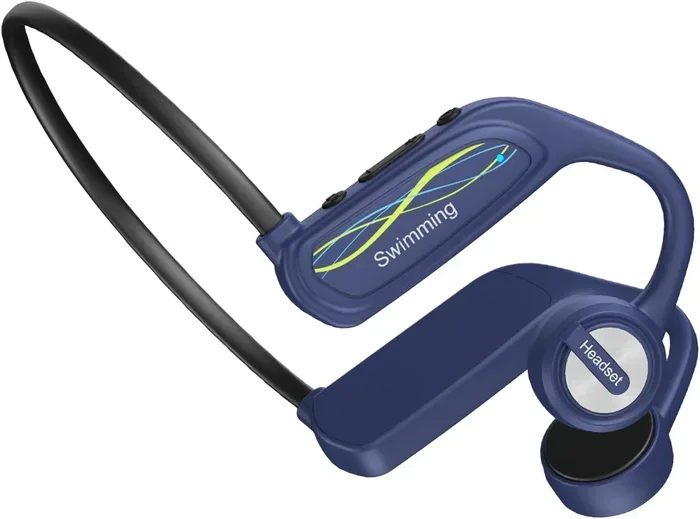
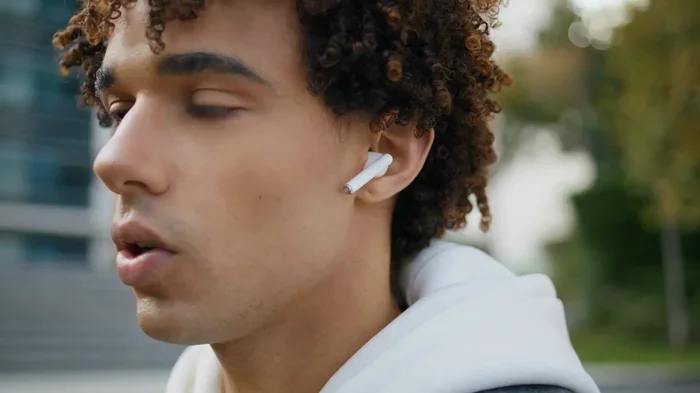
- Wireless headphones and earbuds — the most common Bluetooth use case
- Bluetooth speakers — portable speakers that connect to phones
- Smartwatches and fitness trackers — they sync data using Bluetooth
- Car audio systems — many cars now support Bluetooth connectivity for hands-free calling
- Game controllers — modern controllers use Bluetooth to connect to consoles
- Printers and keyboards — many wireless peripherals use Bluetooth
Bluetooth has evolved a lot over the years. Newer versions offer faster speeds and better range. The latest Bluetooth versions also use much less battery power. This makes them ideal for small portable devices.
Key Differences Between Infrared and Bluetooth
Now that you understand both technologies, let us look at how they differ. These differences matter when you are choosing which technology to use for your entertainment setup.
Range and Distance
Infrared has a very short range. Most devices work within 10 to 20 feet. The signal also needs a clear path. Any object between the sender and receiver will block the connection.
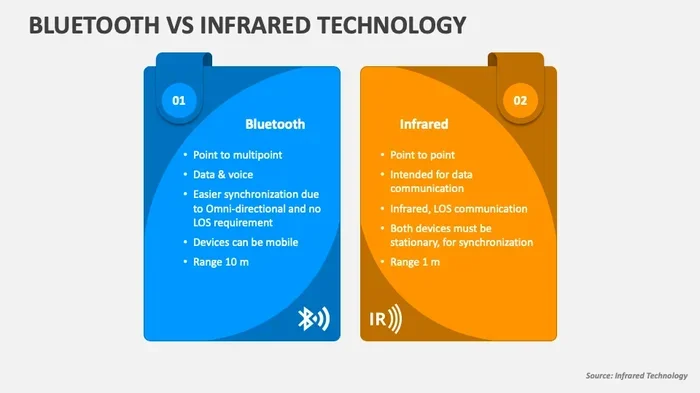
Bluetooth has a much longer range. Class 2 Bluetooth devices, which are the most common, work up to about 30 feet. Class 1 devices can reach up to 300 feet in ideal conditions. Bluetooth signals can go through walls and furniture without problems.
If you want to control your TV from across the room, Bluetooth gives you much more freedom. With infrared, you must stay in line of sight with the device.
Speed and Data Transfer
Infrared can transfer data at decent speeds for simple commands. Most TV remotes do not need high speed because they only send basic codes. But for larger data like audio or video, infrared is not ideal.
Bluetooth offers much faster data transfer rates. Modern Bluetooth versions can handle high-quality audio streaming, file transfers, and even video. This is why Bluetooth is the go-to choice for wireless headphones and speakers.
Here is a quick comparison of speed and range:
| Feature | Infrared | Bluetooth |
|---|---|---|
| Max Range | About 10-20 feet | Up to 30 feet (Class 2) |
| Line of Sight Needed | Yes | No |
| Data Speed | Moderate for commands | Fast for audio and files |
| Direction Required | Yes, pointed directly | No, omnidirectional |
| Power Usage | Very low | Low to moderate |
| Multi-Device Support | One-to-one only | Can connect multiple devices |
Connection Type and Line of Sight
This is the biggest difference between the two technologies. Infrared requires what is called a “line of sight” connection. The sender and receiver must be able to see each other directly.
Bluetooth does not need line of sight. It uses radio waves that spread out in all directions. This means you can connect your Bluetooth headphones while your phone is in another room.
Line of sight makes infrared simple but limited. It works great for remotes in a living room. But it does not work well for portable devices that move around the house.
Security and Interference
Infrared signals are very hard to intercept from outside. Because the light does not spread out, someone in another room cannot pick up your signal. This makes infrared naturally secure for simple commands.
Bluetooth has built-in security features too. It uses encryption to protect data between paired devices. However, because Bluetooth uses radio waves, the signal can be picked up by nearby devices. This is why Bluetooth pairing codes exist — they ensure only your devices connect to each other.
Both technologies can experience interference. Infrared can be blocked by sunlight or bright lights. Bluetooth can be interfered with by Wi-Fi networks and other radio devices. In most home environments, Bluetooth interference is rarely a problem.
Which Technology Is Better for Your Setup?
The answer depends on what you want to do. Each technology has strengths that make it better for certain tasks.
When to Use Infrared
Infrared is great for simple control tasks. If you just need to change channels, adjust volume, or power on a device, infrared works perfectly. It is cheap, reliable, and does not drain batteries fast.
Infrared is also good when you want a simple one-to-one connection. A remote to a TV is a perfect example. You do not need anything fancy. Just point and press.
Some people still prefer infrared remotes because they are straightforward. There is no pairing process. There is no setup. You pick up the remote and it works immediately.
When to Use Bluetooth
Bluetooth is the clear winner for audio streaming. If you want wireless headphones, a Bluetooth speaker, or hands-free calling in your car, Bluetooth is the way to go.
Bluetooth is also better for portable devices. You can walk around your house with your phone connected to your headphones. The signal does not drop when you turn your back or walk into another room.
If you want to make your old stereo Bluetooth capable, you can use a Bluetooth adapter. These small devices plug into your stereo and add wireless connectivity. They are affordable and easy to set up. Similarly, if you want to add Bluetooth to your TV, a Bluetooth adapter for TV can make older TVs work with modern wireless headphones and speakers.
Quick Tips for Choosing the Right Connection
Here are some practical tips to help you decide between infrared and Bluetooth:
- Check what your device supports. Not every TV or speaker has both options. Look at the specs before you buy.
- Think about mobility. If you move around a lot, Bluetooth is the better choice.
- Consider battery life. Infrared uses very little power. Bluetooth uses more but has improved a lot over the years.
- Test the range. Try using your Bluetooth device at the far end of your home to see if the signal holds up.
- Look for the latest Bluetooth version. Newer versions offer better speed, range, and battery efficiency.
- Keep infrared devices clean. Dust on the IR sensor can block signals. A quick wipe with a soft cloth helps.
These simple tips can save you a lot of frustration. They help you get the most out of your wireless devices without any hassle.
Expert Insights on Wireless Technology Trends
Wireless technology keeps evolving. New standards and protocols are always being developed. Here are some trends to watch:
Bluetooth is getting faster. The latest Bluetooth versions offer data transfer speeds that rival some wired connections. This means better quality audio streaming and faster file transfers between devices.
Infrared is not going away. Even though Bluetooth is more popular for many tasks, infrared still has a place. TV remotes will likely use infrared for a long time because it is simple and reliable.
Hybrid devices are becoming common. Some devices now support both infrared and Bluetooth. This gives users the flexibility to choose the best connection for each task. For example, a soundbar might use infrared for the remote control but Bluetooth for audio streaming.
Wireless technology is becoming more energy-efficient. Both infrared and Bluetooth are improving in power management. This means longer battery life for portable devices and less energy waste.
These trends show that both technologies will continue to coexist. They each serve different needs in the wireless ecosystem. Understanding both gives you an advantage when setting up your entertainment systems.
Common Mistakes People Make
Here are some mistakes to avoid when working with these wireless technologies:
- Expecting infrared to work through walls. It cannot. You must have a clear path between devices.
- Assuming all Bluetooth connections are the same. Different Bluetooth versions offer different speeds and ranges.
- Forgetting to pair devices properly. Skipping the pairing process can cause connection problems.
- Placing Bluetooth devices near microwave ovens. Microwaves can interfere with Bluetooth signals on the 2.4 GHz band.
- Using infrared remotes with dead batteries. Weak batteries cause weak signals that may not reach the device.
Avoiding these mistakes will help you get the best performance from your wireless devices. A little knowledge goes a long way in troubleshooting connection issues.
Final Thoughts
Infrared and Bluetooth are both important wireless technologies. They each have strengths and weaknesses. Infrared is simple, cheap, and reliable for short-range control tasks. Bluetooth is versatile, flexible, and great for audio streaming and portable connections.
The right choice depends on your specific needs. If you just need a remote for your TV, infrared is perfect. If you want wireless headphones for music or hands-free calling in your car, Bluetooth is the way to go.
Many modern setups use both technologies together. Your TV remote might use infrared while your wireless speakers use Bluetooth. Understanding how each one works helps you get the most out of your entertainment system.
Take some time to explore your options. Try different devices and setups. Once you understand the basics, choosing the right wireless connection becomes second nature. The world of wireless entertainment is wide open, and both infrared and Bluetooth have a role to play in it.
Frequently Asked Questions
Can I use Bluetooth headphones with my PS4?
Yes, but PS4 does not support Bluetooth audio natively for headphones. You will need a Bluetooth adapter or a wireless headset that uses its own USB dongle. This lets you connect wireless headphones to your console for gaming.
Can I make my old TV Bluetooth capable?
Yes, you can add Bluetooth to an older TV using a Bluetooth adapter for TV. These adapters plug into the audio output of your TV and allow you to connect wireless headphones and speakers without any complicated setup.
Can I use a USB Bluetooth dongle on my TV?
Many TVs with USB ports can work with a USB Bluetooth dongle. However, not all TVs support this. Check your TV’s manual or specs to confirm before buying a dongle. Some smart TVs already have built-in Bluetooth.
Can I turn my car radio into Bluetooth?
Yes, you can make your car radio Bluetooth capable with a Bluetooth transmitter. These small devices plug into your car’s audio output and broadcast a Bluetooth signal. This lets you stream music from your phone hands-free.
Does Bluetooth work without Wi-Fi?
Yes, Bluetooth does not need Wi-Fi to work. It creates its own short-range wireless network between devices. You can pair and connect Bluetooth devices anywhere without an internet connection.
Can I connect my Brother printer via Bluetooth?
Some Brother printers support Bluetooth connectivity, but many models use Wi-Fi or USB instead. Check your printer’s specifications to see if it has built-in Bluetooth support. If not, you may need a Bluetooth adapter compatible with your printer model.