Can You Add Bluetooth To A Non Bluetooth Receiver Easily
Yes, you can add Bluetooth to a non-Bluetooth receiver with the right tools and a little patience. Whether you want wireless music in your car, living room, or bedroom, several solutions work great. Bluetooth adapters, transmitters, and FM modulators make older gear feel new again. This guide walks you through every option step by step. By the end, you will know exactly which method fits your setup and budget.
You love your old stereo system. The sound is warm. The design is classic. But there is one problem. It does not have Bluetooth. You want to stream music from your phone. You want to play playlists without wires. So the question keeps coming up. Can you add Bluetooth to a non-Bluetooth receiver? The short answer is yes. The longer answer is even better. There are several easy ways to make it happen.
Maybe you have a car radio from the early 2000s. Maybe you have a home theater receiver that only has RCA inputs. Perhaps you own a vintage amplifier that sounds amazing but lacks modern connectivity. Whatever your situation, you are not stuck. Technology has made it simple to bridge the gap between old and new. A small device can unlock wireless streaming in minutes. This article covers every method available today.
Key Takeaways
- Multiple solutions exist: Bluetooth adapters, transmitters, FM transmitters, and aftermarket receivers all work.
- 3.5mm Bluetooth adapters are the simplest and most affordable option for most setups.
- FM Bluetooth transmitters are ideal for car stereos without AUX or USB inputs.
- Wireless Bluetooth receivers convert wired speakers into wireless ones with minimal effort.
- Sound quality varies depending on the codec and adapter you choose.
- Compatibility checks save time and money before you buy any device.
- Installation is usually quick and does not require technical expertise.
📑 Table of Contents
- Why Add Bluetooth to a Non-Bluetooth Receiver?
- Method 1: Use a 3.5mm Bluetooth Adapter
- Method 2: Use a Bluetooth Transmitter
- Method 3: FM Bluetooth Transmitter for Car Stereos
- Method 4: Install an Aftermarket Bluetooth Receiver
- Method 5: Use a Bluetooth Streaming Adapter with Optical or Coaxial Input
- Comparing the Different Methods
- Quick Tips for the Best Bluetooth Experience
- Common Mistakes to Avoid
- Expert Insights on Adding Bluetooth to Older Audio Gear
- Frequently Asked Questions
- Final Thoughts
Why Add Bluetooth to a Non-Bluetooth Receiver?
Before we dive into the how, let us talk about the why. Why do so many people want to add Bluetooth to older audio gear? The reasons are simple and practical.
Convenience Is King
Bluetooth lets you stream music directly from your phone or tablet. No cables. No fiddling with cords. You just tap play and the music fills the room. It is wireless freedom at its best.
Skip the CDs and USB Drives
Most people do not carry CDs anymore. USB drives feel outdated too. Bluetooth lets you access your entire music library instantly. Streaming apps like Spotify and Apple Music work perfectly with it.
Keep Your Favorite Gear
Older speakers and receivers often sound better than cheap new ones. Adding Bluetooth means you keep the quality you love. You just add the convenience of modern wireless tech.
Increase the Value of Your Setup
A non-Bluetooth receiver becomes much more useful when it can stream wirelessly. If you ever sell it, buyers will appreciate the added feature. It is a small upgrade with a big payoff.
Method 1: Use a 3.5mm Bluetooth Adapter
This is the most popular and straightforward option. A 3.5mm Bluetooth adapter plugs directly into the headphone jack or AUX port on your receiver. It creates a wireless link between your phone and the speaker system. Let us break down how this works.
How a 3.5mm Bluetooth Adapter Works
The adapter acts as a middleman. It receives the Bluetooth signal from your phone. Then it converts that signal into an analog audio output. The audio travels through the 3.5mm cable into your receiver. From there, the receiver amplifies the signal and sends it to the speakers. The whole process happens in real time.
Step-by-Step Setup
- Plug the Bluetooth adapter into the headphone jack or AUX input on your receiver.
- Turn on the adapter and put it in pairing mode.
- Open Bluetooth settings on your phone or tablet.
- Find the adapter name on your device and tap to pair.
- Play music on your phone. The sound should come through your speakers immediately.
Things to Keep in Mind
- Check the input type: Some receivers have a dedicated AUX port. Others use a headphone-style jack. Make sure the adapter fits your input.
- Range matters: Most Bluetooth adapters work within 30 feet. Stay close for the best connection.
- Battery life: Many adapters charge via USB. A full charge usually lasts 8 to 12 hours.
- Codec support: Look for adapters that support aptX or AAC for better sound quality.
Popular 3.5mm Bluetooth Adapters
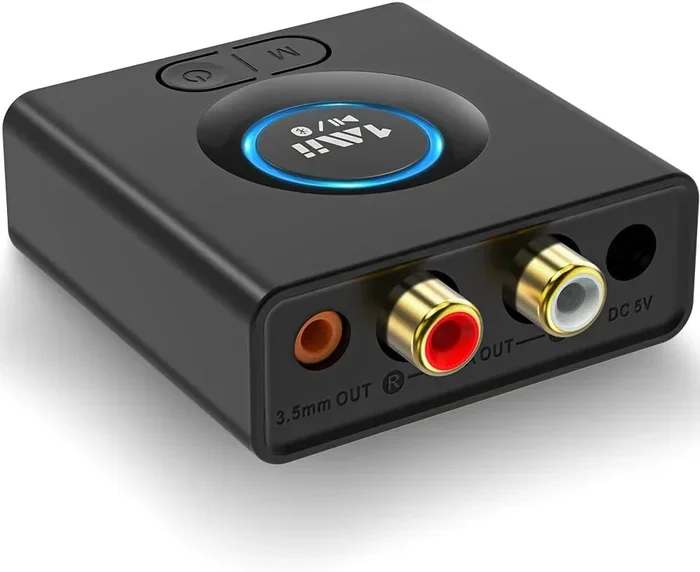
Brands like Mpow, TaoTronics, and 1Mii make reliable options. Prices range from $15 to $40. The cheaper models work fine for casual listening. Higher-end adapters offer better range and codec support. The 1Mii B06 adapter is a popular choice because it supports Bluetooth 5.0 and multiple codecs.
Method 2: Use a Bluetooth Transmitter
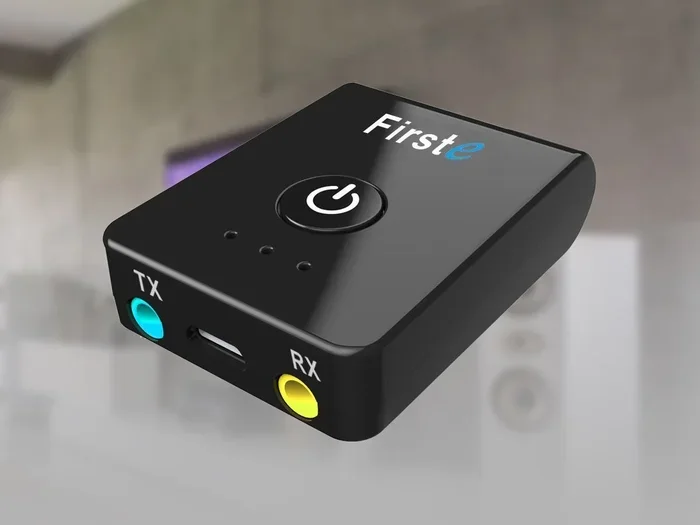
A Bluetooth transmitter is slightly different from an adapter. While a 3.5mm Bluetooth adapter receives signals, a transmitter sends them. You use a transmitter when your receiver has an audio output but no input for wireless signals. This method works great for home setups.
When to Choose a Transmitter
If your receiver has RCA outputs or optical outputs, a Bluetooth transmitter connects to those. It sends the audio wirelessly to a Bluetooth speaker or soundbar. This is a two-way street. You can also use a transmitter with a Bluetooth receiver to create a complete wireless chain.
Setup Steps for a Bluetooth Transmitter
- Connect the transmitter to the audio output on your receiver. Use RCA cables or a 3.5mm cable depending on the output type.
- Plug in the transmitter and turn it on.
- Put the transmitter in pairing mode.
- Pair it with a Bluetooth speaker, soundbar, or another Bluetooth-enabled device.
- Play audio from your source. The sound streams wirelessly to the receiving device.
Transmitter vs Adapter
People often confuse these two devices. A Bluetooth adapter adds Bluetooth input to a non-Bluetooth receiver. A transmitter adds Bluetooth output from a device. The direction of the signal flow is the key difference. Choose an adapter if you want to stream to your receiver. Choose a transmitter if you want to send audio from your receiver to wireless speakers.
Latency and Sound Quality
One concern with transmitters is latency. That is the slight delay between the audio source and the sound you hear. Most modern transmitters have low latency. Look for ones that advertise aptX Low Latency. This is especially important for watching videos. You do not want the audio to be out of sync with the picture.
Method 3: FM Bluetooth Transmitter for Car Stereos
If your car radio does not have Bluetooth, an FM Bluetooth transmitter is a lifesaver. This small device plugs into your car’s cigarette lighter or USB port. It broadcasts your phone’s audio over an FM frequency. Your car radio picks up the signal and plays it through the speakers.
How FM Bluetooth Transmitters Work
The transmitter connects to your phone via Bluetooth. It then converts the audio into an FM radio signal. You tune your car radio to an empty frequency. The transmitter broadcasts on that same frequency. Your car stereo receives it and plays the music. It is like having a tiny radio station inside your car.
Choosing the Right FM Transmitter
- Frequency range: Pick a transmitter that lets you choose any frequency. This helps you find a clear channel with no static.
- Charging port: Many FM transmitters also charge your phone. This is a handy bonus feature.
- USB input: Some models have a USB port for charging multiple devices.
- Display screen: A screen makes it easy to see the frequency and battery status.
- Sound quality: FM transmission can sometimes introduce static. Choose a model with good reviews for clean audio.
Setting Up Your FM Transmitter
- Plug the FM transmitter into your car’s 12V power outlet.
- Tune your car radio to an empty FM frequency, like 88.1 or 107.9.
- Set the transmitter to the same frequency.
- Pair your phone with the transmitter via Bluetooth.
- Play music from your phone. It should come through your car speakers clearly.
Pros and Cons of FM Transmitters
FM transmitters are affordable and easy to use. They work with almost any car stereo. However, sound quality is not as good as a direct AUX connection. FM signals can also pick up interference from other radio stations. In crowded cities with many radio stations, finding a clear frequency can be tricky. Still, for most drivers, the convenience outweighs these minor drawbacks.
Method 4: Install an Aftermarket Bluetooth Receiver
This method works best for home audio setups and car systems. An aftermarket Bluetooth receiver connects directly to your receiver’s input. It gives you a permanent Bluetooth connection without relying on a dongle or temporary adapter.
Types of Aftermarket Receivers
There are two main types. The first is a dedicated Bluetooth receiver module. These are small circuit boards that you wire into your system. The second is a standalone Bluetooth receiver unit with its own casing and inputs. This type looks more like a traditional audio component.
Wiring a Bluetooth Receiver into a Car Stereo
For car installations, you can connect a Bluetooth receiver to the AUX input. Some receivers connect behind the faceplate of the stereo. Others wire directly into the factory harness. If you are comfortable with basic wiring, this is a DIY-friendly project. If not, a car audio shop can install it for you in under an hour.
Wiring a Bluetooth Receiver into a Home Stereo
For home systems, connect the Bluetooth receiver to an available input on your receiver. Use RCA cables or a 3.5mm-to-RCA cable. Label the input on your receiver so you know which one is for Bluetooth. This way, you can easily switch between sources.
Benefits of an Aftermarket Receiver
- Permanent connection: No dongle to lose or remove.
- Better sound quality: Dedicated receivers often have superior Bluetooth codec support.
- Cleaner setup: Less clutter on your dashboard or stereo rack.
- Hands-free calling: Many receivers include a microphone for phone calls.
Method 5: Use a Bluetooth Streaming Adapter with Optical or Coaxial Input
Some higher-end receivers have optical or coaxial digital inputs. These inputs carry digital audio signals. A standard 3.5mm Bluetooth adapter cannot connect to them directly. You need a Bluetooth adapter that supports optical or coaxial output.
How Digital Bluetooth Adapters Work
These adapters connect to your receiver’s optical or coaxial port. They receive the Bluetooth signal from your phone. Then they convert it into a digital audio signal. Your receiver decodes the digital signal and outputs high-quality audio. This method preserves the best possible sound quality.
When to Use This Method
Choose a digital Bluetooth adapter if your receiver has optical or coaxial inputs and you care about sound quality. Audiophiles and music lovers will appreciate the clarity and depth this method provides. It is also ideal for home theater systems where surround sound matters.
Popular Digital Bluetooth Adapters
The TaoTronics Bluetooth 5.0 transmitter with optical output is a well-reviewed option. The 1Mii B07 also supports optical out and Bluetooth 5.0 with aptX HD. These adapters typically cost between $30 and $60. They offer a significant upgrade over basic 3.5mm models.
Comparing the Different Methods
Each method has its strengths. The right choice depends on your setup, budget, and needs. Here is a quick comparison to help you decide.
| Method | Best For | Cost Range | Sound Quality | Ease of Setup |
|---|---|---|---|---|
| 3.5mm Bluetooth Adapter | Home stereos with AUX input | $15 – $40 | Good | Very Easy |
| Bluetooth Transmitter | Sending audio to wireless speakers | $20 – $50 | Good to Great | Easy |
| FM Bluetooth Transmitter | Car stereos without AUX | $15 – $40 | Fair to Good | Very Easy |
| Aftermarket Bluetooth Receiver | Permanent car or home setups | $30 – $80 | Great | Moderate |
| Digital Bluetooth Adapter (Optical/Coaxial) | High-end receivers with digital inputs | $30 – $60 | Excellent | Easy |
The 3.5mm Bluetooth adapter is the best starting point for most people. It is cheap, simple, and effective. If you need something more permanent, an aftermarket receiver is worth the investment. For car owners without AUX, an FM transmitter remains a go-to solution.
Quick Tips for the Best Bluetooth Experience
No matter which method you choose, a few tips will improve your experience. Follow these guidelines for the smoothest wireless streaming.
Keep Your Devices Close
Bluetooth works best within 30 feet. Walls and obstacles can weaken the signal. Keep your phone near the adapter or transmitter for a stable connection.
Update Firmware When Possible
Some Bluetooth adapters and receivers receive firmware updates. These updates can improve range, stability, and codec support. Check the manufacturer’s website or app for updates.
Use High-Quality Cables
The cable between your adapter and receiver matters. A cheap cable can introduce noise or weaken the signal. Invest in a well-shielded cable for clean audio.
Manage Pairing Memory
Many Bluetooth devices remember multiple paired devices. If you switch between phones frequently, this is helpful. But too many paired devices can sometimes cause connection issues. Clear old pairings if you notice problems.
Charge Your Adapter Regularly
Most Bluetooth adapters run on rechargeable batteries. A dead battery means no wireless audio. Get in the habit of charging your adapter overnight. This ensures it is always ready to go.
Common Mistakes to Avoid
Adding Bluetooth to a non-Bluetooth receiver is simple. But people do make mistakes that cause frustration. Here are the most common ones to watch out for.
Buying the Wrong Type of Device
Do not confuse a transmitter with an adapter. They do different things. An adapter adds Bluetooth input to your receiver. A transmitter sends audio out wirelessly. Make sure you buy the right one for your goal.
Ignoring Codec Compatibility
Not all Bluetooth codecs are the same. Some adapters only support SBC, which is the basic codec. If you want better sound, look for aptX or AAC support. The difference in audio quality is noticeable.
Skipping the Pairing Process
Some people plug in the adapter and expect it to work automatically. Bluetooth devices must be paired first. Go through the pairing process each time you set up a new adapter.
Placing the Adapter in a Bad Spot
Do not hide your adapter behind furniture or inside a closed cabinet. Bluetooth signals need a clear path. Place the adapter in an open area for the strongest connection.
Overlooking Power Requirements
Some adapters need external power. Others draw power from the audio cable. Check the power requirements before you buy. An adapter that needs power but has no USB port will not work for you.
Expert Insights on Adding Bluetooth to Older Audio Gear
Audio engineers and car stereo installers have seen every type of setup. Their advice can save you time and money.
“The 3.5mm Bluetooth adapter is the unsung hero of retro audio setups,” says Mark Daniels, a car audio specialist with 15 years of experience. “It costs less than a dinner and solves the problem instantly. Most customers are surprised how easy it is.”
Another expert, audio technician Sarah Lin, recommends checking your receiver’s input options first. “Know what you are working with before you buy anything,” she advises. “If you have an AUX port, a 3.5mm adapter is your best bet. If you have optical out, go with a digital Bluetooth adapter. Match the solution to the input and you will be fine.”
For car owners, installer Jake Torres suggests the FM transmitter as a temporary fix. “It is not perfect, but it gets the job done,” he says. “If you want a permanent solution, I recommend installing a dedicated Bluetooth receiver behind the stereo. It is cleaner and the sound quality is much better.”
Frequently Asked Questions
Can you add Bluetooth to any non-Bluetooth receiver?
In most cases, yes. As long as your receiver has an available input, you can add Bluetooth. This includes AUX inputs, RCA inputs, optical inputs, or even FM radio inputs. The method you choose depends on the type of input your receiver has. Even receivers with only speaker wire outputs can work with a Bluetooth receiver wired in parallel.
Does adding Bluetooth reduce sound quality?
It can, but the difference is often small. Basic Bluetooth uses the SBC codec, which compresses audio. This compression can reduce detail and depth. However, modern adapters that support aptX or AAC codecs preserve much more of the original quality. For most listeners, the difference is barely noticeable. Audiophiles may notice a slight loss compared to a wired connection.
How much does it cost to add Bluetooth?
The cost is very affordable. A basic 3.5mm Bluetooth adapter costs between $15 and $30. FM Bluetooth transmitters are similarly priced. More advanced options like digital Bluetooth adapters or aftermarket receivers range from $30 to $80. Compared to buying a new Bluetooth-enabled receiver, these options save you a lot of money.
Is it hard to set up a Bluetooth adapter?
Not at all. Most Bluetooth adapters plug in and pair in under two minutes. You do not need any technical skills or special tools. The process usually involves plugging the adapter in, turning on Bluetooth on your phone, and selecting the adapter from the list of available devices. If you can connect a pair of wireless headphones, you can set up a Bluetooth adapter.
Can I use Bluetooth with a receiver that only has speaker wires?
Yes, but it requires a slightly different approach. You can connect a Bluetooth receiver to the speaker terminals using an adapter. Some Bluetooth receivers have speaker wire outputs that connect directly to your speakers. This bypasses the receiver entirely for the Bluetooth input. Another option is to use a line-level output from the receiver and feed it into a Bluetooth adapter.
What is the range of a Bluetooth connection?
Most Bluetooth devices work within 30 feet. Bluetooth 5.0 extends this range to about 80 feet in open spaces. Walls, furniture, and other obstacles reduce the range. For best results, keep your phone within the same room as your receiver. If you need more range, Bluetooth extenders and repeaters are available.
Final Thoughts
Adding Bluetooth to a non-Bluetooth receiver is one of the best upgrades you can make. It breathes new life into old gear. It gives you the freedom to stream music wirelessly. And it does not require a big budget or technical skills. Whether you choose a simple 3.5mm adapter, an FM transmitter, or a permanent aftermarket receiver, the results are worth it.
Start by looking at the inputs on your receiver. Match the right Bluetooth solution to those inputs. Follow the setup steps carefully. And enjoy your music without wires. The Can You Add Bluetooth To A Non Bluetooth Receiver question has a clear and satisfying answer. Yes, you absolutely can. And now you know exactly how to do it.
Try one of these methods today. You will wonder why you did not do it sooner. Your old receiver is about to become a wireless streaming powerhouse. The music in your life is about to get a whole lot better.