Can You Connect Your Phone To A Bluetooth Turntable
Yes, you can connect your phone to a Bluetooth turntable and enjoy wireless music streaming from your smartphone. This guide covers pairing steps, sound quality, best models, and common troubleshooting tips. Whether you are a vinyl lover or a tech beginner, you will find everything you need here.
There is something magical about dropping a needle on a spinning record. The warm, rich sound of vinyl records fills the room in a way that digital music just cannot match. But here is the thing — you do not have to choose between classic analog music and modern convenience. A Bluetooth turntable lets you enjoy the best of both worlds.
So, can you connect your phone to a Bluetooth turntable? The short answer is yes. And the process is easier than you might think. In this guide, we will walk you through everything you need to know. From pairing your devices to improving sound quality, we have got you covered. Let us dive in and explore how wireless audio streaming can transform your listening experience.
Key Takeaways
- Easy Pairing: Connecting your phone to a Bluetooth turntable is simple and takes just a few minutes.
- Wireless Freedom: You can stream music, podcasts, and more without cables or extra equipment.
- Sound Quality Matters: Bluetooth audio has improved a lot, but wired connections still offer the best fidelity.
- Compatibility Is Key: Not all turntables have Bluetooth built in, so check before you buy.
- Quick Tips Help: Keeping devices close and updating firmware can solve most connection issues.
- Multiple Uses: You can use your phone to play music, record vinyl, and control playback on a Bluetooth turntable.
📑 Table of Contents
- What Is a Bluetooth Turntable?
- How to Connect Your Phone to a Bluetooth Turntable
- Sound Quality: Bluetooth vs. Wired Connection
- Best Bluetooth Turntables for Phone Connection
- Tips for the Best Listening Experience
- Common Mistakes to Avoid
- Can You Record Vinyl to Your Phone via Bluetooth?
- Frequently Asked Questions
- Final Thoughts
What Is a Bluetooth Turntable?
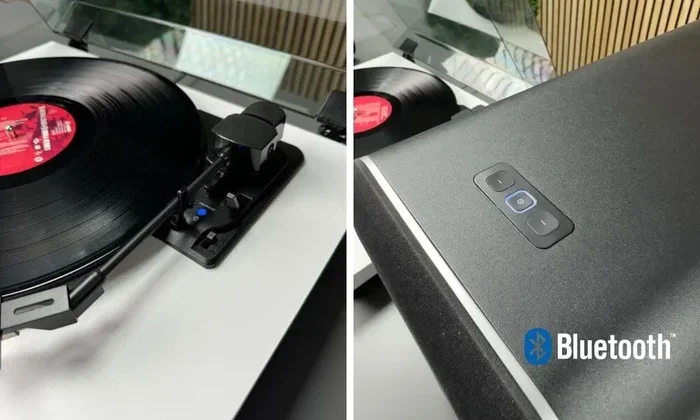
A Bluetooth turntable is a record player that includes built-in wireless technology. This allows it to connect to your phone, tablet, or laptop without any cables. You can stream music from Spotify, Apple Music, or any app on your device while still enjoying the charm of spinning vinyl.
These turntables come in many shapes and sizes. Some are portable record players you can take to picnics. Others are full-size home stereo systems with premium sound. The common thread is the Bluetooth connectivity that makes them versatile and modern.
How Bluetooth Turntables Work
Inside a Bluetooth turntable, there is a small wireless chip. This chip sends audio signals from the turntable to your paired device. The process is called wireless connection, and it uses radio waves to transmit data. Most modern turntables use Bluetooth version 5.0 or higher, which offers a stronger and more stable wireless audio streaming experience.
The turntable can work in two ways. It can send audio to your phone, or it can receive audio from your phone. Some models do both. This flexibility is one of the biggest reasons people love Bluetooth turntables today.
Built-In Speaker vs. External Speaker Systems
Many Bluetooth turntables come with a built-in speaker. This means you can play music right out of the turntable without any extra equipment. These are great for casual listening or small rooms.
If you want better sound, you can connect the turntable to external speakers. Some models offer RCA outputs, aux ports, or even USB connections for digital conversion. This gives you the freedom to upgrade your setup as your listening habits grow.
How to Connect Your Phone to a Bluetooth Turntable
Connecting your phone to a Bluetooth turntable is a straightforward process. Most brands follow a similar routine. Here is a step-by-step guide that works for the majority of models on the market today.
Step-by-Step Pairing Guide
Follow these simple steps to get your devices paired and ready to go:
- Turn on your Bluetooth turntable and make sure it has power.
- Activate Bluetooth mode on the turntable. Look for a Bluetooth button or switch on the side or back.
- Open Bluetooth settings on your phone. You can usually find this in Settings > Bluetooth.
- Wait for your turntable to appear in the list of available devices. It may show a model name or brand name.
- Tap on the turntable name to initiate pairing. You may hear a confirmation sound or see a light flash.
- Wait a few seconds for the connection to establish. Once paired, you should see “Connected” on your phone screen.
- Start playing music on your phone. The audio will stream through the turntable’s speaker or connected speakers.
That is it! The entire process usually takes less than two minutes. Once paired, your devices will often remember each other and reconnect automatically the next time you turn them on.
Troubleshooting Common Pairing Issues
Sometimes, the Bluetooth connection does not work right away. Do not worry — this is normal. Here are a few quick fixes:
- Turn Bluetooth off and back on on both devices.
- Move closer to the turntable. Bluetooth range is typically around 30 feet.
- Restart both devices and try again.
- Check if the turntable is already connected to another device. Disconnect it first.
- Update the firmware on your turntable if a companion app is available.
Quick Tips for Smooth Pairing
- Keep your phone and turntable in the same room during initial pairing.
- Turn off other nearby Bluetooth devices to reduce interference.
- Make sure your phone battery is charged. Low battery can affect Bluetooth performance.
- If the turntable has a dedicated app, use it for the easiest setup experience.
Sound Quality: Bluetooth vs. Wired Connection
One question people always ask about Bluetooth turntables is whether the sound quality is as good as a wired connection. The honest answer is that it has come a long way, but there are still some differences worth understanding.
Understanding Bluetooth Audio Codecs
When your phone sends music to a Bluetooth turntable, it uses a specific audio codec. The most common ones are SBC, AAC, aptX, and LDAC. Higher-quality codecs like aptX and LDAC deliver better audio fidelity and a more detailed sound.
Most budget Bluetooth turntables use the basic SBC codec. This is perfectly fine for casual listening. If you are an audiophile who cares deeply about sound quality, look for a model that supports aptX HD or LDAC. These codecs bring you much closer to the quality of a wired connection.
When Wired Is Better
There is no shame in admitting that a wired connection still offers the best possible audio quality. RCA cables or a USB connection deliver uncompressed audio signals. This means every detail of your vinyl records comes through exactly as it was recorded.
However, for everyday listening, a good Bluetooth turntable with aptX support sounds fantastic. The difference is subtle and most people will not notice it during normal use. The convenience of wireless audio streaming often outweighs the tiny loss in quality.
Comparing Bluetooth and Wired Sound Quality
| Feature | Bluetooth Connection | Wired Connection |
|---|---|---|
| Audio Quality | Good to Excellent (with aptX/LDAC) | Lossless, Best Quality |
| Convenience | Very High — No Cables Needed | Lower — Requires Cables |
| Range | Up to 30 Feet | Limited by Cable Length |
| Setup Time | Quick Pairing Process | Plug and Play |
| Interference Risk | Low to Moderate | None |
| Best For | Casual Listening, Portability | Audiophiles, Critical Listening |
Best Bluetooth Turntables for Phone Connection
If you are shopping for a Bluetooth turntable, you have plenty of great options. Here are some popular models that make smartphone pairing easy and reliable.
Portable Bluetooth Turntables
Portable record players are perfect for people who want music playback on the go. These lightweight turntables fit in a backpack and play your favorite vinyl records anywhere. Many come with built-in rechargeable batteries that last for hours.
Some portable models also let you connect external speakers via Bluetooth or a 3.5mm audio jack. This gives you the flexibility to fill a room with sound or keep things quiet with headphones.
Home Stereo Bluetooth Turntables
For serious vinyl enthusiasts, a home stereo Bluetooth turntable offers premium sound and build quality. These models often include features like adjustable tonearms, replaceable cartridges, and multiple audio outputs.
Many home stereo turntables also support digital conversion. This means you can record your vinyl records directly to your phone or computer. It is a great way to preserve your music collection in a digital format.
Budget-Friendly Options
You do not need to spend a fortune to enjoy Bluetooth turntable technology. Several affordable models offer solid sound quality and reliable wireless connectivity. These are perfect for beginners who want to explore the world of analog music without a big investment.
When shopping on a budget, look for models with at least Bluetooth 4.0 or higher. This ensures a stable connection and decent audio quality. Reading customer reviews can also help you find the best value for your money.
Tips for the Best Listening Experience
To get the most out of your Bluetooth turntable and phone connection, keep these practical tips in mind.
Keep Your Devices Close
Bluetooth range is typically around 30 feet, but walls and obstacles can reduce this distance. For the best wireless connection, keep your phone within a few feet of the turntable. This also helps maintain a strong and uninterrupted audio signal.
Use a High-Quality Streaming App
The app you use for music streaming matters. Apps like Spotify, Tidal, and Apple Music offer high-quality audio streams that sound great through a Bluetooth turntable. Free apps with lower bitrates may not deliver the best experience.
Clean Your Records Regularly
Even the best Bluetooth turntable cannot fix a dirty record. Dust and debris cause crackling and popping sounds that ruin your listening experience. Use a carbon fiber brush or a record cleaning kit to keep your vinyl in top shape.
Update Your Firmware and Apps
Manufacturers often release firmware updates that improve Bluetooth connectivity and fix bugs. Check the companion app or the brand’s website for updates. Keeping your devices current ensures the smoothest wireless audio streaming experience.
Expert Insight
Audio engineers recommend using the aptX codec whenever possible for the best Bluetooth sound quality. If your phone and turntable both support aptX, make sure it is enabled in the settings. This single tip can dramatically improve your audio fidelity over a wireless connection.
Common Mistakes to Avoid
Even with the best Bluetooth turntable, mistakes can happen. Here are some common errors to watch out for.
Forgetting to Turn on Bluetooth
This sounds obvious, but it happens more often than you think. Make sure Bluetooth is enabled on both your phone and your turntable before trying to pair them. A simple oversight can cause a lot of frustration.
Ignoring Interference
Other wireless devices can interfere with your Bluetooth connection. Wi-Fi routers, microwaves, and even other Bluetooth devices can cause dropouts or poor audio quality. If you experience issues, try moving away from other electronics.
Using Old or Low-Quality Audio Files
Your music playback quality depends on the files you stream. Low-bitrate MP3s will sound worse than high-quality AAC or FLAC files. When possible, choose higher-quality streaming settings in your app for the best results through your Bluetooth turntable.
Not Reading the Manual
Every Bluetooth turntable is slightly different. The user manual contains specific pairing instructions and troubleshooting tips for your model. Taking five minutes to read it can save you a lot of time and headaches.
Can You Record Vinyl to Your Phone via Bluetooth?
Yes, in many cases you can. Some Bluetooth turntables allow you to record the audio from your vinyl records directly to your phone. This is a great way to digitize your music collection and enjoy it on the go.
The process usually involves connecting the turntable to a recording app on your phone. Some brands offer their own companion apps that make this process seamless. The audio quality will depend on the Bluetooth codec and the recording app you use.
For the highest quality recordings, consider using a wired connection instead. An RCA-to-USB cable or an audio interface can capture every detail of your analog music without any loss from wireless compression. But for casual recording and sharing, Bluetooth works just fine.
Frequently Asked Questions
Can any phone connect to a Bluetooth turntable?
Most modern smartphones can connect to a Bluetooth turntable without any issues. Both Android and iPhone devices support Bluetooth connectivity. As long as your phone has Bluetooth capability, you should be able to pair it with the turntable. Older phones may not support newer Bluetooth versions, but basic pairing usually still works.
Does connecting via Bluetooth affect the sound quality of vinyl records?
Bluetooth wireless audio streaming does involve some compression, which can slightly affect audio fidelity. However, modern codecs like aptX and LDAC minimize this loss. For most listeners, the difference is barely noticeable. If you are a serious audiophile, a wired connection will always deliver the purest sound.
How far can my phone be from the Bluetooth turntable?
The typical Bluetooth range is about 30 feet or 10 meters. Walls, furniture, and other obstacles can reduce this distance. For the best wireless connection, keep your phone in the same room as the turntable. Some turntables with Bluetooth 5.0 offer an extended range of up to 40 feet.
Can I connect multiple phones to one Bluetooth turntable?
Many Bluetooth turntables can remember multiple paired devices. This means you and your friends can take turns connecting your phones. However, only one device can stream audio at a time. To switch devices, simply disconnect one phone and connect the other through the turntable’s Bluetooth settings.
Is a Bluetooth turntable worth the extra cost?
If you value convenience and wireless music streaming, a Bluetooth turntable is definitely worth it. The ability to play digital music alongside your vinyl collection adds tremendous versatility. Prices have come down in recent years, making quality Bluetooth turntables accessible at many budget levels.
Can I use a Bluetooth turntable without a built-in speaker?
Absolutely. Many Bluetooth turntables work perfectly with external speakers or headphones. You can connect speakers via Bluetooth, RCA cables, or a 3.5mm aux port. This flexibility lets you customize your setup based on your room size and listening preferences.
Final Thoughts
Connecting your phone to a Bluetooth turntable opens up a world of possibilities. You get the warm, authentic sound of vinyl records combined with the convenience of modern wireless audio streaming. Whether you are relaxing at home or hosting a gathering, the experience is unmatched.
The process is simple, the technology is reliable, and the options are plentiful. From budget-friendly portable models to premium home stereo systems, there is a Bluetooth turntable for everyone. Take the time to find the right one for your needs, follow the pairing steps, and enjoy the best of both analog and digital music.
So go ahead — connect your phone, drop the needle, and let the music play. Your Bluetooth turntable is ready to deliver an incredible listening experience whenever you are.