Advantages and Disadvantages of Cat 5 Ethernet Cables
Cat 5 Ethernet cables were once the go-to choice for home and office networks, but they now face stiff competition from newer standards. This guide breaks down every advantage and disadvantage of Cat 5 cables so you can make a smart buying decision. Whether you are upgrading old wiring or setting up a new network, understanding the pros and cons of Cat 5 cables helps you save money and avoid frustration.
Cat 5 Ethernet cables have been around for decades. They once ruled the world of home networking and office connections. Even today, you can find them in many closets, basements, and old wiring setups. But times have changed. Faster internet speeds and more demanding devices mean that older cable standards often fall short. In this article, we will walk through every advantage and disadvantage of Cat 5 cables. By the end, you will know exactly whether a Cat 5 cable is right for your situation.
We will cover everything from cost and speed to real-world use cases. You will also learn how Cat 5 compares to newer cable types. This guide is practical and straightforward. No fluff, no jargon, just the facts you need. Let us dive in.
Key Takeaways
- Cat 5 cables offer low cost and wide availability, making them a budget-friendly option for basic networking tasks.
- Speed is limited to 100 Mbps on Cat 5, which is not enough for modern gigabit or faster internet plans.
- Cat 5 cables support distances up to 100 meters, which is sufficient for most home and small office setups.
- Newer cable categories like Cat 5e and Cat 6 outperform Cat 5 significantly in speed, bandwidth, and interference resistance.
- Cat 5 cables still work for phone lines, basic internet, and legacy devices, so they are not completely obsolete.
- Signal interference and crosstalk are real drawbacks of Cat 5 cables, especially in environments with heavy electronic equipment.
📑 Table of Contents
- What Is a Cat 5 Ethernet Cable?
- Advantages of Cat 5 Ethernet Cables
- Disadvantages of Cat 5 Ethernet Cables
- Cat 5 vs Cat 5e vs Cat 6: How Do They Compare?
- Common Uses for Cat 5 Cables Today
- How to Choose the Right Ethernet Cable for Your Needs
- Expert Insights: Are Cat 5 Cables Worth It in 2024 and Beyond?
- Final Thoughts
What Is a Cat 5 Ethernet Cable?
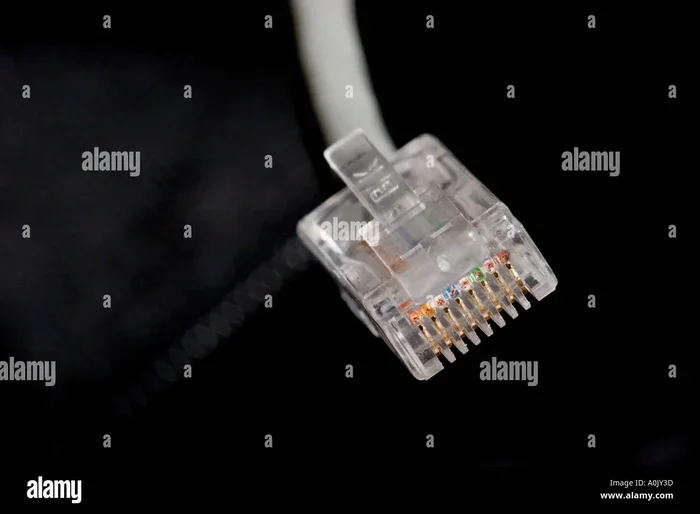
A Cat 5 cable is a type of network cable used to connect devices in a local area network, or LAN. It uses twisted pair wiring, which means pairs of copper wires are twisted together to reduce interference. The cable ends in an RJ45 connector, the small plastic plug you plug into your computer, router, or modem.
Cat 5 stands for Category 5. It was standardized in the mid-1990s and quickly became the most common Ethernet cable type. It supports frequencies up to 100 MHz and can handle speeds of up to 100 Mbps. For many years, that was more than enough for most internet activities. However, modern internet plans and streaming services demand much more. This is where the limitations of Cat 5 start to show.
Inside a Cat 5 cable, you will find four twisted pairs of copper wire. The cable is typically unshielded, which means it has no extra layer of protection against electromagnetic interference. This design keeps the cable thin, flexible, and affordable. But it also makes it more vulnerable to signal problems in noisy environments.
Advantages of Cat 5 Ethernet Cables
1. Very Affordable
The biggest advantage of Cat 5 cables is their price. They are among the cheapest Ethernet cables available. You can buy a Cat 5 cable for just a few dollars, even in longer lengths. This makes them perfect for people on a tight budget. If you need to run a few extra connections around the house, Cat 5 is an easy and inexpensive choice.
2. Widely Available
Because Cat 5 cables have been around for so long, they are everywhere. You can find them at any electronics store, online marketplace, or hardware shop. This wide availability means you will never have trouble finding a replacement or an extra cable. Almost every retailer that sells networking gear carries Cat 5 cables in stock.
3. Sufficient for Basic Internet Use
If your internet plan runs at 50 Mbps or below, a Cat 5 cable can handle it just fine. For basic browsing, email, and light streaming, Cat 5 performs well. Many older devices and routers still use Fast Ethernet, which operates at 100 Mbps. In these cases, a Cat 5 cable works perfectly without any issues.
4. Easy to Install and Use
Cat 5 cables are simple to set up. The RJ45 connector clicks right into place on most devices. You do not need any special tools or technical knowledge. Even if you are not tech-savvy, you can plug in a Cat 5 cable and get online in seconds. The cables are also lightweight and flexible, which makes routing them through tight spaces much easier.
5. Good for Legacy Devices
Many older devices only support 100 Mbps Ethernet. If you have an older desktop computer, a legacy printer, or an older gaming console, Cat 5 is the right match. Using a newer cable type will not give you any extra benefit on these devices. Cat 5 provides exactly what these older devices need.
6. Supports Longer Distances
Cat 5 cables can transmit data reliably up to 100 meters, or about 328 feet. This is plenty for most home networks and small offices. You can run a cable from your router to a room across the house without worrying about signal loss. This makes Cat 5 a practical choice for larger homes where the router is far from the workspace.
Disadvantages of Cat 5 Ethernet Cables
1. Limited Speed
The most significant disadvantage of Cat 5 cables is their speed cap. Cat 5 cables max out at 100 Mbps. If you have a modern internet plan that delivers 300 Mbps, 500 Mbps, or even 1 Gbps, a Cat 5 cable will bottleneck your connection. Your internet will never reach its full potential. This is a serious problem for anyone who pays for fast internet but uses an outdated cable.
2. Low Bandwidth
Bandwidth refers to how much data a cable can carry at one time. Cat 5 cables offer only 100 MHz of bandwidth. This is quite low compared to modern standards. Low bandwidth means slower data transfer rates, especially when multiple devices share the same network. If you have a smart home with many connected devices, Cat 5 will struggle to keep up.
3. Vulnerable to Interference
Cat 5 cables are unshielded, which makes them susceptible to electromagnetic interference, or EMI. Nearby power cables, microwaves, and other electronic devices can all disrupt the signal. This leads to slower speeds, dropped connections, and data errors. In environments with lots of electronic equipment, this interference can be a major headache.
4. Not Future-Proof
Technology moves fast. What works today may not work tomorrow. Cat 5 cables are not future-proof. As internet speeds continue to increase, Cat 5 will become even more outdated. Investing in Cat 5 now means you may need to replace your cables sooner rather than later. This can cost more in the long run, even if the upfront price is low.
5. No Support for Power over Ethernet
Many modern networking setups use Power over Ethernet, or PoE. PoE allows a single cable to carry both data and electrical power. Cat 5 cables do not reliably support PoE for higher-power devices. If you want to install security cameras, wireless access points, or VoIP phones, you will likely need a better cable type. This limits the versatility of Cat 5 in modern setups.
6. Higher Crosstalk
Crosstalk happens when signals from one wire bleed into another wire inside the same cable. Because Cat 5 cables have looser twisting and no shielding, they experience more crosstalk than newer cable types. This results in more signal degradation and lower overall performance. In longer cable runs, crosstalk becomes even more noticeable.
Cat 5 vs Cat 5e vs Cat 6: How Do They Compare?
When shopping for Ethernet cables, you will see several categories. Cat 5, Cat 5e, and Cat 6 are the most common. Each one offers different performance levels. Understanding the differences helps you choose the right cable for your needs.
| Feature | Cat 5 | Cat 5e | Cat 6 |
|---|---|---|---|
| Max Speed | 100 Mbps | 1 Gbps | 1 Gbps (up to 10 Gbps at short range) |
| Bandwidth | 100 MHz | 350 MHz | 550 MHz (250 MHz for Cat 5e) |
| Max Distance | 100 meters | 100 meters | 100 meters (55 meters for 10 Gbps) |
| Shielding | Unshielded | Unshielded (reduced crosstalk) | Shielded options available |
| Price | Lowest | Low to moderate | Moderate to high |
| Best For | Basic internet, legacy devices | Most home networks | High-performance setups |
Cat 5e is an enhanced version of Cat 5. It offers the same speed but much better performance against crosstalk. Cat 6 cables go even further, supporting higher bandwidth and faster speeds. For most people today, Cat 5e is the sweet spot between cost and performance. Cat 5 is really only worth choosing when budget is the top priority or when dealing with older devices.
Interestingly, many of the same physical components found inside networking hardware are shared across these cable types. For instance, the connectors and ports on networking equipment, much like the key components found on the motherboard, play a vital role in ensuring reliable data transfer regardless of the cable category used.
Common Uses for Cat 5 Cables Today
Despite their limitations, Cat 5 cables still have a place in modern setups. Here are some common scenarios where Cat 5 makes sense:
- Connecting older devices: Printers, scanners, and legacy computers that only support Fast Ethernet work perfectly with Cat 5 cables.
- Phone lines: Many telephone systems use the same wiring as Cat 5 cables. They work great for VoIP phone setups in offices.
- Basic home networks: If your internet plan is slow and your devices are old, Cat 5 can still get the job done without any issues.
- Temporary setups: For short-term events, trade shows, or temporary office arrangements, Cat 5 cables are a quick and cheap solution.
- Outdoor runs: Because Cat 5 cables are thin and flexible, they are easy to route through walls and conduits for outdoor networking.
The key is to be honest about your needs. If you are streaming 4K video, playing competitive online games, or running a home server, Cat 5 will hold you back. But for simple tasks, it still gets the job done.
How to Choose the Right Ethernet Cable for Your Needs
Choosing the right cable depends on several factors. Here is a quick guide to help you decide:
- Check your internet speed. If your plan is under 100 Mbps, Cat 5 is fine. If it is faster, look at Cat 5e or Cat 6.
- Consider your devices. Older devices may not support speeds beyond 100 Mbps. Newer devices will benefit from faster cables.
- Think about your budget. Cat 5 is the cheapest option. Cat 5e offers the best value for most users. Cat 6 costs more but delivers better performance.
- Evaluate your environment. If you have lots of electronic devices nearby, consider shielded cables to reduce interference.
- Plan for the future. If you want your network to last several years, invest in Cat 5e or Cat 6 now. You will avoid the hassle of rewiring later.
Quick Tips for Getting the Most Out of Your Cat 5 Cable
- Keep cable runs under 100 meters to maintain signal quality.
- Avoid running Cat 5 cables parallel to power cords to reduce interference.
- Use high-quality RJ45 connectors and crimp them properly for a secure connection.
- Label your cables at both ends so you can easily identify them later.
- Store extra cables coiled loosely to prevent internal wire damage.
Common Mistakes People Make with Cat 5 Cables
Many people make avoidable mistakes when using Cat 5 cables. Here are the most common ones:
- Using Cat 5 for gigabit internet: This simply does not work. You need at least Cat 5e for gigabit speeds.
- Ignoring cable quality: Cheap, poorly made cables can cause connection drops and slow speeds, even if the category is correct.
- Bending cables too sharply: Sharp bends can damage the internal wires and degrade performance over time.
- Assuming all Ethernet cables are the same: Different categories offer very different performance. Always check the label.
- Overlooking distance limits: Pushing a Cat 5 cable beyond 100 meters will result in signal loss and unreliable connections.
Expert Insights: Are Cat 5 Cables Worth It in 2024 and Beyond?
Industry experts generally agree that Cat 5 cables are no longer the best choice for new installations. Most professionals recommend Cat 5e as a minimum for any new setup. Cat 5e costs only slightly more than Cat 5 but delivers vastly better performance.
That said, Cat 5 cables are not useless. They still serve a purpose in specific situations. If you are dealing with old hardware, tight budgets, or simple networking needs, Cat 5 remains a viable option. The key is understanding what you need and matching it to the right cable type.
For anyone building a new network from scratch, skipping Cat 5 entirely and going straight to Cat 5e or Cat 6 is the smartest move. The small extra investment pays off in better speed, reliability, and future-proofing. As broadband speeds continue to climb and more devices connect to the internet, having a solid cable infrastructure matters more than ever.
Final Thoughts
The advantages and disadvantages of Cat 5 Ethernet cables come down to one simple tradeoff: cost versus performance. Cat 5 cables are cheap, easy to find, and simple to use. They work well for basic internet tasks and older devices. But they fall short when it comes to speed, bandwidth, interference resistance, and future-readiness.
If you are still using Cat 5 cables today, that is okay. They are not broken or useless. But if you are planning a new setup or experiencing slow speeds, it is worth considering an upgrade. Moving to Cat 5e or Cat 6 can transform your network experience. Faster downloads, smoother streaming, and more reliable connections are all within reach.
Take a look at your current setup. Check your internet speed. Think about what you want from your network in the next few years. Then choose the cable that fits. A small decision today can save you a lot of trouble tomorrow.
Frequently Asked Questions
Can I use a Cat 5 cable for gigabit internet?
No, Cat 5 cables cannot support gigabit internet speeds. They are limited to 100 Mbps. To get gigabit speeds, you need at least a Cat 5e cable or a Cat 6 cable. Using a Cat 5 cable with gigabit internet will cap your speeds at 100 Mbps.
How long do Cat 5 Ethernet cables last?
A Cat 5 cable can last anywhere from 5 to 15 years, depending on the quality and how well it is handled. Physical damage, frequent bending, and exposure to heat or moisture can shorten its lifespan. Storing cables properly helps them last longer.
Is Cat 5 the same as Cat 5e?
No, Cat 5 and Cat 5e are different. Cat 5e is an enhanced version of Cat 5. It supports the same speeds but has better protection against crosstalk and interference. Cat 5e is a significant improvement over standard Cat 5.
Can I use a Cat 5 cable for a phone line?
Yes, Cat 5 cables work well for phone lines and VoIP systems. They use the same RJ45 connectors and can carry voice signals just as easily as data signals. Many offices use Cat 5 cables for both phone and internet connections.
What is the maximum distance for a Cat 5 cable run?
The maximum recommended distance for a Cat 5 cable is 100 meters, or about 328 feet. Beyond this distance, signal quality drops and data errors increase. If you need to cover a longer distance, use a switch or repeater to boost the signal.
Should I buy Cat 5 or Cat 6 for my home network?
For most home networks today, Cat 6 is the better choice. It offers higher speeds, more bandwidth, and better resistance to interference. Cat 5 is only worth buying if you have a very tight budget or are connecting older devices that do not need faster speeds.
=== CONCLUSION ===
Cat 5 Ethernet cables have served us well for decades. They are affordable, widely available, and easy to use. But every technology has its limits, and Cat 5 is no exception. The advantages of Cat 5 cables make them a solid choice for basic, low-cost networking. The disadvantages, however, become more noticeable as internet speeds and device demands grow.
Understanding the advantages and disadvantages of Cat 5 cables empowers you to make the best decision for your home or office. Whether you stick with Cat 5 for now or upgrade to a newer standard, the most important thing is choosing a cable that matches your actual needs. A well-chosen cable keeps your network fast, reliable, and ready for whatever comes next.