Are 8k Hdmi Cables Backwards Compatible With Your TV
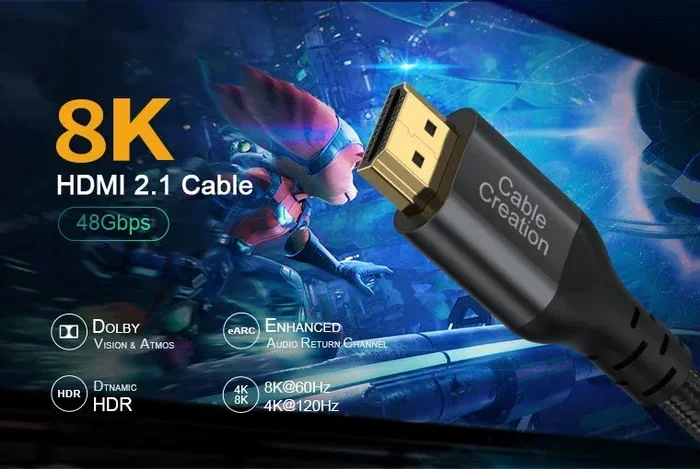
8K HDMI cables are fully backwards compatible with older devices like 4K TVs, 1080p monitors, and gaming consoles. The HDMI 2.1 standard supports ultra high resolution and high bandwidth, but it also works seamlessly with older equipment. You do not need to replace every cable just because you own an 8K TV. Understanding cable versions and device capabilities saves money and prevents confusion.
This is a comprehensive guide about Are 8k Hdmi Cables Backwards Compatible.
Key Takeaways
- Full Backwards Compatibility: 8K HDMI cables work perfectly with 4K, 1080p, and older devices without any issues.
- HDMI 2.1 Is the Key Standard: The latest HDMI version supports 8K at 60Hz and 4K at 120Hz with enhanced features.
- You Do Not Need to Upgrade Everything: Your existing cables may still work fine with newer devices depending on their bandwidth needs.
- Check Your Device Capabilities: A cable alone does not guarantee 8K performance. Both the source and display must support the resolution.
- Premium High Speed Cables Matter: Not all HDMI cables are equal. Look for certified cables that handle the required data transfer rates.
- Future Proofing Is Smart: Investing in 8K HDMI cables now prepares your setup for upcoming devices and content.
[FEATURED_IMAGE_PLACEHOLDER]
Are 8K HDMI Cables Backwards Compatible With Your TV?
Let us answer the big question right away. Yes, 8K HDMI cables are backwards compatible. They work with older devices like 4K TVs, 1080p monitors, and even older gaming consoles. You do not need to worry about buying a new cable every time a new TV hits the market.
The HDMI 2.1 standard was designed with compatibility in mind. It supports a wide range of resolutions and refresh rates. Whether you have a brand new 8K television or a trusty old 1080p monitor, the cable will adapt to what your device needs. This is one of the best things about modern cable design.
But here is the catch. Backwards compatible does not mean every cable is the same. The quality of the cable, its version, and its bandwidth capacity all matter. A cheap cable might not deliver the best performance even if it physically connects. So let us break this down in detail.
Understanding HDMI Versions and What They Mean
HDMI cables come in different versions. Each version brings new features and higher bandwidth. The version number tells you what the cable can handle. Let us look at the main versions you will encounter.
HDMI 1.4 and Earlier
Older HDMI versions like 1.4 support up to 4K at 30Hz. This was great for its time but feels slow today. These cables handle basic video signals but lack the speed for modern high refresh rate content. Most older devices still use these standards.
HDMI 2.0
HDMI 2.0 brought 4K at 60Hz to the table. This was a huge step forward. It became the standard for most 4K TVs and streaming devices. Many people still use HDMI 2.0 cables every day without any problems. They handle ultra HD content just fine for regular viewing.
HDMI 2.1
HDMI 2.1 is the current top tier. It supports 8K at 60Hz and 4K at 120Hz. It also features Enhanced Audio Return Channel and Variable Refresh Rate. This is the standard you want for the best gaming and cinematic experience. The HDMI 2.1 cable is fully backwards compatible with all older versions.
| HDMI Version | Max Resolution | Max Refresh Rate | Bandwidth |
|---|---|---|---|
| HDMI 1.4 | 4K | 30Hz | 10.2 Gbps |
| HDMI 2.0 | 4K | 60Hz | 18 Gbps |
| HDMI 2.1 | 8K | 60Hz | 48 Gbps |
As you can see, each new version adds more power. But the older versions still work perfectly with their supported devices. The backwards compatibility of HDMI cables ensures you are not left behind when upgrading.
How Backwards Compatibility Actually Works
Backwards compatibility means a newer cable works with older devices. An 8K HDMI cable can connect to a 4K TV, a 1080p monitor, or even an older gaming console. The cable automatically adjusts to the lowest common standard. It does this through a process called signal negotiation.
When you plug in a cable, the source device and the display communicate. They agree on the best resolution and refresh rate both can handle. If your TV only supports 4K, the cable will deliver 4K. If your monitor only supports 1080p, the cable will deliver 1080p. This happens instantly and without any input from you.
The same principle applies to the HDMI port on your devices. The port on your TV or monitor determines the maximum capability. A cable cannot force a device to do something it was not designed to do. So an 8K cable connected to a 1080p TV will output 1080p. Simple as that.
One thing to keep in mind is the cable length. Longer cables can sometimes lose signal quality. This is true for all HDMI versions. If you need a long run, consider a certified high speed cable with a built-in signal booster.
Do You Need 8K HDMI Cables for Your Current Setup?
This is where many people get confused. The answer depends on what devices you own and what you plan to do with them.
If You Have a 4K TV
You do not need an 8K cable right now. An HDMI 2.0 cable handles 4K at 60Hz perfectly well. However, if you plan to upgrade to an 8K TV in the near future, buying an 8K cable now is a smart move. It future proofs your setup without any downside.
If You Are a Gamer
Gamers benefit the most from HDMI 2.1 cables. The 4K at 120Hz support and Variable Refresh Rate make a huge difference. Current consoles like the PlayStation 5 and Xbox Series X support 4K at 120Hz. An 8K cable handles this easily. It also works with older consoles like the PS4 or Xbox One without any issues.
If You Work with Professional Displays
Some professionals use high resolution monitors for video editing or design work. The HDMI 2.1 standard supports deeper color depths and higher refresh rates. This makes it ideal for creative workflows. Even if your current monitor is not 8K, the cable will still perform well at lower resolutions.
For most home users, an 8K HDMI cable is like buying a bigger bucket. It holds more water than you need right now. But when the demand grows, you are ready. The backwards compatibility ensures it works with everything you own today.
Common Mistakes People Make With 8K HDMI Cables
There are several mistakes that people make when buying and using 8K HDMI cables. Avoiding these saves money and frustration.
Assuming All Cables Labeled 8K Are Equal
Not every cable marketed as 8K meets the same standard. Some are certified Ultra High Speed HDMI cables while others are not. Look for the official HDMI certification logo on the packaging. This ensures the cable has been tested for the full 48 Gbps bandwidth.
Thinking the Cable Alone Gives You 8K
The cable is only one part of the equation. Your source device must output 8K. Your display must support 8K. Both the transmitter and the receiver must be 8K capable. A great cable connected to a 4K source will only ever deliver 4K. This is a very common misunderstanding.
Ignoring Cable Length Requirements
Longer HDMI cables can suffer from signal loss. At 8K resolution, the data rate is very high. A 10 foot cable works great. A 50 foot cable might need a signal booster or an active cable. Always check the manufacturer recommendations for maximum length at the target resolution.
Buying the Most Expensive Cable
Price does not always equal quality. Many affordable cables perform just as well as premium ones. The key is to look for HDMI 2.1 certification rather than brand name or price tag. A well certified budget cable often outperforms an overpriced uncertified one.
Using the Wrong Port on Your TV
Many modern TVs have multiple HDMI ports. Not all of them support the latest HDMI 2.1 features. Check your TV manual to see which ports are HDMI 2.1 compatible. Plugging an 8K cable into an HDMI 2.0 port limits your performance. This is a simple but overlooked mistake.
Expert Insights on Choosing the Right 8K HDMI Cable
When shopping for an 8K HDMI cable, focus on these key factors. They make a real difference in your experience.
Certification matters most. Look for the Ultra High Speed HDMI cable label. This is the official HDMI 2.1 certification. It guarantees the cable supports 48 Gbps bandwidth. Without this certification, you are taking a gamble.
Build quality counts. A well constructed cable with good shielding reduces interference. Gold plated connectors last longer and provide better contact. Braided cables are more durable than standard rubber ones. These small details add up over time.
Consider your setup. If you run cables behind walls, use in-wall rated cables. If you connect a gaming console to a TV across the room, get a length that gives you slack without excess. The right cable for your specific setup beats a generic one every time.
Future proof when possible. If you are building a new entertainment setup, invest in 8K cables now. The prices have come down significantly. You will not need to replace them when you upgrade to 8K content. This is especially true if you are connecting devices like a high performance PC or next generation console.
How 8K HDMI Cables Compare to Older Versions
Let us put the comparison in perspective. The table below shows how 8K HDMI cables stack up against older versions.
| Feature | HDMI 1.4 | HDMI 2.0 | HDMI 2.1 |
|---|---|---|---|
| Max Resolution | 4K at 30Hz | 4K at 60Hz | 8K at 60Hz |
| Bandwidth | 10.2 Gbps | 18 Gbps | 48 Gbps |
| HDR Support | Basic | Full HDR | Dolby Vision HDR |
| VRR Support | No | No | Yes |
| eARC Support | No | Yes | Yes |
| Backwards Compatible | N/A | Yes | Yes |
The comparison makes it clear that HDMI 2.1 cables are the most versatile. They offer the best features and the widest compatibility. Even if you do not need 8K today, the benefits of HDMI 2.1 extend to all your current devices. The high dynamic range support alone makes a noticeable difference in picture quality.
Quick Tips for Getting the Most From Your 8K HDMI Cable
- Always check for certification. The Ultra High Speed label ensures full HDMI 2.1 performance.
- Keep cables as short as possible. Shorter cables maintain better signal integrity at high resolutions.
- Update your device firmware. Sometimes a firmware update unlocks better HDMI performance on your TV or console.
- Use the right HDMI port. Check your TV manual to identify which ports support HDMI 2.1 features.
- Do not daisy chain adapters. Use direct connections whenever possible to avoid signal loss.
- Store cables properly. Avoid sharp bends and tight coils to extend the lifespan of your cable.
The Role of HDMI in Modern Devices and Setup
HDMI cables play a vital role in connecting modern devices. From gaming consoles to streaming boxes, almost everything uses HDMI. The HDMI port on the motherboard of a computer or the back of a television serves as the primary digital connection for audio and video. Understanding how this connection works helps you make better choices.
In professional settings, high resolution displays are used in many fields. Medical imaging, for example, relies on detailed visual displays to interpret scans and data. The 10 ways computers are used in medicine often involve high resolution monitors that depend on quality digital connections like HDMI for clear image output. This shows how important the right cable is across different industries.
For home users, the connection between your source device and your TV is just as important. A premium 8K cable ensures that every frame looks its best. Whether you are watching a movie, playing a game, or working from home, the cable quietly handles the heavy lifting of delivering your content.
Final Thoughts
8K HDMI cables are backwards compatible, and that is great news. You can use them with your current 4K TV, older gaming console, or basic monitor. The cable will automatically adjust to match your device capabilities. This makes upgrading easier and more affordable.
You do not need to rush out and buy 8K cables if your current setup works fine. But if you are planning any upgrades or building a new setup, investing in an HDMI 2.1 certified cable is a smart decision. It prepares you for the future without sacrificing today’s performance.
The world of display technology moves fast. New resolutions and features come out every year. A good 8K HDMI cable keeps you ready for whatever comes next. It is one of the simplest and most cost effective upgrades you can make to your home entertainment or workstation setup.
So go ahead and make the switch if you need a new cable. Your 8K HDMI cable will work with everything you own today and everything you buy tomorrow. That is the real power of backwards compatibility.
Are 8K HDMI Cables Backwards Compatible With Older Gaming Consoles?
Yes, they are. An 8K HDMI cable works perfectly with older gaming consoles like the PS4, Xbox One, and Nintendo Switch. The cable negotiates the best resolution your console and TV can handle. You will get the best picture quality your console supports, which is typically 1080p or 4K depending on the model.
Can I Use an 8K HDMI Cable With a 4K TV?
Absolutely. An 8K HDMI cable is fully compatible with 4K TVs. It will deliver 4K resolution at the refresh rate your TV supports. You may even get access to features like HDR and higher refresh rates if your TV supports them through HDMI 2.1.
Does Cable Length Affect 8K Performance?
Yes, it can. Longer cables may experience signal loss at 8K resolution because of the high data rate. For runs over 10 feet, consider a certified high speed cable or one with a built-in signal booster. Shorter cables generally provide the most reliable 8K performance.
Do I Need an 8K Cable to Watch 8K Content?
You need an HDMI 2.1 certified cable to watch 8K content. Not all cables labeled 8K are certified. Look for the Ultra High Speed HDMI label to ensure the cable can handle the 48 Gbps bandwidth required for 8K at 60Hz.
Will an 8K HDMI Cable Improve My 1080p TV Picture Quality?
Not directly. The cable will deliver the best 1080p signal your TV supports. However, the build quality of the cable can affect signal clarity. A well shielded 8K cable may reduce interference compared to a very cheap low quality cable, but it will not upgrade your TV’s resolution.
Are All HDMI 2.1 Cables the Same?
Most HDMI 2.1 cables meet the same basic standard of 48 Gbps bandwidth. However, build quality, connector durability, and shielding can vary between brands. Look for certified cables from reputable manufacturers to ensure consistent performance and longevity.
Frequently Asked Questions
What is Are 8k Hdmi Cables Backwards Compatible?
Are 8k Hdmi Cables Backwards Compatible is an important topic with many practical applications.