Are All HDMI Connectors The Same Not Quite Here Is Why
Not all HDMI connectors are the same. There are several different types, sizes, and versions of HDMI connectors, and each one serves a specific purpose. Understanding the differences helps you pick the right cable for your TV, gaming setup, or home theater system.
Have you ever grabbed an HDMI cable from the junk drawer, plugged it into your TV, and wondered if it was even the right one? You are not alone. Are all HDMI connectors the same is one of the most searched questions in the tech world right now. The short answer is no. Not even close. But the good news is that once you understand the basics, picking the right connector becomes a breeze.
HDMI connectors come in different shapes, sizes, and versions. Each type serves a specific purpose. Some are built for big-screen TVs. Others are designed for tiny cameras and tablets. And then there are the different versions that determine speed, resolution, and features. In this guide, we will walk you through everything you need to know about HDMI connectors. By the end, you will never pick the wrong cable again.
Whether you are setting up a home theater, building a gaming PC, or just trying to connect a laptop to a monitor, this article has you covered. We will break down every HDMI connector type, explain the different HDMI versions, and give you practical tips for choosing the right one. Let us dive in.
Key Takeaways
- Multiple connector types exist: Standard, Mini, and Micro HDMI connectors all serve different devices and purposes.
- HDMI versions matter: HDMI 2.0 and HDMI 2.1 offer different bandwidth levels and support for 4K and 8K video.
- Cable quality affects performance: A high-speed HDMI cable with gold-plated connectors delivers better signal quality and durability.
- Matching the connector to your device is essential: Using the wrong type can lead to no signal, poor image quality, or compatibility issues.
- Common problems are usually easy to fix: Loose connections, outdated cables, and wrong port selections cause most HDMI issues.
📑 Table of Contents
What Are HDMI Connectors and Why Do They Matter
HDMI stands for High-Definition Multimedia Interface. It is the standard cable type used to transmit both audio and video from one device to another. A single HDMI cable replaces the mess of multiple cables. This is why the HDMI port has become so common on TVs, monitors, laptops, and game consoles.
The HDMI connector is the physical plug at the end of the cable. It plugs into the HDMI port on your device. Think of it like a USB plug. Not all USB plugs look the same, right? The same idea applies to HDMI. The connector type determines what devices it can plug into and what kind of signal it can carry.
The Basics of HDMI Technology
HDMI technology has been around since the early 2000s. Over the years, it has evolved to support higher resolutions, faster refresh rates, and more features. The original HDMI 1.0 cable could handle 1080p video. Today, the latest versions can handle 8K video and dynamic HDR content.
Here is a quick look at what an HDMI cable carries:
- Uncompressed video signals
- Compressed and uncompressed audio
- Ethernet data (on some cables)
- Audio return channel (ARC) signals
- 3D video signals
All of this travels through a single cable. That is the beauty of HDMI. But not every cable and connector is built the same. And that is exactly why this question matters so much.
Why HDMI Connectors Are Not All Created Equal
You might be thinking, “If they all do the same job, why does it matter?” Great question. The truth is that different devices need different connector shapes and sizes. A large Standard HDMI plug will not fit into a tiny Micro HDMI port on a drone. And a cable built for basic 1080p video will struggle with 4K resolution at 120Hz.
Using the wrong connector or cable can cause real problems. You might get no signal at all. Or you might see a blurry picture. Sometimes the audio and video will be out of sync. These issues are frustrating, but they are easy to avoid once you know what to look for.
It is also worth noting that HDMI connectors are not the only display connection option out there. DisplayPort is another popular choice, especially for PC monitors and gaming setups. But HDMI remains the most widely used connector for TVs, Blu-ray players, and streaming devices.
If you are curious about what components make up the devices that use these connectors, check out this guide on 5 Components That Are Found On The Motherboard to learn more about the internal hardware that supports HDMI ports.
The Different Types of HDMI Connectors
There are five main types of HDMI connectors. Each one has a specific shape and purpose. Let us break them down one by one so you can easily identify which one you need.
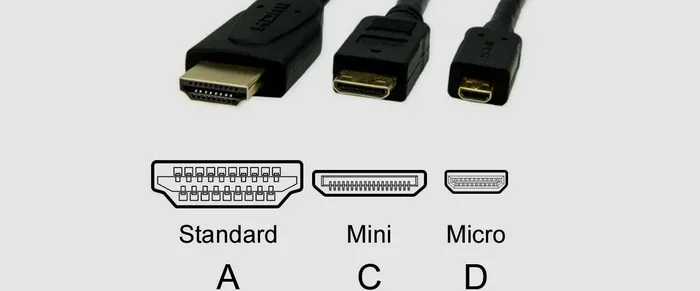
Type A: The Standard HDMI Connector
This is the one you see most often. The Standard HDMI connector is the full-size plug that goes into your TV, monitor, or projector. It has 19 pins and measures about 13.9 millimeters wide. Almost every device with an HDMI port uses this type.
The Standard HDMI connector handles everything from basic 1080p video to 4K and even 8K signals, depending on the cable version. If you are buying a cable for your living room TV or home theater system, this is the one you want.
Type C: The Mini HDMI Connector
The Mini HDMI connector is smaller than the Standard type. It measures about 10.42 millimeters wide. You will find it on some digital cameras, tablets, and older laptops. It has the same 19 pins as the Standard connector but in a more compact design.
The Mini HDMI connector is not as common as it used to be. Many modern devices have switched to USB-C for video output. But if you have an older camera or a specific tablet, you might still need a Mini HDMI cable.
Type D: The Micro HDMI Connector
The Micro HDMI connector is the smallest of the bunch. It measures only 5.83 millimeters wide. You will find it on very compact devices like action cameras, smartphones, and some portable media players.
Despite its tiny size, the Micro HDMI connector carries the same signal as the Standard type. It has 19 pins packed into a much smaller space. If you need a cable for a GoPro or a small Android phone, this is the connector to look for.
Type B: The Dual-Link HDMI Connector
The Dual-Link HDMI connector was designed for very high-resolution displays. It has 29 pins, which is almost double the Standard connector. However, this type was never widely adopted. You are unlikely to encounter it in everyday use. Most high-resolution needs are now handled by the Standard connector with updated HDMI versions.
Type E: The Automotive HDMI Connector
The Automotive HDMI connector is a less common type. It is designed for use in vehicles. It has a locking mechanism that prevents the cable from coming loose due to vibration. You will mostly find this in car infotainment systems and dashboard displays.
| Connector Type | Width | Pins | Common Devices |
|---|---|---|---|
| Type A (Standard) | 13.9 mm | 19 | TVs, monitors, projectors, game consoles |
| Type C (Mini) | 10.42 mm | 19 | Digital cameras, tablets, older laptops |
| Type D (Micro) | 5.83 mm | 19 | Smartphones, action cameras, portable players |
| Type B (Dual-Link) | N/A | 29 | Rare, high-res displays (legacy) |
| Type E (Automotive) | Varies | 19 | Car infotainment systems |
Knowing which connector type your device uses is the first step. The next step is understanding which HDMI version your cable supports. That is where things get really interesting.
Understanding HDMI Versions and Their Capabilities
The connector type is only half the story. The HDMI version is what determines what kind of signal the cable can carry. A Standard HDMI connector can support HDMI 2.1, and a Micro HDMI connector can support HDMI 2.0. The connector shape and the version are two different things.
HDMI 1.4 and Earlier Versions
HDMI 1.4 was a big deal when it came out. It introduced support for 4K resolution at 30Hz. It also added the Audio Return Channel, which lets your TV send audio back to your soundbar or receiver through the same HDMI cable. Ethernet HDMI was also introduced in this version, allowing devices to share an internet connection.
Earlier versions like HDMI 1.0 through 1.3 supported up to 1080p video. These older cables are still fine for basic setups. But if you want to watch 4K content or play games at higher refresh rates, you need a newer cable.
HDMI 2.0: The 4K Era
HDMI 2.0 was released in 2013 and changed the game. It supports 4K resolution at 60Hz. That means smooth, high-quality video on your 4K TV or monitor. The bandwidth jumped to 18 gigabits per second. This version also added support for High Dynamic Range (HDR) content.
Most modern gaming HDMI cables and home theater setups use HDMI 2.0 or higher. If you have a 4K TV and a streaming device or game console, you almost certainly want an HDMI 2.0 cable at minimum.
HDMI 2.1: The Future-Proof Standard
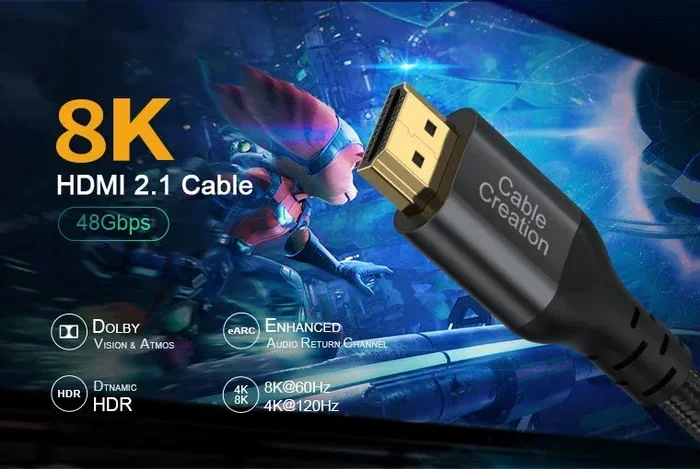
HDMI 2.1 is the latest version. It supports up to 10K resolution and can handle bandwidth up to 48 gigabits per second. This means you can enjoy 4K video at 120Hz or even 8K at 60Hz. For serious gamers and home theater enthusiasts, HDMI 2.1 is the gold standard.
HDMI 2.1 also introduces features like Variable Refresh Rate (VRR), Auto Low Latency Mode (ALLM), and Quick Frame Transport. These features reduce input lag and make gaming feel smoother. If you are building a gaming HDMI setup or investing in a high-end home theater, HDMI 2.1 cables are the way to go.
Quick Tips
- Always check the HDMI version on the cable packaging. It should be clearly labeled.
- An HDMI 2.1 cable is backward compatible with older devices. You can use it with older TVs and still get great performance.
- Look for the “Ultra High Speed” label on cables. This is the official HDMI 2.1 certification.
- Do not assume a thicker cable is automatically a high-speed cable. Check the specs instead.
How to Choose the Right HDMI Connector for Your Setup
Choosing the right HDMI connector comes down to three things: your device, your resolution needs, and your budget. Let us walk through how to make the right choice for your situation.
Matching the Connector to Your Device
Start by checking what kind of HDMI port your device has. Look at the port on the back or side of your TV, monitor, or laptop. Is it a full-size Standard HDMI port? A smaller Mini HDMI? Or a tiny Micro HDMI?
Once you know the port type, buy a cable with the matching connector. This sounds obvious, but it is one of the most common mistakes people make. A Standard HDMI plug will not fit into a Micro HDMI port, no matter how hard you try.
If you need an adapter to bridge two different connector types, make sure you buy a quality HDMI adapter. Cheap adapters can cause signal loss and intermittent connection problems.
Cable Quality Matters More Than You Think
Not all HDMI cables are built the same. The quality of the cable affects signal strength, durability, and overall performance. Here are a few things to look for when buying an HDMI cable:
- Gold-plated connectors: These reduce corrosion and provide a more reliable connection over time.
- Braided outer jacket: This makes the cable more durable and resistant to fraying.
- Proper shielding: Good shielding prevents interference from other electronic devices.
- Bandwidth rating: Make sure the cable supports the bandwidth you need for your resolution and refresh rate.
A cheap, poorly made cable might work fine for basic use. But if you are investing in a 4K TV or a gaming setup, spending a little more on a quality cable is worth it.
Common Mistakes
- Buying the wrong connector type: Always check your device port before purchasing a cable.
- Assuming all cables support 4K: Only HDMI 2.0 and higher cables reliably support 4K at 60Hz.
- Using excessively long cables: Cables over 15 feet can experience signal degradation unless they are active or amplified.
- Ignoring the HDMI version: The connector shape does not tell you the version. Always check the packaging or product description.
- Buying from unverified sellers: Many cheap HDMI cables online are falsely labeled. Stick to reputable brands and sellers.
Expert Insights
According to HDMI Licensing experts, the version of the cable matters more than the connector type for most users. A Standard HDMI connector with an HDMI 2.1 certification will outperform a Mini HDMI connector with an HDMI 1.4 certification. Always prioritize the version and bandwidth rating over the connector shape.
Also, if you are wondering how computers are used across different fields including medical settings where display quality is critical, high-quality HDMI connections play a vital role. You can learn more about the wide range of computer applications in this guide on 10 Ways Computers Are Used In Medicine.
In devices like medical monitors and imaging equipment, the right HDMI connector ensures that diagnostic images are displayed clearly and accurately. This is a great example of how choosing the right connector is not just about convenience, but about performance and reliability in critical applications.
Common HDMI Connector Problems and How to Fix Them
Even with the right connector and cable, you might run into problems from time to time. Here are the most common issues and how to solve them.
Loose or Intermittent Connections
If your HDMI cable keeps falling out or the signal drops in and out, the connector might be loose. This is a common issue with frequently unplugged cables. The fix is simple. Replace the cable with one that has a snug fit. Some HDMI cables come with locking mechanisms that prevent accidental disconnection.
You can also try plugging the cable in firmly and making sure it is fully seated in the port. Sometimes a loose fit is just a matter of the connector not being pushed in all the way.
No Signal or Blank Screen
A blank screen is one of the most frustrating HDMI problems. Here are a few things to try:
- Check that the cable is plugged into the correct HDMI port on your TV or monitor.
- Try a different HDMI port on your display device.
- Unplug the cable, wait a few seconds, and plug it back in.
- Test with a different HDMI cable to rule out a faulty cable.
- Check that your source device is powered on and set to the correct output.
If none of these steps work, the cable or connector might be damaged. Replace it with a new one and see if that fixes the issue.
Audio and Video Sync Problems
Sometimes the picture and sound will be out of sync. This is more common with longer cables or older HDMI versions. Here is what you can do:
- Use a shorter cable to reduce signal delay.
- Upgrade to an HDMI 2.0 or HDMI 2.1 cable for better synchronization.
- Check your TV or monitor settings for audio delay adjustments.
- Make sure your source device firmware is up to date.
Most sync issues can be resolved with a better cable or a simple settings adjustment. You do not need to be a tech expert to fix these problems.
Expert Insight
Technicians recommend keeping a spare high-quality HDMI cable on hand. Whether you are setting up a new home theater HDMI system or troubleshooting an existing one, having a reliable backup cable saves time and frustration. Look for cables that are certified by HDMI Licensing for guaranteed performance.
Final Thoughts on HDMI Connectors
So, are all HDMI connectors the same? No, they are definitely not. From the Standard HDMI connector on your TV to the tiny Micro HDMI on your action camera, each type has its own role. And the HDMI version behind the connector determines what kind of video and audio quality you can expect.
The good news is that choosing the right connector is not complicated. Check your device port, match the connector type, pick the right HDMI version for your needs, and invest in a quality cable. That is all it takes to get a great picture and sound every time.
Whether you are setting up a simple streaming setup or a high-end gaming rig, understanding your HDMI connectors makes all the difference. Take a few minutes to learn what you have, and you will save yourself a lot of headaches down the road.
The world of HDMI connectors might seem confusing at first. But once you understand the basics, it all makes sense. You now know the different connector types, the HDMI versions, and how to pick the right cable for any situation. You are better equipped than most people to make the right choice.
Next time you are shopping for a cable or setting up a new device, you will know exactly what to look for. And that confidence is worth more than any cable you can buy. Happy connecting.
Frequently Asked Questions
What is the difference between HDMI connector types?
The main difference is the size and shape. Type A is the full-size Standard HDMI you see on TVs and monitors. Type C is the smaller Mini HDMI used on cameras and tablets. Type D is the tiny Micro HDMI found on smartphones and action cameras. All three carry the same audio and video signals, but they fit different devices.
Do all HDMI cables support 4K resolution?
No, not all HDMI cables support 4K. Only cables that meet HDMI 2.0 or higher standards can reliably handle 4K resolution at 60Hz. Older cables that only meet HDMI 1.4 standards may support 4K at 30Hz, which can cause lag and stuttering during fast-moving content.
Can I use an HDMI 2.1 cable with an older TV?
Yes, you can. HDMI 2.1 cables are backward compatible with older devices. If you plug an HDMI 2.1 cable into an older TV, it will still work. The TV will simply operate at the highest resolution and refresh rate it supports. You will not damage anything by using a newer cable with an older device.
What does gold-plated mean on HDMI connectors?
Gold-plated connectors have a thin layer of gold coating on the contact pins. This coating prevents corrosion and oxidation over time. It also provides a more reliable electrical connection. Gold-plated connectors tend to last longer and maintain better signal quality compared to plain nickel or copper connectors.
How do I know which HDMI version my cable supports?
Check the packaging or the cable itself. HDMI 2.1 cables are labeled as “Ultra High Speed HDMI.” HDMI 2.0 cables are labeled “Premium High Speed.” HDMI 1.4 cables may be labeled “High Speed.” If the label is missing, you can check the manufacturer website or contact the seller for specifications.
Are HDMI adapters safe to use?
Yes, high-quality HDMI adapters are safe to use. They allow you to connect devices with different connector types. However, cheap or poorly made adapters can cause signal loss, intermittent connections, or reduced image quality. Always buy adapters from reputable brands to ensure reliable performance.
=== CONCLUSION ===
Are all HDMI connectors the same? The answer is a clear no. As we have covered throughout this article, HDMI connectors come in different types, sizes, and versions. Each one is designed for specific devices and purposes. Understanding these differences empowers you to make better choices for your entertainment setup, gaming rig, or professional workspace.
From the Standard HDMI connector on your living room TV to the Micro HDMI on your portable camera, every type has a place. And with the right HDMI version, you can enjoy everything from basic 1080p video to stunning 8K resolution with HDR.
Take the time to check your devices, choose the right cable, and invest in quality connectors. Your eyes and ears will thank you. And the next time someone asks you if all HDMI connectors are the same, you will know exactly what to tell them.