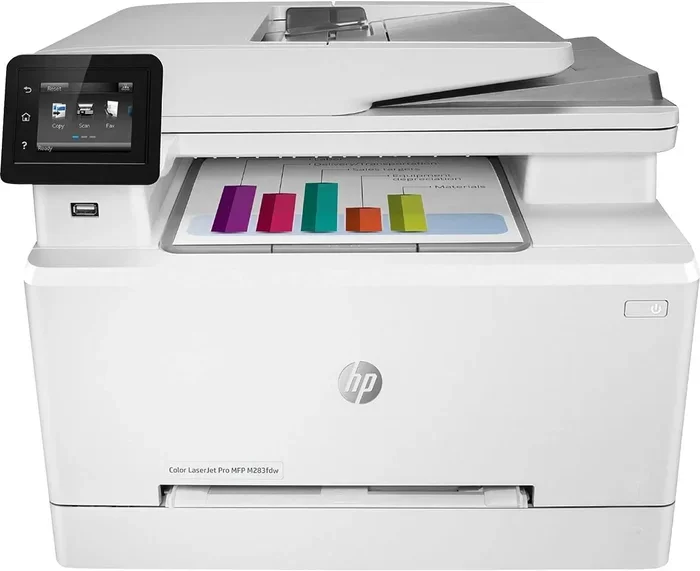
Can Laser Printers Print In Color With Vibrant Quality
Yes, laser printers can absolutely print in color with vibrant quality. Modern color laser printers use advanced laser printing technology to produce sharp, vivid prints for both documents and photos. Whether you need professional printing at home or in the office, understanding how these machines work helps you get the best print quality every time.
Key Takeaways
- Color laser printers use CMYK toner: They combine cyan, magenta, yellow, and black to produce a wide range of vibrant colors.
- They outperform inkjets in speed and volume: Color laser printers deliver fast print speeds and consistent quality for large jobs.
- Print quality depends on several factors: Resolution, toner quality, paper type, and color management all play a role.
- They excel in office and medical settings: Color laser printers are ideal for offices, healthcare environments, and any setting that needs reliable output.
- Vibrant results need the right settings: Using proper color profiles and quality modes makes a big difference in output.
- They cost more upfront but less over time: Toner lasts longer than ink, making laser printers more economical long-term.
📑 Table of Contents
How Do Laser Printers Create Color Prints?
Many people wonder whether a laser printer can produce color output. The short answer is yes. But the process behind it is fascinating. Understanding how color laser printers work helps you appreciate the technology and get better results.
Unlike inkjet printers that spray liquid ink, laser printing technology uses heat and static electricity. A laser beam draws the image onto a drum. The drum then attracts toner particles. These particles transfer to paper and bond through heat.
Color laser printers repeat this process multiple times. Each pass adds a different color layer. The result is a full-color print output that looks sharp and professional. Let us break down the steps.
The Four Colors of Laser Printing
Color laser printers use four toner colors. These are cyan, magenta, yellow, and black. This is known as the CMYK color model. By mixing these four colors in different proportions, the printer creates a wide spectrum of hues.
Each color has its own toner cartridge. The printer applies them in precise layers. First, it lays down black. Then it adds cyan, magenta, and yellow in sequence. This layering process creates rich, deep colors.
Why Laser Color Differs from Inkjet Color
The difference matters more than most people realize. Inkjet printers mix colors by blending liquid inks. Laser printers fuse dry toner onto paper. This gives laser prints a distinct look and feel.
Laser color tends to be sharper along edges. The toner bonds firmly to the paper surface. Inkjet prints can sometimes bleed or feather. Laser prints stay crisp even at high speeds. This makes them ideal for professional printing tasks.
Color Laser Printers vs Inkjet Printers
Choosing between a color laser printer and an inkjet printer is a common dilemma. Both have strengths. Both serve different needs. Let us compare them side by side.
Speed and Volume
Laser printers win on speed. They can print dozens of pages per minute. Inkjet printers are slower, especially when producing color. If you need large volumes fast, laser is the clear choice.
For home use, inkjets often suffice. For busy offices, laser printers handle the load effortlessly. They also warm up quickly and start printing almost instantly.
Cost Over Time
Inkjet printers usually cost less upfront. But their ink cartridges run out fast. Replacement ink can be expensive. Over months and years, the costs add up.
Laser toner cartridges last much longer. A single toner can print thousands of pages. This makes laser printers more economical for heavy users. The print cost per page is significantly lower.
Print Quality Comparison
Inkjet printers often produce better photo quality. The liquid ink blends smoothly on paper. This creates smooth gradients and natural skin tones.
Laser printers excel at text and graphics. Their output is razor-sharp and precise. For charts, presentations, and marketing materials, laser color looks outstanding. Modern color laser printers have also improved photo printing a great deal.
| Feature | Color Laser Printer | Inkjet Printer |
|---|---|---|
| Print Speed | Fast (20-40 ppm) | Moderate (10-20 ppm) |
| Upfront Cost | Higher | Lower |
| Cost Per Page | Lower | Higher |
| Photo Quality | Good to Very Good | Excellent |
| Text Sharpness | Excellent | Very Good |
| Volume Capacity | High | Low to Moderate |
| Warm-Up Time | Minimal | Moderate |
Factors That Affect Color Print Quality
Not all color laser prints look the same. Several factors influence how vibrant and accurate your output appears. Knowing these factors helps you troubleshoot and improve results.
Printer Resolution
Resolution is measured in dots per inch, or DPI. Higher DPI means more detail. Most modern color laser printers offer 600 to 1200 DPI. Some premium models go even higher.
For everyday documents, 600 DPI is plenty. For marketing materials and graphics, 1200 DPI or more makes a noticeable difference. The print resolution directly impacts how sharp and detailed your colors appear.
Toner Quality
Not all toner is created equal. OEM (original equipment manufacturer) toners produce the best colors. They are specifically designed for each printer model. Third-party toners can save money but may vary in quality.
Cheap toner can lead to faded colors or inconsistent coverage. Investing in quality toner ensures your vibrant colors stay true. It also protects your printer’s drum and internal parts.
Paper Type and Weight
The paper you use matters more than you might think. Standard office paper works fine for everyday prints. But for color-heavy documents, heavier paper produces better results.
Coated paper enhances color saturation. It gives prints a glossy or matte finish. Plain paper absorbs more toner, which can dull the colors. Always match your paper to the print job for the best print quality.
Color Management Settings
Most printers come with color management tools. These settings control how colors are rendered on paper. Using the right profile makes a huge difference.
For accurate colors, use the printer’s color management software. Many models support ICC profiles. These profiles ensure what you see on screen matches what comes out of the printer. Taking five minutes to calibrate can transform your output.
Best Uses for Color Laser Printers
Color laser printers shine in many settings. They are versatile machines that handle a wide range of tasks. Here are the scenarios where they perform best.
Office Environments
In busy offices, speed and reliability matter most. Color laser printers deliver both. They handle high-volume printing without breaking a sweat. Reports, presentations, and marketing materials all come out looking professional.
Offices also benefit from low print cost per page. Unlike inkjets that need frequent cartridge changes, laser printers go for weeks or months between replacements. This reduces downtime and maintenance.
Healthcare and Medical Settings
Medical offices need reliable printing for patient records, charts, and color-coded documents. Color laser printers are widely used in healthcare environments. They produce clear, readable output that meets professional standards.
In settings where computers play a vital role in patient care, having a dependable color printer is essential. The combination of computing systems and laser printing technology ensures medical staff can access and print high-quality documents quickly. Healthcare facilities rely on these printers for everything from color-coded charts to professional presentations. You can learn more about how computers support medical workflows in this article about 10 Ways Computers Are Used In Medicine.
Home Offices and Small Businesses
Small businesses and home offices benefit from color laser printers too. They produce professional-looking materials without the hassle of ink spills or frequent cartridge changes. Business cards, flyers, and invoices all look sharp.
For those who need vibrant quality in a compact setup, modern color lasers are surprisingly affordable. Many models are designed specifically for small spaces and light workloads.
Tips for Getting Vibrant Color Prints
Want your color laser prints to look their best? Follow these practical tips. They are simple but make a real difference.
Use the Right Print Settings
Always select the appropriate print quality setting. For important documents, choose “Best” or “High Quality” mode. Draft mode saves toner but sacrifices color vibrancy.
Most printers also offer a “Vivid” or “Photo” mode. This setting increases color saturation and sharpness. Use it for presentations and marketing materials that need to stand out.
Calibrate Your Printer Regularly
Printers drift over time. Colors may shift or become less accurate. Running a calibration cycle fixes this. Most printers have a built-in calibration tool.
Do this at least once a month. It ensures your color accuracy stays consistent. It also helps you spot any issues early before they affect your prints.
Keep Your Printer Maintained
Regular maintenance keeps your printer running smoothly. Clean the rollers and drum periodically. Replace worn parts before they cause quality issues.
A well-maintained printer produces better colors and lasts longer. Follow the manufacturer’s maintenance schedule. It is a small effort that pays off in vibrant prints and reliable performance.
Store Toner Cartridges Properly
Toner cartridges are sensitive to heat and humidity. Store them in a cool, dry place. Keep them away from direct sunlight.
Before installing a new cartridge, gently shake it side to side. This redistributes the toner evenly. It helps ensure consistent color coverage across every page.
Common Mistakes That Hurt Color Print Quality
Avoiding common mistakes saves time, toner, and frustration. Here are the pitfalls most people fall into.
- Using low-quality paper: Thin or rough paper absorbs toner unevenly. This dulls colors and creates a faded look.
- Skipping calibration: Uncalibrated printers produce inconsistent colors. What looks great on screen may come out dull on paper.
- Ignoring toner levels: Running on low toner causes faded prints. Replace cartridges before they run completely empty.
- Using draft mode for everything: Draft mode saves toner but sacrifices quality. Reserve it for internal documents only.
- Overloading the paper tray: Overfilled trays cause jams and misalignment. This leads to blurry or skewed color prints.
- Neglecting firmware updates: Manufacturers release updates that improve color accuracy and performance. Keep your printer’s software current.
Expert Insights on Color Laser Printing
Industry experts agree that color laser printers have come a long way. Early models struggled with photo-quality output. Today’s machines deliver stunning results across a wide range of media.
According to printing professionals, the key to great color is a combination of factors. Quality toner, proper calibration, and the right paper all work together. No single element alone guarantees vibrant results.
Experts also emphasize the importance of understanding your printer’s capabilities. Not every model handles every task equally. A printer designed for office documents may not excel at photo printing. Choose a machine that matches your primary use case for the best print quality.
One thing is clear: color laser printers have earned their place in homes and offices worldwide. They offer speed, reliability, and excellent color output. With the right settings and maintenance, they deliver vibrant quality that rivals any inkjet printer.
Final Thoughts
So, can laser printers print in color with vibrant quality? Absolutely. Modern color laser printers use sophisticated laser printing technology to produce sharp, vivid, and professional-looking prints. They excel at documents, graphics, presentations, and even photos.
Whether you are printing for a busy office, a healthcare facility, or a home setup, color laser printers deliver reliable and cost-effective results. By understanding the technology and following a few simple tips, you can get the most out of your printer.
Invest in quality toner, calibrate regularly, and choose the right paper. These small steps make a big impact on your print output. With the right approach, your color laser printer will produce stunning results for years to come.
The world of color printing has evolved dramatically. Laser technology continues to advance, offering better quality at lower costs. Embrace the power of color laser printing and enjoy vibrant, professional prints every single day.
Frequently Asked Questions
Can a color laser printer print photos as well as an inkjet?
Color laser printers have improved significantly for photo printing. They produce sharp and vibrant photo prints. However, inkjet printers still offer smoother gradients and more natural skin tones. For most everyday photo needs, a laser printer does an excellent job.
How long does a color laser toner cartridge last?
A standard toner cartridge can print between 1,500 and 5,000 pages. The exact number depends on coverage and print settings. High-yield cartridges last even longer. This makes laser printers very economical for regular use.
Are color laser printers expensive to buy?
The upfront cost is higher than inkjets. But the long-term savings are significant. Toner lasts longer and costs less per page. Over time, laser printers often prove more affordable overall.
Do color laser printers need special paper?
They work with standard office paper for everyday prints. For the best color quality, use heavier or coated paper. The right paper enhances color saturation and prevents toner from absorbing too deeply.
Can laser printers handle high-volume color printing?
Yes, that is one of their biggest strengths. Color laser printers are built for volume. They print fast and consistently without overheating or jamming. This makes them ideal for offices and busy environments.
Is color laser printing technology still improving?
Absolutely. Manufacturers continue to advance the technology. Newer models offer higher resolution, better color accuracy, and faster speeds. The gap between laser and inkjet quality keeps narrowing with each generation.
=== CONCLUSION ===
Can laser printers print in color with vibrant quality? Yes, they can and they do it remarkably well. Color laser printers use proven laser printing technology to deliver sharp, vivid, and professional prints. From office documents to marketing materials, they handle it all with ease.
The key is understanding how they work and using them correctly. Choose quality toner, calibrate often, and match your paper to the job. Follow the tips in this guide and your prints will look their best. Color laser printing is a smart choice for anyone who values speed, reliability, and vibrant output.