Can Usb Ports Wear Out After Years Of Heavy Daily Use
Yes, USB ports can wear out after years of heavy daily use. The constant plugging and unplugging, dust buildup, and electrical stress all contribute to port degradation over time. Understanding how USB ports fail helps you prevent damage and keep your devices connected reliably.
You plug in your phone every night. You connect your flash drive, your keyboard, your external hard drive. You do it all without thinking. But have you ever stopped to wonder, can USB ports wear out after years of heavy daily use? The short answer is yes. But the full story is more interesting than you might think.
USB ports are everywhere. They are on your laptop, your desktop, your TV, your car, and even your kitchen appliances. These tiny connectors handle a massive amount of daily activity. Over months and years, they take a beating. And just like any other part of your devices, they can degrade. Understanding how this happens can save you time, money, and a lot of frustration.
In this article, we will explore everything you need to know about USB port lifespan. We will look at the science behind port wear, the common signs of a failing port, and what you can do to keep your connections strong. Whether you use USB-A or USB-C, this guide has you covered.
Key Takeaways
- USB ports do wear out: Repeated use, dust, and physical stress cause gradual degradation of USB connectors over time.
- Mechanical wear is the biggest factor: Frequent plugging and unplugging loosens the internal contacts and weakens the port structure.
- USB-C and USB-A ports fail differently: Each port type has unique vulnerabilities that affect how quickly they wear down.
- Signs of a failing port include loose connections, data transfer errors, and charging issues.
- Simple habits can extend port life: Proper insertion, regular cleaning, and using quality cables make a big difference.
- Repair and replacement options exist: Many devices can have their USB ports repaired or replaced by a professional.
📑 Table of Contents
How USB Ports Work and Why They Wear Out
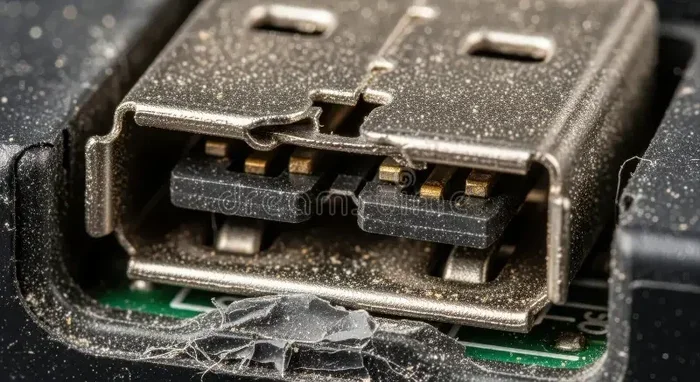
To understand why USB ports wear out, it helps to know what they are made of and how they function. A USB port is a small, female connector on your device. It has tiny metal pins inside that make contact with the male connector on your cable. This contact allows data transfer and power delivery.
Every time you plug something in, those metal pins touch, connect, and disconnect. That simple action happens hundreds or thousands of times over the life of a device. Each cycle adds a tiny amount of stress. Over time, that stress adds up.
The Anatomy of a USB Port
A standard USB port has several key parts:
- Metal contact pins: These are the tiny gold or copper strips inside the port. They carry data and power.
- Plastic housing: This is the outer shell that holds everything in place.
- Solder joints: These connect the port to the motherboard inside your device.
- Spring-loaded clips: These help hold the cable plug securely in place.
Each of these parts can degrade over time. The metal pins can lose their tension. The plastic can crack. The solder joints can weaken. And the spring clips can become loose. All of these issues lead to a failing port.
The Science Behind Port Degradation
USB port wear is a combination of mechanical and electrical factors. Mechanically, the repeated insertion and removal of cables causes friction. This friction wears down the gold plating on the contact pins. It also loosens the fit over time.
Electrically, heat plays a major role. When you charge a device or transfer large files, the port generates heat. Over time, this heat can weaken the solder joints and damage the internal components. Moisture and dust also contribute to corrosion on the metal contacts.
So when you ask, can USB ports wear out, the answer is a clear yes. It is not a matter of if but when. The question is how to slow down the process.
USB-A vs USB-C: Which Ports Wear Out Faster?
Not all USB ports are created equal. The two most common types are USB-A and USB-C. They have very different designs, and they wear out in different ways. Understanding these differences can help you take better care of your devices.
USB-A Port Wear
The USB-A port is the classic rectangular connector. You have seen it on computers, printers, and chargers for decades. It is a sturdy design, but it has a known weakness. The port relies on friction to hold the cable in place. There is no locking mechanism.
Over time, the friction fit becomes loose. You may notice your cable wiggles or falls out easily. This is a classic sign of USB-A port wear. The metal contacts inside also become less springy with repeated use. This leads to intermittent connections and charging problems.
USB-C Port Wear
USB-C is the newer, reversible connector. It is smaller, more versatile, and supports faster data transfer and higher power delivery. But it also has its own vulnerabilities.
USB-C ports are smaller, which means the internal components are more delicate. The thin metal pins inside a USB-C port can bend or break more easily than USB-A pins. Additionally, because USB-C supports high power delivery, there is more electrical stress on the port during charging.
Many users also report that USB-C ports become loose faster than USB-A ports. This is especially true on laptops, where the port is used daily for charging. The combination of frequent use and high power draw can accelerate wear.
| Feature | USB-A | USB-C |
|---|---|---|
| Connector Size | Larger | Smaller |
| Reversible Design | No | Yes |
| Common Wear Issue | Loose friction fit | Bent or broken pins |
| Typical Lifespan | 5,000+ insertions | 10,000+ insertions |
| Power Delivery Stress | Lower | Higher |
| Repair Difficulty | Moderate | Higher |
So which port wears out faster? The answer depends on how you use it. A USB-A port that is plugged and unplugged dozens of times a day will wear out quickly. A USB-C port that is left connected and handles high power loads can also fail prematurely.
Signs Your USB Port Is Wearing Out
Knowing the warning signs of a failing USB port can help you catch problems early. The earlier you notice the issue, the easier it is to fix. Here are the most common signs that your USB port is wearing out.
Loose or Wiggly Connection
This is the most obvious sign. If your cable does not fit snugly anymore and falls out with a slight bump, the port is likely wearing out. The spring-loaded clips inside the port have lost their tension. This is especially common on laptops and tablets that get carried around.
Intermittent Charging
Your device charges fine one moment and stops the next. You have to wiggle the cable to get it to charge again. This is a clear indicator that the metal contacts inside the port are not making consistent contact. The plating has worn down, or the pins have shifted.
Slow Data Transfer Speeds
If your files take much longer to transfer than they used to, the port might be the culprit. A worn-out port can cause data errors and slow speeds. This is especially noticeable with USB 3.0 and USB-C ports that support fast data transfer.
Physical Damage or Discoloration
Sometimes you can see the damage. The port might be visibly loose or crooked. There might be discoloration or burn marks around the port. These are signs of electrical issues and should be addressed immediately.
Device Not Recognized
If your computer stops recognizing a device that was working fine before, the port could be failing. This often happens gradually. The port works intermittently before it stops working altogether.
Common Causes of USB Port Damage
Several factors contribute to USB port wear and tear. Some are unavoidable, but many can be prevented with simple habits. Understanding these causes helps you protect your ports.
Frequent Plugging and Unplugging
This is the number one cause of USB port wear. Every time you plug in a cable, the metal contacts rub against each other. Over thousands of cycles, this friction wears down the gold plating and loosens the internal structure. If you use a port daily for charging, it will wear out faster than a port you rarely use.
Dust and Debris Buildup
Dust, lint, and crumbs can collect inside USB ports. This debris interferes with the metal contacts and can cause poor connections. Over time, it can also cause corrosion on the pins. This is especially common in desktop computers and devices that sit on desks or floors.
Improper Cable Insertion
Forcing a cable into a port at an angle puts stress on the internal pins. It can bend or break them. USB-C ports are especially vulnerable to this because the pins are small and delicate. Always insert cables straight and gently.
Heat and Moisture Exposure
Excessive heat can weaken solder joints inside the port. Moisture can cause corrosion on the metal contacts. Both of these factors accelerate port degradation. Keeping your devices in cool, dry environments helps extend port life.
Using Low-Quality Cables and Chargers
Cheap cables often have poorly fitting connectors. A loose cable puts extra stress on the port because it does not seat properly. It also delivers inconsistent power, which can cause electrical issues over time. Using high-quality, certified cables makes a real difference.
How to Extend the Life of Your USB Ports
The good news is that you can take steps to slow down USB port wear. These simple habits can add years to the life of your ports and keep your devices working smoothly.
Handle Cables Gently
When plugging in or unplugging a cable, do it gently. Do not force the connector. Do not yank the cable out by pulling on the cord. Grab the plug itself and pull it straight out. This reduces stress on both the port and the cable.
Keep Ports Clean
Regularly clean your USB ports to remove dust and debris. You can use a can of compressed air to blow out loose particles. For stubborn buildup, use a toothpick or a soft brush very gently. Never use metal objects, as these can damage the pins inside.
Use Port Protectors
Port covers and dust plugs are inexpensive accessories that protect USB ports when they are not in use. They keep dust and debris out and prevent accidental damage. These are especially useful for desktop computers and devices that sit in one place.
Invest in Quality Cables
Good cables have well-fitting connectors that seat properly in the port. They also deliver consistent power and data without putting extra strain on the port. Look for cables that are certified by the USB Implementers Forum (USB-IF) or made by reputable brands.
Avoid Leaving Cables Plugged in Unnecessarily
While it is convenient to leave cables plugged in, doing so puts constant stress on the port. The spring clips are under continuous tension. Over time, this can weaken them. If you are not actively using a device, consider unplugging the cable.
Use USB Hubs and Docks
A USB hub or docking station can reduce the wear on your laptop or desktop ports. Instead of plugging and unplugging cables directly into your device, you plug them into the hub once and leave them there. This dramatically reduces the number of insertion cycles your device ports experience.
Expert Insight
Hardware engineers recommend treating USB ports with the same care you would treat any other physical connector. A port that is used carefully and kept clean can easily last the entire lifespan of a device. The key is minimizing unnecessary stress and keeping debris out of the port at all times.
Can You Repair a Worn-Out USB Port?
When a USB port starts to fail, you have options. Repair is possible in many cases, and replacement is always an option. The right choice depends on the severity of the damage and the device you are working with.
DIY Fixes for Minor Issues
For minor issues like a loose connection, you can try a few things at home. Cleaning the port with compressed air can sometimes restore a poor connection. You can also try using a different cable to rule out cable-related problems. Sometimes the issue is not the port but the cable itself.
If the port is physically loose, you can try gently tightening the internal connector. This requires opening the device, so it is not for everyone. But for those who are handy, it can be a simple fix.
Professional Repair Options
For more serious damage, professional repair is the best option. A technician can resolder the USB port to the motherboard, replace the port entirely, or repair damaged solder joints. The cost varies depending on the device and the extent of the damage.
On laptops, USB port repair typically costs between $50 and $150. On desktop computers, it is often cheaper because the motherboard is easier to access. For smartphones and tablets, the cost can be higher due to the compact design and the need for specialized tools.
When to Replace the Device
Sometimes, repairing a USB port is not worth the cost. If the device is old and has multiple failing ports, it might be time to upgrade. Consider the cost of repair against the cost of a new device. Also consider the age of the device and whether it still meets your needs.
Quick Tips for USB Port Care
- Always insert cables straight and gently.
- Clean ports monthly with compressed air.
- Use dust plugs on ports you rarely use.
- Buy certified, high-quality cables.
- Do not leave cables plugged in 24/7 if you can avoid it.
- Use a USB hub to reduce direct port usage.
- Address loose connections early before they get worse.
How Long Should a USB Port Last?
The lifespan of a USB port depends on several factors. The type of port, how often it is used, and the quality of the device all play a role. Here is what you can expect from different types of USB ports under normal use conditions.
A standard USB-A port is rated for about 1,500 to 10,000 insertion cycles. USB-C ports are typically rated for 10,000 or more cycles. In everyday terms, this means a USB-A port used once a day should last about 4 to 27 years. A USB-C port used once a day could last 27 or more years.
Of course, these numbers assume normal use. Heavy daily use, poor cable quality, and environmental factors can all shorten the lifespan significantly. If you use a port several times a day for charging and data transfer, you might see wear within 3 to 5 years.
The key takeaway is that USB ports are designed to last. But they are not indestructible. With proper care and good habits, you can get many years of reliable use from every port on your devices.
Conclusion
So, can USB ports wear out after years of heavy daily use? The answer is definitively yes. USB ports are physical connectors that experience mechanical stress, electrical heat, and environmental exposure every single day. Over time, this takes a toll. The metal contacts wear down, the plastic housing cracks, and the solder joints weaken.
But this does not mean you should accept port failure as inevitable. By understanding how USB ports wear out and taking proactive steps to care for them, you can significantly extend their lifespan. Clean your ports regularly, use quality cables, handle connections gently, and consider using a USB hub to reduce direct port usage.
The signs of a failing port are clear if you know what to look for. Loose connections, intermittent charging, slow data transfer, and physical damage are all red flags. Catch these issues early, and you can often fix them before they become major problems.
Your USB ports work hard for you every day. Give them a little care in return, and they will keep your devices connected and charging reliably for years to come.
Frequently Asked Questions
Can a worn-out USB port be fixed?
Yes, in most cases a worn-out USB port can be repaired. A technician can resolder the port, replace it entirely, or fix damaged solder joints. The cost and feasibility depend on the device type and the extent of the damage. For minor issues like loose connections, cleaning the port or trying a different cable may solve the problem without any repair at all.
How many times can you plug in a USB cable before the port wears out?
USB-A ports are typically rated for 1,500 to 10,000 insertion cycles, while USB-C ports are rated for 10,000 or more cycles. In practical terms, this means a port used once a day can last anywhere from 4 to 27 years or more. However, heavy daily use, poor cable quality, and improper handling can significantly reduce this lifespan.
Why does my USB port feel loose?
A loose USB port is usually caused by repeated plugging and unplugging over time. The spring-loaded clips inside the port lose their tension, and the metal contacts wear down. This creates a wiggly, unreliable connection. Dust and debris can also contribute to a loose fit by preventing the cable from seating properly.
Is it bad to leave a USB cable plugged in all the time?
Leaving a USB cable plugged in constantly puts continuous stress on the port. The spring clips stay under tension, and the metal contacts remain in constant friction. Over time, this can accelerate port wear. It is best to unplug cables when you are not actively using the device, especially if the port is already showing signs of wear.
Does dust really damage USB ports?
Yes, dust and debris can definitely damage USB ports over time. Particles collect between the metal contacts and interfere with the electrical connection. Moisture in the dust can also cause corrosion on the pins. Regular cleaning with compressed air or a soft brush can prevent this buildup and keep your ports functioning properly.
Should I use a USB hub to protect my device ports?
Yes, using a USB hub is an excellent way to reduce wear on your device ports. Instead of plugging and unplugging cables directly into your laptop or desktop, you connect them to the hub once and leave them there. This dramatically reduces the number of insertion cycles your device ports experience and helps them last longer.