Can You Print Labels In Colour And Get Amazing Results
Yes, you absolutely can print labels in colour, and the results can be truly amazing. Whether you need vibrant product labels, colourful shipping labels, or eye-catching marketing stickers, modern printers make it easier than ever. This guide walks you through everything you need to know about colour label printing, from choosing the right printer to getting professional-quality results at home or in the office.
Have you ever wondered whether your printer can handle colour labels? Maybe you want to create beautiful product stickers for a small business. Or perhaps you need eye-catching shipping labels that stand out on the conveyor belt. Whatever your reason is, the answer is a resounding yes. You can print labels in colour, and the results can look absolutely fantastic when you know what you are doing.
The world of label printing has changed dramatically over the past decade. What once required expensive commercial equipment is now something you can do from your desk. Colour label printing has become more affordable, more accessible, and more impressive in quality. Whether you are a hobbyist, a small business owner, or someone who just wants to organize things with a personal touch, colour labels add a level of polish that black-and-white simply cannot match.
In this guide, we will explore everything you need to know about printing labels in colour. We will cover the types of printers that work best, the benefits of going colour, how to choose the right equipment, and practical tips that will help you get amazing results every single time. Let us dive right in.
Key Takeaways
- Colour label printing is widely accessible: You can print vibrant labels using inkjet, laser, or thermal printers with colour capabilities.
- Multiple printer types support colour: Inkjet and laser printers are the most popular choices for full-colour label printing at home or in business.
- Quality depends on several factors: Printer resolution, label paper quality, and design software all impact your final results.
- Specialized printing exists for niche needs: Medical and pharmaceutical labels often rely on how computers are used in medicine to ensure precision and compliance.
- Simple tips make a big difference: Using the right settings, quality paper, and proper design files will dramatically improve your colour label output.
📑 Table of Contents
- What Is Colour Label Printing?
- Types of Printers That Print Labels in Colour
- Benefits of Printing Labels in Colour
- How to Choose the Right Colour Label Printer
- Tips for Getting Amazing Colour Label Results
- Common Mistakes to Avoid When Printing Colour Labels
- Specialized Applications of Colour Label Printing
- The Future of Colour Label Printing
- Conclusion
What Is Colour Label Printing?
Colour label printing refers to the process of producing adhesive labels that include full-colour images, text, and graphics. Instead of sticking to plain white or monochrome output, colour printing allows you to incorporate logos, photographs, gradients, and vibrant designs directly onto your labels.
The technology behind this is not as complicated as it might seem. Most home and office printers today are capable of producing colour output. When you pair a colour printer with the right label paper and design software, you can create professional-looking labels in minutes. The key is understanding which printer type suits your needs and how to optimize your settings for the best possible output.
How Colour Printing Works on Labels
Most colour printers use one of two main technologies: inkjet or laser. Inkjet printers spray tiny droplets of liquid ink onto the label surface. This method produces rich, vibrant colours and is excellent for photographic images. Laser printers use toner powder that is melted onto the paper. They tend to be faster and produce sharper text, making them great for labels with lots of information.
Both methods have come a long way. Modern colour printers can achieve resolutions of 1200 dots per inch (dpi) or higher. This means your labels will look crisp and detailed. The challenge is not really about whether your printer can do it. The challenge is about choosing the right materials and settings to make your colour labels look their absolute best.
Types of Printers That Print Labels in Colour
Not all printers are created equal when it comes to colour label printing. Some are better suited for the job than others. Let us look at the main types of printers you can use to print labels in colour.
Inkjet Printers for Colour Labels
Inkjet printers are the most popular choice for printing colour labels at home and in small offices. They are affordable, widely available, and produce excellent colour quality. If you want to print labels with photographs, gradients, or complex graphics, an inkjet printer is your best friend.
Here are some reasons why inkjet printers work well for colour label printing:
- Vibrant colour output: Inkjets blend colours smoothly and produce rich, saturated results.
- Affordable upfront cost: You can buy a decent inkjet printer for a reasonable price.
- Photo-quality printing: If your labels need images or artwork, inkjets deliver stunning detail.
- Wide media compatibility: Most inkjet printers handle various label paper types and sizes.
The downside of inkjet printers is that the ink can smudge if it gets wet. For labels that need to withstand moisture or handling, you may want to use a protective spray or choose laser printing instead.
Laser Printers for Colour Labels
Laser printers are the workhorses of the office world, and they also excel at printing colour labels. They use toner instead of liquid ink, which means your labels dry instantly and resist smudging. This makes laser printers a great choice for labels that will be handled frequently, shipped, or exposed to varying conditions.
Here is what makes laser colour printers a strong option:
- Smudge-proof output: Toner fuses to the paper, so your labels stay crisp and clean.
- Fast printing speed: Laser printers churn out labels quickly, which is great for batch jobs.
- Sharp text quality: If your labels have lots of text or small fonts, laser printers handle them beautifully.
- Durability: Laser-printed labels tend to last longer than inkjet-printed ones.
The trade-off is that laser printers are generally more expensive upfront. However, toner cartridges last longer than ink cartridges, so the cost per label can be lower over time.
Thermal Printers with Colour Capability
Thermal printers are commonly used for barcode labels and shipping labels. Most thermal printers print in black only, but some models now offer colour thermal printing. These printers use a thermal transfer process with coloured ribbons to produce labels with limited colour options.
Colour thermal printers are popular in retail and logistics. They offer fast printing and durable output. However, they are more specialized and may not be the best choice if you want full-colour, photographic-quality labels.
Benefits of Printing Labels in Colour
Why should you bother printing labels in colour when black-and-white works just fine? The answer comes down to impact, organization, and professionalism. Colour labels offer several advantages that go beyond just looking pretty.
Enhanced Visual Appeal
Let us be honest. A colourful label catches the eye. Whether you are selling products at a market or organizing files in your office, colour makes things more noticeable. Colour label printing allows you to stand out from the crowd and make a memorable impression.
Think about the last time you walked down a store aisle. The products with the most eye-catching labels are the ones that grab your attention. You can recreate that same effect for your own labels. A well-designed colour label communicates quality and professionalism before anyone even reads a word on it.
Better Organization and Categorization
Colour-coded labels are a game-changer for organization. You can assign different colours to different categories. For example, you might use red labels for urgent documents, green labels for completed tasks, and blue labels for pending items. This simple trick makes sorting and finding things much faster.
In warehouses and retail environments, colour-coded labels help workers identify products quickly. This reduces errors and speeds up processes. Even at home, colour labels on your pantry shelves or filing cabinets make daily life more convenient.
Brand Identity and Marketing
If you run a business, colour labels are a powerful branding tool. Your brand colours on a product label create instant recognition. Customers start to associate specific colours with your brand, which builds trust and loyalty over time.
Custom colour labels also serve as mini marketing materials. A beautifully designed label can tell your brand story, highlight key features, and even include QR codes that link to your website. The possibilities are truly endless when you embrace colour label printing.
Improved Readability and Accessibility
Colour labels can also improve readability. Using a coloured background with contrasting text makes labels easier to read from a distance. This is especially useful for price labels, shelf markers, and information tags in busy environments.
For people with visual impairments, colour coding on labels can make a significant difference. Combining colour with clear typography and high contrast ensures that labels are accessible to a wider audience. This is one of the reasons why accessible label design is becoming increasingly important in public spaces and workplaces.
How to Choose the Right Colour Label Printer
Choosing the right printer for colour label printing can feel overwhelming with so many options available. But if you focus on a few key factors, the decision becomes much simpler.
Consider Your Volume
How many labels do you plan to print? If you only need a few labels now and then, a basic inkjet printer will do the job. If you run a business and print hundreds of labels daily, you need a faster, more durable solution like a laser printer or a dedicated colour label printer.
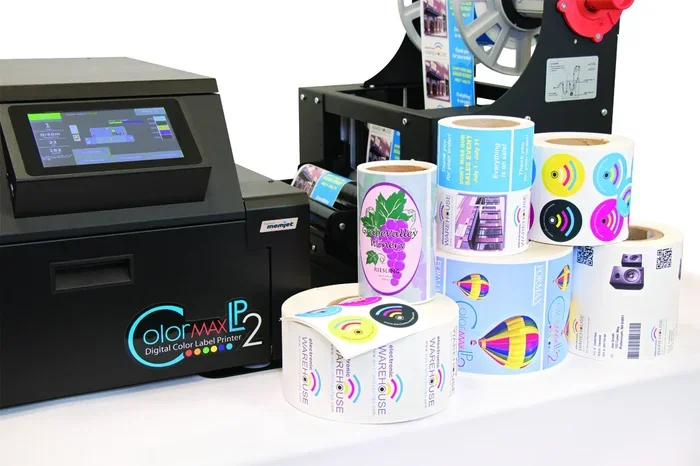
Dedicated label printers are designed specifically for this purpose. They handle label paper more efficiently and often come with features like automatic cutting and peeling. Brands like Brother, Dymo, and Zebra offer excellent options in this category.
Check the Resolution
Printer resolution matters a lot for colour label printing. Look for a printer with a resolution of at least 1200 dpi. Higher resolution means sharper images and smoother colour gradients. If you are printing labels with detailed graphics or photographs, you will want to aim for 2400 dpi or higher.
Resolution is measured in dots per inch. The more dots the printer can place in a single inch, the finer the detail. This is especially important for small labels where every pixel counts.
Think About Label Size and Shape
Not all printers handle all label sizes equally well. Some printers struggle with very small labels, while others cannot accommodate large formats. Before you buy, check the printer’s maximum and minimum label size specifications.
Also consider the shape of your labels. Most printers work best with rectangular labels. If you need circular or custom-shaped labels, you may need a printer with more flexible feed options or a dedicated label printing machine.
Budget and Running Costs
Your budget matters, but so do the ongoing costs. A cheap printer might seem like a good deal until you start buying ink cartridges. Inkjet printers tend to have lower upfront costs but higher ongoing costs. Laser printers cost more initially but are cheaper to operate in the long run.
Factor in the cost of label paper, ink or toner, and any maintenance. A slightly more expensive printer that is efficient and reliable will save you money over time. This is especially true if you print labels regularly.
Tips for Getting Amazing Colour Label Results
Now that you know which printer to choose, let us talk about how to actually get stunning results. Colour label printing is equal parts equipment, materials, and technique. Here are some practical tips that will elevate your labels from good to great.
Use High-Quality Label Paper
The paper you use matters enormously. Cheap label paper can cause ink to bleed, colours to look dull, and labels to peel off easily. Invest in high-quality label paper that is designed for your specific printer type.
Look for label paper that is compatible with inkjet or laser printers, depending on which type you own. The right paper has a special coating that helps the ink or toner adhere properly. This produces sharper colours and more durable labels.
Some label papers also come with a protective layer that resists water, smudging, and fading. If your labels will be exposed to harsh conditions, this extra protection is well worth the investment.
Design with Print in Mind
Not all digital designs translate perfectly to print. When creating your colour label designs, keep a few things in mind. First, always work in the CMYK colour mode rather than RGB. CMYK is the colour model that printers use, so your colours will look more accurate on paper.
Second, pay attention to resolution. Design your labels at 300 dots per inch or higher. This ensures that images and text look crisp and clear. Low-resolution designs will look pixelated and unprofessional, no matter how good your printer is.
Third, leave a small margin around the edges of your label. Printers cannot always print right up to the edge, and a margin prevents important content from being cut off. Most design software like Canva, Adobe Illustrator, and even free tools like GIMP let you set up your canvas with the correct label dimensions.
Run Test Prints First
Before you print a full batch of labels, always run a test print on regular paper first. This lets you check the colours, alignment, and overall layout without wasting expensive label paper.
Compare the test print to your digital design. Are the colours accurate? Is the text aligned properly? Are there any blurry areas? Making adjustments before the final print run saves time, paper, and frustration.
Calibrate Your Printer Regularly
Printers can drift out of alignment over time, especially with colour printing. Most modern printers have built-in calibration tools that you can run from the settings menu. Calibration ensures that colours are accurate and that text and images line up correctly on every label.
Make it a habit to calibrate your printer every few weeks, especially if you print labels frequently. This simple step makes a noticeable difference in print quality and consistency.
Let Labels Dry Completely
If you use an inkjet printer, give your labels time to dry before handling them. Fresh ink is vulnerable to smudging, and touching a wet label can ruin the print. Most inkjet printers have a drying setting that you can enable to speed up the process.
For laser printers, this is less of a concern since the toner fuses to the paper immediately. However, it is still a good idea to let a stack of fresh labels sit for a minute before peeling them apart. This prevents any residual toner from transferring to adjacent labels.
Use the Right Software
The software you use to design your labels plays a big role in the final result. Label design software like Avery Design & Print, Canva, and LibreOffice Writer offer templates specifically made for common label sizes. These templates save you time and ensure that your labels print correctly.
Some printers also come with their own dedicated software that optimizes print settings for label paper. Check the manufacturer’s website for free tools and drivers that can help you get the best results from your specific printer model.
Common Mistakes to Avoid When Printing Colour Labels
Even experienced label printers make mistakes sometimes. Being aware of common pitfalls helps you avoid them and get better results from the start.
Using the Wrong Paper Type
This is the most common mistake people make. Using regular paper instead of proper label paper leads to poor adhesion, ink bleeding, and labels that peel off easily. Always use paper that is specifically designed for label printing and compatible with your printer type.
Ignoring Printer Settings
Every printer has settings that affect print quality. If you use the default settings, you might not get the best results. Look for settings like “High Quality,” “Best,” or “Photo Mode” when printing colour labels. These settings use more ink and take slightly longer, but the improvement in quality is well worth it.
Overloading the Paper Tray
Label paper is thicker than regular paper, and it feeds differently. Overloading the tray can cause jams, misalignment, and poor print quality. Load only the number of label sheets that the printer can handle smoothly, and fan them before loading to prevent sticking.
Neglecting Printer Maintenance
Printers need regular maintenance to perform at their best. Clean the print heads, replace worn cartridges, and keep the paper path free of dust and debris. Neglecting maintenance leads to faded colours, streaks, and inconsistent print quality over time.
Skipping the Test Print
We mentioned this earlier, but it bears repeating. Skipping test prints is how you end up with wasted label sheets and disappointing results. Always test before committing to a full run.
Specialized Applications of Colour Label Printing
Colour label printing is not just for product packaging and organization. It has specialized applications across many industries. In the medical field, for instance, precise and compliant labelling is essential for patient safety and regulatory adherence. The role of technology in healthcare, including how computers are used in medicine, has expanded the need for accurate, colour-coded labels in hospitals, pharmacies, and laboratories. Colour labels help medical professionals quickly identify medications, specimens, and equipment, reducing the risk of errors in critical environments.
Similarly, in the food and beverage industry, colour labels help consumers identify products at a glance. Nutritional information, allergen warnings, and brand colours all come together on a single label to create a cohesive and informative package. Retailers use colour labels for pricing, inventory management, and promotional displays. The versatility of colour label printing means it can serve virtually any industry or personal need.
In the world of events and crafts, colour labels add a personal touch to handmade goods, party favors, and gift tags. Small businesses use them to create professional-looking packaging that competes with big brands. The ability to print custom colour labels in-house has democratized branding and made it accessible to everyone, regardless of budget or technical expertise.
The Future of Colour Label Printing
The technology behind colour label printing continues to evolve. New printers are faster, more affordable, and capable of producing higher quality output than ever before. Some modern printers can even print on specialty materials like waterproof vinyl, fabric, and textured paper.
Wireless printing has also transformed the label printing experience. You can now send print jobs from your smartphone or tablet, making it easier than ever to print labels on the go. Cloud-based design tools let you create and print labels from anywhere, which is a huge advantage for remote teams and mobile businesses.
As printing technology advances, we can expect even more innovation in the label printing space. Eco-friendly inks, biodegradable label materials, and AI-assisted design tools are just some of the developments on the horizon. The future of colour label printing is bright, and there has never been a better time to explore what you can create.
Conclusion
The answer to the question “Can you print labels in colour?” is a definitive yes. With the right printer, the right paper, and a bit of know-how, you can produce amazing colour labels that look professional and make a real impact. Whether you are organizing your home, growing a small business, or working in a specialized industry, colour label printing offers endless possibilities.
Start by choosing a printer that fits your needs and budget. Invest in quality label paper and design software. Follow the tips in this guide, avoid common mistakes, and always run test prints before committing to a large batch. With these steps, you will be printing beautiful colour labels in no time.
The world of colour label printing is waiting for you. So grab your printer, pick a design, and start creating labels that truly stand out. The results will speak for themselves.
Frequently Asked Questions
Can any printer print labels in colour?
Most modern printers can print labels in colour, but not all are equally suited for the task. Inkjet and laser printers are the most common and versatile options. Check that your printer supports the label size and paper type you plan to use before you start printing.
What is the best type of label paper for colour printing?
The best label paper depends on your printer type. Inkjet printers need inkjet-compatible label paper, and laser printers need laser-compatible label paper. Look for papers with a smooth, coated surface for the sharpest colours and most vibrant results.
Does colour label printing cost more than black-and-white?
Colour label printing does cost slightly more because it uses more ink or toner. However, the price difference is usually small, especially if you buy compatible or remanufactured cartridges. The added visual impact and professionalism of colour labels often far outweigh the small extra cost.
Can I print waterproof colour labels at home?
Yes, you can. Look for waterproof label paper that is compatible with your printer type. Some printers also work with specialty label materials like vinyl or polyester that offer water resistance and durability for outdoor or industrial use.
How can I make my colour labels look more professional?
Use high-quality label paper, design at 300 dpi or higher, work in CMYK colour mode, and always run test prints. Calibrating your printer regularly and using sharp, clean designs also makes a significant difference in the final output.
Is colour label printing suitable for small businesses?
Absolutely. Colour label printing is one of the most cost-effective ways for small businesses to create professional product labels, shipping labels, and marketing materials. With a decent printer and some design skills, you can produce labels that rival those of much larger companies.