Do All Ink Cartridges Fit All Printers Without Issues
No, not all ink cartridges fit all printers. Each printer model requires a specific cartridge type based on manufacturer design, chip recognition, and physical dimensions. Using the wrong cartridge can cause print quality problems, damage your printer, or void your warranty. Always check your printer model and cartridge number before purchasing.
Key Takeaways
- Cartridges are not universal: Every printer brand and model uses specific cartridge designs and chip systems.
- OEM and compatible cartridges differ: Original manufacturer cartridges offer reliability, while third-party options can save money if chosen carefully.
- Wrong cartridges cause real problems: Physical fit issues, chip errors, and poor print quality are common when mismatched cartridges are used.
- Check your cartridge number first: The printer manual or the old cartridge label has the exact model number you need.
- Wireless printer users should pay extra attention: Connectivity and signal strength can affect how your printer recognizes cartridges, which ties into overall WiFi antenna design in your device.
📑 Table of Contents
- Do All Ink Cartridges Fit All Printers? The Short Answer Is No
- Why Ink Cartridges Are Not Universal
- Understanding Printer and Cartridge Compatibility
- What Happens When You Use the Wrong Cartridge
- How to Find the Right Cartridge for Your Printer
- Common Mistakes People Make with Ink Cartridges
- Expert Insights on Ink Cartridge Compatibility
- Conclusion
Do All Ink Cartridges Fit All Printers? The Short Answer Is No
Many people assume that ink cartridges work the same way across all printers. They pick up a cartridge off the shelf, bring it home, and expect it to fit. More often than not, that assumption leads to frustration. Not all ink cartridges fit all printers, and understanding why can save you time, money, and a lot of headache.
The truth is that printer manufacturers design their machines to work with specific cartridges. Each brand uses unique shapes, sizes, and chip systems. A cartridge made for an HP printer will not work in an Epson machine. A cartridge built for one Canon model will not slide into another Canon model either. The differences are real, and they matter.
In this guide, we break down exactly why cartridges are not universal. We cover how printer compatibility works, what happens when you use the wrong cartridge, and how to find the right one every single time. Whether you are a home user or running a small office, this article has the answers you need.
By the end, you will know exactly what to look for before buying any ink cartridge. You will avoid common mistakes and keep your printer running smoothly. Let us dive in.
Why Ink Cartridges Are Not Universal
Printer makers do not want a one-size-fits-all approach. They build their machines around proprietary systems. This means each brand, and sometimes each model, uses a different cartridge setup. Here is why that matters.
How Manufacturers Design Cartridges Differently
Every printer brand creates its own cartridge ecosystem. HP uses its own design language. Epson does the same. Canon, Brother, and Lexmark all follow separate blueprints. These designs include physical dimensions, ink delivery systems, and electronic communication protocols.
The print head is a key part of this puzzle. Some printers have the print head built into the cartridge itself. Others keep the print head inside the printer and use the cartridge only as an ink reservoir. These two approaches require completely different cartridge shapes and connections.
Ink type also varies. Some brands use dye-based ink. Others use pigment-based ink. Certain printers mix both. Each ink type needs a specific cartridge chamber and delivery system. Mixing ink types or cartridge designs leads to leaks, clogs, and poor print quality.
The Role of Cartridge Chips
Modern ink cartridges contain small electronic chips. These chips do more than just store ink levels. They communicate with the printer to confirm the cartridge is genuine and recognized. When you insert a cartridge, the printer reads the chip to verify the cartridge model and ink system.
If the chip does not match, the printer may refuse to work. It might display an error message or simply ignore the cartridge entirely. This is a deliberate design choice by manufacturers. They want you to use their cartridges or approved alternatives.
The chip system also tracks ink yield and page coverage. It tells you how much ink remains and when to replace the cartridge. Without a matching chip, all of this data becomes unreliable.
Understanding Printer and Cartridge Compatibility
Printer compatibility is not just about the brand. It goes deeper than that. You need to understand model numbers, cartridge codes, and the differences between original and third-party options.
OEM vs Compatible Cartridges
OEM cartridges are made by the same company that built your printer. HP makes HP cartridges. Epson makes Epson cartridges. These are the original cartridges designed for each machine. They offer the highest level of printer compatibility and reliability.
Compatible cartridges are made by third-party manufacturers. They are designed to work with specific printer models but are not made by the original brand. These cartridges cost less and can be a great value. However, quality varies widely between brands.
Here is a quick comparison to help you understand the differences:
- OEM cartridges: Made by the printer manufacturer. Higher cost. Reliable print quality. Full warranty coverage.
- Compatible cartridges: Made by third parties. Lower cost. Varying print quality. May void warranty if issues arise.
- Refillable cartridges: Reusable tanks or cartridges you fill yourself. Lowest long-term cost. Requires more effort and care.
When shopping for cartridges, always check the printer model first. Then match the cartridge number. This simple step prevents most compatibility problems.
Cartridge Numbers and Model Codes
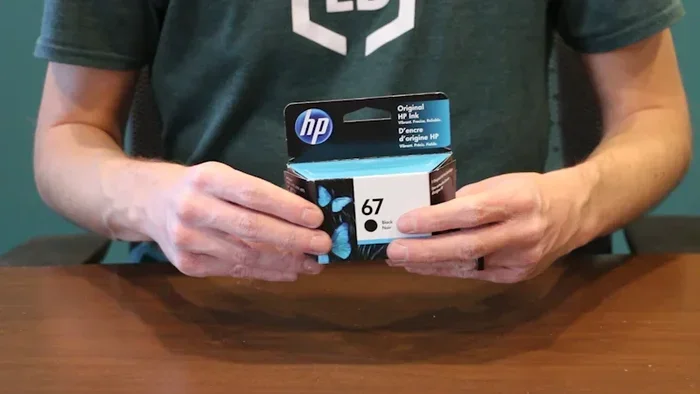
Every cartridge has a model number printed on its label. You will find codes like HP 305, Epson 202, or Canon PGI-280. These numbers are not random. They identify the exact cartridge designed for a specific printer.
Your printer manual lists the compatible cartridges. You can also find this information on the manufacturer’s website. Simply enter your printer model number, and the site will show you the correct cartridge options.
Some printers use multiple cartridges at once. A standard setup might include a black cartridge and a tri-color cartridge. Higher-end printers use individual color cartridges for cyan, magenta, and yellow. Each of these has its own cartridge model number. Mixing them up is an easy mistake to make.
What Happens When You Use the Wrong Cartridge
Using an incompatible cartridge can cause a range of problems. Some issues appear immediately. Others build up over time. Let us look at what can go wrong.
Physical Fit Issues
The most obvious problem is that the cartridge simply does not fit. Cartridges come in different shapes and sizes. A cartridge that is too wide will not slide into the slot. One that is too short may not make proper contact with the printer’s connectors.
Forcing a cartridge into a slot it does not belong in can damage the printer’s internal components. The contacts can bend. The cartridge holder can crack. Repair costs often exceed the savings from using a cheaper cartridge.
Software and Chip Recognition Problems
Even if a cartridge physically fits, the printer may not accept it. The chip inside the cartridge tells the printer who made it and what model it is. If the chip does not match, the printer will not print.
Some third-party cartridges use reset chips that mimic genuine cartridges. These can work, but they are not always reliable. The printer might display warnings or refuse to recognize the cartridge after a few uses.
In wireless printers, WiFi antenna quality can also play a role in how smoothly the printer communicates with connected devices during cartridge setup. Poor WiFi antenna quality may cause delays or errors during wireless printer setup, especially when the printer tries to verify cartridge authenticity through cloud-connected services.
Print Quality Problems
Even when a wrong cartridge does work, the results are often disappointing. You may notice faded prints, streaks, or uneven color distribution. The ink type and ink system in an incompatible cartridge may not align with the printer’s expectations.
Over time, using the wrong cartridge can clog the print head. Dried ink or incorrect ink formulations can damage internal parts. This leads to costly repairs or the need to replace the printer entirely.
How to Find the Right Cartridge for Your Printer
Finding the correct cartridge is straightforward when you know where to look. Follow these steps to make sure you always get the right match.
Step-by-Step Guide to Cartridge Selection
- Check your printer model number. Look on the front or back of the printer. Write it down.
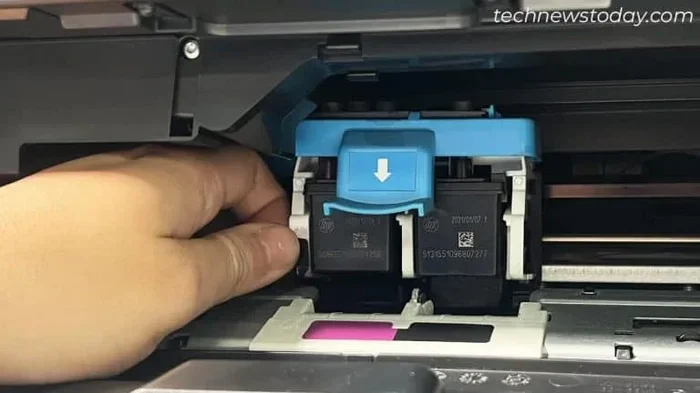
- Open the printer’s cartridge compartment. Remove the current cartridge and read the label.
- Note the cartridge model number. This is usually printed clearly on the top or side of the cartridge.
- Search for that model number online. Use the manufacturer’s website or a trusted retailer.
- Compare OEM and compatible options. Decide based on your budget and print quality needs.
- Verify the ink type. Make sure the cartridge uses the same ink system as your printer requires.
Quick Tips for Cartridge Selection
- Always buy from reputable sellers. Counterfeit cartridges are a real problem in the market.
- Keep your old cartridge packaging until you have tested the replacement.
- If you print often, consider high-yield cartridges. They cost more upfront but save money over time.
- For wireless printer users, ensure your printer firmware is up to date. Firmware updates improve cartridge recognition and overall print quality.
- Remember that the page coverage rating on cartridges assumes 5% coverage per page. Heavy graphics or photos use more ink.
Some printers work best with specific ink systems that are optimized for their print heads. Using a cartridge designed for a different printer brand or even a different model within the same brand can lead to poor results. Always double-check before you buy.
The Impact of Printer Connectivity on Cartridge Setup
Modern printers connect to devices through WiFi, Bluetooth, and USB. When you install a new cartridge, the printer often communicates with the manufacturer’s servers to verify the product. This verification process depends on a stable connection.
If your printer has a weak wireless signal, cartridge setup can fail or take longer than expected. The quality of your printer’s WiFi antennas directly affects how smoothly this process works. A strong and reliable connection ensures that cartridge verification, firmware updates, and ink level tracking all function properly.
For best results, place your printer close to your wireless router. Avoid placing it behind thick walls or metal objects. A stable connection makes the entire printing experience smoother, from cartridge installation to the final print output.
Common Mistakes People Make with Ink Cartridges
Even careful users make mistakes with ink cartridges. Here are the most common ones and how to avoid them.
Assuming All Cartridges From the Same Brand Are Interchangeable
This is one of the biggest mistakes. Just because a cartridge is made by HP does not mean it fits every HP printer. Different HP printer lines use different cartridge systems. The HP Envy series uses different cartridges than the HP OfficeJet series. Always match the specific cartridge model to your printer model.
Ignoring Chip Compatibility
The chip on a cartridge is not just a formality. It plays a real role in how the printer operates. Some cheap compatible cartridges use low-quality chips that wear out quickly. Once the chip fails, the printer will not recognize the cartridge at all.
Invest in compatible cartridges from trusted third-party brands. Read reviews and check return policies before purchasing. A little research goes a long way toward avoiding frustration.
Forgetting to Reset or Replace Chips
When you refill a cartridge, the chip often still shows the cartridge as empty. You need to either replace the chip or reset it manually. Skipping this step means the printer will not print, even if the cartridge is full of ink.
Some refillable ink systems come with auto-reset chips. These make the process much easier. If you use refillable cartridges, look for this feature to save time and effort.
Buying Based on Price Alone
The cheapest cartridge is not always the best deal. Low-quality cartridges may leak, dry out faster, or produce poor print quality. Over time, you may spend more replacing failed cartridges than you saved by buying the cheap option.
Look for a balance between price and quality. Check the ink yield rating and read user reviews. A slightly more expensive cartridge that lasts longer and prints better is a smarter choice.
Expert Insights on Ink Cartridge Compatibility
Printer technicians and industry experts agree on a few key points about cartridge compatibility. Here is what the professionals want you to know.
Always use the cartridge recommended by the printer manufacturer. This is the single best way to ensure reliable performance and long printer life. If you choose to use compatible or refillable cartridges, do your research and buy from reputable sources.
Keep your printer firmware updated. Manufacturers regularly release firmware updates that improve cartridge recognition and print quality. An outdated firmware version can cause compatibility issues even with the correct cartridge.
Store cartridges properly. Ink cartridges should be kept in a cool, dry place. Heat and humidity can damage the ink and the chip. Proper storage extends the shelf life of your cartridges and ensures consistent results every time you print.
Do not mix old and new cartridges. If one cartridge is running low and another is full, replace both at the same time. Mixing levels can cause uneven ink flow and affect the print head.
Know your warranty terms. Using third-party cartridges does not automatically void your printer warranty in most regions. However, if a third-party cartridge causes damage, the manufacturer may refuse to cover the repair. Understand your rights before making a switch.
Conclusion
Do all ink cartridges fit all printers without issues? The answer is clearly no. Each printer requires a specific cartridge based on its design, chip system, and ink delivery mechanism. Using the wrong cartridge leads to fit problems, recognition errors, and poor print quality.
The good news is that finding the right cartridge is simple when you follow the right steps. Check your printer model. Match the cartridge number. Choose between OEM and compatible options based on your needs. Take care of your cartridges and your printer will reward you with reliable, high-quality prints for years to come.
Remember that every detail matters. From the printer model to the cartridge model, from the chip to the ink type. A little attention to compatibility saves you money, protects your printer, and keeps your prints looking their best. Apply what you have learned here, and you will never second-guess your cartridge choice again.
Frequently Asked Questions
Can I use a compatible cartridge instead of an OEM cartridge?
Yes, you can use a compatible cartridge, but make sure it is designed for your specific printer model. Compatible cartridges from reputable brands offer good value and reliable print quality. However, some manufacturers may void your warranty if a third-party cartridge causes damage. Always check your printer’s warranty terms before switching.
Why does my printer reject a cartridge even though it fits physically?
The cartridge’s chip may not be recognized by the printer. Each manufacturer uses a unique chip system to verify cartridge compatibility. If the chip does not match, the printer will refuse to print. Try removing and reinserting the cartridge. If the problem persists, the cartridge may be incompatible or the chip may be faulty.
How do I know which cartridge number my printer needs?
Check your printer manual or look at the label on your current cartridge. The cartridge model number is printed directly on the cartridge. You can also find this information on the printer manufacturer’s website by entering your printer model number. Always use the exact model number listed for your printer.
Will using the wrong ink cartridge damage my printer?
Yes, using the wrong ink cartridge can cause damage over time. Incorrect ink formulations can clog the print head and damage internal components. Physical mismatches can bend connectors or crack cartridge holders. Always use cartridges recommended for your specific printer model to avoid costly repairs.
Do wireless printers have different cartridge requirements than wired printers?
No, the cartridge requirements are the same regardless of connection type. What matters is the printer model, not how it connects to your devices. However, wireless printers rely on stable connectivity for cartridge verification and firmware updates. A printer with strong WiFi antennas will handle cartridge setup and updates more smoothly than one with a weak signal.
How long do ink cartridges last before they expire?
Most ink cartridges last for about two years from the date of manufacture if stored properly. Unopened cartridges can last even longer. Once installed in the printer, the cartridge’s lifespan depends on usage and storage conditions. Keep cartridges in a cool, dry place and avoid exposing them to direct sunlight or extreme temperatures.