Are All Wifi Antennas The Same Or Are They Different
No, all wifi antennas are not the same. Different designs, shapes, and technologies dramatically impact your wireless signal range, speed, and coverage. This guide breaks down the key differences so you can choose the right wifi antenna for your home or office.
You might think every wifi antenna looks the same. They all seem like little sticks or patches on your router. But the truth is, they are very different. The design of a wifi antenna changes how far your signal travels and how strong it is. If you have slow internet in the back bedroom, your antenna might be the problem.
Many people buy a new router when the signal drops. But a simple antenna swap can fix the issue. This guide explains why wifi antennas are not all the same. You will learn about gain, direction, and the different types. By the end, you will know exactly which antenna fits your home.
We will also cover common mistakes and expert tips. You will get clear, simple advice you can use today. No jargon, no fluff. Just real help for better wireless performance.
Key Takeaways
- Not all wifi antennas are identical: They vary in shape, gain, and design to suit different needs.
- Antenna gain measured in dBi determines how focused or spread the signal is.
- Omnidirectional antennas broadcast in all directions, while directional antennas focus the signal.
- Internal vs external antennas affect performance and placement flexibility.
- Upgrading your antenna can solve dead zones without buying a new router.
- Matching antenna type to your use case is crucial for optimal wifi performance.
📑 Table of Contents
Why Wifi Antennas Are Not All Created Equal
Think of a wifi antenna like a flashlight. A bare bulb shines light everywhere. A focused beam reaches far in one direction. Antennas work the same way. They shape radio waves to cover your space. The shape, size, and design decide how the signal behaves.
Not all routers use the same antenna. Some have tiny internal pieces hidden inside the plastic shell. Others have big external sticks you can see. Each type serves a different purpose. The key is matching the antenna to your needs. A wrong choice leads to weak spots and frustration.
The Role of Antenna Gain
Antenna gain is the first thing to understand. Gain measures how well an antenna focuses energy. It is not about making the signal stronger from nothing. It is about shaping the signal. The unit is dBi, which stands for decibels relative to an isotropic radiator.
A low gain antenna spreads signal wide. A high gain antenna pushes signal far in one direction. Imagine a balloon inflating. A low gain antenna is like a round balloon. The air goes everywhere equally. A high gain antenna is like a long balloon. It stretches the air forward. This changes your wifi coverage completely.
Most home routers ship with 2 dBi to 5 dBi antennas. These give a nice round shape for a small apartment. A 9 dBi antenna will reach much farther down the hall. But it might not cover the floor above as well. You must balance gain with your space.
Omnidirectional vs Directional Signals
Omnidirectional antennas send signal in all directions. They look like a straight stick. They work great for a central router in a home. You get coverage in every room around it. This is the most common type for router antennas.
Directional antennas focus the signal into a narrow beam. They look like a flat panel or a long tube. They push the signal far in one direction. You use them to reach a distant shed or office. They ignore the back area to boost the front. This is perfect for point-to-point links.
Some antennas are semi-directional. They cover a wide arc but not a full circle. A panel antenna is a good example. It sends signal forward and slightly down. This works well in hallways or long buildings. You get more range than an omnidirectional stick in that direction.
Types of Wifi Antennas Explained
Not all wireless antennas are built the same. They come in many shapes for different jobs. Let us break them down so you can spot them easily.
Internal Antennas in Modern Routers
Many new routers hide the antenna inside the plastic case. These are called internal antennas. They are flat and low profile. They look clean on your desk. But they have limits.
Internal antennas are usually omnidirectional. They send signal in all directions. However, the plastic case can block some of the signal. The gain is often low, around 2 dBi to 3 dBi. This is fine for a small room. But if you need to reach far, they will struggle. You cannot replace an internal antenna easily either.
External Antennas You Can Upgrade
External antennas are the detachable sticks on many routers. They have connectors on the base. Common connector types are RP-SMA and SMA. These let you swap the antenna easily.
You can buy higher gain external wifi antennas to boost range. A 9 dBi omnidirectional stick will reach much farther than the stock 5 dBi one. You can also attach a directional antenna for a specific area. This is a cheap way to fix a dead zone without a new router.
External antennas also help with heat. They sit outside the router body. This can improve stability. Some heavy-duty routers have multiple external antenna ports. They use MIMO technology to send and receive data on several paths at once.
Specialty Antennas for Long Range
When you need serious reach, specialty antennas come in. A Yagi antenna looks like a flat grid with many elements. It is highly directional. You point it at a distant house or building. It can reach over a mile with clear line of sight.
A parabolic dish works like a satellite dish. It focuses the signal very tightly. These are used for point-to-point links between buildings. They are not for home use usually. But they show how shape changes distance.
A patch antenna is flat and square. It sends a wide beam forward. You can mount it on a wall or ceiling. It works well for covering a long corridor. A ceiling-mounted omnidirectional antenna hangs down and covers all floors equally. These specialty pieces solve hard coverage problems.
How Antenna Design Impacts Your Wifi Performance
The shape of an antenna shapes your wireless performance. It affects signal strength, speed, and how many devices can connect. Let us look at the key factors.
Signal Strength and Coverage Area
A higher gain antenna does not make your internet faster. It makes the signal travel farther. But it also narrows the coverage area. This is a trade-off. You gain distance but lose width.
If you live in a single story house, a high gain stick antenna might work. It reaches the backyard and the far bedroom. But it might leave the room right next to the router with a weak spot. The signal is focused away from the router. You must place it carefully.
Signal strength is measured in dBm. A stronger signal means fewer dropped packets. This reduces latency for gaming and video calls. Your wifi speed stays more stable when the signal is strong. A good antenna keeps the dBm numbers high in the areas you need.
Frequency Bands: 2.4 GHz vs 5 GHz
Most wifi antennas work on both 2.4 GHz and 5 GHz bands. The 2.4 GHz band travels farther and penetrates walls better. The 5 GHz band gives higher speed but shorter range. Antennas must be designed for these different wavelengths.
A dual-band antenna handles both frequencies. It has elements tuned to each band. Some antennas are single band. They only work on 2.4 GHz. You must check this before buying. A 5 GHz only antenna will not work with older devices on 2.4 GHz.
Interference also plays a role. The 2.4 GHz band is crowded with microwaves and Bluetooth. The 5 GHz band is cleaner. A good antenna reduces the impact of interference by focusing the signal. Beamforming is a technology that shapes the signal toward your device. It works best with compatible routers and antennas.
When You Should Upgrade Your Wifi Antenna
You do not need a new router to get better coverage. Swapping the antenna is often the first step. But how do you know it is time? Here are clear signs.
Signs Your Current Antenna Is Holding You Back
Do you see a dead zone in your home? A dead zone is a spot with no signal. If the router is close but the signal drops, the antenna might be weak. You might also notice slow speeds in certain rooms. This happens when the signal has to pass through thick walls or long hallways.
Another sign is the router getting too hot. Internal antennas trapped in a hot case can throttle performance. An external antenna moves the radio energy outside. This can cool the router down. You may also have an old router with only 2 dBi antennas. Upgrading to 5 dBi or 8 dBi can make a big difference.
Think about your layout. Do you have a two-story home? A flat antenna on the first floor may not reach the second floor well. A ceiling-mounted omnidirectional antenna can spread signal vertically. A directional antenna can shoot the signal down the stairs. Matching the shape to your home is key.
Quick Tips for Choosing a Replacement
First, check the connector type. Most routers use RP-SMA connectors. Do not buy an SMA antenna by mistake. The pin positions are different. A quick look at the base of your current antenna tells you the type.
Second, decide on gain. For a small apartment, 3 dBi to 5 dBi is fine. For a large house, 8 dBi to 12 dBi might help. But do not go too high. A 15 dBi antenna is very narrow. It will reach far but miss the sides. Third, pick the right type. Omnidirectional for all-around coverage. Directional for a specific distant spot.
Fourth, consider the frequency band. Buy a dual-band antenna if your router supports both. Fifth, look for weatherproof antennas if you go outdoor. A standard indoor antenna will rust quickly outside. These simple checks save you from buying the wrong piece.
Common Mistakes People Make with Wifi Antennas
Even with the right antenna, people make errors. Avoid these mistakes to get the best results.
Buying the Highest Gain Antenna Without Thinking
The highest gain number looks impressive. But it is not always better. A 12 dBi directional antenna pointed at the wrong wall will give you nothing. You must aim it correctly. A high gain antenna also has a narrow sweet spot. If your device is not in that beam, the signal drops fast.
Many users buy a high gain stick and wonder why the back of the house is worse. The energy has moved forward. You traded back coverage for front reach. Always map your coverage needs before choosing gain. A medium gain omnidirectional is a safer starting point.
Ignoring Connector Types and Compatibility
Antennas do not all plug in the same way. RP-SMA and SMA are the most common. They look similar but the center pin is swapped. Plugging the wrong one can damage the router port. Always check the connector type on your router and antenna cable.
Some routers use proprietary connectors. You may need a specific pigtail or adapter. Do not force a connector. It will not fit and can break the threads. A cheap adapter can also cause signal loss. Keep the connection short and direct for best wireless performance.
Placing the Antenna Poorly
A great antenna in the wrong spot fails. Do not stuff it behind a metal cabinet. Metal blocks radio waves. Do not lay a flat panel antenna face down on a desk. The signal shoots out the back, not through you. Position matters as much as the antenna type.
Keep antennas away from thick walls and large appliances. Microwaves and cordless phones cause interference on the 2.4 GHz band. Elevate the antenna if possible. Signal travels better downward and outward. A little thought on placement gives you a big boost.
Expert Insights: Getting the Most from Your Antenna Setup
Professional network builders use a few tricks to maximize wifi coverage. You can apply them at home too.
Positioning and Placement Tricks
Place the router in the center of your home. This gives the omnidirectional signal the best chance to reach all rooms. Elevate the router on a shelf. Signals spread better downward from a height. Avoid corners and closets. A corner blocks two sides of the signal at once.
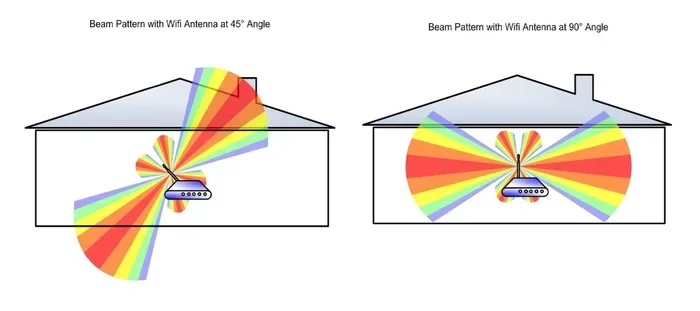
If you use external antennas, point one slightly up and one slightly down. This creates a donut shape of coverage around the router. It covers the same floor well. For a two-story home, you can angle one antenna horizontally. This spreads the signal across floors. Many people point all antennas straight up. That is not always optimal.
Combining Antennas for Better MIMO Performance
Modern routers use MIMO, which stands for Multiple Input Multiple Output. They have multiple antenna ports. Each port sends a separate data stream. Using the right antennas on each port boosts speed and reliability.
Do not mix antenna types on a MIMO router. Use the same gain and type on all ports. A mismatch can cause one stream to be weaker. The router then balances all streams to the slowest one. Keep all antennas the same for the best network coverage. If you upgrade one, upgrade them all.
Some advanced users use a directional antenna on one port and an omnidirectional on another. This creates a shaped coverage pattern. But it requires careful tuning. For most homes, matching antennas is simpler and safer.
Conclusion
So, are all wifi antennas the same? The answer is a clear no. They come in many shapes, gains, and designs. Each one shapes your wireless signal in a unique way. A small antenna swap can fix dead zones and boost range. You do not need to buy a whole new router to get better performance.
Understanding gain, direction, and connector types puts you in control. You can choose an omnidirectional antenna for all-around coverage. Or a directional antenna to reach a distant building. The right choice depends on your home layout and needs. Avoid common mistakes like mismatched connectors and poor placement.
Take a look at your current setup. Is your router hidden behind a TV stand? Are the stock antennas old and low gain? A simple upgrade might be all you need. Apply the tips from this guide and enjoy stronger wifi performance today.
Frequently Asked Questions
Can I replace the antenna on my router?
Yes, if your router has detachable external antennas. Look for RP-SMA or SMA connectors on the base. You can unscrew the stock antenna and screw in a new one. Internal antennas are not user-replaceable.
Does a higher dBi antenna make internet speed faster?
Not directly. A higher dBi antenna extends range and signal strength. It does not increase your internet plan speed. But a stronger signal reduces drops and latency, which can improve perceived speed for streaming and gaming.
What is the difference between 2.4 GHz and 5 GHz antennas?
A dual-band antenna works on both 2.4 GHz and 5 GHz frequencies. The 2.4 GHz band travels farther and penetrates walls better. The 5 GHz band offers faster speeds but shorter range. Make sure your antenna supports the bands you need.
Will a directional antenna improve my home wifi?
It depends on your layout. A directional antenna sends signal far in one direction. It is great for reaching a detached garage or office. But it will not improve coverage in all rooms. Use it for a specific weak spot, not whole-home coverage.
How many antennas should my router have for best performance?
More antennas support more MIMO streams. A 2×2 router has two antenna ports. A 4×4 router has four. More antennas can increase speed and reliability for multiple devices. But the router and your devices must also support the same number of streams.
Can I use an outdoor antenna indoors?
You can, but it is not ideal. Outdoor antennas are built for weather resistance. They often have higher gain and are directional. Indoors, they may be too strong and focused. An indoor omnidirectional antenna usually works better for home use.