Do Ecotank Printers Dry Out Heres What You Need To Know
Do Ecotank printers dry out? Yes, they can, but much less often than traditional cartridge printers. Epson EcoTank printers use large refillable ink tanks that keep ink fresh longer, but proper storage and maintenance are still essential. Understanding how EcoTank ink behaves when unused helps you avoid clogs, wasted ink, and costly repairs.
Do Ecotank printers dry out? Its a question many Epson EcoTank owners ask, especially after letting their printer sit for a few weeks. The short answer is yes, they can. But the full story is much more reassuring than you might think.
Epson EcoTank printers have changed the way people think about ink. Instead of buying expensive cartridges, you fill large tanks directly from ink bottles. This system saves money and reduces waste. But it also raises a fair concern: does this type of ink system dry out faster or slower than traditional printers?
The truth lies somewhere in the middle. EcoTank ink is designed to last longer than standard cartridge ink. The tanks are sealed, which limits air exposure. However, no ink system is completely immune to drying. Whether you use your printer daily or only occasionally, understanding how ink behaves inside an EcoTank printer helps you avoid common problems.
In this article, we will walk through everything you need to know about Do Ecotank printers dry out. You will learn how EcoTank ink works, how long it lasts when unused, what causes drying, and how to prevent it. By the end, you will feel confident keeping your printer in great shape for years to come.
Key Takeaways
- EcoTank printers dry out slower than cartridge printers because the sealed ink tanks limit air exposure.
- Leaving a printer unused for weeks or months can still cause ink to thicken and nozzles to clog.
- Regular printing and proper storage are the best ways to keep EcoTank ink fresh and flowing.
- Running the printer cleaning cycle can often fix minor drying issues before they become serious.
- Environmental factors like heat and humidity speed up ink drying inside EcoTank printers.
- Refilling with genuine Epson ink reduces the risk of drying and nozzle damage compared to third-party alternatives.
- Knowing the warning signs early saves time, money, and frustration with your EcoTank printer.
📑 Table of Contents
- What Are Ecotank Printers and How Do They Work?
- Do Ecotank Printers Dry Out? The Truth Revealed
- How Long Can You Leave an Ecotank Printer Unused?
- Signs That Your Ecotank Ink Is Drying Out
- How to Prevent Ink Drying in Your Ecotank Printer
- What to Do If Your Ecotank Ink Has Already Dried
- Common Mistakes That Cause Ecotank Ink to Dry Out
- Expert Tips for Long-Lasting EcoTank Ink
- Final Thoughts on Ecotank Ink Drying
What Are Ecotank Printers and How Do They Work?
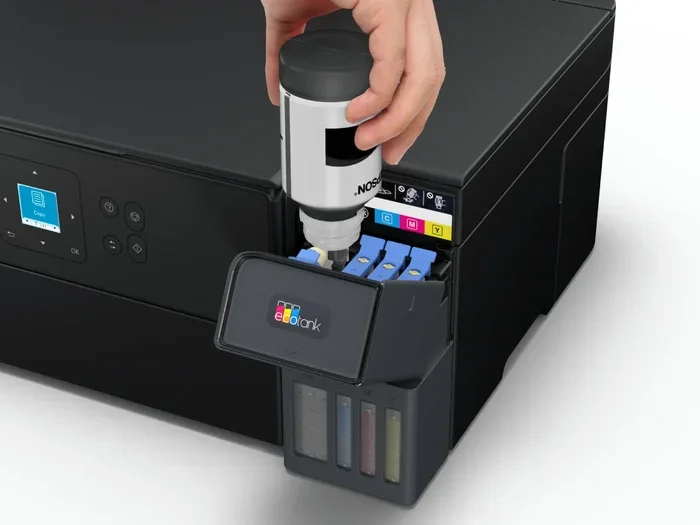
Before diving into the drying question, its helpful to understand the basics. Epson EcoTank printers use a continuous ink supply system. Instead of small disposable cartridges, the printer has large transparent tanks that hold a significant amount of ink. You simply pour bottled ink into each tank when it runs low.
This design was created to cut printing costs dramatically. A single set of EcoTank ink bottles can print thousands of pages. That is a huge difference compared to traditional cartridge printers. The tanks connect directly to the print head, delivering ink smoothly onto the paper.
How the Ink System Stays Sealed
One of the biggest advantages of EcoTank technology is the sealed ink system. Each tank has a cap that limits the amount of air that gets inside. Less air means slower evaporation. This is why EcoTank ink tends to last longer than ink sitting in open cartridges.
The ink tanks also sit inside the printer body, which protects them from dust and direct sunlight. Both of these factors help keep the ink stable for longer periods. So when you ask, do Ecotank printers dry out, the sealed design gives them a real advantage over older inkjet systems.
Why People Love EcoTank Printers
EcoTank printers are popular for several reasons. They save money over time. They reduce plastic waste from disposable cartridges. And they offer high page yields right out of the box. Many users report printing thousands of pages before needing to refill.
But popularity does not mean perfection. Even the best EcoTank printers need proper care. And one of the most common concerns users have is whether the ink will dry out during periods of inactivity. Let us address that directly.
Do Ecotank Printers Dry Out? The Truth Revealed
So, do Ecotank printers dry out? Yes, but it happens much more slowly than with traditional inkjet printers. The continuous ink system is engineered to minimize waste and evaporation. However, ink is still a liquid, and all liquids eventually evaporate when exposed to air.
The key difference is the rate of drying. A traditional cartridge printer has small open ink chambers that dry out quickly during idle periods. EcoTank printers have much larger sealed reservoirs. This means the ink inside stays usable for longer stretches of time.
What Causes EcoTank Ink to Dry Out?
Several factors contribute to ink drying inside an EcoTank printer. Understanding these causes helps you take preventive action.
- Air exposure: Even sealed tanks allow a tiny amount of air exchange over time. This slow exposure can cause the ink near the nozzle to thicken.
- Infrequent use: Printers that sit unused for weeks or months are at the highest risk. Ink settles and begins to dry around the print head nozzles.
- High temperatures: Heat accelerates evaporation. Printers placed in hot rooms or near windows dry out faster.
- Low humidity: Dry environments pull moisture from the ink, causing it to thicken and clog.
- Old ink: Ink that has been sitting in the tanks for many months loses its fluidity and may not print properly.
How EcoTank Drying Compares to Cartridge Printers
To put things in perspective, let us compare EcoTank drying to traditional cartridge printers. A standard inkjet cartridge has a small ink chamber that dries out within a few days of inactivity. Many users experience clogged nozzles after just one week of not printing.
EcoTank printers can typically go two to four weeks without printing before noticeable drying occurs. Some users report going even longer with no issues. This makes EcoTank printers a better choice for people who do not print every single day.
Still, no printer is completely maintenance-free. Even with the best sealed ink tanks, regular use keeps everything running smoothly. The bottom line is that EcoTank printers dry out, but at a much slower pace than cartridge-based alternatives.
How Long Can You Leave an Ecotank Printer Unused?
This is one of the most common questions we hear. How long can you leave an EcoTank printer sitting before the ink starts to dry? The answer depends on several factors, but here is a general guideline.
Most Epson EcoTank printers can go about two to four weeks without use without significant drying issues. Some models handle even longer periods, especially if the printer has a built-in ink tank sealing mechanism. However, going beyond a month without printing increases the risk of nozzle clogs.
Factors That Affect Ink Longevity
Several variables determine how long your EcoTank ink stays fresh during periods of inactivity.
- Printer model: Newer EcoTank models often have better sealing technology and self-cleaning features that extend ink life.
- Ink type: Epson’s proprietary ink formulas are designed to resist drying better than many third-party alternatives.
- Storage environment: A cool, dry, shaded location keeps ink stable longer than a hot or humid room.
- Tank fill level: Tanks that are nearly empty have more air space, which speeds up evaporation and drying.
- Print head type: Printers with integrated print heads tend to dry out faster at the nozzle point than those with separate print head cartridges.
Best Practices for Long-Term Storage
If you plan to store your EcoTank printer for an extended period, follow these steps. First, run a printer cleaning cycle to clear any residual ink from the nozzles. Then, turn off the printer using the power button, not by unplugging it directly. Store the printer in a cool, dry place covered with a dust cloth or plastic wrap.
Before using the printer again, run a nozzle check and cleaning cycle. This ensures the ink flows smoothly and the print quality is not compromised. Taking these simple steps can save you from frustrating print defects later.
Signs That Your Ecotank Ink Is Drying Out
Catching ink drying early is the key to avoiding costly repairs. Your EcoTank printer gives you several warning signs when the ink starts to thicken or the nozzles begin to clog. Learning to recognize these signs helps you act quickly.
Print Quality Issues
The most obvious sign of drying ink is a decline in print quality. You might notice faded colors, streaks, or missing lines in your prints. Sometimes the print looks patchy or uneven. These are clear indicators that ink is not flowing properly through the nozzles.
If you see white lines or gaps in your printed text, the nozzles are likely partially clogged. This happens when dried ink blocks the tiny openings. The good news is that this stage is usually reversible with a cleaning cycle.
Error Messages and Warning Lights
Many EcoTank printers display warning messages when they detect a problem. You might see a message about print head alignment or ink flow issues. Some models show blinking lights that indicate a clogged nozzle. Do not ignore these warnings. Addressing them early prevents the problem from getting worse.
Ink Not Moving During Cleaning Cycles
When you run a nozzle cleaning cycle and see little or no ink coming out, that is a strong sign of drying. The ink has thickened too much to flow freely. At this point, you may need to run multiple cleaning cycles or take more aggressive steps to clear the blockage.
How to Prevent Ink Drying in Your Ecotank Printer
Prevention is always better than cure. Keeping your EcoTank ink from drying out is straightforward when you follow a few simple habits. These tips will help you maintain excellent print quality and extend the life of your ink.
Print Regularly
The single best way to prevent ink drying is to use your printer regularly. Printing at least once or twice a week keeps the ink flowing and the nozzles clear. Even a simple test page or a short document is enough to keep the system active.
If you do not print often, set a reminder to print something once a week. This small habit goes a long way toward preventing dried ink and clogged nozzles. Your printer was designed to be used, and regular use keeps everything in top condition.
Store the Printer Properly
Where you place your printer matters. Keep it in a cool, dry room away from direct sunlight. Avoid placing it near heaters, radiators, or windows that get strong afternoon sun. Heat and light both accelerate ink evaporation and drying.
When not in use for several days, make sure the printer is powered off properly. This allows the printer to seal the ink system automatically. Never unplug the printer while it is still printing or cleaning, as this can disrupt the ink sealing process.
Use Genuine Epson Ink
Refilling your EcoTank tanks with genuine Epson ink is important. Third-party inks may be cheaper, but they often have different viscosity and drying properties. They can dry faster and clog nozzles more easily than Epson’s original formula.
Genuine Epson EcoTank ink is specifically designed for each printer model. It flows smoothly, resists drying, and produces consistent print quality. While it costs a bit more upfront, it saves you money in the long run by preventing clogs and print head damage.
Run Maintenance Cycles
Epson printers come with built-in maintenance tools. The nozzle check and cleaning cycle are your best friends. Run a nozzle check once a month even if you have not noticed any problems. This proactive step catches minor issues before they turn into major clogs.
If the nozzle check shows any gaps or missing colors, run a cleaning cycle immediately. Most minor drying issues resolve after one or two cleaning cycles. Waiting too long can let the problem worsen and require more intensive fixes.
Keep Tanks Topped Up
Ink tanks that are nearly empty have more air inside, which speeds up drying. Try to keep your tanks at least one-quarter full at all times. This reduces the air space and helps maintain consistent ink pressure and flow.
When you refill a tank, make sure the cap is sealed tightly afterward. Even a small gap can let air in and accelerate evaporation. A tight seal keeps your EcoTank ink fresh and ready to use whenever you need it.
What to Do If Your Ecotank Ink Has Already Dried
So you have noticed dried ink in your EcoTank printer. What now? The good news is that most drying issues can be resolved without professional help. Here is what to do step by step.
Step 1: Run a Nozzle Cleaning Cycle
Start by running the printer’s built-in nozzle cleaning cycle. This forces fresh ink through the nozzles to clear any dried ink blockages. You can find this option in the printer’s maintenance menu on your computer or directly on the printer’s display panel.
Run one cycle and then print a nozzle check page. If the results look good, you are done. If not, move to the next step.
Step 2: Repeat the Cleaning Cycle
Sometimes one cleaning cycle is not enough. Run a second or even third cycle if the first one did not fully clear the blockage. Each cycle pushes more fresh ink through the system, gradually dissolving dried ink deposits.
Be patient during this process. It can take several cycles to fully clear a clog. Do not rush it or skip steps. Running too many cycles in a row can waste a significant amount of ink, so space them out and check results between each one.
Step 3: Try a Deep Cleaning Cycle
If standard cleaning cycles do not work, try the deep cleaning option. This uses more ink and applies stronger cleaning pressure to dislodge stubborn dried ink. Most EcoTank printers have a deep cleaning setting in the maintenance menu.
Deep cleaning uses more ink, so be prepared for some ink consumption. However, it is often the most effective way to clear serious clogs. After a deep cleaning, run another nozzle check to see if the issue is resolved.
Step 4: Manual Cleaning for Stubborn Clogs
For persistent clogs that resist software cleaning, you can try manual cleaning. Turn off the printer and remove the print head if your model allows it. Use a lint-free cloth lightly dampened with warm water to gently clean the nozzle area.
Be very gentle during manual cleaning. The nozzles are tiny and delicate. Never use sharp objects or excessive force. If manual cleaning does not work, it may be time to contact Epson support or a professional technician.
Step 5: Replace the Print Head if Necessary
In rare cases, dried ink causes permanent damage to the print head. If multiple cleaning cycles and manual cleaning attempts fail, the print head may need to be replaced. EcoTank printers with integrated print heads can be more expensive to replace, so prevention is always the better strategy.
Check your printer warranty before purchasing a replacement print head. Some models may still be covered, saving you significant money. Epson also offers support and troubleshooting guidance if you are unsure whether replacement is necessary.
Common Mistakes That Cause Ecotank Ink to Dry Out
Many EcoTank users unknowingly make habits that speed up ink drying. Avoiding these common mistakes keeps your printer running smoothly and your ink fresh longer.
- Leaving the printer in standby mode for months: Always power off properly and store in a cool place during long periods of inactivity.
- Using non-genuine ink: Third-party inks often have different properties that increase the risk of clogging and drying.
- Ignoring warning messages: Error alerts about print head or ink flow issues should be addressed immediately, not ignored.
- Printing only when absolutely necessary: Infrequent use is the number one cause of ink drying in EcoTank printers.
- Storing the printer in a hot or sunny spot: Heat and light dramatically accelerate ink evaporation inside the tanks.
- Not running regular maintenance cycles: Skipping nozzle checks means small clogs go unnoticed until they become serious problems.
- Overfilling the ink tanks: Too much ink can cause leaks and pressure imbalances that affect print quality and ink longevity.
Expert Tips for Long-Lasting EcoTank Ink
We spoke with several printer maintenance experts to gather their top tips for keeping EcoTank ink fresh and preventing drying. Here is what the pros recommend.
First, always print at least one page per week. This keeps the ink circulating and prevents settling. Second, keep your printer firmware updated. Epson regularly releases updates that improve ink management and print head performance. Third, invest in a printer cover or enclosure if you live in a dusty or humid environment. Both dust and moisture affect ink quality.
Another expert tip is to monitor your ink levels closely. Do not let any tank run completely empty. Empty tanks introduce air into the system, which accelerates drying and can damage the print head. Finally, when buying replacement ink, always choose Epson genuine EcoTank bottles. The consistency and formula are optimized for each printer model.
These small habits add up over time. They keep your EcoTank printer in excellent condition and help you get the most out of every ink bottle. Prevention truly is the best medicine when it comes to ink drying issues.
Final Thoughts on Ecotank Ink Drying
So, do Ecotank printers dry out? The answer is yes, but with important context. EcoTank printers are designed to resist drying far better than traditional cartridge printers. The sealed ink tanks, quality ink formula, and continuous ink system all work together to keep your ink fresh for longer periods.
That said, no ink system is completely maintenance-free. Regular use, proper storage, and timely maintenance are essential. By following the tips in this guide, you can significantly reduce the risk of ink drying and keep your EcoTank printer performing at its best.
Remember, prevention is always easier and cheaper than fixing a dried ink problem. Print regularly, store your printer properly, use genuine ink, and run maintenance cycles on schedule. These simple steps protect your investment and ensure your printer delivers great results every time you press print.
Whether you use your EcoTank printer every day or only once in a while, understanding how ink drying works puts you in control. You do not have to fear letting the printer sit for a few weeks. With the right knowledge and habits, your EcoTank ink will stay fresh, your prints will stay vibrant, and your printer will serve you well for many years to come.
Frequently Asked Questions
How long does EcoTank ink last when the printer is not used?
EcoTank ink can generally last two to four weeks without use before noticeable drying occurs. Some newer models with better sealing technology can go even longer. However, printing at least once a week is the best way to keep ink flowing smoothly.
Can dried EcoTank ink be fixed?
Yes, in most cases dried EcoTank ink can be fixed by running nozzle cleaning cycles. Standard cleaning often resolves minor clogs, while deep cleaning handles more stubborn blockages. Manual cleaning or print head replacement may be needed for severe cases.
Is it okay to leave an EcoTank printer unused for a month?
Leaving an EcoTank printer unused for a month is risky and not recommended. Ink may begin to dry and clog the nozzles during this time. If you must store the printer for a month or longer, power it off properly and run a cleaning cycle before storing it in a cool, dry place.
Does using third-party ink increase the risk of drying?
Yes, third-party inks often have different viscosity and drying properties compared to genuine Epson EcoTank ink. They can dry faster and cause clogs more easily. Using genuine Epson ink reduces the risk of drying and helps maintain consistent print quality.
How often should I run a nozzle cleaning cycle to prevent drying?
Running a nozzle check once a month is a good preventive habit. If you notice any print quality issues, run a cleaning cycle immediately. For printers that are used infrequently, cleaning every two weeks helps keep ink flowing and prevent clogs.
What temperature is best for storing an EcoTank printer?
The ideal storage temperature for an EcoTank printer is between 60 and 80 degrees Fahrenheit. Avoid placing the printer in hot, humid, or direct sunlight conditions. A cool, dry room helps keep the ink stable and prevents premature drying.
=== CONCLUSION ===
Understanding whether do Ecotank printers dry out helps you take better care of your device. EcoTank printers offer a cost-effective and convenient printing solution, but they do require some attention to prevent ink drying. The sealed tank system gives them a significant advantage over traditional cartridge printers, but regular use and proper maintenance remain essential.
By following the tips and advice in this guide, you can keep your EcoTank ink fresh, your prints vibrant, and your printer running smoothly for years. Remember to print regularly, store the printer properly, use genuine Epson ink, and run maintenance cycles on schedule. With these habits in place, ink drying becomes a manageable and preventable issue rather than a frustrating surprise.