Do I Need A Cellular Plan For Apple Watch Explained
Do I Need A Cellular Plan For Apple Watch? The short answer is: it depends on how you use your watch. A cellular plan for Apple Watch lets you make calls, stream music, and use apps without your phone nearby. But a GPS-only model works great for most people who stay close to their iPhone. This guide breaks down everything you need to know about Apple Watch cellular connectivity, costs, setup, and whether it is truly worth the extra monthly fee.
You just bought a shiny new Apple Watch, and you are staring at the setup screen. There is a question that stops you in your tracks. Do I need a cellular plan for Apple Watch? It is a common question, and the answer is not as simple as yes or no. A lot depends on your lifestyle, how you use your watch, and what you expect from it.
Apple offers two main versions of its smartwatch. There is the GPS-only model, and then there is the GPS + Cellular model. The GPS-only watch connects to your iPhone using Bluetooth and Wi-Fi. The cellular version adds mobile data and LTE connectivity. This means your watch can work independently, even when your phone is not around.
In this article, we will walk through everything you need to know. We will cover what a cellular plan for Apple Watch actually does, how much it costs, who really needs it, and how to set it up. By the end, you will know exactly whether a cellular plan for Apple Watch makes sense for you.
Key Takeaways
- A cellular plan is optional: Most Apple Watch users get by just fine with a GPS-only model and their iPhone nearby.
- GPS + Cellular models cost more: You pay extra for the hardware and an additional monthly fee from your carrier.
- Cellular unlocks standalone features: Make calls, send texts, stream music, and use emergency SOS without your phone.
- Family Setup works for kids: You can set up a cellular Apple Watch for children or family members without their own iPhone.
- Data usage is low: Apple Watch uses very little mobile data, so it won’t spike your phone bill.
- Not all carriers support Apple Watch cellular: Check carrier compatibility before buying a GPS + Cellular model.
- eSIM technology makes setup easy: The Apple Watch uses an embedded SIM card that activates directly from your iPhone.
📑 Table of Contents
What Is a Cellular Apple Watch?
An Apple Watch cellular model is a smartwatch that can connect to a mobile network on its own. It uses something called eSIM technology. An eSIM is a tiny chip built into the watch. It acts like a SIM card but you do not need to insert anything physically.
When you activate the cellular feature, your Apple Watch gets its own mobile data connection. This means it can connect to the internet, make calls, and send messages even when your iPhone is out of range. Think of it as giving your watch its own phone number or sharing your existing number through Family Setup.
How Does Apple Watch Cellular Connectivity Work?
The cellular connectivity on Apple Watch works through a technology called eSIM (embedded SIM). Unlike traditional SIM cards that you pop into a tray, an eSIM is soldered directly onto the watch’s motherboard. When you set up a cellular plan for Apple Watch, your carrier loads a profile onto this eSIM remotely.
Here is how it works in practice. Your Apple Watch connects to the same network coverage as your iPhone. If your phone carrier has good LTE coverage in your area, your watch will too. The watch uses very little data usage compared to a phone. Most activities like checking notifications or streaming a song use only a small amount of data.
GPS-Only vs GPS + Cellular Models
Apple sells two versions of nearly every Apple Watch Series and Apple Watch Ultra model. Understanding the difference is key to answering the question, do I need a cellular plan for Apple Watch?
Here is a quick look at the main differences between the two models:
| Feature | GPS-Only Model | GPS + Cellular Model |
|---|---|---|
| Connection to iPhone | Bluetooth and Wi-Fi | Bluetooth, Wi-Fi, and Cellular |
| Works without iPhone | No | Yes (with cellular plan) |
| Make calls independently | No | Yes |
| Stream music offline | Wi-Fi only | Cellular or Wi-Fi |
| Price | Lower | Higher (by $100-$150) |
| Monthly fee | None | $5-$15 extra |
| Emergency SOS | Only with phone nearby | Works anywhere with coverage |
The GPS-only model is perfect for people who always carry their iPhone. If you rarely leave your phone behind, you probably do not need the extra cost. The GPS + Cellular model shines when you want freedom from your phone. Runners, swimmers, and commuters benefit the most from standalone cellular connectivity.
Do You Really Need a Cellular Plan for Apple Watch?
This is the million-dollar question. The answer depends entirely on your daily routine and how you use technology. Let us break it down into two scenarios. When a cellular plan for Apple Watch makes sense, and when you can skip it entirely.
When a Cellular Plan Makes Sense
There are clear situations where a cellular plan for Apple Watch adds real value. If any of these sound like you, the cellular option is worth considering.
- You exercise without your phone: Many people leave their iPhone at home during a run or gym session. With Apple Watch cellular, you can still stream music, track your workout, and call for help if needed.
- You want hands-free calling: Imagine walking into a store and taking a call on your watch. The cellular connectivity lets you do this without digging for your phone.
- You have kids with an Apple Watch: Through Family Setup, you can give your child a cellular Apple Watch for safety. They can call you or emergency services even without their own phone.
- You travel often: When you leave your phone in a hotel room or locker, a standalone Apple Watch keeps you connected.
- You want emergency features: Fall detection and emergency SOS work best with cellular. If you fall and cannot reach your phone, your watch can call for help on its own.
When You Can Skip the Cellular Plan
On the other hand, many people do just fine without a cellular plan for Apple Watch. If any of these apply to you, a GPS-only model is likely all you need.
- You always carry your iPhone: If your phone is with you most of the day, Bluetooth handles all your watch’s needs. Notifications, messages, and calls all route through your phone.
- You use Wi-Fi at home and work: Even without cellular, your watch connects to the internet through Wi-Fi. You can still reply to messages and stream music when near a known network.
- You want to save money: The cellular model costs more upfront, and you pay an extra monthly fee. If you are on a tight budget, the GPS-only model saves you money.
- You mostly use basic features: If your watch usage is limited to telling time, tracking steps, and checking heart rate, you do not need cellular connectivity at all.
How Much Does an Apple Watch Cellular Plan Cost?
Cost is a big factor when deciding do I need a cellular plan for Apple Watch. Let us look at both the upfront cost and the ongoing monthly expenses.
Carrier Fees and Monthly Pricing
The extra monthly cost for an Apple Watch cellular plan varies by carrier. Most major carriers in the US charge between $5 and $15 per month for a smartwatch data plan. Some carriers offer shared plans where the watch uses a portion of your existing data allowance.
Here is a rough look at what different carriers charge:
- Verizon: $5-$10 per month for an Apple Watch plan
- AT&T: $10 per month for an Apple Watch line
- T-Mobile: $10 per month, with some plans including the watch at no extra cost
- Regional carriers: Pricing varies, but many fall in the $5-$15 range
Keep in mind that data usage on an Apple Watch is very low. Streaming a few songs or checking notifications uses minimal data. Most people use less than 100 MB per month. So even if your plan charges by data, the cost stays low.
Family Setup and Shared Plans
One of the best features of Apple Watch cellular is Family Setup. This lets you set up a watch for a family member who does not have their own iPhone. You manage the cellular plan from your phone. This is great for giving kids or elderly relatives a connected watch for safety.
Family Setup works with select carriers. The monthly cost is usually lower than a full phone line. Some carriers charge as little as $5 per month for a Family Setup Apple Watch plan. This makes it an affordable way to stay connected with loved ones.
Setting Up Cellular on Your Apple Watch
If you decide to go with a cellular plan for Apple Watch, the setup process is surprisingly easy. Apple designed it to be simple, and most carriers support direct activation from the Watch app on your iPhone.
Compatibility Requirements
Before you start, make sure you meet these requirements:
- Apple Watch model: You need a GPS + Cellular model (not GPS-only). Check the back of your watch or the product box to confirm.
- iPhone model: You need an iPhone 8 or later running the latest WatchOS.
- Carrier support: Your carrier must support Apple Watch cellular. Most major carriers do, but smaller regional carriers may not.
- Cellular plan: You need an active carrier plan that supports Apple Watch. You can add a new line or use a shared plan.
- Network coverage: Your carrier needs to have LTE coverage in your area for full functionality.
Step-by-Step Activation Process
Here is how to activate your Apple Watch cellular connection:
- Open the Watch app on your iPhone.
- Tap the My Watch tab at the bottom.
- Go to Cellular and tap Set Up Cellular.
- Follow the on-screen prompts. You may need to contact your carrier or choose a plan directly in the app.
- Wait for the eSIM profile to download. This usually takes less than a minute.
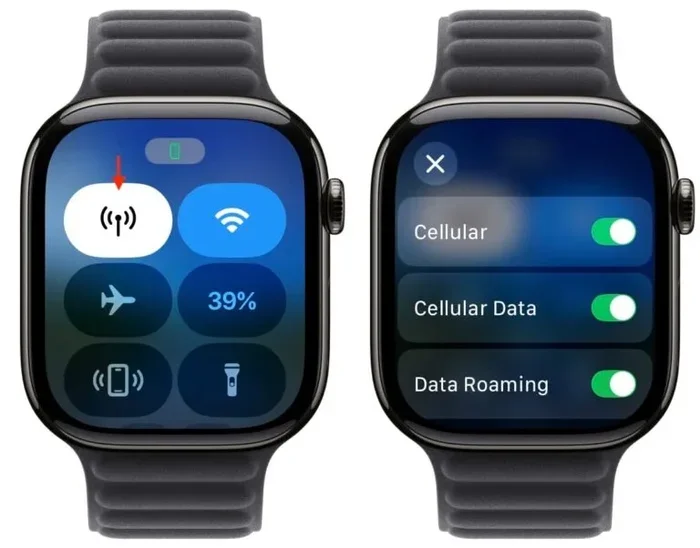
- Once activated, you will see a cellular signal icon at the top of your watch screen.
That is it. Your Apple Watch is now connected to the cellular network. You can make calls, send texts, and use data without your iPhone nearby.
Quick Tips for Apple Watch Cellular Setup
- Restart both devices if the setup fails. A fresh start often resolves connection issues.
- Update WatchOS before setting up. Newer versions improve carrier compatibility.
- Check your carrier’s website for specific Apple Watch plan details and pricing.
- Keep your iPhone nearby during the initial setup. You need it to complete the activation.
Features You Get With Cellular Connectivity
So what can you actually do with a cellular Apple Watch that you cannot do with GPS-only? The list of features is impressive and adds real everyday value.
Emergency SOS and Fall Detection
One of the most important Apple Watch cellular features is emergency SOS. When you press and hold the side button, your watch can call emergency services even without your phone nearby. This works over cellular networks or Wi-Fi.
Fall detection is another life-saving feature. If the watch detects a hard fall and you do not respond, it automatically calls for help. With cellular connectivity, this works anywhere there is network coverage. Without it, the watch can only alert you if your iPhone is nearby.
Streaming, Music, and Calls on the Go
A cellular plan for Apple Watch unlocks the ability to stream music directly from services like Apple Music or Spotify. You can leave your phone at home and still listen to your favorite playlists during a workout. The watch uses very little data usage for streaming, so you do not need to worry about going over your data limit.
You can also make and receive phone calls directly from your watch. The built-in speaker and microphone make calls clear and convenient. You can reply to texts using voice dictation or scribble. All of this works independently thanks to cellular connectivity.
Other features that shine with a cellular plan include:
- Podcast streaming without your phone
- Live weather updates in real time
- Location-based reminders that work without your phone
- App downloads directly to the watch over cellular
- Siri requests processed over the network
Common Mistakes and Misconceptions About Apple Watch Cellular
There are several myths and mistakes that trip people up when deciding about Apple Watch cellular. Let us clear them up.
Mistakes to Avoid
Mistake 1: Thinking cellular means unlimited data. An Apple Watch cellular plan uses very little data, but it is not unlimited. Most plans include a small data allowance or share your phone’s data. Check your plan details to avoid surprises.
Mistake 2: Buying a cellular model and not activating the plan. If you buy a GPS + Cellular model but never set up a carrier plan, the watch works just like a GPS-only model. You pay extra for the hardware but do not get the standalone features.
Mistake 3: Ignoring carrier compatibility. Not every carrier supports Apple Watch cellular. Before buying, confirm that your carrier offers Apple Watch plans and supports your specific model and region.
Mistake 4: Overestimating data needs. Some people worry that an Apple Watch will eat through their data allowance. In reality, the watch uses very little data. Checking notifications and doing a voice call uses only a few megabytes. Streaming music for an hour uses about 50-80 MB.
Expert Insights
According to tech experts and Apple support guides, most users who buy a GPS + Cellular model but never activate the plan end up using their watch the same way as a GPS-only model. The cellular connectivity sits idle unless you actively set up a plan. If you are unsure, start with a GPS-only model and test your usage for a few weeks. You can always add a cellular plan later if you find you need the freedom.
Experts also recommend checking whether your carrier offers an Apple Watch bundle. Some carriers include the watch data plan at no extra cost when you sign up for a certain phone plan. This can make the cellular option much more affordable than you might expect.
Conclusion
So, do I need a cellular plan for Apple Watch? The honest answer is: most people do not need one. If you always carry your iPhone and use basic watch features, a GPS-only model will serve you well. You save money upfront and avoid an extra monthly fee.
However, if you value the freedom of leaving your phone behind, the cellular plan for Apple Watch is a game-changer. It unlocks calls, messages, music, and safety features that work anywhere with network coverage. For runners, travelers, parents, and anyone who wants a truly standalone Apple Watch, the investment pays off.
Before you decide, consider your daily habits, your budget, and how much you rely on your watch for connectivity. Weigh the upfront cost of the GPS + Cellular model against the ongoing monthly fee. If the benefits align with your lifestyle, go for it. If not, the GPS-only model is an excellent choice that delivers great value.
Whatever you choose, Apple Watch cellular technology is there when you need it. And with easy setup through Family Setup and eSIM activation, adding a plan later is always an option. The choice is yours, and now you have all the information to make it with confidence.
Frequently Asked Questions
Can I use an Apple Watch without any cellular plan at all?
Yes, absolutely. A GPS-only Apple Watch works perfectly fine without any cellular plan. It connects to your iPhone using Bluetooth and Wi-Fi. You can receive notifications, track workouts, and use most apps as long as your phone is nearby or connected to Wi-Fi.
Does an Apple Watch cellular plan use a lot of data?
No, data usage on an Apple Watch is very low. Most users consume less than 100 MB per month. Activities like checking notifications, making voice calls, and streaming a few songs use only a small amount of data. You do not need to worry about exceeding your data allowance.
Can I add a cellular plan to a GPS-only Apple Watch later?
No, you cannot. The cellular hardware is built into the GPS + Cellular model only. If you buy a GPS-only watch, you cannot add cellular capability later. You would need to purchase a GPS + Cellular model to access standalone features.
What carriers support Apple Watch cellular plans?
Most major carriers support Apple Watch cellular, including Verizon, AT&T, T-Mobile, and others. However, support varies by region and plan type. Check your carrier’s website or contact them directly to confirm carrier compatibility and available plans.
Is Family Setup available for Apple Watch cellular?
Yes, Family Setup allows you to set up a cellular Apple Watch for a family member who does not own an iPhone. You manage the carrier plan from your own iPhone. This feature works with select carriers and is a great option for giving kids or elderly relatives a connected watch.
Can I switch from a GPS-only to a GPS + Cellular model later?
You can sell your GPS-only watch and upgrade to a GPS + Cellular model. However, there is no way to convert the existing watch. When you upgrade, you will need to set up a new cellular plan with your carrier. The process is quick and straightforward through the Watch app.