Do I Need A Wi Fi Deadbolt For Ultimate Home Security
A Wi-Fi deadbolt lets you lock and unlock your door from anywhere using your phone. It adds smart home security without replacing your entire door. If you want keyless entry and remote access, a WiFi enabled lock is worth considering.
Your front door is the first line of defense for your home. But is your current lock really doing enough? A Wi-Fi deadbolt changes how you think about home security. It connects your door lock to your wireless network and lets you manage access from anywhere. In this guide, we will cover everything you need to know about this smart home device.
Whether you are a tech enthusiast or just someone who wants a safer home, this article will help you decide. We will look at what a WiFi enabled lock is, how it works, and whether it is worth your money. By the end, you will know exactly what to do.
Key Takeaways
- Smart Convenience: A Wi-Fi deadbolt lets you control your door lock from anywhere using your smartphone.
- Enhanced Security: Remote access and real-time alerts give you peace of mind when you are away from home.
- Easy Installation: Most WiFi enabled locks retrofit onto existing doors without major changes.
- Battery Powered: These locks run on batteries, so keep spare batteries handy for uninterrupted use.
- Integration Matters: The best smart locks work with Alexa, Google Home, and Apple HomeKit for full automation.
- Not a Full Replacement: A Wi-Fi deadbolt boosts security but works best alongside other home security measures.
📑 Table of Contents
- What Is a Wi-Fi Deadbolt?
- Why You Might Need a Wi-Fi Deadbolt
- Types of Wi-Fi Deadbolts Available
- Pros and Cons of a Wi-Fi Deadbolt
- How to Choose the Right Wi-Fi Deadbolt
- Common Mistakes to Avoid with Wi-Fi Deadbolts
- Expert Insights on Wi-Fi Deadbolts and Home Security
- Is a Wi-Fi Deadbolt Worth the Investment?
- Conclusion
What Is a Wi-Fi Deadbolt?
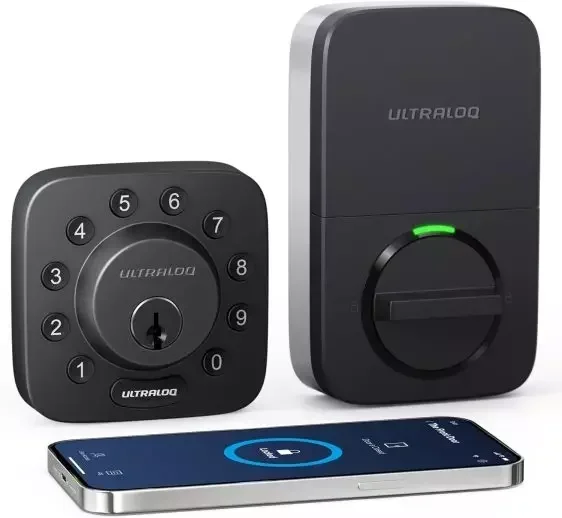
A Wi-Fi deadbolt is a smart lock that connects to your home wireless network. It replaces or upgrades your traditional door lock. You can lock and unlock your door using a phone app, voice commands, or a keypad. No physical key is always needed, though many models still include a key backup.
Unlike Bluetooth locks that only work within a short range, a wireless lock connects directly to your home internet. This means you can control it from across the world. You can let a delivery person in while you are at work. You can check if you locked the door at night. These features make a keyless entry system incredibly practical.
How Does a WiFi Deadbolt Work?
A WiFi enabled lock connects to your home router just like your phone or laptop. It uses your wireless network to send and receive signals. When you tap a button on your phone app, the lock receives the command and turns the deadbolt. This all happens in seconds.
Most models run on batteries. A typical battery lasts between six and twelve months. When the battery gets low, the lock sends you a notification. This way, you never get locked out by a dead battery.
Why You Might Need a Wi-Fi Deadbolt
Not everyone needs a smart lock. But for many homeowners, a Wi-Fi deadbolt brings real benefits. Let us look at the top reasons people choose to upgrade their door lock.
Remote Access and Control
The biggest advantage of a smart lock is remote access. Imagine this scenario. You are on vacation and a friend needs to feed your cat. With a traditional lock, you would have to hide a key or drive home. With a wireless lock, you simply unlock the door from your phone. Your friend enters, feeds the cat, and you lock the door again. All from your living room.
This remote control feature also works for everyday moments. You are leaving for work and suddenly wonder if you locked the door. A quick glance at your phone tells you the status. You can lock it with one tap. This simple convenience reduces stress and saves time.
Enhanced Home Security
A WiFi deadbolt adds a layer of home security that traditional locks cannot match. Most smart locks send real-time alerts to your phone. You get notified every time someone locks or unlocks your door. If an unknown code is entered on your keypad, you get an instant alert.
Many models also include door sensors that detect when the door is opened or left ajar. Some integrate with smart home security systems like cameras and alarms. When someone tries to force the door, the alarm triggers and you get a notification immediately. This makes your home much harder to target.
Keyless Entry for Family and Guests
Juggling keys for every family member can be a hassle. A WiFi enabled lock solves this problem. You can create unique codes for each person. Kids get a code for after school. The dog walker gets a code for specific hours. Guests get a temporary code that expires after their visit.
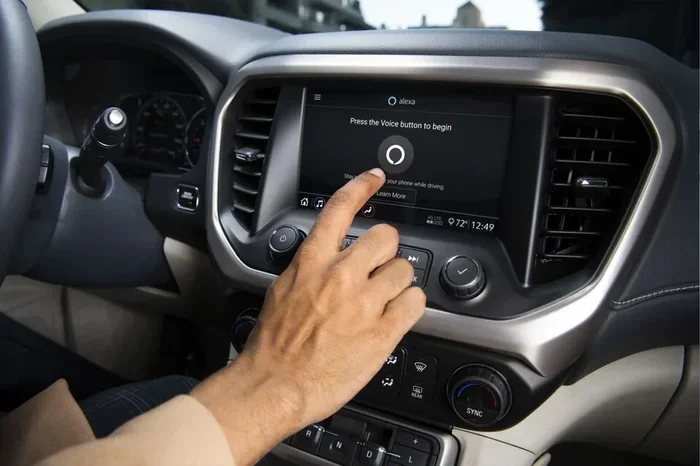
Some locks also support voice control through Alexa or Google Home. You can say “Lock the front door” and it happens instantly. This is especially handy when your hands are full with groceries or a sleeping baby.
Types of Wi-Fi Deadbolts Available
The market for smart door locks has grown a lot in recent years. There are several types to choose from. Understanding the differences helps you pick the right one for your home.
Single-Cylinder Wi-Fi Deadbolts
A single-cylinder lock has a key on one side and a thumb turn on the other. This is the most common type found in homes. A Wi-Fi deadbolt in this style keeps the same look but adds smart features. You control the thumb turn side remotely through the app.
This type works best for doors that have a solid wood or metal door on the outside. It is a popular choice for front doors and back doors. Most homeowners find this style familiar and easy to use.
Double-Cylinder Wi-Fi Deadbolts
A double-cylinder lock requires a key on both sides. This adds extra security because someone cannot break a window and turn the thumb turn to unlock the door. A WiFi enabled lock in double-cylinder style gives you the same benefit with smart features added.
These locks are common in homes with glass panels near the door. They are also preferred in areas where break-ins through windows are a concern. The trade-off is that you always need a key from the inside, which can be a safety issue during emergencies like fires.
Smart Lock Combos with Built-in Cameras
Some smart home security brands now offer locks with built-in cameras. These devices let you see who is at your door before you unlock it. You can talk to visitors through the app even when you are not home. This is a great option for people who want an all-in-one access control system.
Pros and Cons of a Wi-Fi Deadbolt
Every product has strengths and weaknesses. A Wi-Fi deadbolt is no different. Let us weigh the benefits against the drawbacks so you can make a smart decision.
| Pros | Cons |
|---|---|
| Lock and unlock from anywhere | Requires a working Wi-Fi network |
| No need for physical keys | Battery needs regular replacement |
| Real-time security alerts | Higher upfront cost than traditional locks |
| Guest access with temporary codes | Potential hacking risks if not secured |
| Integrates with smart home systems | Installation may require minor door adjustments |
| Voice control support | Some models need a hub or bridge device |
The pros of a smart lock far outweigh the cons for most users. The key is to choose a reputable brand and follow security best practices. Keeping your lock software updated and using strong passwords greatly reduces any hacking risk.
How to Choose the Right Wi-Fi Deadbolt
Not all smart locks are created equal. When shopping for a WiFi enabled lock, there are several factors to consider. These tips will help you find the best fit for your home and budget.
Check Compatibility with Your Door
Before buying, measure your door and check the existing lock bore hole. Most smart door locks fit standard door preparations. But some doors have unusual sizes or shapes that may need a different model. Check the product specifications carefully before you order.
Also consider the door material. Wood, steel, and fiberglass doors all work with most smart locks. However, very thin doors may not provide enough support for a heavy-duty deadbolt lock. A solid core door is always the best choice for security.
Look for Strong Connectivity
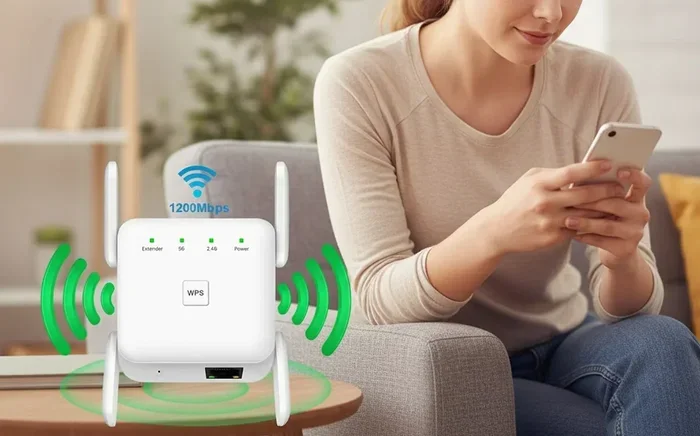
A reliable wireless lock needs a strong Wi-Fi signal near your front door. If your router is far from the door, consider adding a mesh network extender. This ensures your smart home device stays connected at all times.
Some locks also offer Zigbee or Z-Wave connectivity as a backup. These protocols use less power and create a more stable connection. A lock with multiple connection options gives you more flexibility.
Prioritize Security Features
Your lock protects your home, so it needs strong security features of its own. Look for locks that use AES encryption to secure communications. This is the same encryption standard used by banks and government agencies.
Automatic lock features are also important. A good WiFi deadbolt will lock the door automatically after a set time. This prevents the common mistake of leaving the door unlocked. Some locks also offer tamper alerts if someone tries to physically manipulate the lock.
Consider the Power Source
Most smart locks use AA or lithium batteries. Lithium batteries tend to last longer and perform better in cold weather. When shopping, check the battery life rating. A lock that lasts over a year on a single set of batteries is ideal.
Many models also support a physical key backup. This means if the battery dies completely, you can still unlock the door with a traditional key. This is a great safety net that every homeowner should look for.
Common Mistakes to Avoid with Wi-Fi Deadbolts
Installing a smart lock is straightforward, but some mistakes can cause problems. Avoid these common pitfalls to get the most out of your WiFi enabled lock.
Skipping firmware updates. Manufacturers regularly release updates that fix bugs and improve security. Always keep your lock software up to date. This simple habit protects your home automation system from vulnerabilities.
Using weak app passwords. Your smart lock is only as secure as the account that controls it. Use a strong, unique password for your lock app. Enable two-factor authentication if the app supports it. This adds an extra layer of protection against unauthorized access.
Ignoring battery warnings. When your lock sends a low battery alert, do not ignore it. A dead battery can leave you locked out. Keep spare batteries on hand and replace them promptly. Some locks also have a USB backup power option for emergencies.
Not testing the lock regularly. Just like any security device, a wireless lock should be tested periodically. Make sure the auto-lock feature works. Check that remote unlock functions properly. Regular testing ensures everything works when you need it most.
Expert Insights on Wi-Fi Deadbolts and Home Security
Security professionals agree that a Wi-Fi deadbolt adds a valuable layer of protection to any home. According to home security experts, the biggest advantage is visibility. You always know who is coming and going. This awareness alone deters many potential intruders.
However, experts also emphasize that a smart lock is just one piece of the puzzle. It works best when combined with other home security measures. A good security system includes cameras, motion sensors, and strong door frames. A smart lock enhances this setup but does not replace it.
Cybersecurity experts also recommend choosing locks from established brands with a track record of security. Lesser-known brands may cut corners on encryption and data protection. Stick with well-reviewed products from trusted manufacturers. Your door lock is a critical access point, and it deserves serious attention.
Quick Tips for Getting the Most from Your Wi-Fi Deadbolt
- Place your Wi-Fi router close to the front door for a stronger signal.
- Create unique access codes for each family member and guest.
- Enable automatic lock so the door always locks after a few minutes.
- Set up push notifications to get instant alerts about door activity.
- Pair your lock with a smart doorbell camera for full entry point coverage.
- Use a lithium battery for longer life and better performance in all seasons.
- Review access logs regularly to spot any unusual activity.
Is a Wi-Fi Deadbolt Worth the Investment?
The short answer is yes for most homeowners. A Wi-Fi deadbolt costs more than a traditional lock, but the convenience and security benefits are significant. You gain remote access, real-time alerts, and keyless entry. These features make daily life easier and your home safer.
For renters, some smart locks are designed to be portable and easy to remove. You can take the lock with you when you move. This makes it a flexible investment even if you do not own your home. Many landlords are also starting to offer WiFi enabled locks as a standard feature in rental properties.
If you already have a smart home security system, adding a smart lock ties everything together. You create a unified system where your door, cameras, alarms, and lights all communicate. This level of home automation is where modern security really shines.
The key is to do your research. Compare features, read reviews, and choose a lock that fits your specific needs. A well-chosen WiFi deadbolt pays for itself in peace of mind and daily convenience.
Conclusion
A Wi-Fi deadbolt is a smart upgrade for any home that values security and convenience. It gives you remote access, real-time alerts, and keyless entry right at your fingertips. Whether you are a busy parent, a frequent traveler, or simply someone who wants a safer home, this device delivers real value.
The world of smart home security keeps evolving, and smart locks are at the forefront. A WiFi enabled lock is no longer a luxury. It is a practical tool that makes your home smarter and safer. Take the time to choose the right model, install it properly, and enjoy the confidence that comes with knowing your door is secure.
Start small if you are new to smart home devices. A WiFi deadbolt is one of the easiest and most impactful upgrades you can make. Once you experience the convenience of controlling your door from your phone, you will wonder how you ever lived without it.
Frequently Asked Questions
Can I install a Wi-Fi deadbolt myself?
Yes, most WiFi enabled locks come with simple installation instructions and the necessary hardware. The process usually takes about 20 to 30 minutes. If your door has an unusual setup, you may want to consult a locksmith for assistance.
Will a Wi-Fi deadbolt work if my internet goes down?
Most smart locks continue to work locally even without internet. You can still lock and unlock using the keypad or physical key. However, remote access and push notifications will not work until your connection is restored.
Are Wi-Fi smart locks vulnerable to hacking?
Any connected device can be a target, but reputable brands use strong AES encryption and regular security updates. Choosing a trusted brand and using strong passwords greatly reduces any risk. Keeping your lock firmware updated is the best defense.
How long do the batteries last in a Wi-Fi deadbolt?
Battery life varies by model, but most smart door locks last between six and twelve months. Lithium batteries tend to last longer than standard alkaline batteries. The lock will send you a low battery alert well before it dies.
Can I use a Wi-Fi deadbolt on any door?
Most smart locks fit standard door preparations. However, very thin doors or doors with unusual dimensions may not be compatible. Always check the product specifications and measure your door before purchasing.
Do Wi-Fi smart locks work with Alexa and Google Home?
The majority of popular WiFi deadbolt models support both Alexa and Google Home. Some also work with Apple HomeKit. Check the product listing to confirm compatibility with your preferred smart home platform.