Do Iphones Support Wifi 6e And Fast Wireless Speeds
Do Iphones Support Wifi 6e — Yes, select iPhone models released from 2023 onward support WiFi 6E and deliver significantly faster wireless speeds. This guide covers which iPhones are compatible, how WiFi 6E boosts performance, and what you need to set it up at home.
Do Iphones Support Wifi 6e? The short answer is yes — but only on certain models. If you have an iPhone 15 or newer, your phone is ready to tap into the WiFi 6E standard. This means faster downloads, smoother streaming, and way less lag when you are at home or in a crowded space.
Wireless technology has come a long way. Most of us remember the days of slow Wi-Fi that buffered every time someone started a video call. Today, WiFi 6E changes the game entirely. It opens up a brand-new frequency band that reduces traffic and boosts speed dramatically.
In this article, we will walk through everything you need to know. We will cover which iPhones work with WiFi 6E, how the technology improves your connection, and what you need to set it up. Whether you are a casual user or a tech enthusiast, this guide has something useful for you.
Key Takeaways
- iPhone 15 and iPhone 16 models support WiFi 6E, unlocking faster speeds and less congestion on the 6GHz band.
- WiFi 6E works only with a compatible router, so your home network gear matters just as much as your phone.
- Real-world speed gains are noticeable, especially in crowded areas with many wireless networks nearby.
- Older iPhone models do not support WiFi 6E, but they still benefit from WiFi 6 and 5G speeds.
- Setting up WiFi 6E is simple — just make sure your router broadcasts on the 6GHz band and your iPhone is updated.
📑 Table of Contents
What Is WiFi 6E and Why Does It Matter?
Before we get into Do Iphones Support Wifi 6e, let us first understand what WiFi 6E actually is. The “E” stands for “Extended.” It is the latest evolution of the WiFi 6 standard, and it operates on a new frequency band that earlier Wi-Fi versions could not access.
Understanding the 6GHz Band
Traditional Wi-Fi uses two frequency bands: 2.4GHz and 5GHz. Both of these bands have been around for a long time. The problem is that many devices share them. Think about your neighbor’s Wi-Fi, your smart TV, your microwave, and your Bluetooth speaker — all competing for space on the same channels.
WiFi 6E adds a third band: 6GHz. This band is much wider and far less crowded. It gives your iPhone access to more channels, which means less interference and faster speeds. The 6GHz band is like adding a new express lane to a highway that was already packed with traffic.
WiFi 6E vs WiFi 6: What Is the Difference?
Many people wonder whether WiFi 6E is really different from regular WiFi 6. The answer is yes, in a meaningful way. Both standards share the same core technology, including features like OFDMA and MU-MIMO. But WiFi 6E goes further by unlocking the 6GHz band.
Here is a quick comparison of the two:
| Feature | WiFi 6 | WiFi 6E |
|---|---|---|
| Frequency Bands | 2.4GHz and 5GHz | 2.4GHz, 5GHz, and 6GHz |
| Max Channel Width | 160MHz on 5GHz | 320MHz on 6GHz |
| Interference Level | Moderate to high | Low |
| Max Theoretical Speed | 9.6 Gbps | 9.6 Gbps (but faster in practice) |
| Device Compatibility | Widespread | Growing, newer devices only |
As you can see, the real advantage of WiFi 6E is the extra space. When you are in a busy apartment building or a crowded office, the 6GHz band gives your iPhone a clear path to your router. This directly improves your wireless speeds and connection stability.
Which iPhones Support WiFi 6E?
Now let us get to the heart of the topic: Do Iphones Support Wifi 6e? Not every iPhone can connect to WiFi 6E. Apple introduced this support starting with specific models released in 2023 and beyond.
iPhone 15 and Newer Models
The iPhone 15 and iPhone 15 Plus were the first iPhones to support WiFi 6E. They also support Wi-Fi 7 in select regions, which is the next step up. The iPhone 15 Pro and iPhone 15 Pro Max carry the same capability with even faster wireless chipsets.
The iPhone 16 lineup, released in late 2024, continues this support. All four models — the iPhone 16, iPhone 16 Plus, iPhone 16 Pro, and iPhone 16 Pro Max — work with WiFi 6E networks. Apple has made this a standard feature across its latest devices.
If you own one of these models, your phone is fully ready to connect to WiFi 6E networks. You just need the right router and the right setup.
Older iPhone Models
What about older iPhones? The iPhone 14 and earlier models support WiFi 6 and WiFi 5, but they do not support WiFi 6E. This means they cannot access the 6GHz band, even if your router broadcasts it.
Here is a quick breakdown of iPhone Wi-Fi support:
- iPhone 15 and newer: WiFi 6E (and Wi-Fi 7 on select models)
- iPhone 14 and iPhone 13: WiFi 6
- iPhone 12 and iPhone 11: WiFi 6 (WiFi 6 on iPhone 12 and later)
- iPhone X and older: WiFi 5 or earlier
If your iPhone does not support WiFi 6E, you can still enjoy fast speeds on the 5GHz band. But you will miss out on the extra space and lower congestion that the 6GHz band provides.
How WiFi 6E Boosts Wireless Speeds on iPhones
So what actually happens when you connect your iPhone to a WiFi 6E network? The improvements are real and easy to notice. Let us break down the key benefits.
Real-World Speed Improvements
On a WiFi 6E network, your iPhone can reach significantly higher speeds than on older Wi-Fi standards. In ideal conditions, you can see wireless speeds well above 1Gbps. That means a 5GB movie downloads in seconds, not minutes.
Even in everyday use, the difference is clear. Video calls stay smooth. Online games respond faster. Streaming 4K video never buffers. If you have ever struggled with slow internet speeds at home, WiFi 6E can be a real game changer.
Reduced Interference and Congestion
One of the biggest problems with older Wi-Fi is interference. Your neighbors’ networks, smart home devices, and even baby monitors all fight for space on the 2.4GHz and 5GHz bands. This causes lag, slow speeds, and dropped connections.
WiFi 6E solves this problem by moving your iPhone to the 6GHz band. This band is much cleaner and has many more channels available. The result is a more stable and reliable wireless connection, even in dense environments like apartments or offices.
Lower Latency for Gaming and Video Calls
Latency is the delay between when you send a signal and when it reaches its destination. Lower latency means smoother gameplay, clearer video calls, and faster response times. WiFi 6E reduces latency significantly compared to older Wi-Fi standards.
If you play online games on your iPhone or join frequent video meetings, you will feel the difference. The 6GHz band gives your device a direct, uninterrupted path to your router. This is especially valuable for network performance in households with many connected devices.
Setting Up WiFi 6E for Your iPhone
Getting WiFi 6E working on your iPhone is straightforward, but you need the right equipment. Here is everything you need to know.
Router Requirements
First and most importantly, you need a WiFi 6E router. Not all routers support the 6GHz band. If your router only broadcasts on 2.4GHz and 5GHz, your iPhone 15 or iPhone 16 will not be able to access WiFi 6E speeds.
Look for routers that explicitly list WiFi 6E or 802.11ax with 6GHz support. Popular brands like ASUS, Netgear, TP-Link, and Linksys now offer WiFi 6E routers at various price points. You do not need to spend a fortune — many solid options are available under $200.
When shopping for a router, consider these factors:
- Tri-band support: The router must broadcast on 2.4GHz, 5GHz, and 6GHz simultaneously.
- Wider channels: Look for 320MHz channel support on the 6GHz band for maximum speed.
- Processor and RAM: A strong chipset ensures the router can handle multiple devices without slowing down.
- Antenna design: Better antennas mean stronger coverage throughout your home.
Quick Tips for Best Performance
Once you have a compatible router, follow these tips to get the most out of WiFi 6E on your iPhone:
- Update your iPhone to the latest iOS version. Apple regularly improves Wi-Fi performance through software updates.
- Enable the 6GHz network on your router. Some routers broadcast it by default, while others require you to turn it on in the settings.
- Place your router in a central location. Even with WiFi 6E, walls and obstacles can weaken your signal.
- Use an internet speed test to verify you are getting the speeds you expect.
- Keep your router firmware updated. Manufacturers release updates that improve performance and fix bugs.
Quick Tips Section
Here are some extra tips to make sure you get the best wireless connectivity experience:
- Restart your router and iPhone regularly to clear cached network data.
- Avoid placing your router near microwaves or cordless phones, which can cause interference on the 2.4GHz band.
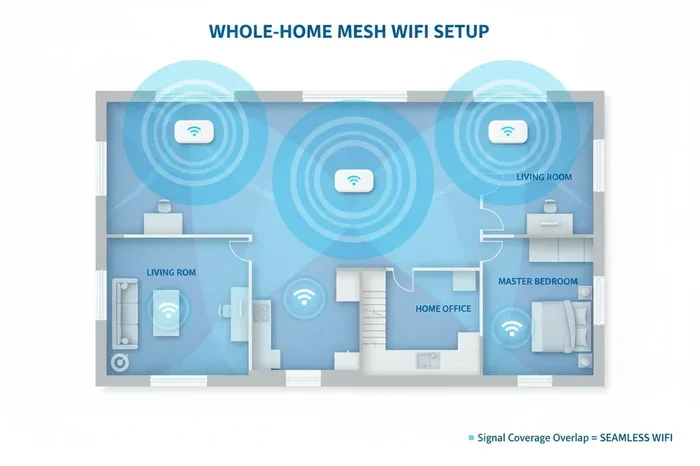
- If your home is large, consider a mesh network system that supports WiFi 6E for whole-home coverage.
- Use your iPhone‘s built-in Wi-Fi analyzer (available in Settings) to check which channels are least congested.
Common Mistakes and Limitations
Even with a WiFi 6E phone and router, things can go wrong. Here are some common mistakes that hold people back from getting the most out of their wireless speeds.
Common Mistakes
- Assuming all routers support WiFi 6E. Many routers labeled “WiFi 6” do not include the 6GHz band. Always check the box or product page for “6E” specifically.
- Not enabling the 6GHz band on the router. Some routers default to hiding the 6GHz network. You may need to go into the admin panel and turn it on.
- Placing the router too far away. The 6GHz band has a shorter range than 2.4GHz or 5GHz. Keep your iPhone reasonably close to the router for best results.
- Ignoring other connected devices. If your smart home devices and laptops are all on the same network, they can still slow things down. Use quality of service (QoS) settings to prioritize your iPhone.
- Expecting WiFi 6E to fix slow internet from your ISP. WiFi 6E speeds are limited by your internet plan. If your ISP only gives you 100Mbps, no Wi-Fi standard will make it faster.
Expert Insights
Networking experts agree that WiFi 6E is one of the most impactful upgrades for home networks in recent years. According to industry analysts, the 6GHz band will only become more important as more devices adopt WiFi 6E and WiFi 7 standards.
If you are planning to buy a new iPhone, choosing a model that supports WiFi 6E is a smart move. It future-proofs your device for years to come. As more Wi-Fi routers and access points adopt the 6GHz standard, having a compatible phone gives you a significant advantage.
Experts also recommend pairing your WiFi 6E iPhone with a mesh network system if you have a larger home. Mesh systems use multiple nodes to extend coverage, and many now support WiFi 6E backhaul, which means the connection between nodes is also blazingly fast.
The Future of iPhone Wireless Connectivity
What comes next after WiFi 6E? Apple and the industry are already moving toward WiFi 7, also known as 802.11be. WiFi 7 promises even faster speeds, lower latency, and better efficiency than WiFi 6E.
The iPhone 15 Pro and iPhone 15 Pro Max already support Wi-Fi 7 in certain regions. The iPhone 16 Pro models are expected to expand this support further. As WiFi 7 routers become more affordable, users will see even more dramatic improvements in wireless speeds and network performance.
For now, WiFi 6E is the sweet spot. It is widely available, affordable, and delivers real-world benefits that are easy to notice. Whether you are browsing the web, working from home, or gaming on the go, WiFi 6E gives your iPhone the wireless connection it deserves.
Do Iphones Support Wifi 6e? Yes, and if you have a compatible model, there has never been a better time to upgrade your home network. A WiFi 6E router paired with a WiFi 6E iPhone delivers an experience that feels like a major leap forward. Your streaming, gaming, and video calls will all feel faster and smoother.
Conclusion
The answer to Do Iphones Support Wifi 6e is a clear yes for iPhone 15 and newer models. WiFi 6E opens up a new world of faster wireless speeds, lower interference, and better connection stability. With the right WiFi 6E router and a compatible iPhone, you can enjoy speeds that older Wi-Fi standards simply cannot match.
Remember that your router and setup matter just as much as your phone. Invest in a quality tri-band router, keep your devices updated, and place your router strategically for the best results. The 6GHz band is the future of home networking, and your iPhone is already ready for it.
Take a few minutes today to check your router and make sure WiFi 6E is enabled. You will be amazed at the difference it makes. Faster speeds, smoother streaming, and a more reliable connection are all waiting for you on the 6GHz band.
Frequently Asked Questions
Do all iPhones support WiFi 6E?
No, only iPhone 15 models and newer support WiFi 6E. Older models like the iPhone 14 and earlier can only connect to WiFi 6 and older standards. Check your specific model to confirm compatibility.
Do I need a special router for WiFi 6E?
Yes, you need a WiFi 6E router that broadcasts on the 6GHz band. A standard WiFi 6 router will not unlock WiFi 6E speeds on your iPhone. Look for tri-band routers that explicitly list WiFi 6E support.
Is WiFi 6E faster than WiFi 6?
In real-world conditions, yes. WiFi 6E is faster because it uses the less crowded 6GHz band, which provides more channels and less interference. This means higher wireless speeds and lower latency, especially in busy environments.
Can I use WiFi 6E outdoors?
You can, but the 6GHz band has a shorter range than 2.4GHz or 5GHz. Outdoors, walls and distance can weaken the signal. WiFi 6E works best in indoor environments where your iPhone is within reasonable range of the router.
Will WiFi 6E drain my iPhone battery faster?
Not significantly. WiFi 6E is designed to be more efficient than older standards. In fact, because it connects faster and stays on stronger signals, it can actually help save battery compared to struggling on a congested 5GHz network.
What is the difference between WiFi 6E and WiFi 7?
WiFi 7 is the next generation after WiFi 6E. It offers even faster speeds, wider channels, and better performance with many devices. Some newer iPhones already support Wi-Fi 7, but WiFi 6E remains the most widely available advanced standard today.