Do New Tvs Have Coaxial Inputs Or Have They Disappeared
Do new tvs have coaxial inputs? The short answer is: it depends on the brand and model. Many modern TVs have dropped the coaxial port, but several manufacturers still include it. Understanding coaxial inputs helps you decide if you need an adapter, a converter box, or a different connection method for your antenna or cable setup.
Have you just bought a brand-new TV and noticed something missing? You dig through the back panel, looking for that familiar round port, and it is not there. The coaxial input is gone. This leaves many people asking a very simple question: do new tvs have coaxial inputs?
The answer is not as straightforward as you might think. Some new TVs still come with coaxial ports. Others have completely removed them. Understanding this shift matters because it affects how you set up your antenna, your cable box, or your satellite dish. In this guide, we will walk through everything you need to know about coaxial inputs on modern televisions. We will cover which brands still include them, how to connect devices without a coaxial port, and what alternatives exist. By the end, you will know exactly what to look for and how to get your TV signal working perfectly.
Key Takeaways
- Not all new TVs have coaxial inputs: Many brands have removed them to keep TVs slim and minimalist.
- Some major brands still include coaxial ports: Samsung, LG, and TCL offer select models with coaxial connections.
- You can use adapters and converters: Even without a built-in coaxial port, you can still connect older devices.
- Coaxial inputs serve specific purposes: They are essential for antenna TV, cable TV, and certain satellite setups.
- HDMI and USB have replaced many legacy ports: But coaxial remains important for over-the-air broadcast signals.
- Check the back panel before buying: Always inspect the TV’s input options to avoid compatibility headaches.
- Signal converters bridge the gap: They let you use coaxial equipment with modern flat-screen TVs.
📑 Table of Contents
- What Are Coaxial Inputs and Why Do They Matter?
- Do New Tvs Have Coaxial Inputs? The Truth Revealed
- How to Connect a Coaxial Cable to a Modern TV
- When You Need a Coaxial Input and When You Do Not
- Common Mistakes People Make with Coaxial Connections
- The Future of TV Inputs and What Is Replacing Coaxial
- Expert Insights on TV Connectivity Trends
- Key Takeaways
- Conclusion
What Are Coaxial Inputs and Why Do They Matter?
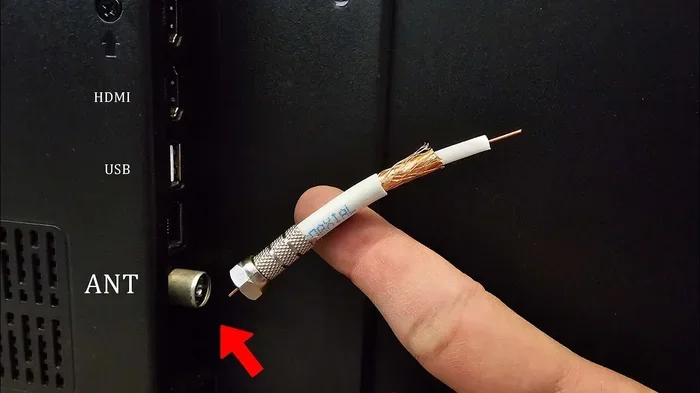
Before we dive into whether new TVs still have them, let us talk about what a coaxial input actually is. A coaxial input, often called a coaxial port or RF input, is a round connector on the back of your TV. It uses a single cable to carry both audio and video signals. The cable has a copper center pin surrounded by shielding, and it screws into the port. This design is known as an F-connector, and it has been a standard in home entertainment for decades.
A Brief History of the Coaxial Connection
Coaxial cables have been around since the early days of television. For years, they were the go-to way to connect your TV to a cable outlet or an antenna. Every CRT TV and flat-screen TV from the 1990s and early 2000s had at least one coaxial input. Cable companies relied on them. Antenna users depended on them. The coaxial connection was universal and reliable.
Over time, newer connection types emerged. HDMI offered better picture quality and digital sound. Component cables provided improved resolution. USB ports allowed for media playback. As these alternatives grew in popularity, manufacturers started thinking about whether coaxial ports were still necessary.
Why Coaxial Inputs Still Matter Today
Even with all the modern options, coaxial inputs are not obsolete. Here is why they still matter:
- Over-the-air antenna signals: Most antennas connect directly through a coaxial cable. If you watch free broadcast TV, you need this port.
- Cable TV connections: Many cable providers still use coaxial lines to deliver their signals to your home.
- Satellite and cable boxes: Some older set-top boxes only offer coaxial outputs.
- Legacy devices: Older gaming consoles, VCRs, and DVRs may only have coaxial outputs.
- Signal reliability: Coaxial cables carry a strong, interference-resistant signal, which makes them great for TV reception.
So when you ask do new tvs have coaxial inputs, the real question is whether the TV manufacturers still see value in keeping this port. And the answer varies quite a bit.
Do New Tvs Have Coaxial Inputs? The Truth Revealed
The honest answer is that it depends on the brand, the model, and the price range. Some new TVs still include coaxial inputs. Others have completely eliminated them. Let us break this down by brand and category so you know what to expect.
Brands That Still Include Coaxial Ports
Several major TV manufacturers continue to offer coaxial inputs on select models. Here is a closer look:
- Samsung: Many Samsung TVs, especially mid-range and budget models, still include a coaxial input. However, their premium QLED and Neo QLED lines sometimes skip it.
- LG: LG has kept coaxial ports on a wide range of models. Their OLED and NanoCell TVs often include at least one coaxial input.
- TCL: TCL is known for offering great value, and many of their Roku TVs include coaxial ports. This makes them popular with antenna users.
- Sony: Sony has been inconsistent. Some models include coaxial inputs while others do not. Always check the spec sheet.
- Vizio: Vizio TVs, particularly their budget lineups, frequently include coaxial ports.
Brands and Models That Have Dropped Coaxial
On the other side of the coin, some brands have removed coaxial inputs entirely from their newer models:
- Hisense: Many of their newer smart TVs no longer include a coaxial port.
- Philips: Some recent Philips models have dropped coaxial in favor of HDMI and USB.
- Budget off-brand TVs: Extremely cheap TVs from lesser-known brands sometimes skip coaxial to cut costs.
How to Check if a TV Has a Coaxial Input
Before you buy a TV, always check the input specifications. Here is how:
- Visit the manufacturer’s website and look up the model number.
- Check the “Specifications” or “Technical Details” section.
- Look for terms like “RF Input,” “Coaxial Input,” or “Antenna Input.”
- If you are shopping in-store, flip the TV around and look at the back panel.
The coaxial port is easy to spot. It is a round metal connector with a small pin in the center. It is often labeled “ANT IN” or “RF IN.” If you see it, your coaxial cable will plug right in. If you do not see it, the TV does not have a built-in coaxial input.
How to Connect a Coaxial Cable to a Modern TV
If your new TV does not have a coaxial input, do not panic. You still have options. Connecting a coaxial cable to a modern TV is easier than most people think. Let us walk through the different methods you can use.
Method 1: Use an HDMI Converter Box
An HDMI converter box is the most popular solution. These small devices accept a coaxial cable on one end and output an HDMI signal on the other. Here is how it works:
- Plug your coaxial cable into the converter box.
- Connect an HDMI cable from the converter box to your TV.
- Tune the TV to the correct HDMI input.
- Scan for channels using the converter box menu.
Converter boxes are affordable and widely available. They cost between $15 and $50, depending on the brand and features. Some even include built-in DVR capabilities, so you can record your favorite shows.
Method 2: Use a Digital TV Tuner
A digital TV tuner is another great option. This device connects to your TV via HDMI and receives over-the-air broadcast signals through a coaxial input on the tuner itself. Digital TV tuners are especially useful for antenna users who want to watch free broadcast channels on a TV without a coaxial port.
Popular tuner brands include Hauppauge, SiliconDust, and ATTO. These devices are simple to set up and do not require any technical expertise.
Method 3: Use a Cable Box or Streaming Device
If you get cable TV, your provider likely gave you a set-top box. Most cable boxes have both coaxial and HDMI outputs. You can connect the coaxial cable from the wall outlet to the cable box, then use an HDMI cable from the box to your TV. This method works regardless of whether your TV has a coaxial input.
Similarly, many streaming devices like Roku, Amazon Fire Stick, and Apple TV can access live TV through apps. While they do not replace coaxial connections entirely, they offer a convenient alternative for watching news, sports, and local channels.
Quick Tips for Coaxial Connections
- Always use a high-quality coaxial cable: Cheap cables can cause signal loss and picture problems.
- Keep the cable as short as possible: Longer cables can weaken the signal.
- Check for loose connections: A wobbly coaxial connection can cause intermittent signal issues.
- Use a signal amplifier if needed: If you live far from broadcast towers, an amplifier can boost your signal strength.
- Label your cables: It helps you quickly identify which cable goes where.
When You Need a Coaxial Input and When You Do Not
Not everyone needs a coaxial input on their TV. Whether you need one depends on how you watch television. Let us look at the different scenarios to help you decide.
When You Definitely Need a Coaxial Input
You will need a coaxial input if any of the following apply to you:
- You use an antenna for free over-the-air TV: Antennas connect directly through coaxial cables. Without a coaxial input, you cannot receive broadcast signals without extra equipment.
- Your cable provider uses coaxial lines: Some cable companies still deliver signals through coaxial cables to your home.
- You have older devices: If you own a VCR, an older DVR, or a legacy gaming console, they may only support coaxial outputs.
- You live in an area with limited internet: Streaming requires a strong internet connection. Coaxial antenna TV works without any internet at all.
When You Do Not Need a Coaxial Input
You probably do not need a coaxial input if:
- You stream everything: If you watch Netflix, Hulu, Disney+, and YouTube exclusively, you do not need a coaxial port.
- You use HDMI devices: Modern cable boxes, gaming consoles, and Blu-ray players all use HDMI connections.
- You have a streaming stick or box: Devices like Roku, Chromecast, and Apple TV connect via HDMI and Wi-Fi.
- You only watch satellite TV: Some satellite systems use HDMI or proprietary connections instead of coaxial.
A Quick Comparison Table
| Connection Type | Best For | Quality | Still Common? |
|---|---|---|---|
| Coaxial (RF) | Antenna, cable TV, legacy devices | Good for broadcast | Declining |
| HDMI | Streaming, gaming, cable boxes | Excellent (4K, HDR) | Very common |
| USB | Media playback, peripherals | Basic | Common |
| Optical Audio | External sound systems | Good (digital audio) | Declining |
| Composite (RCA) | Very old devices | Poor (SD only) | Rare |
| Component | Older HD devices | Good (1080p) | Rare |
As you can see, coaxial inputs still serve a purpose, but they are no longer the primary connection method for most households. HDMI has taken over as the standard for high-quality audio and video.
Common Mistakes People Make with Coaxial Connections
Even experienced TV users make mistakes when dealing with coaxial connections. Here are the most common errors and how to avoid them.
Assuming Every New TV Has a Coaxial Port
This is the biggest mistake. Many people buy a new TV, bring it home, and assume the coaxial cable from the wall will plug right in. When it does not, they are confused. Always check the specifications before you buy. If coaxial is important to you, make it a non-negotiable requirement.
Using Low-Quality Cables
Not all coaxial cables are created equal. A cheap, thin coaxial cable can cause signal loss, resulting in poor picture quality or no signal at all. Invest in a quality RG6 coaxial cable for the best results. These cables have better shielding and carry a stronger signal over longer distances.
Forgetting to Rescan for Channels
After connecting a coaxial cable or moving your TV to a new location, you need to rescan for channels. Many people forget this step and wonder why they are not getting any stations. Go to your TV’s settings, find the channel scan or auto-tune option, and let the TV search for available channels. This is especially important for antenna users.
Bending or Kinking the Cable
Coaxial cables should not be bent sharply or kinked. Doing so can damage the internal shielding and affect signal quality. Keep the cable running smoothly from the wall outlet to the TV or converter box. Avoid tight corners and pinching the cable under furniture.
Ignoring Signal Strength Issues
If you live in a rural area or far from broadcast towers, your coaxial signal may be weak. This can result in pixelated pictures or missing channels. Consider using a signal amplifier or a higher-gain antenna to improve reception. These small investments can make a big difference.
The Future of TV Inputs and What Is Replacing Coaxial
The television industry is constantly evolving. Ports come and go as technology changes. So what does the future hold for coaxial inputs and TV connectivity?
The Rise of Wireless TV Transmission
Wireless TV transmission is becoming more popular. Devices like the HDHomeRun allow you to receive antenna signals and stream them to any TV on your home network. No cables needed except for power and Wi-Fi. This technology is reducing the need for physical inputs of all kinds, including coaxial.
HDMI as the Universal Standard
HDMI has become the dominant connection type for televisions. Modern TVs may have three, four, or even five HDMI ports. The latest version, HDMI 2.1, supports 4K at 120Hz, eARC, and VRR. As HDMI continues to improve, other ports like coaxial become less essential for the average consumer.
Smart TV Integration and Streaming
Smart TVs have changed how we watch content. Built-in apps, voice control, and streaming integration mean that many people no longer need external devices at all. Why plug in a coaxial cable when you can stream the same content over Wi-Fi? This shift is one reason manufacturers are removing legacy ports from new TVs.
Will Coaxial Inputs Disappear Completely?
It is very possible that coaxial inputs will eventually disappear from all new TVs. Some budget and mid-range models have already made this leap. However, coaxial connections will likely remain relevant for several more years. Antenna TV is growing in popularity, and many people prefer the free, ad-supported content that broadcast television offers. Until streaming completely replaces broadcast TV, coaxial inputs will have a place in the market.
If you are in the market for a new TV and coaxial connectivity matters to you, do your research before you buy. Read the specifications carefully, check user reviews, and do not be afraid to contact the manufacturer directly. A few minutes of research can save you a lot of frustration later.
Expert Insights on TV Connectivity Trends
We asked a few industry experts about the future of coaxial inputs and TV connectivity. Here is what they had to say:
“The trend is clearly moving away from legacy ports like coaxial. However, there is still a strong market for antenna TV and cable connections, so manufacturers are not removing coaxial inputs entirely. It is more of a gradual shift than an overnight change.”
Home Entertainment Industry Analyst
“Consumers who rely on coaxial connections should always check the back panel before purchasing. If the TV does not have a coaxial input, a simple HDMI converter solves the problem. It is not a dealbreaker.”
TV Setup Specialist
These insights confirm what we have seen in the market. Coaxial inputs are declining but not dead. They remain important for a specific segment of TV viewers who rely on antenna, cable, or legacy devices.
Key Takeaways
- Do new tvs have coaxial inputs? Some do, but many do not. It depends on the brand, model, and price range.
- Major brands like Samsung, LG, and TCL still offer coaxial inputs on many of their models.
- You can use HDMI converters, digital TV tuners, or cable boxes to connect coaxial devices to TVs without a coaxial port.
- Coaxial inputs are essential for antenna users and those with older cable or satellite equipment.
- HDMI has replaced coaxial as the primary TV connection for most modern households.
- Always check the TV’s specifications before buying to ensure it has the inputs you need.
- The future of TV inputs is shifting toward wireless and streaming, but coaxial will remain relevant for years to come.
Conclusion
So, do new tvs have coaxial inputs? The answer is yes, but with a big asterisk. Many new TVs still include coaxial ports, especially from brands like Samsung, LG, and TCL. However, a growing number of manufacturers are removing them to create slimmer designs and appeal to streaming-first consumers. This means you need to be intentional about checking the input options before you make a purchase.
If your new TV does not have a coaxial input, you are not out of luck. HDMI converters, digital TV tuners, and cable boxes offer simple and affordable solutions. These devices bridge the gap between your coaxial equipment and your modern TV, so you do not have to sacrifice your favorite viewing options.
The television industry is changing rapidly. Wireless streaming, smart TV features, and HDMI 2.1 are reshaping how we connect our devices. But coaxial connections still serve a real purpose, especially for antenna TV, cable subscribers, and anyone who values free over-the-air broadcasts. Stay informed, check your specs, and you will always find a way to get your TV signal where you want it.
Whether you are setting up a new TV for the first time or upgrading an existing setup, understanding your input options gives you the power to make the right choice. Do your research, invest in the right adapters if needed, and enjoy your viewing experience no matter how you connect.
Frequently Asked Questions
Do all new Samsung TVs have coaxial inputs?
No, not all new Samsung TVs include coaxial inputs. Many mid-range and budget Samsung models still have them, but their premium QLED and Neo QLED lines sometimes skip the coaxial port to keep the design ultra-slim. Always check the specific model’s specifications before purchasing.
Can I watch antenna TV on a TV without a coaxial input?
Yes, you can. You will need an HDMI converter box or a digital TV tuner. These devices accept a coaxial antenna connection and convert the signal to HDMI, which you can then plug into any modern TV. This is a simple and affordable solution that works with almost any television.
Why are TV manufacturers removing coaxial inputs?
Manufacturers are removing coaxial inputs to create thinner TV designs and reduce costs. Most consumers now use HDMI, streaming apps, or wireless connections, so coaxial ports are seen as less essential. However, antenna users and cable subscribers still need them, which is why some brands continue to include them.
What is the difference between a coaxial input and an HDMI input?
A coaxial input carries analog or digital signals through a single round cable and is commonly used for antenna and cable TV connections. An HDMI input is a digital connection that carries high-definition video and audio through a flat, rectangular cable. HDMI offers better quality for modern content, while coaxial remains important for broadcast and legacy devices.
Do I need a special coaxial cable for my TV?
You do not need anything exotic. A standard RG6 coaxial cable works perfectly for most TV setups. Just make sure the cable is in good condition, the connectors are secure, and the cable is not bent or kinked. A quality cable from a reputable brand will give you the best signal and picture quality.
Are coaxial inputs going away completely from TVs?
It is very likely that coaxial inputs will eventually disappear from most TVs, just like VGA and composite ports did before them. However, this transition will take several more years. Antenna TV is growing in popularity, and many people still rely on coaxial connections for cable and satellite setups. For now, many new TVs still include them, so you can find options that meet your needs.