Does A Mesh Router Replace Your Existing Home Router
A mesh router can replace your existing home router, but it depends on your setup and needs. Mesh systems offer better coverage, seamless roaming, and easier management compared to a single traditional router. However, you need to understand how the swap works and whether your current ISP modem is compatible.
This is a comprehensive guide about Does A Mesh Router Replace Existing Router.
Key Takeaways
- A mesh router can fully replace your existing router: It acts as the main hub for your home network and eliminates the need for a traditional single-unit router.
- Mesh systems solve Wi-Fi dead zones: Multiple nodes spread strong signals throughout your home, unlike one router that may struggle with range.
- You may still need your ISP modem: A mesh router replaces the router portion, but most setups still require a separate modem from your internet provider.
- Seamless roaming is a major benefit: Devices automatically switch between mesh nodes without dropping your connection.
- Setup is simpler than you think: Most mesh systems use mobile apps and guide you through the process step by step.
- Not everyone needs a mesh system: Small apartments or homes with one router may not see enough benefit to justify the cost.
[FEATURED_IMAGE_PLACEHOLDER]
What Is a Mesh Router and How Does It Work?
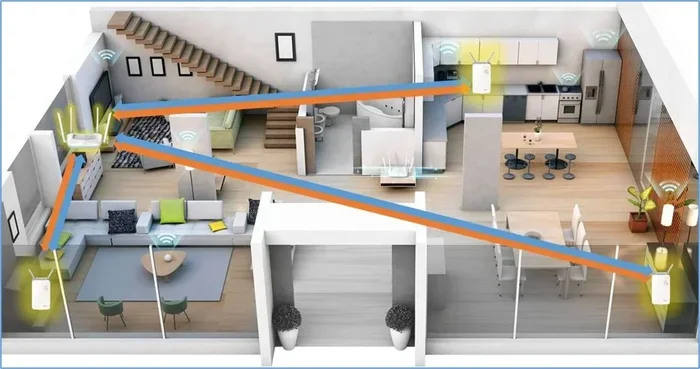
A mesh router is a type of wireless networking system that uses multiple devices, called nodes, to spread your internet signal across your entire home. Unlike a traditional wireless router that broadcasts from one central location, a mesh system creates a unified network with several points of coverage.
Each node in a mesh network talks to the others. This means your devices connect to the strongest signal available, not just the one closest to your main router. The result is a more reliable and consistent Wi-Fi signal in every room.
Think of it like this. A traditional router is like a single speaker in a large room. Some areas get loud, clear sound. Other areas are quiet and hard to hear. A mesh system is like placing speakers throughout the room. Every spot gets clear, strong audio.
Most modern mesh systems come as a two-pack or three-pack. You plug one node into your modem. This becomes your main hub. Then you place the other nodes around your home. They connect wirelessly to each other and to the main hub.
The setup process is usually very simple. You download a mobile app, follow the prompts, and place your nodes in strategic spots. The app often suggests the best router placement for maximum coverage.
Does a Mesh Router Replace Your Existing Router?
The short answer is yes. A mesh router replaces your existing router in almost all cases. Once you set up your mesh system, it takes over the job of distributing your internet to all your devices. Your old router becomes unnecessary.
But there is an important distinction to understand. A mesh router replaces the router function. It does not always replace your modem. Most homes still need a separate modem provided by your internet service provider, or a modem-router combo unit.
When you connect a mesh system, you typically plug one node into your modem using an Ethernet cable. That node acts as the main gateway. It receives the internet signal from the modem and then shares it with the other mesh nodes throughout your home.
Some people wonder whether they can keep their old router and add a mesh system on top. The answer is usually no. Running two routers on the same network can cause conflicts, double NAT issues, and confusing network behavior.
If you want to learn more about connecting mesh equipment alongside your current setup, check out this guide on connecting a mesh router to an existing router. It covers scenarios where you might want to keep both devices temporarily.
For those considering specific brands, you might also wonder whether certain routers can double as mesh units. For example, many users ask whether an Asus router can be used as a mesh system. The answer depends on the model and firmware support.
What Happens to Your Old Router?
Once your mesh system is running, your old router simply stops being the primary device. You can unplug it and store it away. Some people keep it as a backup. Others sell it or repurpose it for a different network.
If your old router has useful features, such as USB ports for file sharing or a strong firewall, you might miss those. However, most modern mesh systems include these features built in now.
When Should You Replace Your Router with a Mesh System?
Not every home needs a mesh network. But there are clear signs that your current setup is not cutting it anymore. If any of the following sound familiar, it might be time to make the switch.
You Have Dead Zones in Your Home
Dead zones are areas where your Wi-Fi signal is weak or completely absent. These often appear in bedrooms, basements, garages, or rooms far from your main router. A mesh system eliminates these dead spots by placing nodes in strategic locations.
Your Home Is Larger Than 2,000 Square Feet
A single traditional router typically handles homes up to about 1,500 to 2,000 square feet. If your home is larger, the signal has to travel farther. Walls, floors, and furniture all weaken the signal over distance. A mesh network scales easily to cover larger spaces.
You Have Many Connected Devices
Modern households have dozens of connected devices. Smart TVs, phones, tablets, smart speakers, security cameras, and smart home gadgets all compete for bandwidth. A mesh system handles this load much better than a single router because the nodes share the work.
You Experience Frequent Slowdowns
If your internet speeds drop significantly when you move to different rooms, your router might be struggling. A mesh system maintains consistent speeds across your entire home because each node helps manage the traffic.
You Want Seamless Roaming
Seamless roaming means your devices switch between mesh nodes automatically without losing connection. You can walk from your living room to your bedroom on a video call and never notice the switch. Traditional routers often require manual reconnection or cause brief drops.
How to Set Up a Mesh Router in Place of Your Current Router
Setting up a mesh system to replace your old router is straightforward. Follow these steps for a smooth transition.
Step 1: Check Your Modem Compatibility
Before you buy a mesh system, make sure your modem is compatible. Most mesh routers work with any standard modem. However, some ISPs provide modem-router combos that might need to be put into bridge mode first.
Step 2: Choose the Right Mesh System
Look at the size of your home and the number of devices you have. For small to medium homes, a two-pack usually works well. Larger homes or homes with many devices benefit from a three-pack or adding extra nodes later.
Step 3: Connect the Main Node to Your Modem
Plug one mesh node into your modem using an Ethernet cable. This node is your main hub. Power it on and wait for it to fully start up before moving to the next step.
Step 4: Place Your Additional Nodes
Place the remaining nodes in rooms where you need better coverage. A good rule of thumb is to keep nodes within range of each other. Most systems have indicator lights or app alerts to confirm proper placement.
Step 5: Configure Through the App
Download the mesh system’s companion app. Follow the on-screen instructions to name your network, set a password, and configure any advanced features. The app makes the entire process simple, even for non-technical users.
Quick Tips for a Smooth Transition
- Put your main node centrally: This gives the best starting point for signal distribution.
- Keep nodes within 30 to 50 feet of each other: Too much distance between nodes weakens the mesh backhaul connection.
- Avoid placing nodes near microwaves or thick walls: These interfere with wireless signals.
- Update firmware right away: Most apps prompt you to update. Always do this for the best performance and security.
- Test coverage after setup: Walk through your home with a speed test app to confirm every room gets strong signal.
Mesh Router vs Traditional Router: Key Differences
Understanding the differences between a mesh router and a traditional router helps you make the best decision for your home.
| Feature | Traditional Router | Mesh Router System |
|---|---|---|
| Coverage Area | Small to medium homes (up to 2,000 sq ft) | Small to large homes (up to 5,000+ sq ft with extra nodes) |
| Number of Devices | Handles moderate loads | Handles heavy loads with multiple nodes |
| Signal Consistency | Weakens with distance and walls | Strong and consistent throughout |
| Roaming | Manual switching or brief drops | Seamless, automatic switching |
| Setup Difficulty | Moderate | Easy with mobile app guidance |
| Cost | $50 to $200 | $100 to $500+ depending on the system |
| Scalability | Not scalable | Easily add more nodes as needed |
| Management | Basic web interface | Advanced app-based controls |
Traditional routers still have their place. For small apartments or single-story homes, a good single router can be more than enough. Mesh systems shine in larger or multi-story homes where coverage is a challenge.
If you currently have weak coverage and want a quick fix without replacing your router, you might consider getting a Wi-Fi extension instead. You can learn more about that option here: can I get a Wi-Fi extension. Extensions are cheaper but do not offer the same seamless experience as a full mesh system.
Common Mistakes When Replacing a Router with Mesh
Making the switch to a mesh system is exciting, but avoid these common pitfalls.
Skipping the Modem Check
Many people assume the mesh router replaces everything. It replaces the router, not the modem. If you skip checking your modem compatibility, you could end up with a system that does not connect to the internet.
Placing Nodes Too Far Apart
Mesh nodes need to communicate with each other. If you place them too far apart, the wireless backhaul connection weakens. This reduces the speed and reliability of your entire network. Keep nodes close enough to maintain a strong inter-node connection.
Not Using Ethernet Backhaul When Available
If you can run Ethernet cables between your nodes, do it. Wired backhaul is significantly faster and more stable than wireless backhaul. Many people miss this simple upgrade that dramatically improves performance.
Ignoring Firmware Updates
Mesh systems receive regular firmware updates that fix bugs, improve security, and boost performance. Ignoring these updates leaves your network vulnerable and underperforming.
Buying More Nodes Than You Need
A three-pack might look like a good deal, but if you live in a small apartment, you only need one or two nodes. Extra nodes are not harmful, but they are an unnecessary expense.
Expert Insights: Should You Make the Switch?
Networking experts generally agree that mesh systems are the future of home networking. As homes become smarter and more connected, a single router simply cannot keep up. Mesh systems offer the flexibility, coverage, and performance that modern households demand.
If you currently rely on a Wi-Fi booster or extender to cover dead spots, a mesh system is a significant upgrade. Boosters repeat the signal from your existing router, but they often cut your speed in half. Mesh nodes communicate intelligently with each other, maintaining much better speeds.
For those who want to boost their signal without a full mesh system, you might explore options like buying a Wi-Fi booster. However, keep in mind that boosters are a temporary fix and do not provide the same seamless experience.
The cost of a mesh system has dropped significantly in recent years. Entry-level two-packs are now available for around $100 to $150. For many households, this is a worthwhile investment that improves daily internet use across every device.
One thing to keep in mind is that not all mesh systems are created equal. Look for systems that support the latest Wi-Fi standards, such as Wi-Fi 6 or Wi-Fi 6E. These offer faster speeds, better efficiency, and improved handling of multiple devices.
Conclusion
A mesh router does replace your existing home router in nearly every scenario. It takes over the job of distributing your internet signal and managing connections to all your devices. The real question is not whether it replaces your router, but whether your home will benefit from the upgrade.
If you live in a larger home, have many connected devices, or struggle with dead zones, a mesh system is a smart investment. The setup is simple, the coverage is vastly superior, and the seamless roaming experience is hard to go back to once you try it.
Before you make the switch, confirm your modem compatibility, choose the right system for your home size, and follow the setup steps carefully. Avoid the common mistakes outlined above, and you will enjoy a stronger, more reliable home network for years to come.
Take the time to evaluate your current setup honestly. If your router is struggling to keep up, a mesh system is one of the best upgrades you can make for your home network. Your devices and your internet experience will thank you.
FAQs
Can I use my old router as a mesh node?
In most cases, no. Mesh nodes are designed to work specifically with their own system. Your old router cannot seamlessly integrate as a mesh node. Some advanced setups allow creative workarounds, but for reliable performance, stick with matching mesh nodes from the same manufacturer.
Do I need to contact my ISP when switching to a mesh router?
Usually no. Your ISP only cares that you have a working modem. As long as your modem is compatible and connected properly, you can swap in a mesh router without calling your internet provider. If your ISP provided a modem-router combo, you may need to put it into bridge mode.
Will a mesh router improve my internet speed?
A mesh router does not increase your internet speed from your provider. However, it can improve your speeds at the device level by providing stronger, more consistent signals. If your current router is losing speed due to distance or obstacles, a mesh system will restore those lost speeds.
How many mesh nodes do I need for my home?
For homes under 1,500 square feet, one or two nodes usually suffice. Homes between 1,500 and 3,000 square feet typically need two or three nodes. Larger homes above 3,000 square feet may require three or more nodes, or a system that supports additional units.
Can I add more nodes to my mesh system later?
Yes. Most mesh systems allow you to add extra nodes over time. This is one of the biggest advantages of a mesh setup. You can start with a two-pack and expand later if your coverage needs grow. Just make sure the new node is compatible with your existing system.
Is a mesh router worth the extra cost compared to a traditional router?
For most homes larger than 1,500 square feet or homes with many connected devices, absolutely. The improved coverage, seamless roaming, and ease of management justify the higher price. For small apartments with minimal devices, a traditional router may still be the better value.
Frequently Asked Questions
What is Does A Mesh Router Replace Existing Router?
Does A Mesh Router Replace Existing Router is an important topic with many practical applications.