Does Netgear Nighthawk Work Anywhere While Traveling
So, does Netgear Nighthawk work anywhere? The short answer is yes, but with some important caveats. The Netgear Nighthawk is a powerful travel router designed to deliver reliable internet, but its performance depends on your location, carrier, and setup. This article covers everything you need to know about using your Nighthawk while traveling, from setup tips to real-world limitations.
Key Takeaways
- Portability is key: The Netgear Nighthawk is built for travelers who need internet on the go.
- It works with multiple carriers: You can use SIM cards from different providers to get coverage abroad.
- Setup is simple: Most models offer plug-and-play functionality with minimal configuration.
- Limitations exist: Signal strength and coverage vary by region and location.
- Travel features are robust: Battery life, dual-band connectivity, and compact design make it ideal for trips.
- Pair with other devices: You can connect multiple devices simultaneously for a seamless travel experience.
📑 Table of Contents
- Does Netgear Nighthawk Work Anywhere While Traveling?
- What Makes the Netgear Nighthawk a Great Travel Companion?
- How Does the Nighthawk Perform Away From Home?
- Setting Up Your Nighthawk for Travel
- Limitations and Challenges of Using the Nighthawk While Traveling
- Expert Tips to Maximize Your Nighthawk While Traveling
- How the Nighthawk Compares to Other Travel Routers
- Final Thoughts: Does the Nighthawk Really Work Anywhere?
Does Netgear Nighthawk Work Anywhere While Traveling?
Traveling without reliable internet is a nightmare. You miss important emails. You can’t navigate new cities. And streaming your favorite shows on the couch becomes impossible. That is where the Netgear Nighthawk steps in. Many travelers swear by this device because it promises to deliver Wi-Fi wherever you go.
But here is the real question. Does the Netgear Nighthawk work anywhere you travel? The answer is not a simple yes or no. It depends on several factors. Your carrier, your destination, and even the type of Nighthawk model you own all play a role. In this guide, we will break it all down. You will learn how the Nighthawk performs in different situations. We will share setup tips, real-world experiences, and honest limitations. By the end, you will know exactly what to expect.
The Netgear Nighthawk series includes several models. Some are designed for home use. Others are built specifically for travel. The travel-friendly models are compact, battery-powered, and easy to carry. They turn any cellular signal into a personal Wi-Fi hotspot. This means you can connect your laptop, phone, and tablet all at once. Whether you are camping in the mountains or staying in a busy city hotel, the Nighthawk aims to keep you online.
Now, let us dive deeper into how this device actually performs away from home. We will look at real-world scenarios, setup steps, and expert tips that will help you get the most out of your Nighthawk during your next trip.
What Makes the Netgear Nighthawk a Great Travel Companion?
The Nighthawk is not just another portable hotspot. It is packed with features that make it stand out. Let us look at what makes it a solid choice for travelers.
Compact and Portable Design
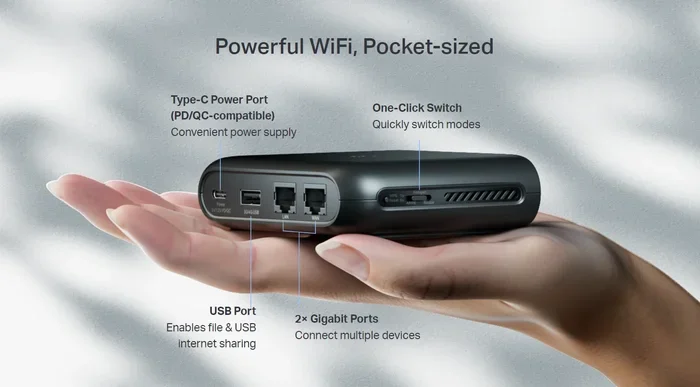
Most Nighthawk travel routers are small enough to fit in your pocket. They weigh very little. You can toss one into your carry-on bag without thinking twice. Unlike bulky modems, the Nighthawk is designed to move with you. Its slim profile means it does not take up valuable space in your luggage.
Battery Life That Keeps Up
Battery life matters a lot when you are on the road. Most Nighthawk models offer several hours of continuous use. Some can last a full day with moderate usage. You do not need to keep hunting for a power outlet. This is especially helpful during long flights or road trips where outlets are scarce.
Dual-Band Connectivity
The Nighthawk supports both 2.4 GHz and 5 GHz bands. This means you get faster speeds and better range. The 5 GHz band is great for streaming and video calls. The 2.4 GHz band covers more distance and works better through walls. You can switch between bands depending on your needs.
Easy Setup for Beginners
You do not need to be a tech expert to use the Nighthawk. Most models offer a simple plug-and-play experience. You insert a SIM card, power it on, and your Wi-Fi network appears. The setup process takes less than five minutes. Even if you are not tech-savvy, you will find it straightforward.
How Does the Nighthawk Perform Away From Home?
So, does the Netgear Nighthawk work anywhere when you are far from home? Let us explore how it performs in different travel situations.
Using the Nighthawk in Hotels
Hotels often have terrible Wi-Fi. The signal is weak. The speed is slow. And the connection drops frequently. With a Nighthawk, you bypass all of that. You plug in your SIM card, create your own private network, and enjoy a stable connection. No more fighting with the hotel’s glitchy internet. Your Nighthawk becomes your personal Wi-Fi oasis.
Staying Connected in Rural Areas
Rural areas can be tricky for internet access. Cell towers are fewer. Signal strength drops. But the Nighthawk can still work in these areas. It pulls whatever cellular signal is available and converts it into Wi-Fi. You may not get blazing-fast speeds. But you will stay connected enough to check emails and use maps. If you are traveling through remote areas, the Nighthawk is a lifesaver.
International Travel and Roaming
One of the biggest concerns for travelers is using the Nighthawk abroad. The good news is that many Nighthawk models support international SIM cards. You just need to check if your carrier offers roaming in your destination country. Some travelers buy local SIM cards when they arrive. This can save money and improve coverage. Just make sure your Nighthawk is unlocked before you travel.
When you are abroad, your connectivity options can vary widely. For example, if you are trying to stay in touch with family back home, you might wonder can Facetime work without Wi-Fi. The Nighthawk helps by providing a cellular-based connection that can support apps like Facetime when a Wi-Fi network is unavailable. This is a huge advantage for staying connected no matter where you are in the world.
Using the Nighthawk for Entertainment on the Road
Traveling does not mean you have to give up entertainment. With a Nighthawk, you can stream music, watch videos, and even connect Bluetooth devices. For instance, if you are wondering can 2 Bluetooth speakers work together while using your Nighthawk hotspot, the answer is yes. The Nighthawk supports multiple connected devices, so you can pair speakers, headphones, and other gadgets without any issues. This makes road trips and camping adventures much more enjoyable.
Setting Up Your Nighthawk for Travel
Setting up your Nighthawk before a trip is essential. A little preparation goes a long way. Here is how to get started.
Step 1: Check Your Carrier Coverage
Before you travel, check your carrier’s coverage map. This tells you where you will have signal. Some carriers have strong international coverage. Others are limited to specific regions. If your carrier does not cover your destination, consider buying a local SIM card or an international roaming plan.
Step 2: Update Your Firmware
Always update your Nighthawk’s firmware before a trip. Firmware updates fix bugs and improve performance. They also add new features that can enhance your travel experience. You can update the device through the Nighthawk app or the web interface.
Step 3: Configure Your Settings
Log into your Nighthawk settings before you leave. Set up your preferred network name and password. Enable any security features. You can also set up parental controls if you are traveling with kids. These small steps save you time and frustration on the road.
Step 4: Test Before You Go
Do a test run at home before your trip. Power on the Nighthawk, connect your devices, and check the speed. This helps you identify any issues early. You do not want to discover a problem while you are already at the airport.
Quick Tips for Travel Setup
- Carry a portable power bank to keep your Nighthawk charged.
- Save your network settings in the app for quick access.
- Pack the charging cable and a spare SIM card.
- Turn off the device when not in use to save battery.
- Keep your Nighthawk in a protective case to prevent damage.
Limitations and Challenges of Using the Nighthawk While Traveling
The Nighthawk is a great device. But it is not perfect. Let us look at the limitations you might face.
Signal Dependence
The Nighthawk relies on cellular signals. If there is no cell coverage in your area, the device will not work. This is true for mountains, deserts, and remote islands. You cannot create a signal out of thin air. Always research the coverage in your destination before relying on the Nighthawk.
Speed Variations
Your internet speed depends on the local network. In some countries, cellular networks are slower. In crowded areas, speeds can drop because too many people are using the same tower. The Nighthawk does its best, but it cannot magically boost a weak signal. Think of it as a tool that enhances the signal you have, not one that creates it from nothing.
Data Limits and Costs
Using your Nighthawk abroad can eat through your data plan quickly. Streaming videos and video calls use a lot of data. Roaming charges can also add up fast. Consider buying a travel data plan or a local SIM card with a generous data allowance. This keeps your costs under control and ensures you stay connected without breaking the bank.
Device Compatibility
Not all Nighthawk models work with every carrier. Some models are locked to specific networks. Before you travel, confirm that your Nighthawk is unlocked and compatible with international networks. This simple check can save you from a lot of headaches.
If you are planning to rely on your Nighthawk for connectivity during travel, it helps to understand how carrier coverage works in different areas. For example, if you are traveling within the United States and wondering about AT&T coverage in remote locations, you might want to check whether you can connect to AT&T Wi-Fi anywhere as a backup option. Knowing your alternatives ensures you are never left without a way to stay online.
Expert Tips to Maximize Your Nighthawk While Traveling
Want to get the most out of your Nighthawk on your next trip? Here are some expert tips that make a real difference.
Choose the Right Location for Your Nighthawk
Placement matters. Keep your Nighthawk near a window when indoors. This improves signal reception. If you are outdoors, place it in an elevated spot. Avoid putting it in a bag or closed container. Good airflow also helps prevent overheating during long use sessions.
Use a Signal Booster App
Some apps can help you find the strongest signal in your area. Use these apps to identify the best spot for your Nighthawk. This simple trick can improve your speeds significantly. It takes just a minute and can save you hours of frustration.
Manage Your Connected Devices
The Nighthawk can handle multiple devices at once. But too many connections slow it down. Disconnect devices you are not using. This frees up bandwidth for the devices that matter most. It also helps extend battery life.
Monitor Your Data Usage
Keep an eye on your data consumption. Most Nighthawk models have a data usage tracker in the app. Set daily limits if possible. This prevents surprises when you get your bill. It also helps you prioritize essential tasks like navigation and communication over streaming.
Keep Your Device Cool
The Nighthawk can get warm during extended use. Heat affects performance. If your device feels hot, turn it off for a few minutes. Let it cool down before using it again. This small habit can extend the lifespan of your router significantly.
Bring a Backup Plan
Even the best devices can fail. Always have a backup plan. Download offline maps before you travel. Save important documents on your device. Consider carrying a second portable hotspot if your trip is critical. A backup plan gives you peace of mind and keeps you connected no matter what happens.
How the Nighthawk Compares to Other Travel Routers
There are many travel routers on the market. How does the Nighthawk stack up against the competition?
| Feature | Netgear Nighthawk | Typical Travel Router |
|---|---|---|
| Portability | Very compact and lightweight | Varies, often bulkier |
| Battery Life | Up to 12 hours on some models | Usually 4 to 8 hours |
| Dual-Band Support | Yes, 2.4 GHz and 5 GHz | Often single-band only |
| Setup Ease | Plug-and-play with app | Can be complicated |
| Price Range | Mid to high range | Budget to mid range |
| Device Connections | Up to 15 to 32 devices | Usually 5 to 10 devices |
As you can see, the Nighthawk offers strong value for travelers. It combines portability, performance, and ease of use in a way that most competitors do not match. While it may cost a bit more upfront, the reliability and features make it worth the investment for frequent travelers.
Final Thoughts: Does the Nighthawk Really Work Anywhere?
So, does the Netgear Nighthawk work anywhere while traveling? The answer is yes, with some realistic expectations. It works best in areas with decent cellular coverage. It performs well in hotels, cities, and suburban areas. It can handle rural areas and international travel with the right setup and planning.
The Nighthawk is not magic. It cannot create a signal where none exists. But within its limits, it delivers excellent performance. It keeps you connected for work, entertainment, and communication while you are away from home. For travelers who depend on the internet, the Nighthawk is one of the best tools you can carry.
Before your next trip, take the time to prepare your device. Update the firmware, check carrier coverage, and test your setup at home. These small steps make a huge difference. You will arrive at your destination confident that you will stay online no matter what.
Traveling should be relaxing. You should not have to worry about losing your internet connection. The Netgear Nighthawk takes that worry away. It gives you the freedom to explore without being tied to a hotel lobby or a coffee shop Wi-Fi network. Pack it in your bag, head out on your next adventure, and enjoy the peace of mind that comes with staying connected wherever you go.
Frequently Asked Questions
Can I use the Netgear Nighthawk in any country?
Yes, most Nighthawk models work internationally. However, you need to make sure your device is unlocked and that your carrier supports roaming in the country you are visiting. Buying a local SIM card is often the best option for international travel.
How many devices can connect to the Nighthawk at once?
Most Nighthawk models support between 15 and 32 connected devices. This is plenty for a family or a small group of travelers. Keep in mind that too many devices can slow down your speeds, so prioritize essential connections.
Do I need a special SIM card for the Nighthawk?
No, you do not need a special SIM card. The Nighthawk works with standard nano-SIM and micro-SIM cards from most carriers. Just make sure your SIM card is active and has a data plan that supports roaming if you are traveling abroad.
Can I use the Nighthawk as a regular Wi-Fi router at home?
Yes, you can. While the Nighthawk is designed with travelers in mind, it works just as well at home. It can replace your existing router or act as a range extender to boost your home Wi-Fi signal.
What should I do if the Nighthawk shows no signal while traveling?
First, check if your SIM card is properly inserted. Then, move to a different location to find a stronger signal. You can also try restarting the device. If the problem persists, contact your carrier to confirm coverage in your area.
Is the Nighthawk worth the price for occasional travelers?
It depends on how much you rely on the internet while traveling. If you work remotely or need constant connectivity, the Nighthawk is absolutely worth it. For occasional travelers who only need internet for a few hours, a local Wi-Fi connection or a phone hotspot may be enough.
=== CONCLUSION ===
The Netgear Nighthawk is a reliable and powerful travel companion. It brings internet to almost anywhere you go. With its compact design, long battery life, and easy setup, it is one of the best options for staying connected while traveling. Does the Netgear Nighthawk work anywhere? Yes, it does, as long as you have cellular coverage and a bit of preparation. Plan ahead, follow the tips in this guide, and you will enjoy seamless connectivity on every trip. Happy travels and stay connected!