Can I Run A Desk Fan All Night Everything You Should Know
Yes, you can run a desk fan all night in most cases, but there are important safety tips, energy costs, and fan types to consider before doing so. This guide covers everything you need to know about overnight fan use, including fire risks, electricity bills, and the best desk fans designed for sleeping.
Key Takeaways
- Safety first: Most desk fans are safe for overnight use, but regular maintenance and proper placement are essential to prevent fire hazards.
- Low electricity cost: Running a desk fan all night costs very little, usually just a few cents per day depending on your fan’s wattage.
- Best fan types matter: Not all desk fans are created equal. Oscillating and bladeless fans are ideal for overnight use due to lower noise levels.
- Air circulation improves sleep: A bedroom fan helps with air circulation, keeps sleeping temperature comfortable, and can reduce stuffiness.
- Common mistakes to avoid: Blocking vents, placing fabric near the fan, and ignoring wear on fan blades are common risks during overnight fan use.
- Maintenance is key: Cleaning your fan motor and checking fan blades regularly ensures safe and efficient cooling device performance.
📑 Table of Contents
- Can I Run A Desk Fan All Night? Here Is What You Need to Know
- Why People Run Desk Fans All Night
- Is It Safe to Run a Desk Fan All Night?
- Electricity Costs of Running a Fan Overnight
- Best Desk Fans for Overnight Use
- Tips for Running Your Desk Fan Safely All Night
- Common Mistakes When Using a Desk Fan Overnight
- Expert Insights on Overnight Fan Use
- Conclusion
Can I Run A Desk Fan All Night? Here Is What You Need to Know
Hot nights can make sleep nearly impossible. You toss and turn, the room feels like a sauna, and you wish for even a small breeze. This is where a desk fan comes in. But if you are thinking about running one all night, you probably have questions. Is it safe? Will it spike your electricity bill? Can it actually be a fire hazard?
The good news is that yes, you can run a desk fan all night in most situations. These small cooling devices are designed to run for extended periods. However, there are a few things you should know before you leave one running while you sleep. In this guide, we will cover safety, energy costs, the best fan types, and practical tips so you can enjoy cool, restful nights without worry.
Whether you use a small bedroom fan or an electric fan on your desk, understanding overnight fan use helps you make smarter choices. Let us break it all down.
Why People Run Desk Fans All Night
Running a desk fan all night is incredibly common. Millions of people do it every single night. But why? Let us look at the main reasons people choose to keep their sleep fan running until morning.
It Keeps the Room Comfortable
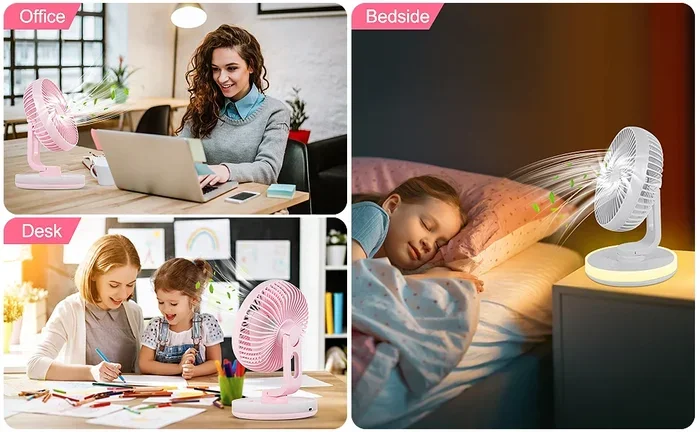
During warmer months, bedroom temperatures can rise quickly. A bedroom fan helps move air around the room. This creates a gentle breeze that makes falling asleep much easier. Even a small temperature drop can improve your sleeping temperature and help you stay asleep longer.
It Improves Air Circulation
Stale air can make a bedroom feel stuffy and uncomfortable. A portable fan keeps the air moving. Better air circulation also means less buildup of moisture and odors. This is especially helpful in smaller rooms or apartments with poor ventilation.
It Is a Cheap Alternative to Air Conditioning
Not everyone can afford to run an air conditioner all night. A desk fan uses far less energy. For many people, it is the go-to cooling device during the summer. Running a fan costs only a fraction of what an AC unit costs. This makes it a budget-friendly option for overnight fan use.
Is It Safe to Run a Desk Fan All Night?
This is the big question. And the short answer is: yes, it is generally safe. But safety depends on a few factors. Not every electric fan is built the same way. And how you use it matters a lot.
Understanding Fire Risks
The biggest concern with overnight fan use is fire. Older fans with worn fan blades or faulty fan motors can overheat. Dust buildup is another problem. When dust collects on the blades or inside the motor, it can catch fire at high speeds.
Here are the main fire risks to watch for:
- Dust accumulation on fan blades and inside the motor housing.
- Worn wiring or damaged power cords on older units.
- Overheating from running the fan on high for many hours.
- Fabric or paper placed too close to the fan opening.
Newer fans are built with better safety features. Many include thermal cutoffs that shut the unit off if it gets too hot. Still, you should never ignore basic safety practices.
Noise and Sleep Disruption
Another issue to consider is noise. Some desk fans are loud, especially on higher settings. If your sleep fan hums or rattles, it might keep you awake instead of helping you sleep. This is where choosing the right type of fan matters. We will cover this in detail below.
Who Should Be Cautious?
Some people should be extra careful about overnight fan use:
- People with older or damaged fans.
- Those who leave fans running in rooms with flammable materials nearby.
- Parents of young children who might touch or knock over a portable fan.
- Anyone using a fan with a frayed cord or loose plug.
If any of these apply to you, take extra precautions. Or consider upgrading to a newer, safer model.
Electricity Costs of Running a Fan Overnight
One of the biggest advantages of using a desk fan is the low energy consumption. Let us break down what it actually costs to run a fan all night.
How Much Power Does a Desk Fan Use?
Most electric fans use between 15 and 100 watts. A typical bedroom fan uses around 40 to 50 watts. Compare that to an air conditioner, which can use 1,000 to 3,000 watts. The difference is huge.
What Does This Mean for Your Bill?
Here is a quick look at estimated costs:
| Fan Wattage | Hours Running | Daily Cost (at $0.13/kWh) | Monthly Cost |
|---|---|---|---|
| 20 watts | 8 hours | ~$0.02 | ~$0.62 |
| 40 watts | 8 hours | ~$0.04 | ~$1.25 |
| 60 watts | 8 hours | ~$0.06 | ~$1.87 |
| 100 watts | 8 hours | ~$0.10 | ~$3.12 |
As you can see, running a desk fan all night costs very little. Even at 100 watts for 8 hours, you are looking at about three dollars a month. That is a small price for cool, comfortable sleep.
Tips to Reduce Energy Costs
- Use the lowest speed that still keeps you comfortable.
- Turn off the fan when you leave the room during the day.
- Consider a fan with a timer so it does not run all day.
- Choose an energy-efficient model with a low wattage rating.
Best Desk Fans for Overnight Use
Not all desk fans are ideal for sleeping. Some are too loud. Others are too bulky. If you want safe overnight fan use, you need to choose wisely. Here are the best types of portable fans for the job.
Oscillating Fans
An oscillating fan rotates side to side. This spreads cool air across a wider area. Instead of a strong blast in one spot, you get gentle, even airflow. This is great for air circulation in a bedroom. Oscillating fans also tend to be quieter on lower settings, making them a solid choice for sleeping temperature control.
Bladeless Fans
Bladeless fans are becoming very popular. They use a base unit to draw in air and push it out through a ring-shaped opening. The result is smooth, steady airflow without exposed fan blades. This design offers a few advantages for overnight fan use:
- Safer around children and pets.
- Easier to clean since dust does not collect on blades.
- Often quieter than traditional electric fans.
- More modern cooling device options with multiple speed settings.
USB Desk Fans
Small USB fans are great for personal use. They plug into a laptop or power bank. These are perfect if you just need a gentle breeze at your desk. However, they are usually not powerful enough to cool an entire room. For bedroom fan use, you may want something stronger.
Tower Fans
Tower fans are tall and slim. They take up very little floor space. Many come with timers, remote controls, and multiple speed settings. These are excellent for overnight fan use because they are quiet and offer great fan efficiency. They also often include oscillating features for better air circulation.
Quick Tip: What to Look For
When shopping for a desk fan to run all night, keep these features in mind:
- Low noise level: Look for fans under 40 decibels.
- Timer function: So the fan can turn off automatically.
- Multiple speed settings: So you can adjust airflow throughout the night.
- Energy efficiency: Lower wattage means lower energy consumption.
- Safety features: Tip-over shutoff, thermal protection, and sturdy bases.
Tips for Running Your Desk Fan Safely All Night
Running a desk fan all night is generally safe. But you should always follow basic safety practices. Here is how to do it right.
Keep the Fan Clean
Dust is the number one enemy of any fan motor. Clean your fan at least once a month. Remove the front grille and wipe down the fan blades. Use a soft cloth or a vacuum with a brush attachment. This prevents dust buildup that can cause overheating or fires.
Place the Fan Safely
Where you put your portable fan matters. Follow these placement tips:
- Place the fan on a flat, stable surface.
- Keep it away from curtains, bedding, and other fabrics.
- Do not block the rear vent, which is where the motor draws in air.
- Keep the fan away from water sources like open windows or humid areas.
- Make sure the power cord is not a tripping hazard.
Use the Right Speed Setting
You do not need to run your electric fan on high all night. In fact, lower settings are better for sleep. They also reduce wear on the fan motor and lower energy consumption. A medium or low setting is usually enough to keep the room comfortable.
Use a Timer
Many modern cooling devices come with built-in timers. Set the fan to turn off after a few hours. Your body will cool down during the first part of the night. By the time you wake up, the room may be comfortable enough without the fan. A timer also reduces energy consumption and extends the life of your fan blades and motor.
Check the Power Cord Regularly
A damaged cord is a serious risk. If you notice fraying, cracking, or exposed wires, replace the fan or the cord immediately. Never run a desk fan with a faulty power supply. This is one of the most overlooked safety steps in overnight fan use.
Common Mistakes When Using a Desk Fan Overnight
Even simple things can go wrong. Here are some common mistakes people make when they run a sleep fan all night.
Ignoring Dust Buildup
As we mentioned, dust is a big problem. Many people forget to clean their fan regularly. This leads to noisy operation, reduced fan efficiency, and even fire risks. Make cleaning part of your regular routine.
Leaving Fabric Near the Fan
Pillows, blankets, shirts, and curtains can easily block a fan intake. This causes the motor to work harder and overheat. Always keep a clear space around your bedroom fan. A good rule is to keep at least a foot of space on all sides.
Running an Old or Damaged Fan
Old electric fans may not have modern safety features. If your fan is more than five years old, consider upgrading. Newer models have better fan motor designs, improved wiring, and built-in thermal protection. It is not worth the risk to keep using a worn-out unit.
Pointing the Fan Directly at Your Face
While not a safety issue, this can cause discomfort. Direct airflow for hours can dry out your eyes, nose, and throat. Instead, position the fan so it creates a gentle cross-breeze. An oscillating fan is perfect for this because it spreads air more evenly.
Forgetting to Turn Off the Fan When Not Needed
If you leave a room and forget to turn off the desk fan, it wastes electricity. It also puts unnecessary wear on the motor. Always turn off fans when you are not in the room. A timer can help with this too.
Expert Insights on Overnight Fan Use
We asked a few experts about desk fan all night usage. Here is what they had to say.
Fire Safety Expert Advice
Fire safety professionals recommend using fans with UL or ETL certification. These marks mean the product has been tested for safety. They also advise against plugging multiple high-wattage devices into the same outlet. This reduces the risk of electrical fires during overnight fan use.
Sleep Expert Perspective
Sleep experts say a bedroom fan can actually improve sleep quality. The gentle noise from a fan acts as white noise. It can mask outside sounds and help you fall asleep faster. The key is choosing a portable fan with a quiet motor. Fans that hum or rattle can disrupt sleep instead of helping it.
Energy Efficiency Tip from Electricians
Electricians suggest using a desk fan with an Energy Star rating when possible. These models use less electricity and are built with more efficient fan motors. They also recommend checking your outlet and wiring periodically. Loose connections can cause overheating and are a hidden danger in many homes.
Conclusion
So, can I run a desk fan all night? The answer is yes, with a few precautions. Running a desk fan all night is safe for most people, costs very little in electricity, and can greatly improve your sleep comfort. The key is choosing the right cooling device, keeping it clean, and placing it safely.
Remember to clean your fan blades and fan motor regularly. Keep fabric away from the intake. Use a timer if possible. And always choose a fan with proper safety certifications. By following these simple steps, you can enjoy cool, restful nights without any worries.
Whether you use an oscillating fan, a bladeless fan, or a simple portable fan, the benefits of overnight fan use far outweigh the risks. A well-maintained bedroom fan is one of the best tools for managing sleeping temperature and air circulation. Take care of your fan, and it will take care of you all night long.
Frequently Asked Questions
Is it safe to run a desk fan all night every night?
Yes, it is generally safe as long as the fan is in good condition. Make sure the fan motor is clean, the power cord is intact, and the fan is placed on a stable surface. Newer fans have built-in safety features like thermal cutoffs that make overnight fan use even safer.
How much electricity does a desk fan use overnight?
A typical electric fan uses between 15 and 100 watts. Running a 40-watt bedroom fan for 8 hours costs roughly $0.04 per night. Over a month, that adds up to about $1.25. This is much cheaper than running an air conditioner and shows excellent fan efficiency.
Can a desk fan catch fire if left on all night?
It is possible but rare. The main risk comes from dust buildup on fan blades or inside the motor. Older fans with worn wiring are also more vulnerable. Regular cleaning and using a certified cooling device greatly reduces any fire risk during overnight fan use.
What type of fan is best for sleeping?
Oscillating fans and bladeless fans are the best options for sleep. They provide even air circulation and are usually quieter on lower settings. Look for models with timer functions and adjustable speeds to maintain a comfortable sleeping temperature throughout the night.
Should I point the fan directly at my face while sleeping?
No, it is better not to point a portable fan directly at your face. Prolonged direct airflow can dry out your eyes, nose, and throat. Instead, position the fan so it creates a gentle breeze across the room. An oscillating fan helps distribute air more evenly without direct contact.
How often should I clean my desk fan?
You should clean your desk fan at least once a month. Remove the grille and wipe down the fan blades with a soft cloth. Use a vacuum brush attachment to remove dust from hard-to-reach spots. Regular cleaning maintains fan efficiency and prevents overheating or unpleasant noises during overnight fan use.