Can I Download Windows 10 For Free Without Any Risk
Can I Download Windows 10 For Free without putting my computer at risk? Yes, you absolutely can, but only through official Microsoft channels. This guide walks you through every legitimate method to get a free Windows 10 ISO file, install it safely, and avoid the scams that plague the internet. You will learn about the free upgrade offer, system requirements, and exactly how to stay protected while setting up your genuine Windows copy.
If you have been searching the web wondering can I download Windows 10 for free without any risk, you are not alone. Millions of people ask this exact question every single day. Maybe your old laptop needs a fresh start, or you just built a new PC and do not want to spend money on an operating system. Whatever the reason, the good news is that yes, you can get Windows 10 for free through completely legal and safe methods.
But here is the catch. The internet is full of shady websites that promise free Windows 10 downloads but actually hand you malware, spyware, or worse. These sites trick you into clicking dangerous links, and before you know it, your personal data is compromised. That is exactly why you need a trustworthy guide. In this article, we cover every official method, every risk to watch out for, and every step you need to take to stay completely safe.
We will walk you through the Microsoft Media Creation Tool, explain your legal rights, compare the free and paid versions, and give you expert tips for a smooth Windows 10 installation. By the end of this guide, you will know exactly how to download Windows 10 for free without putting your computer or your data at risk. Let us get started.
Key Takeaways
- You Can Get Windows 10 for Free: Microsoft still offers legal ways to download and install Windows 10 at no cost through its official website and upgrade tools.
- Always Use Official Sources: Downloading from the Microsoft official website or using the Media Creation Tool ensures a safe Windows download free of malware.
- Know Your Rights: Understanding Microsoft licensing terms helps you stay legal and avoid activation issues down the road.
- Unofficial Sites Are Risky: Third-party download portals often bundle malware, adware, and viruses that can harm your PC.
- A Clean Install Is Simple: With the right tool and a USB drive, you can perform a clean install Windows 10 in under an hour.
- Activation Matters: Without a Windows 10 product key or digital license, you may face limited customization and periodic reminders.
- Windows 10 Still Has Value: Even with Windows 11 available, Windows 10 remains a solid, supported operating system for many users.
📑 Table of Contents
- What Is Windows 10 and Why Do People Search “Can I Download Windows 10 For Free”?
- Official Ways to Download Windows 10 for Free
- Is It Legal to Download Windows 10 Without Paying?
- The Hidden Dangers of Unofficial Windows 10 Downloads
- Step-by-Step: How to Safely Download and Install Windows 10
- Windows 10 Free vs Paid: What You Actually Get
- Expert Insights and Final Thoughts
What Is Windows 10 and Why Do People Search “Can I Download Windows 10 For Free”?
Windows 10 is a personal computer operating system created by Microsoft. It was released in July 2015 and quickly became one of the most popular operating systems in the world. Even though Microsoft has since released Windows 11, Windows 10 is still widely used by millions of people across the globe. It runs on desktops, laptops, tablets, and even some gaming machines.
So why do so many people look for a free Windows 10 download? There are several reasons. Some users are on a tight budget and simply cannot afford to pay for a license. Others have older computers that do not meet the requirements for Windows 11, so Windows 10 becomes the best option. And then there are people who just want to try the operating system before committing to a purchase.
Why Windows 10 Is Still Popular in 2024
Even after the release of Windows 11, Windows 10 remains a top choice for many users. Here is why:
- Broader Hardware Support: Windows 10 runs on older computers that cannot handle Windows 11’s stricter requirements.
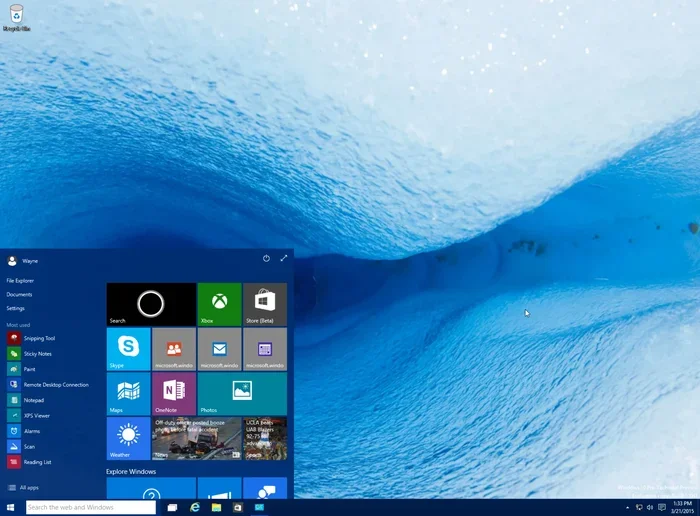
- Familiar Interface: The Start menu, taskbar, and overall layout are well known to billions of users worldwide.
- Software Compatibility: Many programs and games still work best on Windows 10, especially older applications.
- Driver Support: Hardware manufacturers often prioritize Windows 10 drivers for legacy devices.
- Lower System Requirements: You do not need a TPM 2.0 chip or a specific CPU generation to run it.
Who Still Uses Windows 10?
Windows 10 is used by students, professionals, gamers, businesses, and everyday home users. According to various reports, hundreds of millions of devices still run this operating system. Many people prefer it because it is stable, well-tested, and does not force the constant changes that come with newer versions. If you are one of those users, finding a safe way to download Windows 10 for free is a smart move.
Official Ways to Download Windows 10 for Free
Microsoft offers several legitimate ways to get Windows 10 without paying a single penny. These methods are safe, legal, and fully supported by the company. Let us look at each one in detail.
Method 1: The Microsoft Free Upgrade Offer
Even though the original free Windows 10 upgrade offer ended in 2016, Microsoft has never completely shut the door. Users running a genuine copy of Windows 7 or Windows 8.1 can sometimes still upgrade to Windows 10 for free through the Media Creation Tool. This tool downloads the Windows 10 ISO file directly from Microsoft and walks you through the installation process.
Here is how it works:
- Visit the Microsoft official website for the Media Creation Tool.
- Accept the license terms.
- Choose the option to create installation media for another PC.
- Select your language, edition, and architecture (32-bit or 64-bit).
- Download the tool and follow the on-screen instructions.
This method gives you a legal and genuine Windows copy. You may or may not need a product key, but the installation will work. Over time, Microsoft has updated this tool, so it is always worth checking the official site for the latest version.
Method 2: Downloading the ISO File Directly
You can also download the free Windows 10 ISO file directly from Microsoft’s website. An ISO file is essentially a complete copy of the operating system that you can burn to a USB drive or mount as a virtual disc. This method is perfect if you want to perform a clean install Windows 10 on a brand-new or reformatted computer.
To get the ISO file:
- Go to the Microsoft download page for Windows 10.
- Select the Windows 10 edition you want (Home or Pro).
- Choose your preferred language.
- Click the download link for the 64-bit or 32-bit version.
- Save the file and use it with the Media Creation Tool or a USB drive.
Quick Tips for Finding the Right Download
- Always double-check the URL. Make sure you are on an official Microsoft domain (microsoft.com). Look for the padlock icon in your browser.
- Avoid shortened links. Scam sites often use bit.ly or similar services to hide their true destination.
- Check the file size. A genuine Windows 10 ISO file is typically around 5 to 6 gigabytes. If the file is much smaller, it is probably fake.
Comparison: Free vs Paid Ways to Get Windows 10
| Method | Cost | Risk Level | Legitimacy | Activation |
|---|---|---|---|---|
| Microsoft Media Creation Tool | Free | None | 100% Legitimate | Digital License or Key |
| Direct ISO Download from Microsoft | Free | None | 100% Legitimate | Digital License or Key |
| Windows 10 from Microsoft Store | Free (Trial) | None | Legitimate | Time-Limited |
| Refurbished OEM License | Low Cost | Low | Legitimate | Permanent |
| Third-Party Download Sites | Free | High | Often Illegal | May Fail or Be Blocked |
| Torrent / Peer-to-Peer | Free | Very High | Illegal | Unreliable |
As you can see from the table above, the official Microsoft methods are by far the safest and most reliable. Third-party sites and torrents carry significant risks that we will cover in the next section.
Is It Legal to Download Windows 10 Without Paying?
This is one of the most common questions people ask when they search for can I download Windows 10 for free. The answer depends on how you get it. Downloading the ISO file from Microsoft’s website or using the Media Creation Tool is completely legal. Microsoft actually offers these tools for free.
However, using a pirated Windows 10 license key or a key generator is illegal. These tools violate Microsoft’s software licensing agreement and can result in serious consequences. Not to mention, most key generators are bundled with malware and viruses that can infect your computer.
Understanding Microsoft’s Licensing Terms
When you install Windows 10, you agree to a software license agreement. This agreement outlines how you are allowed to use the software. Here are the key points:
- One license per device. You cannot share a single license key across multiple computers.
- No redistribution. You cannot download Windows 10 and sell it to someone else.
- Genuine copy required. Microsoft expects you to use a legal way to get Windows, whether through purchase or their free upgrade tools.
- Activation recommended. While you can use Windows 10 without activating it, you will face limitations and reminders.
Who Qualifies for a Free Copy?
Certain groups of people qualify for a free Windows 10 copy through official programs:
- Accessibility users: Microsoft has offered free copies to users who rely on accessibility features.
- Windows Insiders: Participants in the Windows Insider Program can get early access to builds.
- Users with genuine older licenses: If you had a valid Windows 7 or Windows 8.1 license, you may still be eligible for a free upgrade to Windows 10.
- Students and educators: Some institutions provide free Windows 10 licenses through academic programs.
Expert Insight
According to Microsoft’s support documentation, the company periodically revisits its free upgrade programs. Even if the main offer ended years ago, there have been instances where Microsoft reopens the door for certain user groups. Always check the official Microsoft website for the most current information before trying any method.
The Hidden Dangers of Unofficial Windows 10 Downloads
This is where things get really important. If you decide to skip the official Microsoft channels and search for a free Windows 10 download on random websites, you are putting yourself at serious risk. Let us break down exactly what can go wrong.
Malware and Virus Risks
Many unofficial websites that offer free Windows 10 ISO files are loaded with malicious software. When you download from these sites, you might also be downloading:
- Trojans: Programs that disguise themselves as harmless files but steal your personal data.
- Ransomware: Malware that locks your files and demands payment to unlock them.
- Adware: Software that floods your browser with annoying pop-up ads.
- Keyloggers: Hidden programs that record every keystroke you type, including passwords and credit card numbers.
These threats are real and they are common. A single bad download can compromise your entire computer and put your identity at risk.
Common Scams to Watch Out For
The internet is full of scams targeting people who want Windows 10 for free. Here are some of the most common ones:
- Fake Download Buttons: Websites display large green buttons that look like download links, but they actually download adware or redirect you to sketchy pages.
- Key Generator Scams: Sites promise free Windows 10 product keys through a generator tool. These tools are almost always malware in disguise.
- Survey Scams: You are asked to complete surveys or offer trials before you can download the file. These surveys harvest your personal information.
- Fake Microsoft Sites: Scam websites mimic the look of the official Microsoft site to trick you into downloading infected files.
Common Mistakes People Make
- Ignoring the URL: Always verify that the website is genuinely from Microsoft before downloading anything.
- Skipping antivirus scans: Even official downloads should be scanned with up-to-date antivirus software.
- Trusting too-good-to-be-true offers: If a site promises a permanent Windows 10 license for free with no strings attached, it is almost certainly a scam.
- Disabling security software: Some installers ask you to turn off your antivirus. Never do this.
Step-by-Step: How to Safely Download and Install Windows 10
Now that you understand the risks and the official methods, let us walk through the actual process step by step. This guide will show you exactly how to download Windows 10 for free and install it safely on your computer.
Step 1: Check Your System Requirements
Before you download anything, make sure your computer can run Windows 10. Here are the minimum requirements:
- Processor: 1 GHz or faster
- RAM: 1 GB for 32-bit or 2 GB for 64-bit
- Hard Drive Space: 16 GB for 32-bit or 20 GB for 64-bit
- Graphics Card: DirectX 9 or later with WDDM 1.0 driver
- Display: 800 x 600 resolution
Checking these requirements first saves you time and prevents frustration during the installation process.
Step 2: Grab the Media Creation Tool
The Media Creation Tool is Microsoft’s official utility for creating a bootable USB drive or upgrading your current installation. Here is how to use it:
- Visit the Microsoft official website for the Windows 10 download page.
- Click the “Download tool now” button.
- Run the tool once it has downloaded.
- Accept the license terms.
- Choose “Create installation media for another PC.”
- Select your language, edition, and architecture.
- Choose “USB flash drive” and insert a USB drive with at least 8 GB of space.
- Wait for the tool to download and create the bootable drive.
This process typically takes 15 to 30 minutes depending on your internet speed. Once it is done, you have a fully bootable USB drive with Windows 10 ready to go.
Step 3: Choose Your Installation Type
When you boot from the USB drive, you will be asked to choose between two options:
- Upgrade this PC now: This keeps your files, apps, and settings while installing the fresh copy of Windows 10. It is the easiest and safest option for most users.
- Custom: Install Windows only (advanced): This performs a clean install Windows 10, wiping everything from your hard drive. Use this option if you want a completely fresh start.
For most people, the upgrade option is the best choice. It is faster, safer, and you do not lose any of your existing files.
Quick Tips for a Smooth Installation
- Back up your data first. Even with the upgrade option, always save your important files to an external drive or cloud storage.
- Connect to power. If you are using a laptop, make sure it is plugged in during the installation.
- Have your Wi-Fi password ready. Windows 10 will need internet access during setup.
- Be patient. The installation process can take 20 to 45 minutes. Do not turn off your computer during this time.
- Update immediately after installation. Go to Settings > Update & Security and install all available updates right away.
What About Activation?
After installing Windows 10, you may see a message asking you to activate your copy. If you used the Media Creation Tool and previously had a genuine Windows license on your PC, Microsoft activation should happen automatically. If not, you can still use Windows 10 with limited features. You will see a “Activate Windows” watermark on your desktop, and you will not be able to customize the wallpaper or theme.
To fully activate, you would need a Windows 10 license key. You can purchase one from Microsoft or from authorized retailers. But the core operating system will continue to function even without activation.
Windows 10 Free vs Paid: What You Actually Get
You might be wondering what the difference is between a free Windows 10 copy and a paid one. The truth is, the core operating system is exactly the same. The differences come down to activation and a few minor features.
What the Free Version Includes
Even without a Windows 10 product key, you get access to nearly all of the features that make Windows 10 great:
- Full desktop experience with the Start menu, taskbar, and task view.
- Microsoft Edge browser for fast and secure web browsing.
- Cortana voice assistant for hands-free help.
- Microsoft Store access to apps and games.
- Windows Defender built-in antivirus protection.
- DirectX 12 support for better gaming performance.
- Virtual Desktops for multitasking.
- Snap Assist for easy window management.
That is a lot of functionality for absolutely no cost. Most everyday users will find that the free version covers all their needs perfectly.
What You Miss Without a License
There are a few limitations when you do not activate Windows 10:
- Personalization options are locked. You cannot change your wallpaper, accent color, or theme.
- A watermark appears on the bottom-right corner of your screen.
- Periodic reminder notifications pop up asking you to activate.
- No priority support from Microsoft if you encounter issues.
- Some optional features may be unavailable or delayed.
For most users, these limitations are minor and easy to live with. The operating system works just fine for browsing,办公, gaming, and everyday tasks.
Expert Insights and Final Thoughts
What the Experts Say About Free Windows 10 Downloads
Cybersecurity experts consistently advise users to stick with official Microsoft channels when downloading any operating system. Third-party download sites may seem convenient, but they are the number one source of malware infections related to operating system downloads. The Media Creation Tool and direct ISO downloads from Microsoft are the only methods that guarantee a safe Windows download.
Tech reviewers also point out that Windows 10 continues to receive security updates and patches from Microsoft. While the end of support date is approaching, the operating system remains a reliable and secure choice for users who need a free PC operating system that works well on older hardware.
Pro Tip from the Experts
Before you install Windows 10, create a recovery drive or system image of your current setup. This way, if anything goes wrong during the installation, you can easily restore your computer to its previous state. A recovery drive takes about 15 minutes to create and can save you hours of troubleshooting later.
To answer the question once and for all: Can I Download Windows 10 For Free Without Any Risk? Yes, absolutely. As long as you use the official Microsoft tools and download from the Microsoft official website, you have nothing to worry about. You get a genuine Windows copy, a safe installation experience, and a fully functional operating system that will serve you well for years to come.
Remember to always verify your download source, keep your antivirus software running, and back up your important files before making any major changes to your system. With these precautions in place, you can confidently upgrade to Windows 10 and enjoy a fast, reliable, and secure computing experience without spending a single dollar.
Windows 10 has earned its place as one of the most beloved operating systems ever created. Whether you are a student, a professional, a gamer, or someone who just needs a reliable computer, getting it for free through official channels is one of the smartest moves you can make. So go ahead, grab that free Windows 10 ISO, and give your PC the fresh start it deserves.
Frequently Asked Questions
Is it really possible to download Windows 10 for free from Microsoft?
Yes, Microsoft offers the Media Creation Tool and direct ISO downloads for free on its official website. These tools let you download a genuine copy of Windows 10 and install it on your PC without paying anything upfront.
Will I need a product key to use Windows 10 after a free download?
Not necessarily. If you previously had a genuine Windows license on your computer, Microsoft activation often happens automatically. If not, you can still use Windows 10 with some minor limitations like a watermark and restricted personalization options.
What are the risks of downloading Windows 10 from third-party websites?
Third-party sites frequently bundle malware, adware, and viruses with their downloads. They may also provide altered or corrupted files that can damage your system. Always stick to the Microsoft official website to stay safe.
Can I upgrade from Windows 7 or 8.1 to Windows 10 for free?
In many cases, yes. Users with a genuine Windows 7 or Windows 8.1 license can often use the Media Creation Tool to upgrade to Windows 10 at no cost. Microsoft has not completely removed this option, though availability may vary.
What is the difference between Windows 10 Home and Windows 10 Pro?
Windows 10 Home is the standard edition for everyday users. It includes all the core features like the Start menu, Microsoft Store, and Windows Defender. Windows 10 Pro adds advanced features like BitLocker encryption, Remote Desktop, and group policy management, which are mainly useful for businesses and power users.
How long does it take to download and install Windows 10?
The download typically takes 15 to 30 minutes depending on your internet speed, and the installation process usually takes another 20 to 45 minutes. Using a USB flash drive with at least 8 GB of space is the fastest and most reliable method for a clean install Windows 10.
=== CONCLUSION ===
Can I Download Windows 10 For Free Without Any Risk? The answer is a resounding yes, as long as you follow the right path. By using the Media Creation Tool, downloading the ISO file directly from Microsoft, and understanding your legal rights as a user, you can get a genuine Windows 10 copy without spending a penny. The key is to avoid the temptation of shady third-party sites that promise free downloads but deliver nothing but trouble.
Remember the Windows 10 system requirements before you start, back up your files, and follow the step-by-step instructions in this guide. Whether you choose to upgrade an existing PC or perform a clean install Windows 10 on a fresh machine, the process is straightforward and safe when you use the official tools.
Windows 10 remains a powerful, reliable, and feature-rich operating system that serves millions of users worldwide. With the methods outlined in this guide, you can enjoy all that it has to offer without putting your computer, your data, or your peace of mind at risk. Take action today, download Windows 10 safely, and give your PC the upgrade it deserves.