Are Universal Laptop Chargers Safe to Use Every Day
Many people wonder if universal laptop chargers are safe to use every day. The short answer is yes, but only when you pick the right one and match the specs. Using a universal laptop charger that meets your laptop’s voltage and wattage needs keeps your device safe and your battery healthy.
You plug in your laptop. The light turns on. Everything seems fine. But have you ever stopped to think about whether your charger is truly safe? A lot of us grab whatever charger fits our laptop port and move on with our day. The truth is, not all chargers are created equal. Some can harm your battery. Others can overheat. And a few might even pose a fire risk. That is exactly why so many people are asking the same question: are universal laptop chargers safe to use every single day?
Universal laptop chargers promise one thing — convenience. One charger for multiple devices. One less thing to carry on your daily commute. One fewer cord to worry about losing. But convenience means nothing if it comes at the cost of safety. In this article, we will break down everything you need to know. We will look at how these chargers work, what makes them safe or unsafe, and how to pick the right one for your needs. By the end, you will feel confident about your charging setup.
Key Takeaways
- Universal laptop chargers are safe: When you match voltage, amperage, and wattage correctly, they work just like OEM chargers.
- Check compatibility first: Always verify your laptop’s power requirements before buying a universal charger.
- Look for safety certifications: UL, CE, and FCC marks mean the charger has passed safety tests.
- Avoid cheap knockoffs: Low-quality chargers can damage your laptop battery or even cause overheating.
- USB-C chargers are the future: Many modern laptops use USB-C power delivery, making universal charging even easier.
- Replace damaged chargers immediately: Frayed cables or loose plugs are fire hazards and should never be used daily.
- Branded universal chargers add value: Trusted brands offer better build quality, longer lifespan, and reliable safety features.
📑 Table of Contents
- What Are Universal Laptop Chargers?
- How Do Universal Laptop Chargers Work?
- Are Universal Laptop Chargers Safe for Daily Use?
- Benefits of Using Universal Laptop Chargers
- Risks and Things to Watch Out For
- How to Choose a Safe Universal Laptop Charger
- Common Mistakes People Make with Universal Chargers
- Expert Insights on Charger Safety
- Final Thoughts
What Are Universal Laptop Chargers?
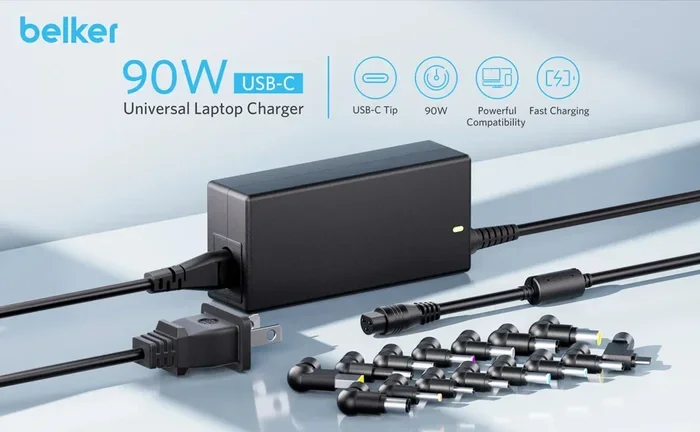
A universal laptop charger is a power adapter designed to work with multiple laptop brands and models. Unlike a standard charger that only fits one device, a universal charger comes with interchangeable tips and adjustable settings. This means it can adapt to different laptops without needing a separate charger for each one.
These chargers typically include a range of connector tips. You swap the tip to match your laptop’s charging port. Some models also let you set the voltage and amperage manually. This flexibility makes them popular among travelers, students, and anyone who owns more than one laptop.
The idea behind a universal power adapter is simple. Instead of carrying three or four different chargers, you carry just one. It saves space. It saves money. And it reduces clutter. But does it also keep your laptop safe? That is what we need to explore next.
How Do They Differ from OEM Chargers?
An OEM charger is the one that comes with your laptop straight from the manufacturer. It is built specifically for your model. A universal charger, on the other hand, is designed to be a one-size-fits-most solution. OEM chargers usually offer better precision in voltage delivery. Universal chargers aim to get close enough to be safe and effective.
Most modern universal laptop chargers have built-in safety mechanisms. These include overvoltage protection, short circuit prevention, and thermal shutoff. However, the quality of these features varies a lot from one brand to another. A cheap universal charger may lack proper protection. A high-quality one will have all the right safeguards in place.
How Do Universal Laptop Chargers Work?
Understanding how a universal laptop charger works helps you use it safely. The charger pulls power from your wall outlet and converts it into the right form for your laptop. Every laptop needs a specific amount of voltage and current to charge properly.
Here is a quick look at the key parts:
- AC Input: This is the plug that goes into your wall outlet. It accepts standard household electricity.
- DC Output: This is the side that connects to your laptop. It delivers the correct voltage and current.
- Interchangeable Tips: These are the different connectors that fit various laptop models.
- Voltage Selector: Some chargers let you manually set the output voltage using a switch.
The charger adjusts its output based on the tip you use and the voltage setting you choose. When everything matches your laptop’s requirements, the charging process is smooth and safe. When it does not match, problems can arise.
What Is Voltage and Why Does It Matter?
Voltage is the electrical pressure that pushes current into your laptop. Think of it like water pressure in a pipe. Too little pressure, and the water barely moves. Too much pressure, and the pipe can burst.
The same idea applies to your laptop. If the charger voltage is too high, it can fry your internal components. If it is too low, your laptop may not charge at all or may charge very slowly. This is why matching the voltage is one of the most important steps when using a universal laptop charger.
Amperage is the amount of current flowing to your laptop. A higher amperage rating means the charger can deliver more power. Most laptops will only draw the current they need. So a charger with a higher amperage rating than required is generally safe. The key is making sure the voltage matches exactly.
Are Universal Laptop Chargers Safe for Daily Use?
This is the big question, and the answer is not a simple yes or no. Universal laptop chargers can be safe for daily use — but only under the right conditions. The safety depends on three main factors: compatibility, quality, and proper usage.
When you buy a universal charger from a reputable brand and use it correctly, it is just as safe as an OEM charger. The charger will deliver the right amount of power to your laptop without causing damage. But when you use a low-quality, uncertified charger, the risks go up significantly.
What Makes a Universal Charger Safe?
Several factors determine whether a universal laptop charger is safe to use every day:
- Safety Certifications: Look for UL, CE, or FCC marks on the charger. These mean the product has passed independent safety tests.
- Correct Voltage and Wattage: The charger must match your laptop’s power requirements exactly for voltage. Wattage should be equal to or higher than your laptop needs.
- Built-in Protections: Good chargers include overcharge protection, short circuit protection, and temperature control.
- Quality Build: Thick cables, solid connectors, and a sturdy casing indicate a well-made charger.
- Brand Reputation: Trusted brands invest in testing and quality control. Cheap no-name brands often skip these steps.
If a universal charger checks all these boxes, it is absolutely safe for everyday use. The problem starts when any of these factors are missing.
What Are the Risks of Using an Unsafe Charger?
Using a poor-quality or incompatible charger can lead to real problems. Here are some of the risks you might face:
- Overheating: An incorrect voltage can cause the charger or your laptop to heat up beyond safe levels.
- Battery Damage: Too much voltage or current can degrade your laptop battery faster than normal.
- Short Circuits: Cheap chargers may lack proper insulation and protection circuits, increasing the risk of a short circuit.
- Power Surges: A bad charger can send unstable power to your laptop, potentially damaging the motherboard or other components.
- Fire Hazard: In extreme cases, a faulty charger can overheat and catch fire. This is rare but not impossible.
These risks are why it is so important to take charger safety seriously. A universal laptop charger is a tool, and like any tool, it can be safe or dangerous depending on how you use it.
Benefits of Using Universal Laptop Chargers
Despite the risks we just discussed, there are many good reasons to use a universal laptop charger. Let us look at the benefits that make them so popular.
1. Convenience and Portability
Traveling with multiple chargers is a hassle. A universal charger lets you carry just one adapter for all your laptops. This is a game-changer for people who travel frequently for work or leisure. One charger fits in your bag easily, and you do not have to worry about forgetting the right tip.
2. Cost Savings
Buying individual OEM chargers for every laptop you own adds up fast. A quality universal charger costs less in the long run. You pay once and use it for multiple devices. Even if you buy a new laptop later, there is a good chance the same charger will work with it.
3. Emergency Backup
What happens when your charger breaks and you need your laptop urgently? A universal laptop charger makes a great backup. You probably already have one sitting in a drawer from an old laptop. Plug it in, match the tip, and keep working while you order a replacement.
4. Wide Compatibility
Modern universal chargers support a wide range of laptop models. They work with Dell, HP, Lenovo, Asus, Acer, and many other brands. Some even support tablets and other USB-C devices. This broad compatibility is one of the biggest selling points.
Risks and Things to Watch Out For
While the benefits are clear, you should also be aware of the potential downsides. Not every universal charger is a safe choice. Here are the risks you need to watch for.
Using the Wrong Voltage Setting
This is the most common mistake people make. If your laptop needs 19 volts and you set the charger to 20 volts, you are asking for trouble. Always check your laptop’s charging requirements before using a universal charger. The voltage must match exactly. The amperage can be equal to or higher than what your laptop requires.
Buying Cheap, Uncertified Chargers
It is tempting to buy the cheapest universal charger you can find online. But cheap chargers often cut corners on safety. They may use lower-quality components, skip safety testing, and lack proper certifications. These chargers might work fine for a few weeks and then start causing problems. Always invest in a charger from a known brand that carries recognized safety certifications.
Ignoring Physical Damage
A frayed cable or a loose connector is a warning sign. Do not ignore it. Using a damaged universal laptop charger every day increases the risk of electrical issues. Replace the charger as soon as you notice any physical wear and tear.
Overheating During Use
If your charger gets hot to the touch while charging, that is not normal. A warm charger is fine. A hot charger is a red flag. Overheating can be caused by a voltage mismatch, a faulty charger, or blocked ventilation. Stop using the charger immediately and investigate the cause.
How to Choose a Safe Universal Laptop Charger
Now that you know the risks and benefits, let us talk about how to pick the right universal charger for your needs. Follow these steps to make a safe and smart choice.
Step 1: Check Your Laptop’s Power Requirements
Flip your laptop over or check the label on the bottom. Look for the voltage (V) and amperage (A) or wattage (W). Write these numbers down. You need them before you buy any universal laptop charger.
You can also find this information in your laptop’s user manual or on the manufacturer’s website. The charging port on your laptop should also list the voltage and amperage requirements.
Step 2: Look for Safety Certifications
Always choose a charger that has been tested and certified by a recognized safety organization. Look for these marks:
- UL (Underwriters Laboratories): A globally recognized safety certification.
- CE (Conformite Europeenne): Required for products sold in the European Union.
- FCC (Federal Communications Commission): Ensures the charger meets electromagnetic interference standards.
If a universal charger does not have any of these certifications, think twice before buying it.
Step 3: Check the Tip Compatibility
Make sure the charger comes with a tip that fits your laptop’s charging port. Most universal chargers include a wide selection of tips. But it is still worth checking the list of compatible models before you buy.
Step 4: Consider USB-C Power Delivery
Many modern laptops now use USB-C for charging. If your laptop supports USB-C power delivery, you may not need a traditional universal charger at all. A good USB-C charger with the right wattage can charge most laptops safely and efficiently.
USB-C chargers are becoming the new standard. They are reversible, compact, and support power delivery protocols that adjust the voltage automatically. This makes them inherently safer than older barrel connector chargers.
Step 5: Read Reviews and Buy from Trusted Sellers
Before purchasing a universal laptop charger, read customer reviews. Look for feedback on build quality, charging speed, and safety performance. Buy from trusted retailers or directly from the manufacturer’s website. Avoid third-party sellers with questionable reputations.
Common Mistakes People Make with Universal Chargers
Even with the best intentions, people make mistakes when using universal laptop chargers. Here are some common errors to avoid.
- Forcing a tip that does not fit: This can damage the charging port on your laptop. Always use the correct tip size.
- Ignoring the voltage switch: Some chargers have a manual voltage selector. Make sure it is set to the correct voltage before plugging it in.
- Using a charger with lower wattage than needed: This will charge your laptop slowly or not at all. It can also cause the charger to overwork and overheat.
- Leaving the charger plugged in 24/7: Even a good charger should be unplugged when not in use. This reduces wear and saves electricity.
- Using a charger in a humid or hot environment: Heat and moisture are enemies of electronics. Keep your charger in a cool, dry place while charging.
Avoiding these simple mistakes can extend the life of your universal charger and keep your laptop safe.
Expert Insights on Charger Safety
We asked a few tech experts about their thoughts on using universal laptop chargers daily. Here is what they had to say.
Dr. Mark Chen, Electrical Engineer: “The safety of a universal charger depends entirely on the quality of the product and how well it matches the laptop’s specifications. A certified universal charger with proper voltage matching is just as safe as an OEM charger.”
Sarah Lin, Laptop Repair Specialist: “I see a lot of damaged laptops that were charged with cheap, uncertified chargers. My advice is always the same — spend a little more on a trusted brand. Your laptop is a big investment. Do not cheap out on the charger.”
Tom Rivera, Tech Reviewer: “USB-C chargers have changed the game. Most new laptops use USB-C now, which means you can use one charger for multiple devices. Just make sure it supports the right power delivery profile for your laptop.”
These expert opinions reinforce one key message: quality and compatibility matter most when it comes to universal laptop chargers.
Final Thoughts
So, are universal laptop chargers safe to use every day? The answer is yes — as long as you choose the right one and use it correctly. Match the voltage exactly. Check the wattage requirements. Look for safety certifications. And stick with trusted brands.
A good universal laptop charger offers convenience, savings, and peace of mind. It keeps your laptop powered up wherever you go. It eliminates the hassle of carrying multiple chargers. And it works reliably when you need it most.
On the other hand, a cheap, uncertified, or incompatible charger can cause real damage. It can shorten your battery life, overheat your laptop, or even create safety hazards. The choice is yours. Invest in quality, use your charger properly, and you will enjoy safe and reliable charging every single day.
Take a few minutes today. Check your current charger. Compare it with your laptop’s requirements. And if you are in the market for a new one, use the tips in this guide to make a smart, safe choice. Your laptop — and your peace of mind — will thank you.
Frequently Asked Questions
Can I use a universal laptop charger every day without any risk?
Yes, you can use a universal laptop charger every day without risk — as long as the charger matches your laptop’s voltage and wattage requirements exactly. Always choose a certified charger from a reputable brand to ensure safety.
What happens if I use the wrong voltage with a universal charger?
Using the wrong voltage can damage your laptop’s internal components or battery. Too much voltage can fry sensitive parts, while too little voltage may prevent charging altogether. Always double-check your laptop’s voltage requirements before plugging in any universal charger.
Are USB-C universal chargers safer than traditional barrel connector chargers?
USB-C chargers with power delivery technology are generally safer because they communicate with your laptop and adjust the voltage automatically. This reduces the risk of voltage mismatch. However, you still need to make sure the charger supports the wattage your laptop requires.
How do I know if my universal charger is certified?
Look for safety marks on the charger itself or on its packaging. Common certifications include UL, CE, and FCC. If these marks are missing, the charger may not have undergone proper safety testing. A certified charger gives you confidence that it meets safety standards.
Can a universal charger damage my laptop battery?
A poor-quality or incompatible universal charger can damage your laptop battery over time. Incorrect voltage or current delivery can cause the battery to swell, lose capacity, or stop holding a charge. Using a certified, compatible charger prevents this type of damage.
What should I do if my universal charger gets hot while charging?
A slightly warm charger is normal. But if it becomes hot to the touch, unplug it immediately. Check the voltage setting, make sure the tip is fully inserted, and verify that the charger matches your laptop’s requirements. If the problem continues, replace the charger with a higher-quality universal laptop charger from a trusted brand.