Are Computer Stickers Removable Heres How To Remove Them
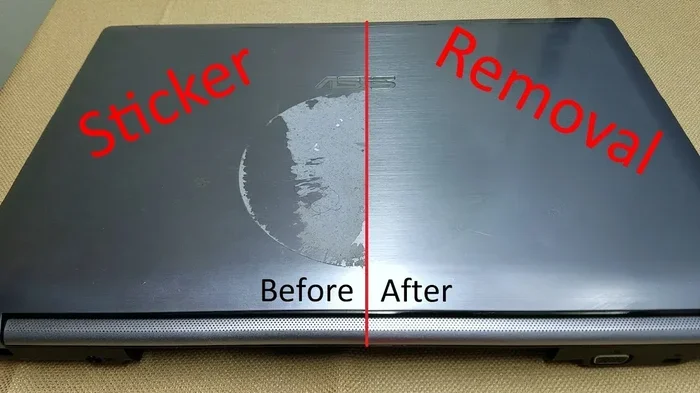
Yes, computer stickers are removable if you use the right technique. Whether you want to peel off old laptop decals or clean sticker residue, this guide shows you the safest and easiest ways. You will learn how to remove stickers from your laptop without scratching the surface or voiding your laptop warranty.
Have you ever looked at your laptop and thought it was time for a change? Maybe the stickers from a tech conference are peeling, or you simply want a clean look. The big question is always the same. Are computer stickers removable?
The short answer is yes. Most computer stickers can be removed without leaving major damage behind. But the process matters a lot. Use the wrong method, and you might end up with scratches, sticky residue, or even a ruined finish. That is exactly why this guide exists.
In this article, you will learn everything about removing stickers from laptops. I will walk you through the safest methods, the tools you need, and the mistakes to avoid. Whether you are removing laptop decals for resale or just want a fresh start, you are in the right place.
Key Takeaways
- Computer stickers are removable: Most laptop decals can be taken off cleanly with heat and patience.
- Use heat first: A hairdryer softens the adhesive and makes peeling much easier.
- Clean residue safely: Rubbing alcohol and microfiber cloths remove sticky leftovers without damage.
- Avoid harsh chemicals: Strong solvents can ruin your laptop finish and void the warranty.
- Work slowly: Rushing the removal process increases the risk of scratches and surface damage.
- Check your warranty: Some manufacturers consider sticker removal a warranty issue, so check first.
📑 Table of Contents
- What Are Computer Stickers Made Of?
- Can You Remove Computer Stickers Without Damaging Them?
- Best Methods To Remove Computer Stickers
- How To Clean Sticky Residue After Sticker Removal
- Common Mistakes People Make When Removing Stickers
- Should You Remove Computer Stickers?
- Tips for Preventing Sticker Damage During Removal
- Comparison Table: Sticker Removal Methods
- Final Thoughts
What Are Computer Stickers Made Of?
Before you start peeling, it helps to understand what you are dealing with. Computer stickers are not just paper with glue. They are usually made of vinyl or similar synthetic materials designed to last. These materials resist water, fading, and general wear and tear.
The adhesive backing on these stickers is often industrial strength. Manufacturers use strong glue so that laptop decals stay put through daily bumps, travel, and temperature changes. This is great for branding but tough when you want them off.
Types of Computer Stickers
Not all stickers are the same. Here is a quick look at the most common types you will find on computers:
- Vinyl stickers: Thin, flexible, and very durable. These are the most common type found on laptops.
- Die-cut decals: Custom shaped stickers with no background. They follow the contours of the laptop surface.
- Glossy finish stickers: Shiny and reflective. Often used for brand logos and event stickers.
- Matte finish stickers: Non-reflective and smoother. These tend to leave less residue but can still be stubborn.
- Clear stickers: Transparent decals that blend with the laptop surface. Popular for minimalist branding.
Knowing what type of sticker you have helps you choose the right removal method. Vinyl stickers generally respond well to heat, while older paper-based stickers may need extra care.
Can You Remove Computer Stickers Without Damaging Them?
This is the question on everyone’s mind. The good news is that removing stickers from laptops is usually safe. The surface underneath is often just as clean as the day you bought it. But there is always a risk involved, and knowing how to minimize it makes all the difference.
Laptop warranty is another concern. Some manufacturers, like Apple, state that removing stickers may affect your warranty. Other brands are more lenient. Always check your warranty terms before you start scraping anything off your device.
Factors That Affect Sticker Removal
Several things determine how easy or hard it is to remove a sticker. Keep these factors in mind before you begin:
- Age of the sticker: Older stickers bond more strongly with the surface. Fresh stickers come off much easier.
- Sticker material: Vinyl holds up better than paper but can leave more adhesive behind.
- Laptop surface: Glossy finishes tend to release stickers more cleanly than matte or textured surfaces.
- Climate and storage: Heat and humidity can weaken adhesive over time, making removal simpler.
- Previous removal attempts: If someone already tried pulling the sticker off, residue may be harder to clean.
Understanding these factors helps you set realistic expectations. Sticker removal is rarely instant. Patience is your best tool.
Best Methods To Remove Computer Stickers
Now let us get into the practical part. There are several proven methods to remove computer stickers safely. I will walk you through each one step by step.
Method 1: Using Heat From a Hairdryer
This is the most popular and safest method. Heat softens the adhesive, allowing you to peel off stickers gently without pulling on the laptop surface.
Here is how to do it:
- Plug in a hairdryer and set it to medium heat.
- Hold the dryer about six inches from the sticker.
- Move the dryer back and forth for 30 to 60 seconds.
- Feel the sticker with your finger. If it feels warm and soft, try lifting a corner with your fingernail.
- Slowly peel the sticker back at a 180-degree angle.
- Apply more heat if the sticker resists.
Quick Tip: Never use a heat gun or open flame. These tools get too hot and can damage your laptop finish. A standard hairdryer works perfectly for sticker removal.
Method 2: Using Dental Floss or Fishing Line
If the sticker is too strong to peel by hand, try the floss method. This works by sliding a thin line under the sticker and cutting through the adhesive.
Here is what to do:
- Cut a piece of dental floss or fishing line about 12 inches long.
- Tie the ends around your index fingers, leaving a taut section in the middle.
- Slide the floss under one edge of the sticker.
- Gently saw back and forth while pulling the floss toward you.
- Continue until the sticker separates from the surface.
This method works well for removing stickers from laptop surfaces that are too tough to peel directly. It is gentle and leaves minimal residue.
Method 3: Using Rubbing Alcohol or Isopropyl Alcohol
When heat and peeling are not enough, rubbing alcohol comes to the rescue. It dissolves the adhesive without harming most laptop surfaces.
Follow these steps:
- Dampen a microfiber cloth with 70% isopropyl alcohol.
- Place the cloth over the sticker and let it sit for two to three minutes.
- Gently rub the sticker in circular motions.
- The sticker should start to curl and lift.
- Continue rubbing until the sticker peels away completely.
Important: Always test the alcohol on a small hidden area first. Some laptop finishes are sensitive to alcohol and may discolor.
Method 4: Using Adhesive Remover Products
For really stubborn stickers, commercial adhesive removers work wonders. Products like Goo Gone or De-Solv-it are designed to dissolve tough glues safely.
Here is how to use them:
- Apply a small amount of adhesive remover to a clean cloth.
- Dab it onto the sticker and let it soak for five minutes.
- Wipe the sticker away gently.
- Repeat if any residue remains.
These products are effective for adhesive residue removal. Just make sure the product is safe for use on electronics and plastics.
How To Clean Sticky Residue After Sticker Removal
Even after you successfully peel off stickers, there is often a sticky mess left behind. This adhesive residue can attract dust and make your laptop look dirty. Cleaning it properly is just as important as the removal itself.
Best Tools for Cleaning Residue
You do not need expensive products to get the job done. Most of what you need is already in your home:
- Microfiber cloth: Soft and non-abrasive. Perfect for wiping surfaces without scratches.
- Isopropyl alcohol: Dissolves most adhesive residues quickly and safely.
- Rubbing alcohol wipes: Convenient and pre-moistened for easy cleanup.
- Baking soda paste: A natural alternative that gently scrubs away residue.
- Warm soapy water: Works for light residue and general cleaning.
Step by Step Residue Cleaning Process
- Start by dampening a microfiber cloth with warm water.
- Wipe the affected area gently to remove loose residue.
- If residue remains, apply a small amount of isopropyl alcohol to the cloth.
- Rub the area in circular motions with light pressure.
- For tough spots, make a paste with baking soda and water.
- Apply the paste, let it sit for one minute, then wipe clean.
- Finish with a dry microfiber cloth to restore the shine.
Expert Insight: Never use abrasive scrubbers or rough cloths. These can scratch your laptop surface and create problems worse than the residue itself. A soft microfiber cloth is your best friend for clean laptop surface maintenance.
Common Mistakes People Make When Removing Stickers
Removing stickers seems simple, but many people make avoidable mistakes. These errors can lead to permanent damage or frustrating cleanup sessions. Here is what to watch out for.
Mistake 1: Pulling the Sticker Too Fast
Ripping a sticker off quickly is the fastest way to leave behind a mess. It can also stretch the adhesive deeper into the laptop surface pores. Always peel slowly and steadily.
Mistake 2: Using Harsh Chemicals
Some people reach for acetone or bleach to dissolve sticker glue. These chemicals can damage the laptop finish, discolor the surface, or even eat through protective coatings. Stick to isopropyl alcohol or dedicated adhesive removers.
Mistake 3: Skipping the Heat Step
Trying to peel a sticker without applying heat first is like pulling tape off a surface without warming it. Heat makes the adhesive flexible and reduces the force needed to remove the sticker.
Mistake 4: Using Sharp Objects
Using knives, razors, or sharp tools to scrape off stickers is a recipe for scratches. These tools can easily gouge the laptop surface and cause irreversible damage. Always use plastic tools or your fingers instead.
Mistake 5: Ignoring the Warranty
As mentioned earlier, removing stickers can sometimes void your laptop warranty. Some manufacturers consider the removal of stickers as tampering with the device. Always read the warranty terms before you start.
Avoiding these mistakes keeps your laptop looking great and your warranty intact. Sticker damage is almost always preventable with the right approach.
Should You Remove Computer Stickers?
Deciding whether to remove your computer stickers is a personal choice. There are good reasons on both sides, and understanding them helps you make the right call.
Reasons To Remove Computer Stickers
- Resale value: A clean laptop looks better and sells faster.
- Aesthetics: You may simply prefer a minimalist look.
- Professional appearance: Clean laptops look more professional in work settings.
- Customization: Removing old stickers makes room for new laptop skins or custom designs.
- Hygiene: Stickers can trap dust and dirt over time.
Reasons To Keep Computer Stickers
- Branding: Some people enjoy showing off their favorite tech brands.
- Memory: Stickers from events or trips hold sentimental value.
- Protection: Some stickers add a thin layer of protection against minor scratches.
- Warranty compliance: Keeping manufacturer stickers may be required in some cases.
Whatever you decide, the key is to do it right. If you choose to remove them, follow the methods in this guide for the best results. If you keep them, make sure they stay clean and intact.
Tips for Preventing Sticker Damage During Removal
Once you decide to remove your laptop decals, you want the process to go smoothly. These tips help you avoid common pitfalls and keep your laptop looking brand new.
- Work in a well-lit area: Good lighting helps you see the edges of the sticker clearly.
- Take your time: Rushing leads to mistakes. Set aside 15 to 20 minutes for the full process.
- Keep your laptop cool: Do not apply heat to a laptop that is already warm from use. Let it cool down first.
- Use plastic tools: Plastic cards or spatulas help lift sticker edges without scratching.
- Clean as you go: Wipe away residue immediately after removing each sticker.
- Test products first: Always test any cleaning solution on a hidden spot before applying it to the sticker area.
These simple habits make sticker removal much easier and safer. They protect your laptop and give you the best possible outcome.
Comparison Table: Sticker Removal Methods
Not sure which method to use? Here is a quick comparison of the most popular sticker removal techniques for computers.
| Method | Difficulty | Best For | Risk Level |
|---|---|---|---|
| Hairdryer Heat | Easy | Fresh and medium-age stickers | Low |
| Dental Floss | Medium | Thick or large stickers | Low |
| Rubbing Alcohol | Easy | Stubborn adhesive and residue | Low to Medium |
| Adhesive Remover | Easy | Very old or stuck-on stickers | Medium |
| Baking Soda Paste | Medium | Light residue cleanup | Low |
As you can see, most methods carry low risk when done correctly. Start with the simplest method and only move to stronger options if needed.
Final Thoughts
So, are computer stickers removable? Absolutely. With the right tools, a little patience, and the methods outlined in this guide, you can remove stickers from laptop surfaces safely and effectively. Whether you prefer the heat method, the floss technique, or a good adhesive remover, there is a solution that works for every situation.
Cleaning residue afterward is just as important as the removal itself. A soft microfiber cloth and some isopropyl alcohol will have your laptop looking as good as new in minutes. And always remember to work slowly, avoid harsh chemicals, and check your warranty before you start.
Your laptop is an investment. Taking care of it, even down to the stickers, pays off in the long run. Now you have everything you need to tackle that sticker removal with confidence. Go ahead and give your laptop the fresh start it deserves.
Frequently Asked Questions
Can removing computer stickers void my laptop warranty?
Some manufacturers consider sticker removal as tampering with the device. Apple, for example, has specific policies about removing logos and stickers. Always check your warranty terms before you begin the removal process to avoid any issues with your laptop warranty.
What is the easiest way to remove stickers from a laptop?
The easiest method is using a hairdryer to apply gentle heat. Warm the sticker for 30 to 60 seconds, then slowly peel it off at a 180-degree angle. This works for most laptop decals without any special tools or chemicals.
Will rubbing alcohol damage my laptop surface?
70% isopropyl alcohol is generally safe for most laptop surfaces. However, you should always test it on a small hidden area first. Some laptop finishes may be sensitive to alcohol and could discolor or dull over time with repeated use.
How do I get rid of sticky residue after removing a sticker?
Dampen a microfiber cloth with isopropyl alcohol and rub the residue gently in circular motions. For tougher spots, a baking soda paste works well. Avoid abrasive materials that can scratch the surface during adhesive residue cleanup.
Can I reuse a computer sticker after removing it?
It is unlikely. Most computer stickers are designed for one-time application. Once removed, the adhesive loses its strength and the sticker may not stick properly again. For a fresh look, consider applying new laptop skins or decals instead.
How long does the sticker removal process take?
For most laptops, the full process takes 15 to 30 minutes. This includes heating the sticker, peeling it off, and cleaning any remaining residue. Older or larger stickers may take a bit longer, but patience always leads to the best results.