Are You Allowed To Mail Laptops Here Is What You Must Know
Yes, you are allowed to mail laptops, but there are important rules, packaging requirements, and carrier-specific policies you need to follow. Whether you are using USPS, FedEx, or UPS, proper laptop packaging and shipping electronics knowledge can save you from damage, delays, and extra costs. This guide covers everything from lithium battery regulations to international shipping rules so your device arrives safely.
Have you ever needed to send a laptop through the mail and thought, “Wait, can I even do this?” The answer is yes, you can mail laptops. But there is a lot more to it than just dropping a box on a counter. Shipping laptops involves specific rules, packaging requirements, carrier policies, and regulations that vary depending on where you are sending it and who handles the delivery.
Whether you are selling a used laptop online, sending one to a repair shop, or moving across the country, knowing the rules matters. A damaged laptop means lost data, expensive repairs, or a full replacement. Nobody wants that. This guide walks you through everything you need to know about mailing laptops the right way.
We will cover carrier policies, packaging tips, battery rules, international restrictions, and common mistakes. By the end, you will feel confident and prepared to ship your laptop safely.
Key Takeaways
- You can mail laptops through most major carriers, but each has its own rules and restrictions.
- Proper packaging is the single most important factor in preventing laptop damage during transit.
- Lithium battery regulations apply to all laptop shipments and vary by carrier and destination.
- Shipping insurance and tracking are highly recommended for valuable electronics like laptops.
- International shipments face additional customs rules, declarations, and potential duties.
- Common mistakes like under-packing or skipping insurance lead to unnecessary losses.
- Carrier comparison helps you choose the best balance of cost, speed, and safety for your needs.
📑 Table of Contents
Understanding the Rules Around Mailing Laptops
Before you wrap up your laptop and head to the post office, it helps to understand the basic rules. Mailing laptops is allowed by all major carriers, but each one has specific guidelines. These rules exist to protect your device, the mail handlers, and other packages in transit.
The good news is that mailing laptops is not illegal or restricted in most cases. The key is knowing what each carrier expects and following those requirements carefully. Let us break this down.
What the Postal Service Says
The United States Postal Service (USPS) allows you to mail laptops. They do not outright ban electronics. However, USPS has guidelines for packaging and shipping methods. For instance, USPS recommends using sturdy boxes and plenty of padding. They also have weight and size limits that apply to all packages, not just laptops.
USPS offers several services for mailing laptops. Priority Mail and Priority Mail Express are popular choices because they include tracking and faster delivery times. USPS also provides free Priority Mail boxes, which can work well for laptops if the size is right.
One thing to keep in mind is that USPS does not offer declared value coverage beyond a certain limit for their standard services. This means if your laptop gets lost or damaged, your reimbursement may be limited. That is why many people choose to buy additional shipping insurance.
Carrier-Specific Policies
FedEx and UPS are two other major carriers that handle laptop shipments regularly. Both companies allow mailing laptops but have their own set of rules. FedEx, for example, has specific guidelines for shipping electronics. They recommend using their FedEx Express services for faster and more secure delivery.
UPS also permits laptop shipments and offers UPS Next Day Air and UPS 2nd Day Air options. Both FedEx and UPS provide better tracking tools and higher insurance limits compared to USPS. This makes them a solid choice for high-value laptops.
Each carrier also has its own rules about hazardous materials. Since laptops contain lithium batteries, there are specific restrictions on how they can be shipped. We will cover this in detail in the next section.
How to Properly Package a Laptop for Shipping
Packaging is the most important step when you mail laptops. A laptop is a fragile electronic device with a screen, hard drive, and sensitive components. Poor packaging is the number one cause of laptop damage during shipping. Taking the time to pack correctly can save you a lot of headaches.
Here is what you need to do to make sure your laptop arrives in perfect condition.
Choosing the Right Box
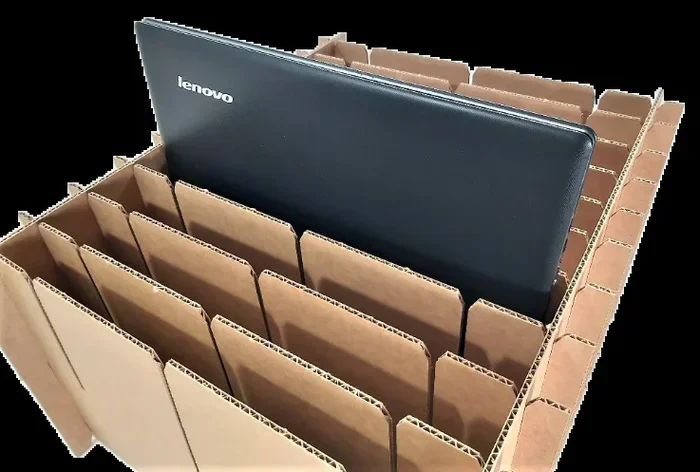
Start with a box that is slightly larger than your laptop. You want enough room for padding on all sides. Do not use a box that is too tight, or the laptop will shift during transit. Also, avoid reusing old boxes that have lost their structural integrity.
A double-walled box is ideal for shipping laptops. It provides extra strength and protection. If you cannot find a double-walled box, place your laptop box inside a larger outer box with cushioning in between.
Padding and Protection
Wrap your laptop in bubble wrap before placing it in the box. Use at least three to four layers of bubble wrap. Pay special attention to the corners and edges, as these are the most vulnerable areas during shipping.
Fill any empty space in the box with packing peanuts, air pillows, or foam inserts. The laptop should not move at all inside the box. Shake the box gently after closing it. If you feel any shifting, add more padding.
Some people also place the laptop inside a foam-lined laptop sleeve before boxing it up. This adds an extra layer of protection. The goal is to prevent any impact or vibration from reaching the laptop.
Sealing and Labeling
Use strong packing tape to seal all seams of the box. Apply tape to the top, bottom, and all edges. Write “Fragile” and “This Side Up” on the box with a marker. This helps mail handlers handle your package with care.
If your carrier offers electronic shipping labels, print them clearly and attach them securely. Make sure the label is not covering any seams or tape lines, as this can cause scanning issues during transit.
Shipping Restrictions and Limitations
Not all shipments are treated equally. Mailing laptops comes with certain restrictions, especially when it involves batteries and international borders. Understanding these limitations helps you avoid delays, extra fees, or rejected packages.
Lithium Battery Regulations
Laptops run on lithium-ion batteries, and these batteries are classified as hazardous materials for shipping purposes. This does not mean you cannot mail laptops. It just means there are specific rules you must follow.
The United States Department of Transportation has regulations for shipping lithium batteries. Laptops with installed lithium batteries can generally be shipped via ground services. However, there are restrictions on air shipping for laptops with damaged or recalled batteries.
Here are some key points about lithium battery rules:
- Laptops with installed batteries are usually allowed on ground shipping services.
- Spare lithium batteries should not be shipped loose. They must be protected from short circuits.
- Air shipments may have additional restrictions depending on the carrier and destination.
- Damaged or recalled laptops with batteries may not be eligible for certain shipping methods.
Always check with your carrier before shipping if your laptop battery has been recalled or shows signs of damage. This is one of the most overlooked aspects of shipping electronics safely.
International Shipping Rules
If you are mailing a laptop to another country, the rules become more complex. International shipments are subject to customs regulations, import duties, and restrictions that vary by country.
Some countries have strict rules about importing electronics. Others may require detailed customs declarations. You will need to provide accurate information about the laptop, its value, and its intended use. Misrepresenting any of this information can lead to seized packages or fines.
Here are some tips for international laptop shipments:
- Always declare the correct value of the laptop on customs forms.
- Check the destination country’s import rules for electronics before shipping.
- Include a detailed packing list inside the package.
- Be aware that the recipient may need to pay import duties or taxes.
- Consider using a carrier that offers international tracking and insurance.
Customs delays are common with international shipments. Plan ahead and allow extra time for delivery when you mail laptops overseas.
Carrier Comparison for Mailing Laptops
Choosing the right carrier can make a big difference in the safety and cost of shipping your laptop. Each carrier has different strengths, and the best choice depends on your priorities like speed, cost, and insurance coverage.
Here is a comparison of the major carriers for mailing laptops:
| Feature | USPS | FedEx | UPS |
|---|---|---|---|
| Tracking Included | Yes (with Priority Mail) | Yes | Yes |
| Insurance Options | Limited (up to $5,000 with add-on) | Up to $100,000 | Up to $50,000 |
| Delivery Speed | 2-3 days (Priority Mail) | 1-3 days (Express) | 1-3 days (Express) |
| Lithium Battery Rules | Ground allowed; air has restrictions | Ground allowed; air has restrictions | Ground allowed; air has restrictions |
| Cost for Laptop Shipping | Lower for lightweight packages | Moderate to high | Moderate to high |
| Best For | Budget-friendly domestic shipping | Fast, reliable domestic and international | Heavy packages and international shipping |
For most people mailing a standard laptop domestically, USPS Priority Mail offers the best value. If speed and insurance are your top priorities, FedEx or UPS Express services are worth the extra cost.
Common Mistakes to Avoid When Mailing Laptops
Even with the best intentions, people make mistakes when shipping laptops. These mistakes can lead to damage, delays, or lost packages. Here are the most common errors and how to avoid them.
Skipping Insurance
This is the biggest mistake people make. Laptops are expensive, and even a minor bump during shipping can cause serious damage. Without insurance, you may have to pay for repairs or replacements out of pocket. Always purchase shipping insurance or choose a carrier that includes coverage.
Under-Packing the Box
Not enough padding is another frequent error. Some people wrap their laptop in a single layer of bubble wrap and call it good. That is not enough. A laptop can experience significant force during transit, especially if it gets dropped. Use plenty of cushioning material and make sure the laptop does not move inside the box.
Using the Wrong Box Size
A box that is too small can crush the laptop. A box that is too big allows the laptop to shift and bounce around. Choose a box that fits snugly with room for padding on all sides. This is one of the simplest yet most overlooked laptop packaging tips.
Ignoring Battery Regulations
As mentioned earlier, lithium battery rules apply to all laptop shipments. Ignoring these rules can result in your package being rejected or delayed. Always check your carrier’s battery shipping policy before you mail laptops, especially internationally.
Not Removing Data or Securing the Laptop
Before shipping, make sure your laptop is powered off and all cables are removed. If possible, remove the battery if it is removable. Secure any loose parts like chargers or mice in a separate bag and tape them to the inside of the box. This prevents damage to both the laptop and its accessories.
Expert Tips for Safe Laptop Delivery
Shipping a laptop does not have to be stressful. With the right approach, you can ensure your device arrives safely and on time. Here are some expert-backed tips that make a real difference.
Use a tracking service. Always choose a shipping option that includes real-time tracking. This lets you monitor your package and know exactly when it will arrive. If something goes wrong, tracking information is essential for filing a claim.
Take photos before shipping. Document the condition of your laptop before you pack it. Take clear photos of the exterior, screen, and any existing marks or scratches. This protects you in case of a dispute about damage during transit.
Consider professional packing services. Many shipping centers offer packing assistance. They have the right materials and experience to pack electronics safely. It may cost a little extra, but it is worth the peace of mind.
Ship during business days. Avoid shipping laptops on Fridays or before holidays. Packages that sit in warehouses over weekends or holidays are more likely to experience delays or handling issues.
Add “Fragile” stickers generously. While stickers alone will not prevent damage, they do remind handlers to be careful. Combine this with proper packaging for the best results.
Keep the original packaging if you have it. If you still have the box and foam that came with your laptop, use it. Manufacturers design these packages specifically to protect the device. It is the easiest and most effective packaging solution.
Final Thoughts
Are you allowed to mail laptops? Yes, absolutely. You can mail laptops through USPS, FedEx, UPS, and most other carriers. The key is following the rules, packaging the device properly, and choosing the right shipping service for your needs.
Proper laptop packaging is the foundation of safe shipping. Use a sturdy box, plenty of bubble wrap, and fill all empty space. Follow lithium battery regulations and always declare your package accurately, especially for international shipments.
Do not skip insurance or tracking. These small extras provide huge protection for your valuable device. And always avoid the common mistakes that lead to damaged or lost laptops in transit.
With the information in this guide, you are now equipped to mail laptops safely and confidently. Take your time, follow the steps, and your laptop will arrive at its destination in great shape.
Frequently Asked Questions
Can I mail a laptop with USPS?
Yes, you can mail a laptop with USPS. Priority Mail and Priority Mail Express are the best options because they include tracking and faster delivery. Just make sure to package the laptop securely with plenty of padding and bubble wrap.
Do I need to declare lithium batteries when mailing a laptop?
Yes, lithium batteries in laptops must be declared when shipping, especially for international packages. Most carriers require you to indicate that the package contains lithium batteries on the shipping label and customs forms.
How much does it cost to mail a laptop?
The cost varies depending on the carrier, shipping speed, package weight, and destination. USPS Priority Mail is generally the most affordable option for domestic laptop shipping, typically ranging from $15 to $30. FedEx and UPS may cost more but offer higher insurance limits and faster delivery.
Can I ship a laptop internationally?
Yes, you can ship a laptop internationally, but there are additional rules. You must complete customs declarations accurately, pay attention to the destination country’s import regulations, and be aware that the recipient may owe import duties or taxes. Always check both the carrier’s and the destination country’s policies before shipping.
What is the best way to package a laptop for shipping?
The best way is to wrap the laptop in at least three to four layers of bubble wrap, place it in a double-walled box, and fill all empty space with packing peanuts or foam. The laptop should not move at all inside the box. Seal all seams with strong packing tape and label the box as fragile.
Should I buy shipping insurance for a laptop?
Yes, shipping insurance is highly recommended for laptops. Laptops are valuable and fragile, and even with careful packaging, accidents can happen. Insurance protects you financially if the package is lost, damaged, or stolen during transit. Most carriers offer insurance options at checkout or through third-party providers.
=== CONCLUSION ===
Are You Allowed To Mail Laptops is a question with a clear yes as the answer. But the real value lies in doing it the right way. From choosing the right carrier to packaging your laptop with care, every step matters. Follow the guidelines in this article, avoid the common pitfalls, and your laptop will arrive safely at its destination.
Take action today. Whether you are selling a laptop online or sending one to a friend or repair shop, use what you have learned here to ship with confidence. Proper preparation and smart choices make all the difference when you mail laptops.