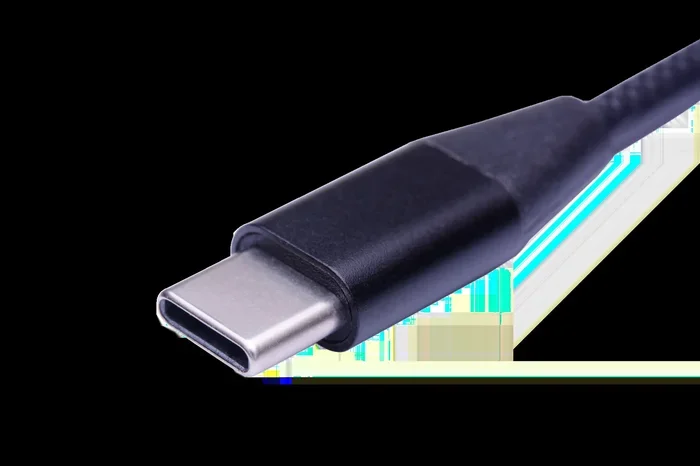
Can I Replace A Usb Cable Here Is Everything You Need
Yes, you can replace a USB cable, and it is easier than you think. Whether your charging cable is frayed, broken, or no longer working, this guide walks you through every step. You will learn about USB cable types, how to choose the right replacement, and when to repair versus replace.
Can I Replace A Usb Cable? The answer is a resounding yes. Whether your charging cable stopped working, the connector is loose, or the wire is frayed beyond repair, replacing a USB cable is one of the simplest and most affordable fixes you can do. Many people throw away perfectly good devices just because of a damaged data transfer cable. That is a waste of money and resources.
In this guide, we will walk you through everything you need to know about USB cable replacement. We will cover the different USB connector types, explain when to repair versus replace, show you how to choose the right replacement cable, and share tips to make your cable durability last longer. By the end, you will feel confident tackling any USB cable issue on your own.
Replacing a USB cable does not require technical skills or expensive tools. You just need a little knowledge about USB cable compatibility and a clear understanding of what your device needs. Let us dive in and make sure you never have to wonder about your charging cable ever again.
Key Takeaways
- USB cables are replaceable: You can swap out a damaged cable with a new one in just a few simple steps.
- Know your connector type: USB Type-A, Type-C, micro USB, and Lightning cables all serve different devices and purposes.
- OEM vs aftermarket matters: Choosing between original and third-party cables affects durability, safety, and performance.
- Repair is sometimes an option: Minor damage like a frayed end can often be fixed without buying a whole new cable.
- Proper care extends cable life: Simple habits like proper coiling and avoiding tension can double your USB cable lifespan.
- Compatibility is key: Always match your replacement cable to your device’s port and power requirements.
📑 Table of Contents
Understanding USB Cable Types and Connectors
Before you can replace a USB cable, you need to understand the different types available. Not all USB cables are the same, and using the wrong one can lead to slow charging, data transfer issues, or even damage to your device. Let us break down the most common USB connector types you will encounter.
USB Type-A and USB Type-C Explained
USB Type-A is the classic rectangular connector that has been around for decades. You will find it on computers, wall chargers, and gaming consoles. It is the standard USB-A cable that most people recognize instantly. However, Type-A is being phased out in favor of newer, smaller connectors.
USB Type-C is the modern standard. It is small, reversible, and supports faster data transfer and higher power delivery. Most new smartphones, tablets, and laptops now use USB Type-C ports. If you bought a device in the last few years, there is a good chance it uses Type-C. This connector is also the future of USB cable standards, so investing in a good Type-C cable makes sense.
Micro USB and Lightning Connectors
Micro USB was the go-to connector for many years before Type-C took over. You will still find it on older phones, Bluetooth speakers, and budget devices. If your device uses micro USB, finding a replacement is easy and inexpensive.
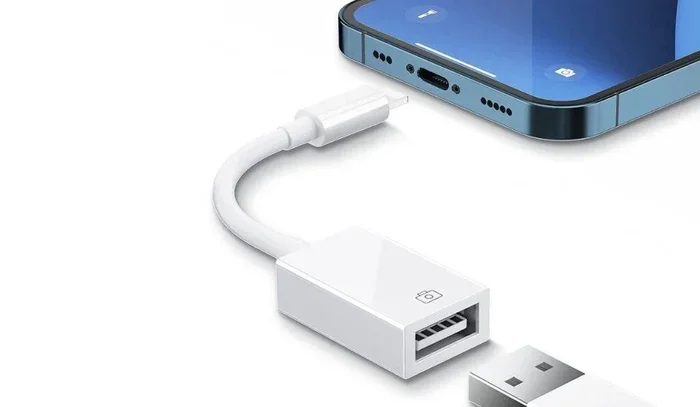
Lightning cables are Apple’s proprietary connector. They are used on iPhones, iPads, and AirPods. While Apple has started transitioning some products to USB Type-C, many devices still rely on Lightning. Note that Lightning cables are not interchangeable with standard USB cables, so you need to buy the right one for your Apple device.
Can I Replace A Usb Cable? The Short Answer
The short answer to Can I Replace A Usb Cable is absolutely yes. You do not need to be a technician or buy a new device when your charging cable fails. A USB cable replacement is quick, affordable, and something you can do at home in minutes.
When Your USB Cable Needs Replacement
How do you know it is time for a USB cable replacement? Here are the most common signs:
- The cable is visibly frayed or exposed: When the outer jacket wears away and you see bare wires, it is time to replace it. A damaged USB cable is a safety hazard.
- Charging is intermittent: If your device only charges when you hold the cable at a certain angle, the internal wires are likely broken.
- The connector is loose or wobbly: A USB port that feels loose in your device means the connector is worn out.
- Data transfer speeds have dropped: If file transfers are suddenly slow, your data transfer cable may be failing.
- The cable smells burnt or gets hot: This is a serious sign. Stop using the cable immediately and replace it.
DIY Cable Replacement Step by Step
Replacing a USB cable is straightforward. Here is how to do it:
- Identify the connector type: Check what type of port your device uses. Is it USB Type-C, micro USB, USB-A, or Lightning?
- Measure the cable length you need: Think about where you use your device. A longer cable gives you more flexibility.
- Buy a quality replacement: Choose a reputable brand. We will discuss how to pick the right one in the next section.
- Dispose of the old cable safely: Do not just throw it in the trash. Many electronics stores accept old cables for recycling.
- Test the new cable: Plug it in and verify that charging and data transfer work properly.
That is it. No special tools, no technical knowledge required. USB cable replacement is one of the easiest DIY tasks you can do.
Choosing the Right Replacement USB Cable
Not all replacement cables are created equal. Choosing the wrong one can lead to frustration, slow performance, or even safety risks. Let us look at what to consider when shopping for a new charging cable.
OEM vs Aftermarket USB Cables
OEM USB cables are made by the original device manufacturer. Apple, Samsung, and other brands sell their own cables. These cables are designed specifically for your device and often come with warranties. The downside? They tend to cost more.
Aftermarket USB cables are made by third-party manufacturers. Many aftermarket options are excellent and cost a fraction of the price. Brands like Anker, Belkin, and Cable Matters produce high-quality braided USB cables that rival OEM products. The key is to buy from reputable sellers and avoid the cheapest options on the market.
| Feature | OEM Cable | Aftermarket Cable |
|---|---|---|
| Price | Higher ($15-$35) | Lower ($5-$20) |
| Compatibility | Guaranteed | Usually excellent |
| Durability | Good | Varies by brand |
| Warranty | Often included | Varies |
| Availability | Limited to brand | Widely available |
Braided USB Cable vs Standard Cable
Braided USB cables are a game-changer for cable durability. The woven outer layer protects the internal wires from fraying and bending damage. If you have ever had a standard cable fall apart after a few months, you know the frustration. A braided USB cable can last years longer.
Here is why braided cables are worth the investment:
- Tangle-free: They coil nicely and resist knotting.
- Heat resistant: The braided sleeve helps dissipate heat during fast charging.
- Flexible yet strong: They bend easily without breaking internal wires.
- Aesthetic appeal: They look premium and professional.
If you are asking Can I Replace A Usb Cable with a braided version, the answer is definitely yes. Braided cables are available in all USB connector types and are one of the best upgrades you can make.
USB Cable Repair vs Replacement
Sometimes you do not need a full USB cable replacement. Minor damage can often be repaired, saving you money and reducing waste. Let us explore when repair makes sense and when you should just buy a new charging cable.
When Repair Makes Sense
Repair is a good option when the damage is minor and localized. Here are situations where a USB cable repair might save the day:
- Frayed cable near the connector: If the outer jacket is worn but the internal wires are intact, a cable sleeve or heat shrink tubing can protect it.
- Loose connector tip: Sometimes the connector itself is still good but the cable end is worn. A USB connector replacement kit can fix this.
- Broken stress relief: The rubber boot at the connector end can crack. Replacing just the boot is simple and cheap.
The cable replacement cost for a repair kit is usually under $10, compared to $15-$30 for a brand-new cable. If the damage is only cosmetic or near the end of the cable, repair is the smarter choice.
When to Buy a New Cable
There are times when repair is not worth the effort. You should buy a new USB cable if:
- The internal wires are exposed: This is a fire hazard and a safety risk.
- The cable is broken in the middle: A break in the cable body usually means the internal wiring is damaged beyond a simple fix.
- Multiple repairs have been attempted: If you have already patched the cable several times, a fresh replacement is the better long-term solution.
- The cable does not meet current standards: Older cables may not support fast charging or modern data transfer speeds.
When in doubt, go with a new cable. The USB cable lifespan of a quality replacement is typically 2-5 years with proper care.
Common USB Cable Problems and How to Fix Them
USB cables are used every day, and they take a beating. Understanding common problems helps you prevent damage and know when to act. Here are the most frequent issues people face with their charging cables and data transfer cables.
Fraying and Breakage Issues
Cable fraying is the number one reason people need a USB cable replacement. The most vulnerable spot is usually where the cable meets the connector. Repeated bending, pulling, and twisting weakens the internal wires over time.
Here is how to prevent cable fraying:
- Avoid pulling the cable by the wire: Always grab the connector when unplugging.
- Use a cable organizer: Keeping cables tidy reduces stress on the joints.
- Do not wrap cables too tightly: Loose coils prevent internal wire damage.
- Invest in a quality braided USB cable: The woven exterior resists wear much better than standard plastic sheathing.
If you notice fraying early, act fast. A small cable repair sleeve can prevent the damage from spreading and save your data transfer cable from complete failure.
Slow Charging and Data Transfer Problems
If your device charges slowly or files transfer at a crawl, your USB cable might be the culprit. Several factors can cause slow performance:
- Damaged internal wires: Even if the outer jacket looks fine, internal wires can be broken.
- Wrong cable standard: Not all USB cables support fast charging. Make sure your cable supports the power delivery your device needs.
- Dirt or debris in the USB port: A dirty port can interfere with connection quality. A quick clean with compressed air can help.
- Incompatible USB cable standards: Older USB 2.0 cables charge slower than USB 3.0 or USB-C Power Delivery cables.
Before assuming your device is broken, try a different replacement cable. Often, the cable is the simple fix you have been overlooking.
How to Extend Your USB Cable Lifespan
Taking care of your USB cable can significantly extend its USB cable lifespan. A few simple habits can prevent damage and save you money on frequent USB cable replacements.
Proper cable storage is the first step. Avoid tossing cables into a drawer loosely. Use a cable pouch or organizer to keep them neat. Avoid tight bends, especially near the connectors. A gentle curve is much easier on the internal wiring than a sharp angle.
Avoid extreme temperatures. Heat is the enemy of cable durability. Do not leave your charging cable in a hot car or under a pillow while charging. Excessive heat degrades the insulation and internal wires faster.
Use the right USB power adapter for your cable. A mismatched power adapter can deliver too much or too little power, stressing the cable and your device. Always check the USB cable compatibility with your charger and device specifications.
Unplug gently. Yanking a cable out of a port puts stress on the connection point. Pull from the connector body, not the wire. This one small habit can add years to your USB cable life.
These tips might seem minor, but they add up. A well-maintained data transfer cable or charging cable can easily outlast a neglected one by two or more years.
Conclusion
So, Can I Replace A Usb Cable? Absolutely. A USB cable replacement is one of the easiest and most cost-effective fixes you can do for your devices. Whether you need a new charging cable, a data transfer cable, or a complete upgrade to a braided USB cable, the process is simple and accessible to everyone.
Remember to choose the right USB connector type for your device, consider OEM vs aftermarket options, and invest in quality cables that will last. When damage is minor, a USB cable repair can save you money. And with proper care habits, your replacement cable will serve you well for years to come.
Do not let a frayed or broken cable ruin your day. Now that you know everything about USB cable replacement, you are equipped to handle any cable problem with confidence. Grab your replacement cable, follow the steps in this guide, and get back to charging and transferring data with ease.
Frequently Asked Questions
Can I Replace A Usb Cable Myself Without Any Tools?
Yes, replacing a USB cable requires no tools at all. You simply unplug the old cable and plug in the new one. The process is so simple that anyone can do it in under a minute. No technical knowledge or special equipment is needed for a basic USB cable replacement.
How Much Does It Cost to Replace a USB Cable?
The cable replacement cost varies depending on the type and brand. A basic USB cable can cost as little as $5, while premium braided USB cables with fast charging support may run $15 to $30. OEM cables from device manufacturers tend to be on the higher end of that range, but aftermarket options offer excellent value.
What Is the Difference Between a USB-A and USB-C Cable?
A USB-A cable has the classic rectangular connector and is commonly found on computers and older chargers. A USB-C cable is smaller, reversible, and supports faster data transfer and higher power delivery. Most modern devices, including smartphones and laptops, now use USB Type-C connectors. They are not interchangeable without an adapter.
Can a Damaged USB Cable Damage My Device?
Yes, a severely damaged USB cable can potentially harm your device. Exposed wires can cause short circuits, and a broken USB port connection can lead to inconsistent power delivery. If your cable shows signs of internal wire damage or burns, replace it immediately to protect your device and ensure safe charging cable operation.
How Long Should a USB Cable Last Before Replacement?
A quality USB cable typically lasts between 2 and 5 years with proper care. The USB cable lifespan depends on how often you use it, how you store it, and the build quality. Braided USB cables tend to last longer than standard cables because the woven exterior resists fraying and physical wear much better.
Are Aftermarket USB Cables Safe to Use?
Yes, aftermarket USB cables from reputable brands are safe and reliable. Look for cables that are certified by organizations like USB-IF or meet USB cable standards for power delivery and data transfer. Avoid extremely cheap, uncertified cables from unknown sellers, as they may not meet safety specifications and could pose a risk to your devices.
=== META TITLE ===
Can I Replace A Usb Cable? Here Is Everything You Need
=== URL SLUG ===
can-i-replace-a-usb-cable