Can You Travel With A Wifi Router Heres What To Know
Can you travel with a wifi router? Yes, you absolutely can. A travel wifi router keeps you connected on the go, whether you are exploring a new city or staying abroad for weeks. This guide covers everything from choosing the right portable wifi router to using it safely overseas. You will learn about mobile hotspots, international wifi tips, and common mistakes to avoid.
Key Takeaways
- Yes, you can travel with a wifi router: Portable and travel-friendly routers are designed for exactly this purpose.
- Check local regulations: Some countries have rules about importing or using wifi equipment.
- Choose the right router: Look for dual band support, compact size, and SIM card compatibility.
- Stay secure: Always use a VPN and secure your connection when using public or foreign networks.
- Battery life matters: Pick a battery powered router for hassle-free use on the road.
- Know your options: From SIM card routers to battery powered hotspots, there is a solution for every type of traveler.
📑 Table of Contents
- Can You Travel With A Wifi Router? Heres What To Know
- Why Travel With A Wifi Router?
- Types Of Wifi Routers You Can Travel With
- Can You Use A Wifi Router Internationally?
- How To Choose The Best Travel Wifi Router
- Staying Secure When Using Wifi Routers While Traveling
- Common Mistakes People Make When Traveling With A Wifi Router
- Quick Tips For Using A Wifi Router While Traveling
- Expert Insights On Travel Wifi Routers
- Conclusion
Can You Travel With A Wifi Router? Heres What To Know
Planning a trip and wondering if you can bring your wifi router along? The short answer is yes. You can travel with a wifi router, and it is one of the smartest moves you can make for staying connected. Whether you are a digital nomad, a business traveler, or someone who simply refuses to lose internet access, a portable wifi router changes the game.
But it is not as simple as tossing your router into a suitcase. There are rules, options, and a few things you need to know before you go. This guide walks you through everything. We will cover the types of routers you can take, how to use them abroad, what to watch out for, and how to pick the best travel router for your needs.
Staying connected while traveling is no longer a luxury. It is a necessity. From checking maps in a foreign city to staying in touch with family back home, reliable network connectivity makes your trip smoother. A good wifi router for travel gives you that reliability without relying on unpredictable hotel or cafe connections.
Let us dive into the details and make sure you are fully prepared for your next adventure with your own internet access device.
Why Travel With A Wifi Router?
You might be asking yourself why you need a portable wifi router when your phone already has a mobile hotspot. That is a fair question. But there are real benefits that go beyond what your phone can offer.
First, a dedicated travel wifi router creates a private network. This means your devices stay connected to a secure network you control. Second, it saves battery life on your phone. When you share your phones hotspot with multiple devices, your phone drains fast. A battery powered router handles the heavy lifting instead.
Third, some wifi routers for travel support multiple SIM cards. This lets you switch between local carriers in different countries without swapping SIMs in your phone. That is a huge advantage for frequent travelers.
Key Benefits of Using A Wifi Router While Traveling
- Secure connection: You control your own network, which reduces risks on public wifi.
- Multiple device support: Connect your phone, laptop, tablet, and camera all at once.
- Better battery life: Your phone does not have to work overtime as a hotspot.
- Consistent coverage: A dedicated compact wifi device gives you stronger and more stable signal.
- Cost savings: You can use local SIM cards to avoid expensive roaming charges.
Types Of Wifi Routers You Can Travel With
Not all routers are built for travel. You need the right kind if you want wifi coverage abroad without the hassle. Let us look at the main options.
Portable Travel Routers
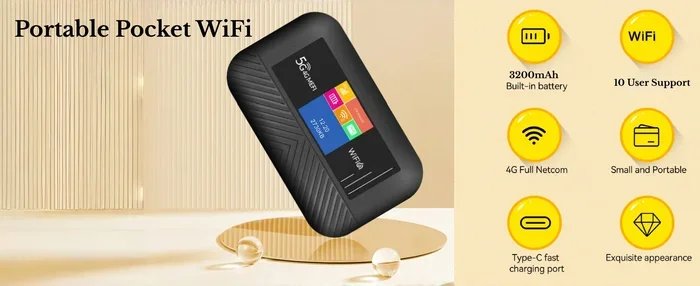
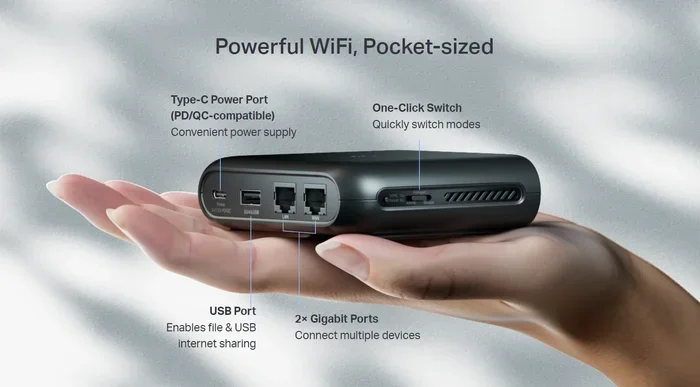
A portable wifi router is small, lightweight, and designed to fit in your backpack. These devices are purpose-built for travelers. They often come with a rechargeable battery, so you do not need to hunt for a power outlet every few hours.
Popular models include devices from brands like GL.iNet, TP-Link, and Netgear. These travel routers typically support both 2.4 GHz and 5 GHz bands, which means you get a strong dual band router experience in a tiny package.
Mobile Hotspot Devices
A mobile hotspot is a dedicated device that creates a wifi network using a cellular data connection. These are sometimes called MiFi devices or cellular wifi hubs. They are incredibly popular among travelers who want reliable overseas internet access.
Mobile hotspots are different from regular routers because they connect to cellular networks instead of a fixed broadband line. This makes them perfect for travel. You just insert a local SIM card, and you have internet access wherever there is cell coverage.
SIM Card Routers
A SIM card router is similar to a mobile hotspot but often has more features. These devices can handle multiple SIM cards at once. This is useful if you travel between countries and want to switch carriers without powering down the device.
Some SIM card routers also support external antennas, which can boost your wifi range extender capabilities. This is great if you are staying in a place with weak signal.
Can You Use A Wifi Router Internationally?
Here is where things get a little tricky. Yes, you can use a wifi router internationally, but there are a few things you need to know.
Check Power Compatibility
Different countries use different power outlets and voltage levels. Most modern portable wifi routers come with universal power adapters or USB-C charging. Before you travel, check if your router supports 100-240V input. If it does, you can plug it in almost anywhere in the world.
If your router only supports 110V, you will need a voltage converter. This adds bulk to your luggage, so it is worth choosing a battery powered router that charges via USB to keep things simple.
Understand Local Regulations
Some countries have strict rules about importing or using wifi equipment. For example, certain nations require you to register your wifi router with local authorities. Others restrict the use of certain frequencies or signal strengths.
Before you travel, research the international wifi laws of your destination. A quick online search or a check with your hotel can save you from surprises at customs.
Roaming and Data Plans
Using a travel router internationally often means buying a local SIM card or an international data plan. Many travelers now use eSIM technology to avoid physical SIM swaps. An eSIM lets you download a local carrier plan directly onto your device.
This approach gives you wifi coverage abroad without the hassle of finding a store to buy a SIM card. Just make sure your wifi router supports eSIM or has a slot for local SIM cards.
How To Choose The Best Travel Wifi Router
Not all wifi routers for travel are created equal. Choosing the right one depends on your travel style, destination, and connectivity needs.
Factors To Consider
- Size and weight: Look for a compact wifi device that weighs under half a pound.
- Battery life: A battery powered router with at least 8 hours of battery life is ideal.
- Dual band support: A dual band router gives you faster speeds and less interference.
- SIM card slots: Multiple slots let you use different carriers across countries.
- Security features: Look for WPA3 encryption and VPN support.
- Price: Good travel routers range from $50 to $200 depending on features.
Quick Tips For Picking The Right Router
- Read reviews from other travelers. Real-world feedback is more helpful than specs alone.
- Choose a router that supports at least 4G LTE or 5G connectivity.
- Make sure the router has a good wifi range extender capability for larger rooms.
- Check if the device supports VPN for travel integration.
- Go for a model with a long warranty and good customer support.
Staying Secure When Using Wifi Routers While Traveling
Security is a big concern when you use internet access devices on the road. Public networks at airports, cafes, and hotels are convenient, but they are also risky. Using your own wifi router helps, but you still need to take precautions.
Use A VPN
A VPN for travel encrypts your internet traffic. This means no one on the same network can see what you are doing. Whether you are checking bank accounts or sending work emails, a VPN adds a critical layer of protection.
Many travel routers now support VPN software directly. This means every device connected to your router benefits from the encryption. It is one of the best ways to stay safe on network connectivity while abroad.
Change Default Passwords
When you set up a new wifi router, always change the default admin password. This is a basic step that many travelers skip. A strong password keeps unauthorized users from accessing your network.
Disable WPS And Remote Management
WPS (Wi-Fi Protected Setup) is convenient but has known security flaws. Disable it on your wifi router before you travel. Also, turn off remote management unless you absolutely need it. These small steps make a big difference for wifi security while traveling.
Expert Insights On Travel Network Security
According to cybersecurity experts, the biggest risk travelers face is connecting to unsecured public networks. Your own portable wifi router creates a private bubble that protects your data. Combine this with a reliable VPN, and your network connectivity is far safer than relying on hotel or airport wifi alone.
Common Mistakes People Make When Traveling With A Wifi Router
Even experienced travelers make mistakes with their wifi router setup. Here are the most common ones and how to avoid them.
Forgetting To Check Power Requirements
Nothing ruins a trip faster than arriving at your hotel and realizing your wifi router does not work with the local power outlet. Always check voltage compatibility before you pack.
Not Testing Your Router Before You Leave
Do not wait until you are at the airport to set up your travel wifi router for the first time. Test it at home. Make sure it connects properly, the battery charges, and you understand how to configure it.
Overlooking Local SIM Card Options
Many travelers rely on their home carriers international roaming plans. These are often expensive. Buying a local SIM card and using it in your mobile hotspot can save you a lot of money. Do your research on local carriers before you arrive.
Ignoring Signal Strength In Your Accommodation
Some hotels and hostels have thick walls or poor network connectivity. Place your compact wifi device near a window or in a central location for the best wifi coverage abroad.
Common Mistakes At A Glance
| Mistake | How To Avoid It |
|---|---|
| Forgetting power compatibility | Check voltage and bring a universal adapter |
| Not testing before departure | Set up and test your router at home |
| Relying on expensive roaming | Buy a local SIM card for your mobile hotspot |
| Placing router in a weak signal spot | Put it near a window or central area |
| Skipping VPN setup | Install and test a VPN for travel before you go |
Quick Tips For Using A Wifi Router While Traveling
Here are some practical tips that will make your experience with a wifi router on the road smooth and stress-free.
- Pack a travel power strip: This gives you extra outlets for your router, phone, and other devices.
- Carry a backup battery: A portable charger keeps your battery powered router going during long days out.
- Label your network: Give your wifi router a unique name so you can find it easily in crowded areas.
- Keep firmware updated: Updated firmware improves security and performance. Update before your trip.
- Bring an ethernet cable: Some hotels offer wired internet. Your travel router can convert that into wifi for all your devices.
- Use a password manager: Store your wifi passwords securely so you do not get locked out of your own network.
Expert Insights On Travel Wifi Routers
We spoke with a few networking professionals who specialize in travel accessories and network connectivity. Here is what they had to say about using a wifi router while on the road.
One expert noted that the rise of eSIM technology has made international travel with a wifi router much easier. You no longer need to find a physical SIM card shop in every country. You can download a plan before you even land.
Another expert emphasized the importance of choosing a dual band router. The 5 GHz band is less crowded, which means faster speeds in busy areas like airports and city centers. However, the 2.4 GHz band has better range, so it is useful in larger spaces or older buildings.
All experts agreed on one thing: a portable wifi router is one of the most underrated travel accessories you can pack. It gives you control over your connection, your security, and your costs.
Conclusion
So, can you travel with a wifi router? Absolutely. A travel wifi router is one of the best investments you can make for your trips. It keeps you connected, secure, and independent from unreliable public networks. Whether you choose a portable wifi router, a mobile hotspot, or a SIM card router, the key is to prepare ahead of time.
Remember to check power compatibility, understand local regulations, and always use a VPN for travel. Pick a compact wifi device that fits your needs, and test it before you leave. Avoid the common mistakes we covered, and you will enjoy seamless network connectivity wherever your adventures take you.
Staying connected on the road should not be a struggle. With the right wifi router and a little preparation, you can have reliable wifi coverage abroad at all times. Pack smart, travel safe, and never worry about losing your internet access again.
Frequently Asked Questions
Do I Need A Special Router To Travel Internationally?
Not necessarily. Many modern portable wifi routers work globally. Just make sure your device supports the right frequency bands and power requirements. A dual band router with universal voltage support is ideal for international travel.
Can I Use My Travel Wifi Router On A Plane?
You can carry a wifi router in your carry-on luggage. However, you cannot use it during the flight unless the airline offers in-flight wifi. Most travel routers are small enough to fit in your backpack without any issues.
Is It Legal To Use A Wifi Router Abroad?
In most countries, yes. However, some nations have specific regulations about importing or using wifi equipment. Always check the local laws of your destination before you travel with a wifi router.
How Long Does A Battery Powered Router Last?
Most battery powered routers last between 4 and 12 hours on a single charge, depending on the model and usage. Look for a router with at least 8 hours of battery life for all-day use while traveling.
Can I Use A Travel Router With A Local SIM Card?
Yes, many travel routers support local SIM cards. This is one of the best ways to get affordable internet access in another country. Just make sure your router is unlocked and compatible with the local network bands.
What Is The Difference Between A Mobile Hotspot And A Travel Router?
A mobile hotspot is a simpler device that primarily creates a wifi network from a cellular connection. A travel router offers more features, like multiple SIM slots, better range, and advanced security options. Both are great for wifi coverage abroad, but a travel router gives you more flexibility.