Difference Between Time Processing and Batch Processing
The difference between time processing and batch processing comes down to timing and execution. Time processing handles tasks instantly as they arrive, delivering immediate results for interactive applications. Batch processing groups tasks together and processes them in bulk at scheduled times, which saves resources and is ideal for large-scale, non-urgent workloads.
When you dig into how computers handle data, two methods stand out: time processing and batch processing. These data processing methods shape how software systems work behind the scenes. Whether you are building a web app, managing payroll, or running analytics, understanding the difference between time processing and batch processing is essential for making smart technical decisions.
Time processing deals with tasks the moment they arrive. Think of it like a conversation where you respond instantly to every message. Batch processing, on the other hand, collects tasks and handles them all at once, like doing your laundry in one big load instead of one sock at a time. Both approaches have strengths and weaknesses, and picking the right one can make or break your system’s performance and user experience.
In this article, we will break down everything you need to know. We will explore what each method is, how they work under the hood, where each one shines, and how to choose between them. By the end, you will have a clear picture of which processing method fits your project best. Let us dive in.
Key Takeaways
- Time Processing: Handles data instantly, making it ideal for interactive and real-time applications that need immediate responses and low latency.
- Batch Processing: Groups data together and processes it in bulk at scheduled times, saving system resources and excelling at large-scale, non-urgent tasks.
- Key Differences: The main contrasts include speed, resource usage, throughput, latency, complexity, and the type of workload management each method handles best.
- Use Cases Matter: Choosing between the two depends on your specific needs, such as whether you need instant results or cost-effective processing of large data volumes.
- Hybrid Approaches: Many modern systems combine both methods to get the best of each world, leveraging event-driven processing and scheduled data pipeline jobs.
- Cost Efficiency: Batch processing is generally more budget-friendly since it runs during off-peak hours, while time processing requires continuous resource allocation.
- Error Handling: Both methods need robust error management, but a failed batch can impact many tasks at once, while time processing errors affect only individual requests.
📑 Table of Contents
What Is Time Processing?
Time processing, also called real-time processing or time-sharing processing, handles each task the moment it arrives. The system processes data immediately and returns a result without noticeable delay. This approach is all about speed, responsiveness, and keeping users engaged.
How Time Processing Works
In time processing, the system assigns a small time slice to each task. A time-sharing system switches between tasks rapidly, giving each one a fair share of the system resources. This creates the illusion that every user gets dedicated attention from the processor.
Here is how it typically works in practice:
- A user submits a request or provides input.
- The system receives the request and assigns it to a time slice.
- The processor handles the task within that time window.
- The result is returned almost instantly to the user.
- The system moves on to the next task in the queue.
This cycle repeats continuously, which is why time processing feels so responsive. The processing delay is minimal, often measured in milliseconds. Users barely notice any wait time, which is exactly what makes this method so effective for interactive applications.
Key Features of Time Processing
Several features make time processing a standout choice for certain types of applications:
- Low latency: Results come back almost immediately, which is critical for interactive applications where timing matters.
- High responsiveness: The system reacts to inputs in real time without waiting for a scheduled run.
- Interactive nature: Users can interact with the system continuously, making it perfect for live applications and real-time dashboards.
- Fair resource sharing: Each task gets equal access to the processor through time slicing, preventing any single task from hogging resources.
- Continuous processing: The system never stops; it keeps handling tasks as they come in, around the clock.
These features make time processing a go-to choice for applications where speed is non-negotiable. If you have ever used a live chat feature, played an online game, or tracked a delivery in real time, you have experienced time processing in action.
Common Examples of Time Processing
Time processing is everywhere in modern software. Online gaming servers process player actions in milliseconds to keep gameplay smooth. Live chat platforms deliver messages instantly using continuous processing and low-latency infrastructure. Stock trading systems execute transaction processing in real time to capture market movements the moment they happen. Ride-sharing apps like Uber match drivers and riders instantly through time-based data pipeline systems. Even your smartphone’s touchscreen uses time processing to register every tap and swipe immediately.
What Is Batch Processing?
Batch processing takes a completely different approach. Instead of handling tasks one by one as they arrive, it groups them into a batch and processes all of them together at a scheduled time. This method has been around since the early days of computing and remains one of the most widely used data processing methods today.
How Batch Processing Works
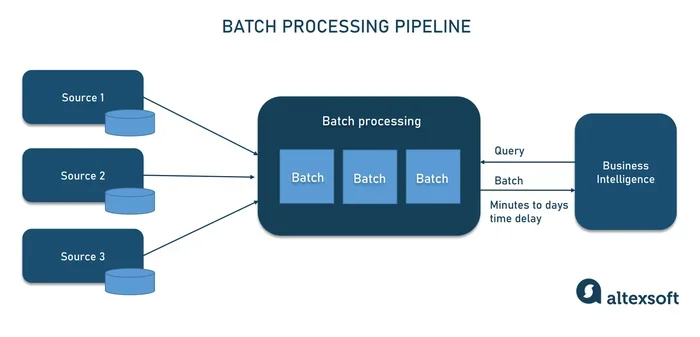
In batch processing, tasks are collected over a period of time and stored in a queue or buffer. When the system is ready, it processes the entire batch in one go. Think of it like a mail sorter who waits until the end of the day to process all the letters at once rather than handling each one individually as it arrives.
The typical workflow for batch processing follows these steps:
- Tasks or data inputs are collected over a period of time.
- They are stored in a queue or buffer waiting to be processed.
- A job scheduling system triggers the batch run at a set time, often during off-peak hours.
- The system processes all tasks sequentially or in parallel, depending on the setup.
- Results are generated and stored for later use or distribution.
Sequential processing is common in batch jobs, where each task follows the previous one in order. However, modern batch systems can also use parallel processing to speed things up by splitting the batch across multiple processors or servers.
When Batch Processing Is Used
Batch processing shines in specific scenarios where speed is not the top priority but volume and efficiency are:
- Payroll processing: Companies process employee salaries monthly in large batches, calculating pay for thousands of employees at once.
- Data backups: Systems back up huge amounts of data overnight when usage is low, minimizing the impact on daytime performance.
- Report generation: Businesses generate end-of-month financial reports as batch jobs that run after business hours.
- Image and video rendering: Animation studios render thousands of frames in batches, often using overnight computing cycles.
- Email marketing: Platforms send thousands or even millions of emails in scheduled batches to avoid overwhelming servers.
The beauty of batch processing is that it does not need constant human attention. Once you set it up, it runs on its own, freeing up system resources for other tasks during the day. This makes it a favorite for organizations that need to process large volumes of data without breaking the bank.
Why Batch Processing Still Matters
Some people think batch processing is outdated because it is not as flashy as real-time systems. But that could not be further from the truth. Batch processing handles the heavy lifting that keeps businesses running smoothly. Banks rely on it to process millions of transactions overnight. Airlines use it to update reservations and schedules. E-commerce platforms use it to generate daily sales reports and update recommendation engines. Without batch processing, many of the systems we rely on would grind to a halt.
Difference Between Time Processing and Batch Processing
Understanding the difference between time processing and batch processing comes down to a few core factors. Let us break them down so you can see exactly how they compare and where each one fits best.
Speed and Responsiveness
Time processing delivers results instantly. There is almost no wait time between submitting a request and getting a response. This makes it perfect for applications where users expect immediate feedback and cannot tolerate any lag.
Batch processing introduces a delay by design. Tasks wait in a queue until the batch runs according to schedule. This means there is a processing delay between when a task is submitted and when it gets completed. For non-urgent tasks, this delay is perfectly acceptable and even preferred since it saves resources.
Resource Usage and Cost
Time processing uses system resources continuously. Because it handles tasks as they arrive, the processor stays active at all times. This can lead to higher processing overhead since the system must constantly switch between tasks, a process known as context switching.
Batch processing is far more efficient with resources. It runs during off-peak hours and uses resource allocation strategically. The system does not need to stay active all the time, which can reduce costs significantly. Organizations often run batch jobs on cheaper, off-peak infrastructure to maximize savings.
Throughput and Volume Handling
When it comes to handling large volumes of data, batch processing wins hands down. It can process thousands or even millions of tasks in a single run, achieving impressive throughput. Time processing, while fast per individual task, may struggle with very high volumes because it needs to handle each task individually as it arrives.
Latency Comparison
Latency is one of the biggest differentiators between these two methods. Time processing keeps latency extremely low, often under a few milliseconds. Batch processing has much higher latency because tasks sit in a queue waiting for their turn. For applications where timing is critical, such as financial trading or live gaming, low latency is a must-have feature.
Complexity and Maintenance
Time processing systems tend to be more complex. They need sophisticated workload management to handle multiple simultaneous requests without slowing down. Batch processing is simpler to set up and maintain because tasks follow a predictable schedule and do not require constant monitoring.
Comparison Table
| Feature | Time Processing | Batch Processing |
|---|---|---|
| Speed | Instant results | Delayed (scheduled runs) |
| Resource Usage | Continuous and active | Scheduled and efficient |
| Throughput | Lower per unit time | Higher for large volumes |
| Latency | Very low (milliseconds) | Higher (minutes to hours) |
| Complexity | Higher | Lower |
| Best For | Interactive, real-time tasks | Large-scale, non-urgent tasks |
| Cost Efficiency | Moderate to high | High |
| User Interaction | Yes, continuous | No, fully automated |
| Error Impact | Affects single task | Can affect entire batch |
This table makes the difference between time processing and batch processing easy to visualize at a glance. Each method has its place, and the best choice depends entirely on your specific needs, budget, and performance requirements.
Advantages and Disadvantages of Each Method
Every approach has trade-offs. Let us look at the pros and cons of both time processing and batch processing so you can make an informed decision for your project.
Pros and Cons of Time Processing
Advantages:
- Instant responses keep users happy, engaged, and satisfied with the experience.
- Great for interactive applications like gaming, live chat, and real-time dashboards.
- Supports event-driven processing where user actions trigger immediate system responses.
- Ideal for systems that require constant user interaction and real-time feedback.
- Enables transaction processing that captures data at the exact moment it occurs.
Disadvantages:
- Higher processing overhead due to constant context switching between tasks.
- Can be expensive to run because system resources are always active and consuming power.
- May struggle with very high-volume workloads that overwhelm the processing capacity.
- Requires more sophisticated workload management infrastructure and specialized expertise.
- Continuous resource usage can lead to higher operational costs over time.
Pros and Cons of Batch Processing
Advantages:
- Highly cost-efficient since it runs during off-peak hours when computing resources are cheaper.
- Excellent for processing large volumes of data at once, maximizing throughput.
- Simple to set up and maintain with predictable schedules and minimal monitoring.
- Reduces processing overhead by grouping similar tasks together and processing them in bulk.
- Frees up system resources during peak hours so interactive applications run smoothly.
Disadvantages:
- Higher latency means users wait longer for results, which is unsuitable for time-sensitive applications.
- Not suitable for applications that need instant responses or real-time updates.
- Errors in a batch can affect many tasks at once, potentially causing widespread issues.
- Requires careful job scheduling to avoid conflicts with peak usage times and other processes.
- Debugging can be harder since errors are only discovered when the batch runs.
Real-World Applications
Both methods power many of the systems we use every day, often without us even realizing it. Let us look at some practical examples of where each excels in the real world.
Time Processing Use Cases
Time processing is the backbone of interactive digital experiences that demand instant responses:
- Online gaming servers: These systems process player actions in milliseconds. Real-time processing ensures smooth gameplay with no noticeable lag or delay.
- Live chat platforms: Messages are delivered instantly thanks to continuous processing and low-latency infrastructure that keeps conversations flowing naturally.
- Stock trading systems: Traders need instant price updates to make split-second decisions. Transaction processing happens in real time to capture every market movement.
- Ride-sharing apps: Apps like Uber match drivers and riders instantly using time-based data pipeline systems that process location data on the fly.
- Customer support systems: Live chatbots and support tickets are handled as they arrive, ensuring customers get help without frustrating wait times.
- IoT sensors: Internet of Things devices send data streams that are processed in real time to trigger alerts and automated responses instantly.
In all these cases, the difference between time processing and batch processing is clear: users need instant results, and time processing delivers exactly that.
Batch Processing Use Cases
Batch processing handles the heavy lifting behind the scenes that keeps businesses running efficiently:
- Banking systems: Banks process millions of transactions overnight in batches. This ensures accuracy and completeness without slowing down daily operations for customers.
- Payroll and HR: Companies run payroll batches monthly to calculate salaries, taxes, and benefits for all employees at once, ensuring everyone gets paid on time.
- Data analytics and warehousing: Large companies analyze massive datasets using batch jobs that run during off-peak hours, generating insights without impacting daytime performance.
- Video streaming platforms: Platforms like Netflix use batch processing to generate personalized recommendations and process viewing data for millions of users.
- Weather forecasting: Supercomputers run batch simulations overnight to predict weather patterns for the next day, processing enormous amounts of atmospheric data.
- E-commerce inventory: Online retailers update stock levels and reconcile inventory counts through nightly batch jobs that process all transactions from the day.
These examples show how batch processing enables large-scale operations that would be impractical or too expensive to handle in real time. It is the quiet workhorse behind many of the systems we depend on every day.
How to Choose Between Time Processing and Batch Processing
Choosing the right method depends on several factors specific to your project. Here are some practical tips and considerations to guide your decision-making process.
Ask Yourself These Key Questions
- Do your users need instant results? If yes, time processing is the clear winner.
- Are you handling large volumes of data that do not need immediate attention? Batch processing is your best bet for cost-effective handling.
- What is your budget? Time processing can be more expensive due to continuous resource usage and higher infrastructure demands.
- How complex is your workload? Simple, scheduled tasks suit batch processing well, while dynamic, unpredictable workloads may need time processing.
- Do you need both speed and volume? Consider a hybrid approach that combines both methods for maximum flexibility.
Quick Tips for Decision Making
- Start by identifying your latency requirements. If milliseconds matter to your users, time processing wins every time.
- Evaluate your data volume carefully. Massive datasets that do not need instant results often benefit greatly from batch processing.
- Consider your team’s expertise. Time processing systems require more specialized knowledge and sophisticated workload management skills.
- Look at your resource allocation budget honestly. Batch processing is generally more cost-effective and easier to scale.
- Think about future scalability. A hybrid model gives you the flexibility to grow and adapt as your needs evolve over time.
Expert Insight on Hybrid Approaches
Many modern platforms use a combination of both approaches, and this trend is only growing. For example, an e-commerce site might use time processing for handling customer orders and live inventory updates while running batch processing overnight for analytics, reporting, and inventory reconciliation. This hybrid approach leverages the strengths of both methods and is increasingly common in enterprise data pipeline architectures.
The difference between time processing and batch processing is not about which one is better overall. It is about which one fits your specific use case. In many cases, the best solution uses both together in a complementary way, giving you the speed of real-time processing and the efficiency of bulk processing.
Common Mistakes to Avoid
Even experienced developers and system architects make mistakes when choosing between these methods. Here are some common pitfalls to watch out for and how to avoid them:
- Using batch processing for real-time needs: This leads to frustrated users and slow responses. Always match the method to your latency requirements from the start.
- Overcomplicating time processing: Not every task needs instant handling. Some tasks are better suited for batch processing, and forcing real-time processing on them wastes resources.
- Ignoring system resources: Running time processing 24/7 can be costly. Monitor your resource allocation carefully and right-size your infrastructure.
- Skipping error handling in batches: A single bad task can fail an entire batch. Build in robust error handling, retry mechanisms, and logging to catch issues early.
- Neglecting job scheduling: Poorly scheduled batch jobs can conflict with peak usage times and degrade the performance of your interactive applications.
- Underestimating processing overhead: Time processing systems can consume more CPU and memory than expected. Plan your capacity accordingly and monitor performance metrics regularly.
Avoiding these mistakes saves time, money, and a lot of headaches down the road. Take the time to evaluate your needs thoroughly before committing to a processing method. A thoughtful choice today can save you from major rework tomorrow.
Conclusion
The difference between time processing and batch processing comes down to timing, approach, and use case. Time processing delivers instant results and is perfect for interactive, real-time applications that demand immediate responses. Batch processing groups tasks together for efficient, cost-effective handling of large-scale workloads that do not need instant results.
Both methods play vital roles in modern software systems. Time processing keeps your live applications responsive and engaging for users. Batch processing handles the heavy data work quietly in the background, often during off-peak hours. Understanding when to use each method is a valuable skill for any developer, system architect, or technical decision-maker.
As technology evolves, hybrid approaches are becoming more popular and more powerful. Many systems now blend time processing and batch processing to get the best of both worlds, handling real-time interactions while processing large datasets efficiently in the background. The key is to evaluate your specific needs, consider your resources and budget, and choose the method that aligns with your goals.
Now that you understand both approaches in depth, you are better equipped to make the right choice for your next project. Think about your users, your data volume, your budget, and your performance requirements. The difference between time processing and batch processing is clear once you know what matters most to your system and your users. Apply what you have learned here, and you will be well on your way to building a system that performs at its best.
Frequently Asked Questions
What is the main difference between time processing and batch processing?
The main difference lies in timing and execution. Time processing handles tasks instantly as they arrive, providing immediate results for interactive applications. Batch processing collects tasks and processes them together at a scheduled time, which introduces a delay but improves efficiency and cost-effectiveness for large data volumes.
Which is faster, time processing or batch processing?
Time processing is faster for individual tasks because it delivers results in milliseconds. Batch processing is slower per task since it waits for a scheduled run. However, batch processing can handle much larger total volumes more efficiently over time, making it the better choice for bulk data operations.
Can you use both time processing and batch processing together?
Yes, many modern systems use a hybrid approach that combines both methods. For example, a web application might use time processing for live user interactions while running batch processing overnight for data analytics, report generation, and system maintenance. This gives you the speed of real-time processing and the efficiency of bulk processing in one system.
Is batch processing outdated in modern software development?
Not at all. Batch processing remains widely used in banking, payroll, data analytics, e-commerce, and many other industries. Its cost efficiency and ability to handle massive data volumes make it indispensable for large-scale operations that do not require real-time responses.
What industries rely most on time processing?
Industries that need instant responses depend heavily on time processing. These include online gaming, stock trading, ride-sharing, live chat platforms, IoT systems, and any application where real-time interaction is essential for the user experience and business operations.
How do I decide which processing method to use for my project?
Start by evaluating your latency requirements, data volume, and budget. If your users need instant responses, choose time processing. If you are handling large, non-urgent data workloads, batch processing is more cost-effective. When in doubt, consider a hybrid approach that combines both methods to give you flexibility and scalability as your project grows.