Computer Viruses That Affect The Keyboard And How To Fix
Computer viruses that affect the keyboard are a real and growing threat to everyday users. These malicious programs can cause keys to type incorrectly, stop working entirely, or secretly record everything you type. In this guide, you will learn how to recognize the signs of a keyboard infection, understand the different types of viruses that target your keyboard, and follow clear steps to fix the problem. We also share practical prevention tips to keep your device safe and your typing smooth.
Your keyboard is one of the most important tools you use every day. You rely on it to type emails, write documents, search the web, and communicate with friends. So when something goes wrong with it, it can be incredibly frustrating. One of the most unsettling problems is when a computer virus that affects the keyboard starts causing strange behavior. Keys might type the wrong letters, stop responding, or even type on their own.
This is not just a minor annoyance. A virus targeting your keyboard can compromise your personal data, steal passwords, and give hackers access to your system. Understanding how these infections work and what to do about them is essential for every computer user. This guide walks you through everything you need to know, from identifying the problem to fixing it and preventing it from happening again.
Key Takeaways
- Keyboard viruses are real: Malware like keyloggers, trojans, and ransomware can directly target your keyboard and disrupt normal typing.
- Early detection saves time: Recognizing symptoms like stuck keys, wrong characters, or unresponsive keys helps you act fast.
- Multiple fix methods work: From antivirus scans to driver updates, several proven solutions can restore your keyboard.
- Prevention is simple: Regular updates, strong passwords, and careful browsing habits reduce your risk significantly.
- Professional help matters: Some infections need expert intervention, especially when personal data is at risk.
- Keep backups ready: Regular backups protect your data even if a virus causes major damage.
📑 Table of Contents
What Are Computer Viruses That Affect The Keyboard?
A computer virus that affects the keyboard is a type of malware designed to interfere with how your keyboard works. Unlike general viruses that slow down your whole system, these specifically target your input device. They can change how keys register, block certain keys entirely, or secretly record every keystroke you make.
These viruses fall under the broader category of malware infections. Malware is short for malicious software. It includes viruses, worms, trojans, spyware, and ransomware. Some of these are designed to steal information, while others aim to disrupt your normal computer use. Keyboard-targeting malware often works silently in the background, which makes it especially dangerous.
The way these viruses spread is similar to how other malware infects computers. You might download an infected file, click a malicious link, or plug in a compromised USB device. Once inside your system, the virus attaches itself to system processes or modifies your keyboard driver. This is the software that allows your computer to communicate with your keyboard. When the driver is altered, your keyboard behavior changes.
It is important to understand that not every keyboard problem is caused by a virus. Sometimes hardware issues, outdated drivers, or software conflicts cause similar symptoms. However, if the problem appears suddenly and without a clear reason, a keyboard virus infection should be high on your list of possible causes.
How Do Keyboard-Targeting Viruses Work?
Most keyboard-targeting viruses operate by intercepting the signals between your keyboard and your computer. They sit between the hardware input and the software output. This means every time you press a key, the virus can record, alter, or block the signal before it reaches your screen.
Some viruses remap your keys. This means pressing the “A” key might produce a “Z” instead. Others disable specific keys entirely, making certain shortcuts or functions impossible. The most dangerous type is the keylogger, which records every single keystroke and sends the data to a remote server controlled by hackers.
These viruses often use rootkit technology to hide deep within your system. A rootkit is designed to conceal the presence of malware, making it very hard to detect. This is why regular computer security practices are so important. Without the right tools, you might not even know your keyboard has been compromised.
Common Signs Your Keyboard Has Been Infected
Detecting a keyboard virus early can save you a lot of trouble. The sooner you spot the signs, the faster you can take action. Here are the most common symptoms that suggest your keyboard has been infected:
- Keys typing the wrong characters: You press one key but get a completely different letter or symbol on screen.
- Keys that stop working: Certain keys become unresponsive or produce no output at all.
- Keys that type on their own: Characters appear without you pressing any keys.
- Random key repeats: A single keypress produces the same character multiple times.
- Special keys malfunction: The Shift, Ctrl, Alt, or Windows keys stop working properly.
- Slow or delayed input: There is a noticeable lag between pressing a key and seeing the result on screen.
- Unusual pop-ups or messages: Strange warnings or demands appear on your screen, often related to ransomware.
- Unexplained system slowdown: Your computer becomes unusually slow, which can accompany a system infection.
If you notice several of these symptoms at the same time, there is a strong chance your keyboard has been affected by malware. It is important not to ignore these signs. The longer you wait, the more damage the virus can cause.
How to Tell If It Is a Virus or a Hardware Problem
Sometimes it is hard to tell whether your keyboard issue is caused by a virus or a hardware problem. Here is a simple way to check. Try connecting a different keyboard to your computer. If the new keyboard works perfectly but the old one still has issues, the problem might be hardware-related. If the new keyboard also shows strange behavior, a malware infection is more likely.
You can also check your system settings. On Windows, go to Device Manager and look at your keyboard driver. If the driver shows a yellow warning triangle, there may be a software conflict. Running a full antivirus scan is the best way to confirm whether a virus is present.
Types of Viruses That Target Keyboards
Not all keyboard viruses are the same. Different types of malware attack keyboards in different ways. Understanding these types helps you recognize the threat and choose the right fix.
Keyloggers
A keylogger is one of the most common and dangerous keyboard viruses. It secretly records every keystroke you make and stores the data for the attacker. Keyloggers are often used to steal passwords, credit card numbers, and personal messages. You might not notice a keylogger at all because it runs silently in the background.
Keyloggers can be installed through phishing emails, malicious websites, or bundled software. Once installed, they are very difficult to detect without specialized malware removal tools. Some advanced keyloggers can even capture screenshots and monitor clipboard activity.
Trojan Viruses
A trojan virus disguises itself as a legitimate program or file. When you download and open it, the trojan installs itself on your computer. Many trojans target keyboard functionality by modifying system files or drivers. They can remap keys, block certain inputs, or install additional malware like keyloggers.
Trojans are especially tricky because they do not replicate like traditional viruses. They rely on tricking users into installing them. This is why being cautious about what you download is so important for device protection.
Ransomware
Ransomware is a type of malware that locks your system or files and demands payment to restore access. Some ransomware variants specifically target keyboard input to prevent you from using your computer normally. They may disable certain keys or make typing impossible so you cannot communicate or seek help.
Ransomware attacks have become increasingly common in recent years. They can cause massive disruption for both individuals and businesses. The best defense is a combination of regular backups and strong cybersecurity tips.
Macro Viruses
Macro viruses are embedded in documents like Word files or Excel spreadsheets. When you open the infected document, the macro runs and can modify your system settings. Some macro viruses specifically target keyboard drivers, causing keys to behave erratically or stop working altogether.
These viruses spread through email attachments and shared files. They are a good reminder to never open attachments from unknown senders and to keep your software updates current.
USB-Borne Malware
Some viruses spread through USB devices. When you plug in an infected flash drive, the malware automatically installs itself. Certain USB-borne malware specifically targets keyboard input by injecting malicious keystrokes or altering driver behavior. This is why you should never plug in unknown USB devices without scanning them first.
How To Fix A Keyboard Affected By A Virus
Once you confirm that a computer virus that affects the keyboard is the problem, you need to act quickly. The good news is that most keyboard infections can be fixed with the right steps. Here is a detailed guide to help you restore normal keyboard function.
Step 1: Run a Full Antivirus Scan
The first and most important step is to run a complete antivirus scan. Use a reputable antivirus software like Windows Defender, Malwarebytes, Norton, or Bitdefender. Make sure your antivirus definitions are up to date before running the scan.
Set the scan to check every file and folder on your system. This may take some time, but it is essential. When the scan finishes, review the results and follow the software’s instructions to remove or quarantine any threats found.
After removal, restart your computer. This ensures that any lingering malware processes are fully stopped. Then test your keyboard to see if the issue is resolved.
Step 2: Update or Reinstall Keyboard Drivers
Viruses often damage or modify your keyboard driver. Even after removing the malware, the driver may still be corrupted. Updating or reinstalling the driver can fix this.
To update the driver on Windows, go to Device Manager, expand the Keyboards section, right-click your keyboard, and select Update Driver. If updating does not work, uninstall the device and restart your computer. Windows will automatically reinstall the driver with fresh settings.
For Mac users, go to System Preferences, then Keyboard settings. If issues persist, resetting the system management controller can help restore normal keyboard function.
Step 3: Use Malware Removal Tools
Sometimes a standard antivirus scan is not enough. Stubborn malware like rootkits may require specialized tools. Programs like Malwarebytes, HitmanPro, and Spybot Search and Destroy are excellent for deep malware removal.
Run these tools in Safe Mode for the best results. Safe Mode loads only the essential system files, which prevents the virus from hiding or interfering with the scan. To enter Safe Mode on Windows, restart your computer and press F8 before the Windows logo appears.
Step 4: Check for System File Corruption
Some viruses corrupt important system files. Windows has a built-in tool called System File Checker that can repair these files. Open the Command Prompt as an administrator and type sfc /scannow. The tool will scan your system and replace any corrupted files it finds.
You can also use the DISM tool to repair the system image. Type DISM /Online /Cleanup-Image /RestoreHealth in the Command Prompt. These tools are powerful and can resolve many issues caused by system infection.
Step 5: Reset Your Browser Settings
If the virus affected your keyboard primarily while browsing, resetting your browser settings can help. Clear your cache, cookies, and browsing data. Remove any unfamiliar extensions or add-ons. This eliminates any browser-based malware that might be interfering with keyboard input.
Step 6: Perform a System Restore
If none of the above steps work, a system restore can revert your computer to a previous state before the infection occurred. Go to Control Panel, select System, and click System Restore. Choose a restore point from before you noticed the keyboard problems.
Keep in mind that a system restore will remove programs and updates installed after the chosen restore point. Make sure to back up any important files first.
Step 7: Reinstall the Operating System (Last Resort)
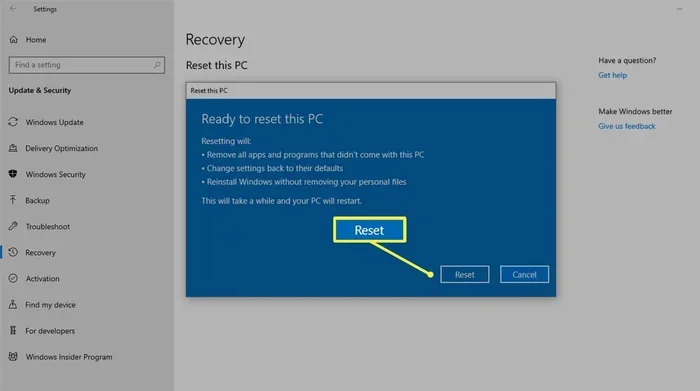
In severe cases, the only reliable fix is to reinstall your operating system. This wipes your system clean and removes any deeply embedded malware. Before doing this, back up all your important files to an external drive or cloud storage.
Reinstalling the operating system should be your last option. It is time-consuming and requires you to set up your computer again from scratch. But when a keyboard virus refuses to budge, it is often the most effective solution.
Prevention Tips To Keep Your Keyboard Safe
Prevention is always better than cure. Taking proactive steps to protect your computer from keyboard-targeting malware can save you hours of frustration. Here are the best prevention strategies:
- Install reliable antivirus software: Use a trusted antivirus program and keep it updated at all times. Set it to perform regular automatic scans.
- Keep your operating system updated: Software updates patch security vulnerabilities that viruses can exploit. Enable automatic updates whenever possible.
- Be careful with email attachments: Never open attachments from unknown senders. Even attachments from known contacts can be dangerous if their account has been compromised.
- Avoid suspicious websites: Stick to reputable websites. If a site looks sketchy or asks you to download something unusual, leave immediately.
- Scan USB devices before use: Always scan external drives with your antivirus software before plugging them into your computer.
- Use strong, unique passwords: Strong passwords reduce the risk of brute-force attacks and make it harder for hackers to access your accounts.
- Enable two-factor authentication: This adds an extra layer of security even if your passwords are compromised.
- Back up your data regularly: Regular backups ensure you do not lose important files even if a virus causes major damage.
- Use a firewall: A firewall monitors incoming and outgoing network traffic and can block malicious connections before they reach your system.
- Be cautious with downloads: Only download software from official sources. Avoid pirated software, which often contains hidden malware.
Quick Tips for Daily Protection
Beyond the major prevention steps, small daily habits make a big difference. Avoid clicking on pop-up ads or suspicious links in messages. Use a browser ad blocker to reduce exposure to malicious ads. Regularly check your installed programs and remove anything you do not recognize. These simple habits strengthen your overall computer security and reduce the chance of a keyboard malfunction caused by malware.
When To Seek Professional Help
Most keyboard virus issues can be resolved at home with the steps outlined above. However, there are situations where professional help is the best choice. If you are not comfortable working with system files or command-line tools, a professional can handle the repair safely.
You should also seek help if the infection appears to have spread beyond your keyboard. Signs of a broader infection include frequent system crashes, unusual network activity, or multiple programs behaving strangely. These could indicate a serious system infection that requires expert intervention.
If you suspect a data breach has occurred because of the virus, contact a cybersecurity professional immediately. They can assess the damage, secure your system, and help you recover compromised data. In cases involving ransomware, professional help is almost always necessary because removing ransomware without losing data requires specialized knowledge and tools.
Finding the Right Professional
Look for certified technicians or reputable local repair shops. Check online reviews and ask for recommendations from friends or family. A good professional will explain the problem clearly, offer transparent pricing, and provide a guarantee on their work. Avoid services that pressure you into expensive repairs or make unrealistic promises.
Conclusion
A computer virus that affects the keyboard can be a frightening and frustrating experience. But with the right knowledge and tools, it is a problem you can solve. The key is to act quickly, identify the symptoms early, and follow the right steps to remove the infection and restore your keyboard to normal function.
Prevention plays a huge role in keeping your system safe. Regular antivirus scans, software updates, and safe browsing habits go a long way in protecting your keyboard and your entire computer from malware infection. Remember, your keyboard is your main window into your computer. Keeping it healthy means keeping your entire computing experience smooth and secure.
Take the time today to review your security practices and make sure your antivirus software is up to date. A few minutes of prevention now can save you hours of frustration later. Stay vigilant, stay protected, and never underestimate the importance of a clean, functioning keyboard.
Frequently Asked Questions
Can a virus permanently damage my keyboard hardware?
In most cases, a virus does not physically damage your keyboard hardware. The damage is usually software-related, affecting the driver or system settings. However, in rare cases, a virus could cause your computer to send unusual signals that stress the hardware. Reinstalling the driver or restoring your system typically resolves these issues completely.
How do I know if my keylogger has been installed?
Keyloggers are designed to run secretly, so they can be hard to detect. Signs include unusual network activity, slow performance, or antivirus alerts. Running a deep scan with specialized malware removal tools like Malwarebytes is the best way to find and remove a keylogger. If you suspect one, change your passwords immediately from a different, secure device.
Is it safe to use my keyboard if I suspect a virus?
It is generally safe to continue using your keyboard while you troubleshoot the issue. However, avoid typing sensitive information like passwords or credit card numbers until you have confirmed your system is clean. A virus that targets your keyboard could be recording your keystrokes and sending them to a third party.
What is the best antivirus software for detecting keyboard viruses?
Several antivirus programs are excellent at detecting keyboard-targeting malware. Malwarebytes, Bitdefender, Norton, and Kaspersky are all highly rated for their ability to find and remove deep-seated infections. Windows Defender is also a solid free option that provides good protection for most users. The key is to keep your software updated and run regular scans.
Can a keyboard virus spread to other computers on my network?
Yes, some keyboard viruses can spread across a network, especially if your network security is weak. Malware like trojans and worms can move from one device to another through shared connections. This is why having a firewall and keeping all devices on your network updated is so important for overall device protection.
How long does it take to fix a keyboard affected by a virus?
The time it takes depends on the severity of the infection. A simple scan and driver update might fix the problem in 30 minutes. A deep malware removal or system restore could take several hours. In the worst case, a full operating system reinstall might take half a day. Acting quickly and following the steps in this guide will help minimize the time needed.