Can You Use Ipad Mini As A Phone Instead of Your Cell
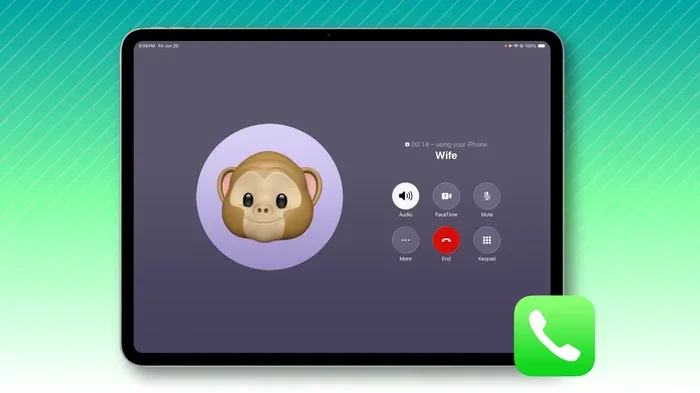
Yes, you can use iPad Mini as a phone with the right setup, cellular plan, and calling apps. This guide covers everything from iPad Mini cellular models to VoIP apps, Wi-Fi calling, and text messaging — so you can decide if using an iPad as a phone replacement is right for you.
Key Takeaways
- You can make calls on iPad Mini: Cellular models support calls, and Wi-Fi models work with apps like FaceTime and WhatsApp.
- Setting up iPad Mini as a phone is easy: You just need a data plan, an eSIM or SIM card, and a calling app.
- The iPad Mini cellular model is your best bet: It has built-in LTE/5G support for true phone-like functionality.
- Several free apps fill the gap: FaceTime, WhatsApp, Skype, and Zoom handle calls and texts effectively.
- There are real trade-offs: Smaller screen for calls, no native SMS without a phone number, and limited portability.
- Not everyone should ditch their cell phone: If you need constant on-the-go connectivity, a phone still wins.
📑 Table of Contents
- Can You Use iPad Mini As A Phone? The Short Answer Is Yes
- Understanding the iPad Mini Cellular Model
- How to Set Up Your iPad Mini for Phone Calls
- Best Apps for Using iPad Mini as a Phone
- iPad Mini vs. Cell Phone: What Is the Real Difference?
- Pros and Cons of Using iPad Mini as Your Phone
- Who Should Consider Using iPad Mini as a Phone?
- How to Make the Switch Smooth and Easy
- Final Thoughts: Is Using iPad Mini as a Phone Worth It?
Can You Use iPad Mini As A Phone? The Short Answer Is Yes
So, can you use iPad Mini as a phone? The answer is a solid yes. You absolutely can turn your iPad Mini into a working phone. It might not look like a traditional phone, but it handles calls, texts, and data just fine.
Apple designed the iPad Mini to be a portable powerhouse. The iPad Mini cellular model comes with built-in LTE and 5G support. That means you can connect to mobile networks just like a regular phone does. You just need the right setup, and you are good to go.
People are ditching their cell phones every day. They want something lighter, cheaper, and simpler. The iPad Mini fits that bill perfectly. It is small enough to carry everywhere, and it does way more than just make calls.
In this article, we will walk you through everything you need to know. We will cover setup, apps, costs, pros, cons, and who this works best for. By the end, you will know exactly whether using iPad Mini as a phone makes sense for your life.
Understanding the iPad Mini Cellular Model
Before you jump in, you need to know which iPad Mini you have. Not all models support cellular connectivity. Let us break it down so you do not buy the wrong device.
Wi-Fi Only vs. Cellular Models
The iPad Mini comes in two main versions. The Wi-Fi only model connects to the internet through wireless networks. It cannot make calls outside of Wi-Fi range. That limits its usefulness as a phone replacement.
The iPad Mini cellular model has a built-in modem. It connects to LTE and 5G networks through a SIM card or eSIM. This gives you true phone-like functionality anywhere you have cell coverage. You can make calls, send texts, and stream data on the go.
Here is a quick comparison to help you understand the difference:
| Feature | Wi-Fi Only | Cellular Model |
|---|---|---|
| Mobile Data | No | Yes |
| Calls Outside Wi-Fi | No | Yes |
| SIM / eSIM Support | No | Yes |
| Price Difference | Lower | Higher (~$100-$130 more) |
| Works as Phone | Limited | Full Functionality |
Which iPad Mini Models Support Cellular?
Most recent iPad Mini models offer a cellular option. The iPad Mini 6, iPad Mini 7, and earlier cellular versions all support mobile data and calling. When you shop, look for the “Cellular” or “LTE/5G” label. That is your ticket to using it as a phone.
Pro Tip: Always check the model number before buying. Apple uses codes like “A2567” for cellular versions. A quick search online will confirm which model you are getting.
How to Set Up Your iPad Mini for Phone Calls
Setting up your iPad Mini as a phone is straightforward. You do not need to be a tech expert. Follow these steps and you will be making calls in minutes.
Step 1: Choose Your Data Plan
First, you need a mobile data plan. Most major carriers offer iPad cellular plans. These are often cheaper than regular phone plans. Some carriers even offer shared plans that work across multiple devices.
You can also use eSIM technology. This lets you activate a plan without a physical SIM card. It is super convenient and perfect for people who switch carriers often. Just scan a QR code, and you are connected.
Step 2: Insert Your SIM or Activate eSIM
For the physical SIM route, use the SIM ejector tool that comes with your iPad. Insert it into the tiny tray on the side. Pop in your SIM card, and you are set.
For eSIM, go to Settings, then Cellular. Tap “Add Cellular Plan” and follow the prompts. Your carrier will send you a QR code or a manual setup option. It takes about two minutes.
Step 3: Configure Calling and Messaging
Once your data plan is active, head to Settings and enable Wi-Fi calling. This lets you make calls over Wi-Fi when cellular signal is weak. It works great indoors and in buildings with poor reception.
Next, set up your iMessage and FaceTime accounts. These are Apple’s built-in calling and messaging tools. They work seamlessly across all Apple devices. You can now send texts and make video calls just like you would on an iPhone.
Best Apps for Using iPad Mini as a Phone
The iPad Mini shines when you use the right apps. There are plenty of free and paid options that turn your tablet into a full phone. Let us look at the best ones.
FaceTime and iMessage
Apple’s own tools are hard to beat. FaceTime handles video and audio calls beautifully. It works over Wi-Fi and cellular data. iMessage lets you send texts, photos, and videos to other Apple users for free.
The best part? Both apps use your Apple ID. You do not need a separate phone number. This makes iPad calling without iPhone very easy. If you live in the Apple ecosystem, these tools are more than enough.
WhatsApp and Messaging Apps
WhatsApp is one of the most popular messaging apps worldwide. It supports text, voice calls, and video calls. You just need a Wi-Fi or data connection. It works on iPad Mini and syncs with your phone number.
Telegram, Signal, and Facebook Messenger are other great options. Each has its own strengths. WhatsApp leads in global popularity. Signal wins on privacy. Telegram excels in group chats and file sharing.
Skype, Zoom, and VoIP Services
VoIP apps are a game-changer for using iPad Mini as a phone. Skype has been around forever. It offers cheap international calls and reliable voice quality. You can even get a Skype phone number for incoming calls.
Zoom is perfect for video calls. Many people use it for work, but it works great for personal calls too. Google Voice is another solid option. It gives you a free phone number and works well for calls and texts in the US.
Texting Without a Phone Number
One common question is how to send regular SMS texts. The iPad Mini does not support traditional SMS natively. But you can use iMessage for free between Apple users. For Android users, WhatsApp and Signal bridge the gap easily.
If you really need to send standard texts, you can use Google Voice. It provides a real phone number and supports SMS. This is the closest you will get to a full phone experience on an iPad Mini.
iPad Mini vs. Cell Phone: What Is the Real Difference?
Let us be honest. An iPad Mini is not a phone. It is a tablet that can make calls. Understanding the real differences helps you set the right expectations.
Size and Portability
The iPad Mini is small for a tablet, but it is still bigger than a phone. You can slip it into a jacket pocket, but it will not fit in your jeans pocket comfortably. If you carry a small bag, this is not a problem. But if you like everything in your pocket, the size difference matters.
Call Quality and Speaker
The iPad Mini has decent speakers, but they are not designed for phone calls the way a phone is. The microphone picks up your voice well, but background noise can be an issue. In quiet environments, calls sound great. In loud places, you might struggle.
Quick Tip: Use wired or Bluetooth headphones for better call quality. This makes a huge difference, especially in noisy areas. A good pair of earbuds turns your iPad Mini into a proper phone.
Battery Life
One area where the iPad Mini wins is battery life. It lasts much longer than a phone on a single charge. You can easily get through a full day of calls, texts, and browsing. This is a major advantage for heavy users.
Cost Comparison
Using an iPad Mini as a phone can save you money. iPad cellular plans are often cheaper than traditional phone plans. You also avoid the cost of a second device. Many people use their iPad Mini as a primary device and keep a basic phone as backup.
Pros and Cons of Using iPad Mini as Your Phone
Every choice has trade-offs. Let us look at the real benefits and drawbacks of using the iPad Mini as a phone.
The Pros
- Lighter and more portable than a typical tablet. Easy to carry around.
- Larger screen makes video calls and reading messages much better.
- Great battery life lasts longer than most phones on a single charge.
- Cheaper data plans compared to traditional phone contracts.
- More apps and features than a basic phone can offer.
- No monthly phone bill if you already own the iPad Mini.
The Cons
- Not pocket-sized like a real phone. You need a bag or pouch.
- Cannot make emergency calls to 911 over cellular in all regions without proper setup.
- No native SMS support for non-Apple users without extra apps.
- Call quality is not as optimized as a dedicated phone.
- Some apps are not fully optimized for iPad screen size.
- Social perception — people might find it odd to see someone on an iPad Mini during a call.
Common Mistakes to Avoid
Many people run into problems when they switch. Here are the most common mistakes:
- Buying the Wi-Fi only model and expecting it to work as a phone everywhere. Always get the cellular version.
- Forgetting to enable Wi-Fi calling. This is essential for good call quality indoors.
- Not setting up iMessage and FaceTime properly. Double-check your Apple ID settings.
- Ignoring data limits. Streaming calls eats data fast. Keep an eye on your usage.
- Skipping a backup device. If your iPad dies, you have no way to make calls. Keep a basic phone handy.
Who Should Consider Using iPad Mini as a Phone?
Not everyone should ditch their cell phone. But for certain people, the iPad Mini works brilliantly as a phone replacement. Let us look at who benefits most.
People Who Work From Home
If you work remotely and rarely leave the house, the iPad Mini is a great phone alternative. You stay connected through Wi-Fi and VoIP apps. You save money on a second phone line. Your workspace stays clutter-free.
Seniors and Minimalist Users
Older adults who just need to stay in touch with family love the iPad Mini. The larger screen makes it easy to see contacts and read messages. FaceTime and WhatsApp make calling simple and intuitive. It removes the complexity of a traditional phone.
Students and Travelers
Students on campus can use the iPad Mini for calls, texts, and studying. Travelers love its portability and long battery life. You stay connected in hotels and cafes without carrying a bulky phone.
People with a Second Device Need
Some people keep their iPhone for emergencies and use the iPad Mini as their daily driver. This gives them the best of both worlds. They get a lightweight device for everyday use and a phone for true emergencies.
Expert Insight: Many tech reviewers recommend the iPad Mini cellular model as a secondary device rather than a full phone replacement. It works best as a complement to your existing setup, not a complete swap.
How to Make the Switch Smooth and Easy
If you have decided to make the switch, here are some tips to ensure a smooth transition.
Transfer Your Contacts and Accounts
Start by syncing your contacts to iCloud. This makes them available on your iPad Mini automatically. Sign into all your apps — WhatsApp, email, social media — so nothing falls through the cracks.
Set Up Emergency Contacts
Even if you are using the iPad Mini as your primary phone, keep a list of emergency contacts handy. Share your new number with close family and friends. Make sure they know how to reach you.
Test Your Setup Before You Commit
Try using the iPad Mini as your phone for a week. Make calls, send texts, and check data usage. See how it fits into your daily routine. If it works well, commit fully. If not, you can always go back to your cell phone.
Key Takeaway: The switch works best when you have Wi-Fi at home and a solid cellular data plan. Test your setup in different locations to make sure the connection is reliable.
Final Thoughts: Is Using iPad Mini as a Phone Worth It?
So, can you use iPad Mini as a phone instead of your cell? Absolutely. The iPad Mini cellular model gives you real calling and texting capabilities. With the right apps and a good data plan, you can live without a traditional phone if you want to.
It is not perfect. The size is not ideal for pocket carry. Call quality is good but not phone-optimized. And you still need a backup device for emergencies. But for many people, the trade-offs are worth it.
The iPad Mini offers something no phone can match — a larger screen, better battery life, and a richer app experience. You get a phone and a tablet in one device. That is a powerful combination.
If you are looking to simplify your life, cut costs, or just try something different, give it a shot. Set up your iPad Mini as a phone for a week and see how it feels. You might be surprised at how well it works.
The bottom line is this: using iPad Mini as a phone is practical, affordable, and increasingly popular. More people are making the switch every day. With the right setup and expectations, it is a choice you will not regret.
Frequently Asked Questions
Can I use iPad Mini as a phone without a cellular plan?
Yes, but with limitations. You can make calls and send texts over Wi-Fi using apps like FaceTime, WhatsApp, and Skype. Without a cellular plan, you are limited to Wi-Fi coverage. This works great at home or in offices but not when you are on the go.
Which iPad Mini models support cellular calling?
The iPad Mini 6, iPad Mini 7, and earlier models with a cellular option all support LTE and 5G calling. Always check for the “Cellular” or “LTE/5G” label when purchasing. The Wi-Fi only models cannot make calls outside of wireless networks.
How much does an iPad cellular plan cost?
iPad cellular plans are often cheaper than traditional phone plans. You can expect to pay between $10 and $30 per month depending on your carrier and data allowance. Some carriers offer shared plans that work across multiple devices, which can save you even more.
Can I send regular text messages (SMS) from iPad Mini?
Not directly through the Messages app for non-Apple users. You can use iMessage for free between Apple devices. For regular SMS texts, use apps like WhatsApp, Signal, or Google Voice. Google Voice is the best option if you need a real phone number for SMS.
Is the call quality on iPad Mini good?
Call quality is generally good, especially over Wi-Fi. The speakers and microphone are decent for a tablet. Using headphones or earbuds significantly improves the experience. In noisy environments, a Bluetooth headset helps a lot.
Can I use iPad Mini as my only phone?
Yes, many people use iPad Mini as their only phone. It works well for people who stay mostly at home or have reliable Wi-Fi access. However, it is best to keep a basic backup phone for emergencies. The iPad Mini lacks the portability and instant 911 calling capability of a traditional phone.
=== CONCLUSION ===
Can you use iPad Mini as a phone instead of your cell? The answer is a clear yes. The iPad Mini cellular model gives you real calling, texting, and data capabilities that rival a traditional phone. With apps like FaceTime, WhatsApp, and Skype, you stay connected no matter where you are.
The setup is simple, the costs are often lower, and the experience is surprisingly good. Whether you are a remote worker, a student, a senior, or just someone looking to simplify, the iPad Mini works as a phone replacement for many people.
Remember the trade-offs. It is not pocket-sized. Call quality is good but not perfect. And you need a data plan to get the full experience. But if you are willing to work around these small limitations, the iPad Mini is a fantastic phone alternative.
Give it a try. Set up your iPad Mini as a phone for one week. You might discover that you do not need your old cell phone anymore. The future of communication is flexible, and the iPad Mini is leading the way.