Easy To Make Qbasic Games With Simple Code Examples
Learning easy to make Qbasic games is one of the best ways to start programming today. This guide gives you simple code examples, practical tips, and hands-on projects you can build right away. Whether you are a complete beginner or revisiting old DOS memories, you will find everything you need to start creating your own Qbasic games from scratch.
Have you ever wanted to build your own video game but thought it was too hard? The truth is, you can start creating easy to make Qbasic games today with just a few lines of code. Qbasic is one of the oldest programming languages, and it remains one of the most accessible tools for learning how games work behind the scenes.
What makes Qbasic games so special is their simplicity. You do not need expensive software, advanced math skills, or years of experience. All you need is a text editor, a Qbasic interpreter, and the curiosity to experiment. In this guide, we will walk you through everything from your first guessing game to a full text adventure. You will get real code examples you can copy, run, and modify right away.
Whether you want to relive the golden age of DOS gaming or teach your kids how programming works, easy to make Qbasic games offer the perfect starting point. Let us dive in and start building.
Key Takeaways
- Beginner-Friendly Foundation: Qbasic offers the simplest entry point into game programming with easy-to-understand syntax.
- Multiple Game Types: You can build text adventures, number guessing games, and simple arcade-style games with just a few lines of code.
- Free Tools Available: QB64 and other modern interpreters let you run Qbasic games on today’s computers without any cost.
- Core Programming Skills: Building Qbasic games teaches you variables, loops, conditionals, and input handling that apply to all programming languages.
- Creative Freedom: With Qbasic, you control every aspect of your game from graphics to sound to game logic.
- Community Support: A thriving retro programming community shares Qbasic game code, tips, and inspiration online.
📑 Table of Contents
What Are Qbasic Games And Why They Matter
A Brief History Of Qbasic
Qbasic stands for Quick Beginners All-purpose Symbolic Instruction Code. It was released by Microsoft in 1991 as a simplified version of the BASIC programming language. Back in the early 1990s, millions of people learned to program using Qbasic on their home computers.
The language was designed to be simple enough for anyone to pick up. You did not need to understand complex data structures or memory management. You just wrote a line of code, ran it, and saw results immediately. This instant feedback loop made Qbasic incredibly popular for teaching programming concepts.
Many classic DOS games were built using Qbasic or similar BASIC dialects. Games like Gorillas, Nibbles, and Lemmings started as simple Qbasic experiments. These games proved that you do not need powerful hardware or expensive tools to create something fun and playable.
Why Qbasic Games Still Matter Today
You might wonder why anyone would still use Qbasic in 2024. The answer is simple: it works. Easy to make Qbasic games teach fundamental programming concepts that apply to every modern language. When you learn how to build a game loop in Qbasic, you understand the same logic used in Python, C++, and JavaScript games.
Here is why Qbasic remains relevant:
- Low Barrier To Entry: Qbasic requires no setup. You can start writing code in minutes.
- Clear Syntax: The language reads almost like English, making it easy to understand.
- Instant Results: You see your game come to life immediately without complex build processes.
- Focus On Logic: Without complex frameworks, you focus on pure programming logic and game design.
- Nostalgic Value: For many programmers, Qbasic was their first introduction to coding and game development.
When you build Qbasic games, you are not just playing around. You are learning the same core skills that professional game developers use every day. The only difference is the complexity of the tools.
Setting Up Your Qbasic Environment
Choosing The Right Interpreter
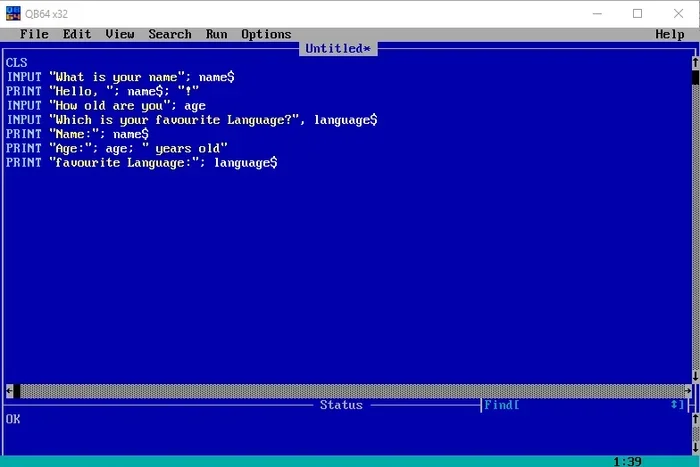
Before you start making games, you need a way to run Qbasic code. The original Qbasic software only works on older DOS systems. Fortunately, there are modern alternatives that run perfectly on Windows, Mac, and Linux.
QB64 is the most popular modern Qbasic interpreter. It is a free, open-source compiler that runs Qbasic code and produces native executables. You can download it from the official QB64 website and start writing games within minutes. It supports most Qbasic commands and even adds some modern features.
Another option is FreeBASIC, which is a more advanced free BASIC compiler. It is backward compatible with Qbasic but offers more power for larger projects. For beginners, QB64 is the best starting point because it closely matches the classic Qbasic experience.
Quick Setup Checklist
Getting started is straightforward. Follow these steps to have your environment ready:
- Download QB64 from the official website.
- Install it on your computer following the setup wizard.
- Open QB64 and create a new file.
- Type in a simple test program like
PRINT "Hello World". - Press F5 to run your program and see the output.
That is it. You are ready to start building easy to make Qbasic games. The setup process takes less than ten minutes, and you will be writing your first game code in no time.
Essential Qbasic Commands For Game Development
Before diving into full games, you should know the basic commands that make Qbasic games work. These commands form the building blocks of every game you will create.
Here are the essential Qbasic commands you need to know:
- PRINT: Displays text on the screen. Used for menus, instructions, and game output.
- INPUT: Gets user input from the keyboard. Essential for player choices and controls.
- IF…THEN…ELSE: Makes decisions in your game. Used for collision detection and game rules.
- FOR…NEXT: Creates loops. Used for repeated actions like game rounds and animations.
- RND: Generates random numbers. Critical for enemy behavior and game variety.
- CLS: Clears the screen. Keeps your game display clean and responsive.
- LOCATE: Positions text at specific screen coordinates. Helps create structured game layouts.
- COLOR: Changes text and background colors. Adds visual flair to your Qbasic games.
- SLEEP: Pauses the program for a set number of seconds. Controls game pacing and timing.
- END: Stops the program. Marks the end of your game or a game over sequence.
These ten commands are all you need to build a surprising variety of Qbasic games. You do not need advanced knowledge to create something fun and playable. Start with these basics and layer on complexity as you grow more comfortable.
Building Your First Qbasic Game
Guess The Number Game
Your first easy to make Qbasic game will be a number guessing game. This classic game teaches you how to use variables, random numbers, loops, and user input. It is the perfect starting project for any beginner.
Here is the complete code for your first Qbasic game:
CLS

PRINT "Welcome to Guess The Number!"

PRINT "I am thinking of a number between 1 and 100."

SECRET = INT(RND  100) + 1

GUESSES = 0
DO
INPUT "Enter your guess: ", GUESS
GUESSES = GUESSES + 1
IF GUESS < SECRET THEN PRINT "Too low! Try again."
IF GUESS > SECRET THEN PRINT "Too high! Try again."
LOOP UNTIL GUESS = SECRET
PRINT "Congratulations! You got it in"; GUESSES; "tries!"
END
Let us break down what this code does. First, it clears the screen and prints a welcome message. Then it picks a random number between 1 and 100 using the RND function. The program enters a loop that asks the player to guess, compares the guess to the secret number, and gives hints until the player gets it right.
This simple Qbasic game teaches you about variables, comparison operators, loops, and user input. You can easily modify it by changing the number range, adding a scoring system, or limiting the number of guesses.
Rock Paper Scissors Game
Once you understand the basics, try building a rock paper scissors game. This easy to make Qbasic game introduces you to computer decision-making using random numbers and multiple conditionals.
CLS

PRINT "Rock Paper Scissors!"

PRINT "Choose: 1 for Rock, 2 for Paper, 3 for Scissors"

RANDOMIZE TIMER

COMP = INT(RND  3) + 1

INPUT "Your choice: ", PLAYER
IF COMP = 1 THEN PRINT "Computer chose Rock"
IF COMP = 2 THEN PRINT "Computer chose Paper"
IF COMP = 3 THEN PRINT "Computer chose Scissors"
IF PLAYER = COMP THEN PRINT "It is a tie!"
IF PLAYER = 1 AND COMP = 3 THEN PRINT "You win!"
IF PLAYER = 2 AND COMP = 1 THEN PRINT "You win!"
IF PLAYER = 3 AND COMP = 2 THEN PRINT "You win!"
IF PLAYER > 3 THEN PRINT "Invalid choice"
END
The computer makes a random choice between 1 and 3. The program then compares the player’s choice to the computer’s choice using a series of IF statements. This teaches you how to handle multiple conditions and create simple game logic.
Text Adventure: The Lost Key
Now let us build something more ambitious. A text adventure game lets you tell a story and give the player choices that affect the outcome. This type of Qbasic game is perfect for developing your storytelling and programming skills simultaneously.
CLS

PRINT "
Frequently Asked Questions
What is Qbasic and is it still used today?
Qbasic is a beginner-friendly programming language created by Microsoft in 1991. While it is an older language, it is still actively used today for learning programming and creating simple games. Modern interpreters like QB64 allow you to run Qbasic code on current computers without any issues.
Can I make real games with Qbasic?
Yes, you can make real playable games with Qbasic. While the graphics are simple compared to modern engines, Qbasic games can be genuinely fun and engaging. Many classic DOS games were built with Qbasic or similar BASIC dialects, proving that great gameplay does not require advanced technology.
Do I need any special software to start making Qbasic games?
No special software is required. You can download QB64 for free, which is a modern Qbasic interpreter that runs on Windows, Mac, and Linux. It lets you write, run, and even compile Qbasic programs without needing the original Qbasic software.
How long does it take to build a Qbasic game?
A simple Qbasic game like a number guessing game can be built in under 30 minutes. More complex games like text adventures or hangman might take a few hours. The beauty of Qbasic is that you can start small and gradually build more complex projects as your skills grow.
What skills do I need to start making Qbasic games?
You need zero prior programming experience to start making Qbasic games. All you need is curiosity, patience, and a willingness to experiment. The Qbasic language was designed specifically for beginners, making it one of the most accessible entry points into game programming.
Are there resources where I can find more Qbasic game code examples?
Yes, there are many online resources for Qbasic game code. Websites dedicated to retro programming, GitHub repositories, and programming forums all have collections of Qbasic game source code. The QB64 community forum is also an excellent place to find code examples, ask questions, and share your own Qbasic games with others.