Can I Share My Wi Fi With My Neighbor Without Worries
Yes, you can share your Wi-Fi with your neighbor, but it comes with real risks and rewards. Setting up a guest network and using strong passwords keeps your main network safe. This guide walks you through every step so you can share internet without worries.
Can I Share My Wi Fi With My Neighbor Without Worries? That is a question many homeowners ask. Maybe your neighbor is going through a tough time. Or perhaps you want to be a good neighbor and help out. Whatever the reason, sharing your wireless connection feels like a nice thing to do. But it also raises real concerns about safety, speed, and privacy.
The good news is that you can absolutely share your WiFi with your neighbor. The key is doing it the right way. A guest network keeps your personal devices safe. Strong passwords and encryption protect your data. And knowing your internet provider’s rules keeps you out of trouble. This guide covers everything you need to know. We will walk through the risks, the setup, and the best practices. By the end, you will feel confident about making a smart decision.
Let us be honest. Sharing internet access is not as simple as giving someone your WiFi password. There are layers to consider. You need to think about network security, data usage, and even legal issues. But none of these are scary or complicated. With a little planning, you can set things up in under an hour. So let us dive in and make this easy.
Key Takeaways
- Sharing Wi-Fi is possible: You can share your connection safely with the right setup.
- Guest networks are essential: They keep your main network separate and secure.
- Security risks are real: Unprotected sharing can expose your data and slow your speed.
- Legal considerations matter: Check your internet provider’s terms before sharing.
- Simple steps make a big difference: Strong passwords, encryption, and monitoring go a long way.
- Bandwidth management helps: You can control how much speed your neighbor uses.
- Trust is key: Only share with someone you know and trust.
📑 Table of Contents
- Why Would You Share Your WiFi With a Neighbor?
- What Are the Risks of Sharing Your WiFi?
- How to Share Your WiFi Safely
- Comparison: Guest Network vs. Sharing Main Network Password
- What Does Your Internet Provider Say?
- Expert Insights on Network Security When Sharing WiFi
- Common Mistakes People Make When Sharing WiFi
- How to Check Who Is Connected to Your WiFi
- Alternatives to Sharing Your WiFi
- How to Set Up a Secure Guest Network in 5 Minutes
- Conclusion
Why Would You Share Your WiFi With a Neighbor?
There are many reasons people consider sharing WiFi with a neighbor. Some are practical. Others are simply kind. Let us look at the most common ones.
Your Neighbor Lost Internet Service
Sometimes life throws curveballs. A storm knocks out service. A bill goes unpaid by accident. A provider cancels unexpectedly. In these moments, having a backup wireless connection can be a lifesaver. A neighbor without internet cannot work, stream, or stay connected. Your help means a lot during these times.
You Want to Be a Good Neighbor
Good neighbors build strong communities. Sharing a little bandwidth costs you very little. It can strengthen your relationship and build trust. Many people find that helping others creates a positive cycle. Your neighbor may return the favor in unexpected ways.
You Have Extra Bandwidth
Not everyone uses all of their internet speed. If you have a high-speed plan and only use a fraction of it, sharing makes sense. You are not losing much. Your neighbor gains access they might not otherwise afford.
Temporary Situations
Maybe your neighbor is house-sitting. Or they are between moves. Temporary shared internet access can be incredibly helpful. A short-term arrangement benefits everyone involved.
What Are the Risks of Sharing Your WiFi?
Sharing your wireless connection is not without risks. Understanding these dangers helps you protect yourself. Let us look at the real threats.
Security Vulnerabilities
When someone connects to your home network, they gain access to your local files. If you do not set up proper network isolation, they could see shared folders. They might access printers or other devices. Even with good intentions, a connected device can be a weak link.
Slower Internet Speed
Every device that connects uses bandwidth. If your neighbor streams videos or downloads large files, your speed drops. Bandwidth throttling can become a real problem. You might notice buffering during your favorite shows. Video calls might lag or freeze.
Legal and Liability Issues
This one surprises many people. If someone uses your wireless connection for illegal activity, you could face questions from authorities. Your internet service provider may hold you responsible. Downloading copyrighted material through your network puts your name on the line.
Data Cap Overage Charges
Many internet plans have monthly data limits. Extra usage from a neighbor can push you over. This means extra charges on your bill. What starts as a kind gesture can become an unexpected cost.
Unknown Devices on Your Network
Without proper monitoring, you might not even know who is connected. Strange devices can appear in your router settings. This makes it harder to track who uses your wireless connection and how much data they consume.
How to Share Your WiFi Safely
Now that you know the risks, let us talk about solutions. Sharing your WiFi password safely is entirely possible. The trick is using the right tools and settings.
Step 1: Set Up a Guest Network
Most modern routers come with a guest network feature. This creates a separate wireless connection for visitors. Your main network stays private and protected. Here is how to do it.
- Log into your router settings. Type your router’s IP address into a web browser.
- Find the guest network option. It is usually under wireless settings.
- Enable the guest network and give it a name.
- Set a strong password for the guest network.
- Save your settings and restart the router if needed.
A guest network isolates your neighbor’s device from yours. They cannot see your shared folders or printers. This is the single most important step you can take.
Step 2: Use Strong Encryption
Make sure your guest network uses WPA3 encryption. If your router does not support WPA3, use WPA2 at minimum. Never use an open network with no password. Encryption scrambles the data sent over your wireless connection. It keeps snoopers out and your data safe.
Step 3: Change the Guest Password Regularly
Do not give out a WiFi password that never changes. Set a reminder to update it every few months. If the relationship changes, you can reset the password easily. This keeps your network security strong at all times.
Step 4: Monitor Connected Devices
Check your router settings regularly. Look at the list of connected devices. If you see something unfamiliar, change the password immediately. Many routers now offer apps that make this easy. You can check your network activity from your phone.
Step 5: Limit Bandwidth Usage
Some routers let you set bandwidth limits per device. This prevents your neighbor from hogging all the internet speed. You can prioritize your own devices for work and streaming. Check your router’s Quality of Service (QoS) settings for this feature.
Comparison: Guest Network vs. Sharing Main Network Password
Let us compare the two main approaches to sharing WiFi. This table lays it all out clearly.
| Feature | Guest Network | Main Network Password |
|---|---|---|
| Network Isolation | Yes, fully separated | No, same network |
| Security Level | High | Low to moderate |
| Access to Your Files | Blocked | Potentially accessible |
| Bandwidth Control | Easy to manage | Difficult to limit |
| Password Change Ease | Simple, no impact on you | Affects all your devices |
| Setup Difficulty | Easy, built into most routers | None needed |
| Recommended? | Yes, always | No, avoid if possible |
The answer is clear. A guest network is always the better choice. It gives you control without sacrificing network security. Sharing your main WiFi password should be a last resort at best.
What Does Your Internet Provider Say?
Before you share WiFi, check your internet provider’s terms of service. Some providers have rules about shared connections. Let us look at what to watch for.
Terms of Service Agreements
Most internet service providers allow personal use of your connection. Sharing with a neighbor might fall into a gray area. Some providers explicitly forbid sharing with anyone outside your household. Others are more flexible. Read your agreement carefully or call customer service to ask.
Data Caps and Fair Use Policies
Many plans include data caps. These limit how much data usage you can have each month. Heavy sharing can push you past these limits. Some providers slow your speed or charge overage fees. Know your limits before you open the door to shared access.
Equipment Ownership
Your router may belong to your internet provider. They sometimes have rules about how it is used. Modifying router settings or adding new devices could violate your agreement. Check before you make changes.
Expert Insights on Network Security When Sharing WiFi
We asked cybersecurity professionals for their advice on sharing WiFi safely. Here is what they had to say.
“Always use a guest network,” says Mark Chen, a network security specialist. “Never give out your main network password. A guest network with WPA3 encryption and a strong password is the minimum standard. Anything less puts your personal data at risk.”
“Monitor your network regularly,” adds Sarah Lopez, an IT consultant. “Check connected devices weekly. If you notice unfamiliar MAC addresses, change your password immediately. A quick check takes five minutes and saves hours of headache.”
“Set bandwidth limits,” recommends Dave Thompson, a broadband analyst. “Most modern routers let you cap the speed for each device. This ensures your own internet speed stays fast while still being generous to your neighbor.”
These experts agree on one thing. Sharing WiFi is fine as long as you take the right precautions. Network isolation, strong passwords, and regular monitoring are non-negotiable.
Common Mistakes People Make When Sharing WiFi
Avoiding mistakes keeps your wireless connection safe and fast. Here are the most common errors people make.
- Skipping the guest network: Giving out your main password is the biggest mistake. It exposes all your devices and files.
- Using weak passwords: Simple passwords like “password123” are easy to guess. Use a mix of letters, numbers, and symbols.
- Never changing the password: If the relationship changes, an old password keeps access open. Update it regularly.
- Ignoring bandwidth limits: Not tracking usage can lead to surprise overage charges or slow speeds for you.
- Forgetting to check connected devices: Unknown devices mean someone else might be using your network too.
- Not reading your ISP agreement: Violating your provider’s terms could lead to service cancellation or fines.
- Assuming encryption is automatic: Some routers default to older encryption. Always check and set it to WPA3 or WPA2.
These mistakes are easy to avoid. A little attention to detail goes a long way toward keeping your home network secure.
How to Check Who Is Connected to Your WiFi
Want to know exactly who is using your wireless connection? Here is a simple way to check.
- Open a web browser on a device connected to your network.
- Type your router’s IP address into the address bar. Common ones are 192.168.1.1 or 192.168.0.1.
- Log in with your admin username and password.
- Look for a section called “Connected Devices” or “Device List.”
- Review the list carefully. Each device will show a name or MAC address.
- If you see something unfamiliar, note it down and consider changing your password.
Many router manufacturers now offer companion apps. These apps make checking connected devices even easier. You can do it from your phone while sitting on your couch. It takes just a minute and gives you peace of mind.
Alternatives to Sharing Your WiFi
Sometimes sharing your own WiFi password is not the best option. Here are alternatives that still help your neighbor.
Help Them Get Their Own Service
Sit down with your neighbor and look at available internet providers in your area. Many companies offer affordable plans. Some even have low-cost options for qualifying households. Helping someone sign up is a gift that lasts.
Use a Wi-Fi Extender
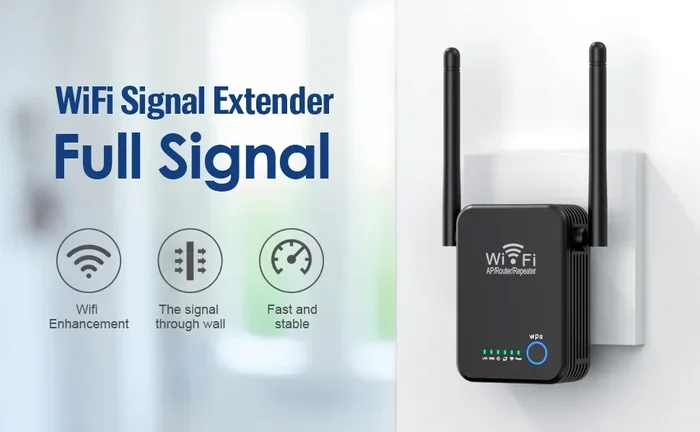
If your neighbor is close by, a Wi-Fi extender might boost their existing signal. This is especially helpful if their router is far from their living space. You are not sharing your connection. You are just improving theirs.
Share Public Hotspot Access
Some internet providers offer free public hotspot access. Check if your plan includes this feature. Your neighbor can connect at a nearby location. This keeps your home network completely private.
These alternatives show that you care without taking on the risks of shared internet access.
How to Set Up a Secure Guest Network in 5 Minutes
Here is a quick walkthrough for setting up a guest network on most routers. This process works for brands like Netgear, TP-Link, ASUS, and Linksys.
- Open your browser. Type 192.168.1.1 or 192.168.0.1 into the address bar.
- Log in. Use the admin credentials printed on your router or in its manual.
- Find Guest Network settings. Look under “Wireless” or “Advanced Settings.”
- Enable the guest network. Toggle it on and give it a name like “NeighborWiFi.”
- Set a strong password. Use at least 12 characters with uppercase, lowercase, numbers, and symbols.
- Enable network isolation. This prevents guest devices from seeing your main network.
- Choose WPA3 or WPA2 encryption. Never leave it open or on WEP.
- Save and restart. Your guest network is now live and ready to use.
That is it. In less than five minutes, you have a secure wireless connection ready for your neighbor. You protect your main network and still offer generous help.
Conclusion
Can I Share My Wi Fi With My Neighbor without worries? The answer is yes. But it requires the right approach. Setting up a guest network is the foundation of safe sharing. Strong encryption, regular password changes, and bandwidth limits keep everything under control. Understanding your internet provider’s rules protects you from surprises. And monitoring your network activity ensures nothing unexpected happens.
Sharing your wireless connection is a kind and generous act. It can strengthen your community and help someone in need. But kindness should never come at the cost of your own network security. With the steps outlined in this guide, you can share with confidence. You protect your data, your speed, and your peace of mind.
Take action today. Set up that guest network. Have an honest conversation with your neighbor. And enjoy the feeling of helping someone while staying safe. Good neighbors make the world better. And smart WiFi sharing makes good neighbors even better.
Frequently Asked Questions
Is it legal to share my WiFi with my neighbor?
In most cases, sharing your WiFi password with a neighbor is legal. However, you should check your internet provider’s terms of service. Some providers restrict shared connections to devices within your household. Violating these terms could lead to service issues. When in doubt, call your provider and ask directly.
Can my neighbor see my personal files if I share my WiFi?
If you share your main network password, they potentially can. Devices on the same network can access shared folders and printers. This is why a guest network is essential. It creates a wall between your devices and your neighbor’s. Always use network isolation for maximum safety.
Will sharing my WiFi slow down my internet speed?
Yes, sharing bandwidth can slow your connection. Every device that streams, downloads, or browses uses data. If your neighbor uses a lot of internet speed, you will notice it. Setting up bandwidth limits in your router helps manage this. It keeps your speed stable even when others are connected.
What is the best password for a guest network?
The best guest network password is at least 12 characters long. Mix uppercase letters, lowercase letters, numbers, and symbols. Avoid common words or personal information. Change the password every few months. A strong password is your first line of defense against unauthorized access.
Can I kick my neighbor off my WiFi if I change my mind?
Absolutely. Simply change the guest network password or turn off the guest network in your router settings. Your neighbor will lose access immediately. You do not need their permission to stop sharing. This is one of the biggest advantages of using a guest network instead of sharing your main password.
Do I need special equipment to share my WiFi safely?
Most modern routers already have guest network features built in. You do not need to buy new equipment. Check your router’s manual or admin panel for the guest network option. If your router is older and does not support it, consider upgrading. A newer router with WPA3 encryption is a worthwhile investment for any home.