Can You Use Bluetooth On An Airplane Heres The Answer
Yes, you can use Bluetooth on an airplane, but only after the plane reaches cruising altitude and you have turned on airplane mode first. The FAA allows Bluetooth devices during flights, and most airlines support wireless headphones and accessories. However, you must follow specific rules to stay compliant and avoid disruptions.
Have you ever settled into your airplane seat, ready to enjoy some music or watch a movie, only to wonder if you can connect your Bluetooth headphones? It is a common question that many travelers ask before every flight. The short answer is yes, you can use Bluetooth on an airplane, but there are some important rules and steps you need to follow.
Using wireless devices on planes can feel confusing. There are signs everywhere telling you to turn off electronics, then later you are allowed to use them again. Add Bluetooth connectivity into the mix, and things can get tricky fast. This guide breaks down everything you need to know about using Bluetooth on flights so you can travel with confidence.
Whether you want to listen to music, watch a show on the in-flight screen, or type on a wireless keyboard, Bluetooth technology makes it all possible. But you need to understand the rules set by the FAA, your airline, and the basics of how wireless signals work at 30,000 feet. Let us dive in and clear up all the confusion.
Key Takeaways
- Bluetooth is allowed on airplanes: The FAA permits Bluetooth use once the aircraft reaches cruising altitude.
- Airplane mode is required: You must enable airplane mode before turning on Bluetooth during a flight.
- Airline policies vary: Some airlines have specific rules about when and how you can use Bluetooth.
- Bluetooth headphones are the most popular use case: Wireless earbuds and headphones work great for in-flight entertainment.
- Cellular service is not allowed: Bluetooth is fine, but you cannot make phone calls or use cellular data.
- Prepare your devices before boarding: This saves time and avoids frustration during the flight.
📑 Table of Contents
- What The Rules Say About Bluetooth On Flights
- How Bluetooth Works On Airplanes
- What You Can Connect With Bluetooth On A Plane
- Step-By-Step Guide To Using Bluetooth On Flights
- Common Problems And How To Fix Them
- Expert Tips For The Best Bluetooth Experience On Flights
- Frequently Asked Questions
- Conclusion
What The Rules Say About Bluetooth On Flights
The rules around using wireless devices on airplanes have changed a lot over the years. Not too long ago, passengers had to turn off all electronics during takeoff and landing. Today, the rules are much more relaxed, but there are still guidelines you must follow.
FAA Guidelines For Wireless Devices
The Federal Aviation Administration, or FAA, sets the rules for electronic devices on all flights in the United States. According to the FAA, passengers can use Bluetooth enabled devices during all phases of flight, but only in a specific way. You must first switch your device to airplane mode, which disables cellular connections. After that, you can turn on Bluetooth and Wi-Fi separately.
The FAA approved the use of Bluetooth on airplanes because Bluetooth operates on a low-power frequency that does not interfere with aircraft systems. This is different from cellular signals, which can be much stronger and potentially cause interference. So the FAA sees Bluetooth connectivity as safe for use during flights.
It is worth noting that some countries have their own aviation authorities with slightly different rules. If you are flying internationally, check with the local aviation authority or your airline before using wireless devices on planes. Most countries follow similar guidelines, but it is always better to be safe.
Airline-Specific Bluetooth Policies
While the FAA sets the general rules, individual airlines can have their own policies. Most major airlines like Delta, American, and United allow Bluetooth on flights without any issues. However, the timing and specifics can vary from one airline to another.
Some airlines ask you to wait until the seatbelt sign is turned off before turning on Bluetooth. Others let you use it right after takeoff as long as airplane mode is on. A few budget airlines may have stricter rules, so it is always a good idea to check the airline’s website or ask a flight attendant.
If you are curious about Wi-Fi options during your flight, you might want to look into whether you can buy Wi-Fi before flight to save time and money. Many airlines now offer pre-purchased Wi-Fi passes that make staying connected easier.
How Bluetooth Works On Airplanes
Understanding how Bluetooth technology works can help you feel more confident about using it on a plane. Bluetooth is a short-range wireless communication technology that connects devices like headphones, keyboards, and speakers to your phone, tablet, or laptop.
Bluetooth vs Wi-Fi: Understanding The Difference
People often confuse Bluetooth with Wi-Fi, but they are quite different. Wi-Fi connects your device to the internet through a router or a network. Bluetooth connects your devices directly to each other without needing the internet. Both can be used on airplanes, but they serve different purposes.
On a flight, you can use Wi-Fi to access the internet if the airline offers it. You can use Bluetooth to connect your wireless headphones to your phone or tablet. The two technologies work together but do not interfere with each other or with the plane’s systems.
Here is a quick comparison to help you understand the differences:
- Bluetooth: Connects devices directly to each other. Low power. Short range. No internet needed.
- Wi-Fi: Connects your device to a network or the internet. Higher power. Longer range. Needs a network.
- Cellular: Connects to mobile networks. Not allowed on airplanes without airplane mode.
Why Bluetooth Is Allowed While Cellular Is Not
The main reason Bluetooth is allowed on airplanes while cellular signals are not is power and frequency. Bluetooth uses very low power and operates on the 2.4 GHz frequency band. This low power means it is extremely unlikely to interfere with the plane’s navigation and communication systems.
Cellular signals, on the other hand, are much stronger. They connect to cell towers on the ground, and at high altitudes, your phone might try to connect to dozens of towers at once. This can cause interference with the plane’s systems and also disrupt cellular networks on the ground. That is why you must use airplane mode to disable cellular during flights.
Some people wonder if they can just skip airplane mode and use Bluetooth alone. The answer is no. You must enable airplane mode first, which turns off cellular and other wireless transmissions. Then you can manually turn Bluetooth back on. This is the standard procedure for using Bluetooth wireless devices on any flight.
What You Can Connect With Bluetooth On A Plane
Now that you know the rules, let us talk about what you can actually connect using Bluetooth during a flight. The good news is that most common wireless devices are allowed.
Bluetooth Headphones For Flights
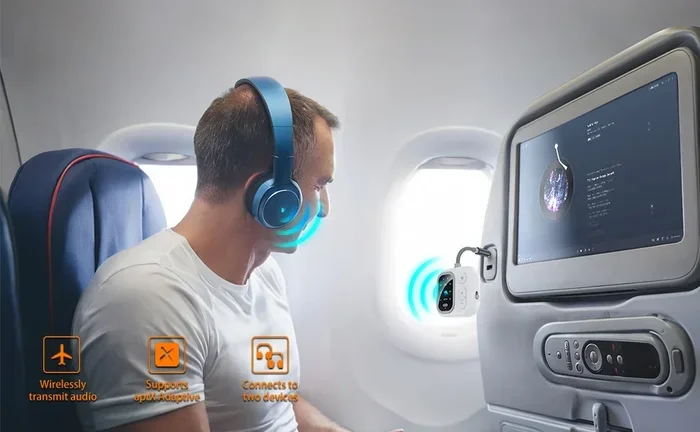
The most popular use of Bluetooth on airplanes is connecting wireless headphones. Whether you have AirPods, Bose headphones, Sony earbuds, or any other wireless headphones, you can pair them with your phone or tablet and enjoy your entertainment without wires.
If you own a Samsung device and want to know more about using Bluetooth headphones with your TV at home, check out this guide on listening to Samsung TV with Bluetooth headphones. The same pairing principles apply.
Most airlines now offer in-flight entertainment systems that support Bluetooth connections. You can pair your headphones directly with the seatback screen on many modern aircraft. If the airline’s system does not support Bluetooth, you can use the airline’s provided headphones or bring your own with a headphone jack adapter.
Keyboards And Other Accessories
Beyond headphones, you can also connect Bluetooth keyboards, mice, and other accessories during a flight. This is especially useful if you are working remotely or need to type something on your tablet. A wireless keyboard can make typing on a small screen much more comfortable.
Some travelers also like to bring Bluetooth speakers for personal use during the flight. Just keep in mind that you should use speakers at a low volume so you do not disturb other passengers. The same rules apply to any Bluetooth accessory you bring on board.
Step-By-Step Guide To Using Bluetooth On Flights
Using Bluetooth on an airplane is simple once you know the steps. Here is a clear guide to help you through the process.
Preparing Your Devices Before Boarding
Before you even get on the plane, take a few minutes to prepare your devices. This small step can save you a lot of hassle during the flight.
- Charge all your devices fully before the trip. You do not want your headphones or tablet to die mid-flight.
- Make sure your Bluetooth headphones or accessories are fully charged too.
- Pair your devices at home before the flight if possible. This way, you just need to reconnect them on the plane.
- Download any movies, shows, or music you want to watch or listen to in advance. Do not rely solely on Wi-Fi.
Connecting During The Flight
Once the plane takes off and reaches cruising altitude, follow these steps:
- Turn on airplane mode on your phone, tablet, or laptop. This disables cellular and Wi-Fi connections.
- Wait for the seatbelt sign to turn off, which is usually after takeoff.
- Go to your device settings and turn on Bluetooth.
- Find your Bluetooth device in the list of available devices and tap to connect.
- Once connected, you can start using your wireless headphones or other accessories.
That is it! The whole process takes less than a minute once you have done it a few times. If you are flying with Delta and want to learn more about their Wi-Fi options, you can buy a day pass Wi-Fi for Delta to stay connected throughout your journey.
Common Problems And How To Fix Them
Using Bluetooth on a plane is not always perfect. Here are some common issues and how to solve them.
Bluetooth Not Pairing On Airplane Mode
If your Bluetooth device will not connect, the first thing to check is whether airplane mode is on. You need airplane mode enabled, but Bluetooth turned on separately. Sometimes toggling airplane mode off and back on can reset your wireless connections and fix pairing issues.
Another common fix is to forget the device on your phone or tablet and then re-pair it. Go to your Bluetooth settings, find the device, and select “Forget This Device.” Then try connecting again. This simple step solves most pairing problems.
Connection Drops During Flight
Bluetooth connections can sometimes drop during a flight, especially during turbulence or when the plane is changing altitude. This is normal and usually not a cause for concern. The signal can be affected by the plane’s movement and altitude changes.
To minimize connection drops, keep your devices close to each other. Do not leave your phone in the overhead bin while your headphones are in your ears. Staying within a few feet of each other helps maintain a strong Bluetooth signal throughout the flight.
Expert Tips For The Best Bluetooth Experience On Flights
Here are some pro tips to make your Bluetooth experience on airplanes as smooth as possible.
- Bring a backup: Pack wired headphones just in case your Bluetooth device runs out of battery or has pairing issues.
- Use noise-canceling headphones: Airplanes can be loud, and noise-canceling Bluetooth headphones make a huge difference in audio quality.
- Turn off Bluetooth when not in use: This saves battery life on both your device and your headphones.
- Be respectful: Keep your volume at a reasonable level and avoid using Bluetooth speakers that might disturb other passengers.
- Check your airline’s app: Many airline apps let you access in-flight entertainment directly on your phone, and they work great with Bluetooth headphones.
For those who want to learn more about using Bluetooth accessories in different settings, you might find this article on using a Bluetooth transmitter for your car helpful. The principles of Bluetooth connectivity are similar across different devices and environments.
Another great resource is learning more about how Bluetooth works with different devices. If you are curious about using Bluetooth logo compatibility and what it means for your devices, understanding the basics can help you make better purchasing decisions for travel accessories.
Frequently Asked Questions
Can I use Bluetooth headphones during takeoff and landing?
No, you cannot use Bluetooth headphones during takeoff and landing. You must wait until the plane reaches cruising altitude and the seatbelt sign is turned off. During takeoff and landing, all electronic devices must be stowed away and airplane mode must remain on.
Do I need to pay for Wi-Fi to use Bluetooth on a plane?
No, Bluetooth does not require Wi-Fi or internet access. You can use Bluetooth headphones and other accessories without purchasing any Wi-Fi package. Bluetooth connects your devices directly to each other, not to the internet.
Can I use Bluetooth on international flights?
Yes, Bluetooth is generally allowed on international flights as well. Most countries follow similar aviation guidelines as the FAA. However, it is always a good idea to check with your airline before the flight, as international carriers may have slightly different policies.
What happens if I forget to turn on airplane mode before using Bluetooth?
If you forget to turn on airplane mode and just enable Bluetooth, your phone will still try to connect to cellular networks, which is not allowed on airplanes. Always enable airplane mode first, then turn on Bluetooth separately. This ensures you comply with all aviation regulations and avoid any issues with the flight crew.
Can I connect multiple Bluetooth devices at once on a plane?
Most modern devices support connecting to multiple Bluetooth devices at the same time. You can pair your headphones and a keyboard, for example. However, keep in mind that having too many active Bluetooth connections can drain your battery faster and may occasionally cause connection issues during the flight.
Are Bluetooth speakers allowed on airplanes?
Bluetooth speakers are technically allowed, but you should use them at a very low volume or not at all. Most airlines ask passengers to use headphones rather than speakers so as not to disturb other travelers. Using a Bluetooth speaker loudly could lead to a warning from a flight attendant.
Conclusion
Using Bluetooth on an airplane is completely allowed and quite common these days. As long as you follow the basic rules, you can enjoy wireless headphones, keyboards, and other accessories throughout your flight. Remember to enable airplane mode first, turn on Bluetooth after takeoff, and always be considerate of your fellow passengers.
The rules around Bluetooth connectivity on flights are designed to keep everyone safe while still allowing you to stay entertained and productive. With a little preparation and understanding, you can have a seamless wireless experience at 30,000 feet. So next time you board a plane, feel confident connecting your Bluetooth headphones and enjoying your favorite music or movies without a single wire in sight.
Safe travels, and happy flying! The skies are open for Bluetooth, and now you know exactly how to make the most of it.