Do I Need An Amplifier To Connect Speakers Properly
Do I Need An Amplifier To Connect Speakers? The answer depends on your speaker type and audio source. Powered speakers have built-in amps, so you may not need a separate amplifier, while passive speakers require external amplification to work. This guide walks you through everything you need to know about speaker connections, amplifier choices, and setting up your audio system the right way.
Do I Need An Amplifier To Connect Speakers? It is one of the most common questions people ask when setting up a new sound system. The short answer is: it depends on your speakers and your audio source. Some speakers need an amplifier to work, and some do not. In this guide, we will break it all down for you in simple terms.
Whether you are building a home theater, setting up a stereo system, or just trying to get better sound from your computer, understanding how amplifiers and speakers work together is key. You do not need to be an audio expert to figure this out. A little knowledge goes a long way.
We will cover powered speakers vs passive speakers, how to choose the right amplifier, common mistakes to avoid, and practical tips to get the best sound from your setup. By the end of this article, you will know exactly what you need for your speaker system.
Key Takeaways
- Powered speakers work without a separate amplifier because they have a built-in amp inside the speaker cabinet.
- Passive speakers always need an external amplifier to receive and boost the audio signal before producing sound.
- Checking impedance and wattage is essential before connecting any amplifier to your speakers to avoid damage.
- An audio receiver can serve as both an amplifier and a signal switcher for home theater and stereo setups.
- Bluetooth and wireless speakers often have built-in amplification, making external amps unnecessary in most cases.
- Connecting speakers incorrectly can lead to poor sound quality, distorted audio, or even blown speakers.
- Room size and speaker placement play a big role in deciding whether you need a more powerful amplifier.
📑 Table of Contents
- What Does An Amplifier Do?
- Powered Speakers vs Passive Speakers
- Do I Need An Amplifier To Connect Speakers?
- How to Choose the Right Amplifier for Your Speakers
- Common Mistakes When Connecting Speakers to Amplifiers
- Quick Tips for the Best Speaker Setup
- Do I Need An Amplifier for Wireless Speakers?
- Expert Insights on Speaker Amplification
- Final Thoughts
What Does An Amplifier Do?
An amplifier takes a small audio signal and makes it stronger. Think of it like a megaphone for your music. Your phone, computer, or music player sends out a tiny electrical signal. That signal alone is not strong enough to move the speaker cones and create the sound you hear.
The amplifier boosts that signal to a level that can drive your speakers. Without enough amplification, your speakers will produce weak, distorted, or no sound at all. The right amplifier ensures clean, powerful audio that fills your room.
How Amplification Works
Here is a simple way to think about it. Your audio source creates a small signal. The amplifier takes that signal and increases its voltage and current. The stronger signal then travels through speaker wires to your speakers. The speaker cones move back and forth based on that signal, creating the sound waves you hear.
Amplifiers come in different sizes and power levels. A small desktop amplifier might deliver 20 watts per channel. A large home theater amplifier can deliver over 100 watts per channel. The right amount depends on your speakers and your listening environment.
Powered Speakers vs Passive Speakers
This is the most important distinction to understand. Not all speakers are the same, and the type of speaker you have determines whether you need a separate amplifier.
Powered Speakers
Powered speakers, also called active speakers, have a built-in amplifier inside the speaker cabinet. You plug them directly into your audio source, and they work right away. You do not need a separate amplifier or receiver.
Many modern Bluetooth speakers, computer speakers, and studio monitors are powered. They are designed to be simple and convenient. You just plug them in and play music.
Some powered speakers also have volume controls built right into the speaker. This makes them even easier to use. You do not need to fiddle with separate amplifier controls.
Passive Speakers
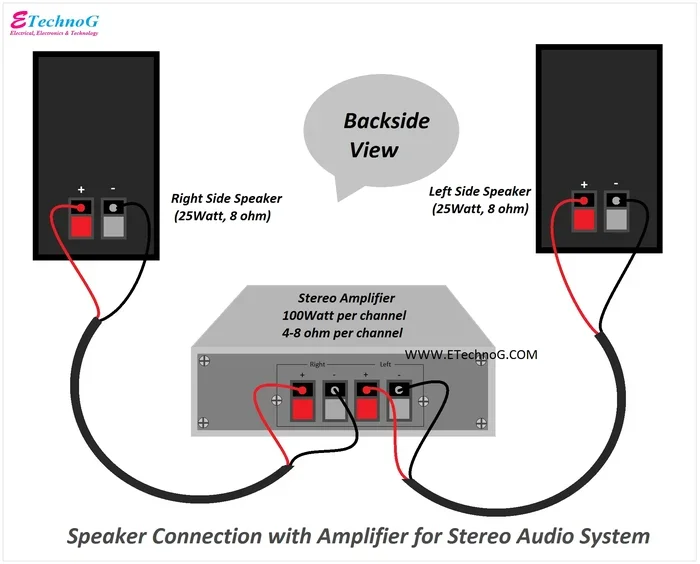
Passive speakers do not have a built-in amplifier. They need an external amplifier or receiver to work. You connect the amplifier to the speaker using speaker wire, and the amplifier sends the boosted signal to the speakers.
Most traditional home stereo speakers, floor-standing speakers, and bookshelf speakers are passive. They offer more flexibility because you can pair them with different amplifiers based on your needs and budget.
If you are not sure whether your speakers are powered or passive, check the back panel. Look for a power plug or a built-in power supply. If the speaker has its own power cord, it is likely a powered speaker. If it only has speaker wire terminals, it is passive.
Do I Need An Amplifier To Connect Speakers?
Now that you understand the difference between powered and passive speakers, let us answer the main question. Do I Need An Amplifier To Connect Speakers? The answer varies based on your setup.
When You Do NOT Need an Amplifier
You do not need a separate amplifier in these situations:
- Your speakers are powered (active). They have a built-in amplifier and work with any line-level audio source.
- You are using a Bluetooth speaker. Most portable Bluetooth speakers have built-in amplification. You just pair your phone and play.
- Your audio source has a built-in amplifier. Some devices, like certain all-in-one systems or soundbars, include amplification.
- You are using powered computer speakers. These typically plug directly into your computer and do not need extra amplification.
For example, if you plug a pair of powered studio monitors into your laptop, you are good to go. No amplifier needed. The same applies to most Bluetooth speakers you use at home or outdoors.
When You DO Need an Amplifier
You need an external amplifier in these situations:
- Your speakers are passive. They cannot work without an external amplifier to boost the signal.
- You want louder volume or better sound quality. Even with powered speakers, a dedicated amplifier can improve performance for larger rooms.
- You are building a home theater system. Most home theater setups use an AV receiver that acts as both an amplifier and a signal processor.
- You are using a turntable or vinyl record player. Turntables output a very weak signal called a phono signal. You need a phono preamp or amplifier to boost it properly.
If you have ever tried to connect passive speakers directly to your phone or computer without an amplifier, you probably noticed the sound was very quiet and weak. That is because the audio output from those devices is a line-level signal, not strong enough to drive passive speakers on its own.
Can I Connect My Tv To My Receiver Using Both The Hdmi And Component Cables At The Same Time?
Many people ask about connecting their TV to an audio receiver. The answer is yes in most cases, but it depends on your specific equipment. Using an HDMI connection from your TV to a receiver is the most common and simplest method. The receiver then amplifies the audio signal and sends it to your speakers. This is a great setup for home theater systems where you want both video and audio to work seamlessly.
When setting up your TV with a receiver, make sure your receiver has enough channels for your speaker setup. A 5.1 or 7.1 receiver works well for most home theater configurations. The receiver handles both the amplification and the audio processing, so you do not need a separate amplifier in most cases.
How to Choose the Right Amplifier for Your Speakers
Choosing the right amplifier is important for getting the best sound and protecting your speakers. Here are the key factors to consider.
Match the Wattage
Wattage measures the power output of an amplifier. You want to match the amplifier wattage to your speaker specifications. Most speakers list their recommended power range on the back label or in the user manual.
As a general rule, your amplifier should deliver power within the range your speakers can handle. Too little power can cause distortion. Too much power can damage your speakers. A good match is when the amplifier wattage is close to the speaker’s rated power.
Check the Impedance
Speaker impedance is measured in ohms and is another critical factor. Most home speakers are 8 ohms, but some are 4 ohms or 6 ohms. Your amplifier must be compatible with your speaker impedance.
If you connect 4-ohm speakers to an amplifier designed for 8-ohm speakers, the amplifier may overheat or deliver too much power. Always check both the amplifier and speaker specifications before connecting them.
Consider the Number of Channels
Amplifiers come in different channel configurations. A stereo amplifier has two channels for left and right speakers. A 5-channel amplifier can power five speakers for a surround sound setup.
Think about how many speakers you want to connect. If you are setting up a simple stereo pair, a 2-channel amplifier is perfect. For a full home theater, you need a 5-channel or 7-channel amplifier, or an AV receiver.
Types of Amplifiers
Here are the most common types of amplifiers you will encounter:
- Stereo Amplifier: Two channels, ideal for a pair of bookshelf or floor-standing speakers in a stereo setup.
- AV Receiver: Multiple channels with built-in radio tuner and audio processing. Great for home theater systems.
- Integrated Amplifier: Combines a preamp and power amp in one unit. Common in stereo systems.
- Power Amplifier: Standalone amp that boosts the signal. Usually paired with a separate preamp in professional audio setups.
- Headphone Amplifier: Designed specifically for headphones. Provides clean, powerful sound for personal listening.
Can I Convert Hdmi To Analog Audio?
Yes, you can convert HDMI to analog audio using an HDMI-to-analog audio converter or extractor. This is useful when you have a modern device with only HDMI output but older speakers or amplifiers that only accept analog connections like RCA or 3.5mm jacks. The converter takes the digital HDMI signal and splits it into analog audio and video outputs. This allows you to connect your amplifier or powered speakers to devices like gaming consoles, Blu-ray players, or streaming devices that only have HDMI ports.
When choosing a converter, make sure it supports the audio formats you need. Most basic converters handle stereo PCM audio, which is sufficient for most home speaker setups. For higher quality audio, look for converters that support surround sound formats.
Common Mistakes When Connecting Speakers to Amplifiers
Many people make avoidable mistakes when setting up their speaker systems. Here are the most common ones and how to prevent them.
Mismatching Impedance
Connecting speakers with the wrong impedance to your amplifier is one of the most common mistakes. It can cause poor sound quality, overheating, or even damage to your equipment. Always verify that your amplifier supports the impedance of your speakers before making any connections.
Using the Wrong Speaker Wire
Not all speaker wire is the same. Thin wire has higher resistance, which can reduce power delivery to your speakers. For most home setups, 16-gauge or 14-gauge speaker wire works well. For longer runs over 50 feet, consider using thicker 12-gauge wire to minimize signal loss.
Overloading the Amplifier
Connecting too many speakers to one amplifier channel can overload it. This is especially true with passive speakers wired in parallel. Check your amplifier’s specifications for the minimum impedance it can handle per channel. If you are unsure, consult the amplifier manual or a knowledgeable audio retailer.
Ignoring Room Acoustics
Even with the perfect amplifier and speakers, poor room acoustics can ruin your listening experience. Hard surfaces cause echoes, while soft surfaces absorb sound. Consider adding rugs, curtains, or acoustic panels to improve the sound quality in your room.
Forgetting About Speaker Placement
Where you place your speakers matters a lot. For stereo sound, place your speakers at ear level and angle them slightly toward your listening position. Keep them away from corners and walls to reduce bass buildup. Proper placement makes a huge difference in sound quality, even with a basic amplifier.
Quick Tips for the Best Speaker Setup
Here are some practical tips to help you get the most out of your speaker and amplifier setup:
- Start with the right speaker type. Choose powered speakers if you want simplicity, or passive speakers if you want flexibility and upgrade options.
- Read the manuals. Both your amplifier and speaker manuals contain important information about compatibility, wiring, and setup.
- Use quality speaker wire. Good speaker wire ensures clean signal transfer and reduces power loss.
- Keep connections tight. Loose connections cause crackling sounds and signal loss. Make sure all speaker wire terminals are secure.
- Test at low volume first. When connecting everything for the first time, start at a low volume and gradually increase it. This protects your speakers and lets you check for any issues.
- Consider an audio receiver for versatility. An audio receiver combines amplification, signal processing, and multiple input options in one unit. It is a great all-in-one solution for most home setups.
If you are connecting audio equipment like microphones or other devices to your speaker system, make sure your amplifier or receiver has the right inputs. Some setups require adapters or converters to connect different types of audio devices properly.
Do I Need An Amplifier for Wireless Speakers?
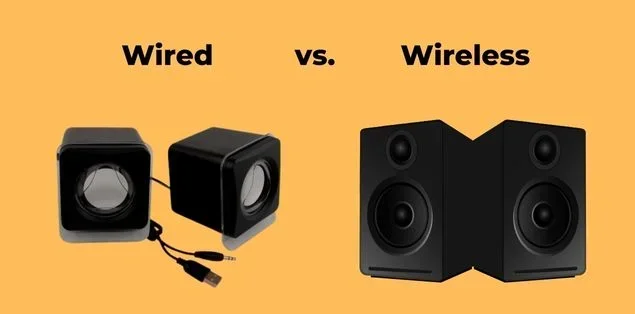
Wireless speakers, including Bluetooth speakers and Wi-Fi-enabled speakers, have built-in amplification. You do not need a separate amplifier to use them. They receive the audio signal wirelessly from your phone, tablet, or computer and amplify it internally.
This makes wireless speakers incredibly convenient. You can place them anywhere in your room without worrying about running speaker wires to an amplifier. However, wireless speakers are limited by their built-in amplification. For very large rooms or outdoor events, a dedicated amplifier with passive speakers may deliver better performance.
Some wireless speakers also support wired connections. You can plug them into your audio source using a 3.5mm cable or RCA cables for a more stable connection. Even with a wired connection, the built-in amplifier handles the signal boosting, so no external amplifier is needed.
Can I Connect My Powerbeats To My Laptop? Yes, you can connect Powerbeats to a laptop via Bluetooth or USB. Since Powerbeats are wireless earbuds with built-in amplification, you do not need a separate amplifier. The same principle applies to most wireless speakers and earbuds. They handle amplification internally, making external amplifiers unnecessary for personal listening devices.
Expert Insights on Speaker Amplification
Audio professionals often emphasize one key point: match your amplifier to your speakers. The best amplifier is the one that delivers clean power within your speaker’s rated range. Expensive amplifiers are not always better. What matters most is compatibility and proper setup.
Many audiophiles also recommend investing in quality speaker wire and ensuring clean connections. Even the best amplifier and speakers will sound mediocre with poor wiring and loose connections. Take the time to set up your system correctly, and you will be rewarded with clear, powerful sound.
If you are setting up a multi-speaker system, consider using an audio receiver or processor. These devices handle multiple inputs, process audio signals, and distribute clean amplification to all your speakers. They simplify the setup and improve overall performance.
Can I Plug A Microphone Directly Into Speakers? In some cases, yes, especially if the speakers are powered and have the right input. However, the sound quality may not be ideal because microphones output a very low-level signal. For the best results, use a mixer or preamp between the microphone and speakers to boost and clean up the signal before it reaches the amplifier or powered speakers.
Final Thoughts
So, do I need an amplifier to connect speakers? The answer really comes down to the type of speakers you have and what you want to achieve. Powered speakers and wireless speakers work great without a separate amplifier. Passive speakers always need one.
Take the time to understand your equipment. Check the specifications, match the impedance and wattage, and use quality connections. A well-set-up speaker system delivers amazing sound that enhances your music, movies, and games.
Do I Need An Amplifier To Connect Speakers properly? Now you have the knowledge to answer that question with confidence. Whether you are a casual listener or an audio enthusiast, the right amplifier makes all the difference. Choose wisely, set up correctly, and enjoy your music the way it was meant to be heard.
Frequently Asked Questions
Can I connect passive speakers directly to my phone without an amplifier?
No, you should not connect passive speakers directly to your phone. Phones output a line-level signal that is too weak to drive passive speakers. You need an external amplifier or receiver to boost the signal to a level that can power passive speakers properly. Without an amplifier, you will get very quiet and distorted sound, and you risk damaging your speakers over time.
What happens if I use an amplifier that is too powerful for my speakers?
If your amplifier delivers more power than your speakers can handle, it can cause the speaker cones to overextend, leading to distortion and potential damage. However, modern amplifiers often have built-in protection circuits that prevent this. To be safe, always check that your amplifier wattage matches or is slightly above your speaker’s recommended power range, and never play at maximum volume for extended periods.
Do I need an amplifier for a stereo pair of bookshelf speakers?
It depends on whether the bookshelf speakers are powered or passive. If they are powered bookshelf speakers, you do not need a separate amplifier. If they are passive, you will need an amplifier or stereo receiver to drive them. Most traditional bookshelf speakers on the market are passive and require external amplification to work properly.
Can I use an AV receiver as my amplifier?
Yes, an AV receiver serves as both an amplifier and an audio/video processor. It amplifies the audio signal and sends it to your speakers while also processing video signals from multiple sources. AV receivers are ideal for home theater setups and are a great all-in-one solution for most users who need amplification for multiple speakers.
How do I know if my amplifier is compatible with my speakers?
Check two key specifications: impedance and wattage. Make sure your amplifier supports the ohm rating of your speakers and that its power output falls within your speaker’s recommended range. If both numbers match or are compatible, your amplifier and speakers will work well together. When in doubt, consult the manuals for both devices.
Is it better to buy powered speakers or passive speakers with a separate amplifier?
Powered speakers are simpler and more convenient, making them great for beginners and casual listeners. Passive speakers offer more flexibility and upgrade potential, allowing you to swap amplifiers as your needs change. Your choice should depend on your budget, setup goals, and how much control you want over your audio system.