Does It Matter What Projector Screen You Really Get
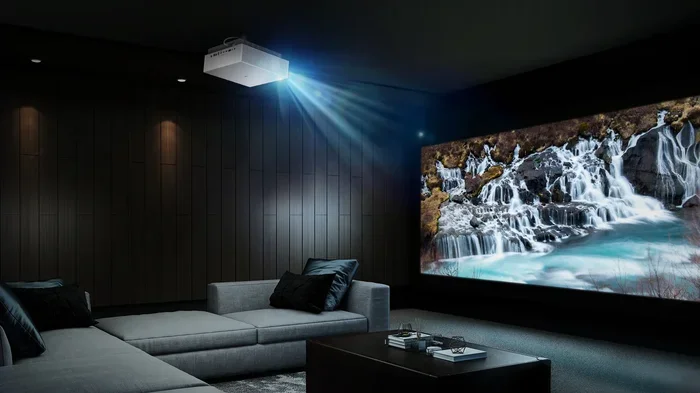
Yes, the projector screen you choose genuinely affects your viewing experience. The right projector screen can dramatically improve image quality, contrast, and color accuracy. From screen material to gain rating and viewing angle, every detail counts. Whether you are building a home theater or setting up a backyard display, picking the correct projection surface makes a real difference. Let us walk you through exactly what matters and how to choose wisely.
You just bought a brand-new projector. You are excited to set it up and enjoy a big movie night. But then you start wondering, does it really matter what projector screen you get? The short answer is yes. The screen you choose shapes everything from brightness to color accuracy to how wide your viewing angle can be. A great projector paired with a poor screen will never deliver the experience you want. On the other hand, a smart screen choice can make even a budget projector look amazing.
In this guide, we will walk through everything you need to know about projector screens. We will cover screen materials, gain ratings, sizes, and common mistakes people make. By the end, you will know exactly what to look for and how to pick the best projection surface for your setup. Let us get into it.
Key Takeaways
- Screen material directly impacts image sharpness and color accuracy: different surfaces perform better under specific lighting conditions.
- Gain rating is not one-size-fits-all: higher gain boosts brightness but narrows your viewing angle significantly.
- Screen size and throw distance must match your room: an oversized or undersized screen ruins the experience.
- Gray screens excel in rooms with ambient light: they improve contrast far better than white screens in bright environments.
- You do not always need an expensive screen: DIY options like black cloth can work surprisingly well for casual setups.
📑 Table of Contents
- Why Your Projector Screen Matters More Than You Think
- Types of Projector Screens You Can Choose
- Screen Material and Gain: The Science Behind the Choice
- How Screen Size and Aspect Ratio Affect Your Experience
- Common Mistakes People Make When Choosing a Projector Screen
- Expert Tips for Getting the Best Screen Setup
- So, Does It Really Matter What Projector Screen You Get?
Why Your Projector Screen Matters More Than You Think
Many people assume that all projector screens are basically the same. They are not. The screen is the final surface that turns light into the image you see. A cheap or wrong screen can wash out colors, reduce sharpness, and kill contrast. Think of it like this: a projector is the artist, and the screen is the canvas. A bad canvas ruins even the best painting.
Your screen material determines how light bounces back to your eyes. Some surfaces focus light straight ahead, while others scatter it wider. This affects how bright and clear the image looks from different seats in the room. If you have ever watched a movie on a wall and noticed dull colors or hotspots, the screen was probably the culprit.
The ambient light in your room also plays a huge role. A screen that works great in a dark basement might fail miserably in a living room with windows. Understanding this connection helps you make smarter choices. Your goal is to match the screen to your specific environment and viewing habits.
How the Screen Affects Image Quality
Every pixel your projector creates lands on the screen. The screen then reflects that light back to you. A high-quality projection surface preserves more of that light and color information. It keeps the image crisp and vibrant. A low-quality surface absorbs light or scatters it in the wrong direction.
Here is what happens when you use the wrong screen:
- Colors look washed out: the surface does not reflect color accurately.
- Contrast drops: dark areas look gray and muddy.
- Hotspots appear: the center of the image is brighter than the edges.
- Text looks blurry: fine details get lost on rough surfaces.
These problems are not just about the projector. They often come from the screen. This is why picking the right projector screen deserves serious attention.
Types of Projector Screens You Can Choose
Not all screens are built the same way. Different types serve different needs. Let us break down the most common options so you can find what fits your situation.
Fixed Frame Screens
A fixed frame screen stays stretched tight on a rigid frame. It does not roll up or fold. This design gives you a perfectly flat surface, which means no wrinkles or waves to distort the image. Fixed screens are ideal for dedicated home theater rooms where the setup does not change.
They come in many sizes and materials. Because they are permanently mounted, they offer the best image consistency. The downside is that they are not portable. You cannot easily move them or store them away.
Retractable and Roll-Up Screens
Retractable screens roll up into a case when not in use. They are perfect for people who want a clean look or need to save space. You can mount them on a wall or ceiling and pull them down when you want to watch something.
These screens are versatile and convenient. However, the rolling mechanism can sometimes create slight wrinkles. For most casual viewers, this is not a big deal. If you want a clean, permanent setup, a fixed screen is better. If flexibility matters more, go retractable.
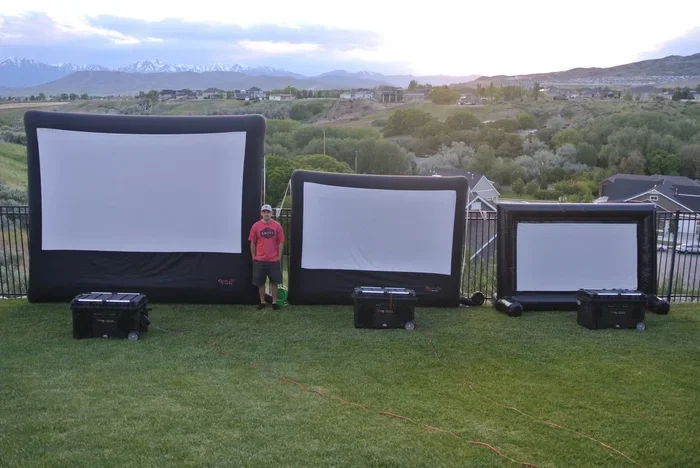
Portable and Inflatable Screens
Portable screens are lightweight and easy to carry. They are great for outdoor movie nights, camping trips, or presentations at work. Many of these come with their own stand or frame.
Inflatable screens take portability even further. You can blow them up in minutes and deflate them just as fast. They are a blast for backyard gatherings. The trade-off is that image quality usually falls short of a fixed screen. Wind and uneven surfaces can also cause slight distortions.
DIY and Improvised Screens
You do not always need to buy a dedicated screen. Some people use a plain white wall or even hang up a bedsheet. Others get creative with materials like black cloth. If you are curious about DIY options, check out whether black cloth works as a projector screen. It can be a surprisingly effective low-cost solution for casual viewing.
The key with DIY screens is to keep the surface as smooth and white as possible. Any wrinkles or colored fabric will hurt the image quality. But for a quick setup, these options work surprisingly well.
Screen Material and Gain: The Science Behind the Choice
Two of the most important factors in choosing a screen are the material and the gain rating. These two elements control how light behaves when it hits the surface. Understanding them helps you avoid common buying mistakes.
What Is Screen Gain?
Gain measures how much light the screen reflects back compared to a standard white surface. A screen with a gain of 1.0 reflects light exactly like a standard white wall. A screen with a gain of 1.5 reflects 50 percent more light back toward the viewer.
Higher gain sounds better, right? Not always. Here is the catch. When you increase gain, the screen becomes more directional. It focuses light into a narrower beam. This means the sweet spot shrinks. If you sit off to the side, the image gets dimmer and colors shift.
Here is a quick comparison:
- Gain 1.0 (Standard White): Wide viewing angle, accurate colors, good for dark rooms.
- Gain 1.3 (High White): Brighter image, slightly narrower viewing angle, great for moderately bright rooms.
- Gain 1.5+ (Ultra-High): Very bright, very narrow sweet spot, best for large auditoriums or single-seat setups.
- Gain below 1.0 (Gray): Reduces ambient light, improves contrast, best for rooms with windows or overhead lighting.
White vs Gray Screens
White screens are the most popular choice. They deliver bright, vibrant images and work well in dark or dimly lit rooms. Most home projectors perform best on a white surface. If your room has controlled lighting, a white screen is almost always the way to go.
Gray screens are different. They absorb some of the ambient light that hits them. This makes blacks look deeper and improves overall contrast. If your living room has windows or you watch during the day, a gray screen can make a noticeable difference. You can learn more about projector setup tips in our guide on mounting your projector off center for optimal screen placement.
Matte White vs High-Contrast Screens
Matte white screens scatter light evenly across the surface. This creates a wide viewing angle and natural colors. They are the safest all-around choice for most people.
High-contrast screens use special coatings or textures to boost black levels. They suppress ambient light more aggressively. The result is deeper darks and more vivid colors. The trade-off is a narrower viewing angle and sometimes a slight color shift. If you are building a serious home theater, a high-contrast screen is worth considering.
How Screen Size and Aspect Ratio Affect Your Experience
Size matters when it comes to projector screens. But bigger is not always better. The right size depends on your room, your projector, and how far you sit from the screen.
Finding the Right Screen Size
Start by measuring your throw distance. That is the distance between your projector and the screen. Most projectors have a throw ratio listed in the specs. This number tells you how wide the image will be at a given distance.
For example, if your projector has a throw ratio of 1.5:1 and sits 10 feet from the screen, your image will be about 6.7 feet wide. You can use online throw ratio calculators to find the perfect fit. The goal is to fill your field of view without stretching the image.
Here are some quick tips for sizing:
- Measure the distance from your seating area to where the screen will be.
- Multiply that distance by 0.84 to estimate the ideal diagonal screen size for a cinematic feel.
- Make sure the screen width fits within your wall or frame space.
- Consider the aspect ratio of your projector. Most modern projectors use 16:9, which matches most movies and TV shows.
The Aspect Ratio Question
Aspect ratio determines the shape of your image. The most common ratios are 16:9 and 16:10. Some projectors use 4:3 for older content. Choosing the right ratio ensures you do not see black bars on the sides or top of the image.
If you mostly watch movies, 16:9 is the standard and works great. If you use your projector for presentations, 16:10 or 4:3 might be more practical. Some screens come in adjustable formats, but fixed-ratio screens give the best image quality for their specific ratio.
Common Mistakes People Make When Choosing a Projector Screen
Even experienced projector users make mistakes when picking a screen. Avoiding these pitfalls saves you money and frustration.
Buying Based on Price Alone
It is tempting to grab the cheapest screen you can find. But a low-cost screen often uses thin, low-quality material that wrinkles easily and reflects light poorly. Spending a little more on a reputable brand pays off in image quality and durability.
Ignoring Room Lighting
This is the single biggest mistake people make. They buy a bright white screen for a room full of windows. The result is a washed-out image that looks terrible during daytime viewing. Always consider the lighting conditions in the room where the screen will live.
Choosing the Wrong Aspect Ratio
Mismatching your screen ratio to your projector creates black bars and wasted space. Double-check your projector specs before you buy. A little homework upfront prevents disappointment later.
Skipping the Gain Rating
Many buyers never look at gain at all. They pick a screen that looks nice and hope for the best. But gain directly affects brightness and viewing angle. A screen with the wrong gain for your room will leave you unhappy with the results.
Forgetting About Screen Texture
Some screens have a smooth surface, while others have a pebbled or textured finish. Texture affects how light scatters. Smooth screens give sharper images but are more sensitive to surface imperfections. Textured screens hide minor flaws but can slightly soften the image. Choose based on your priorities.
Expert Tips for Getting the Best Screen Setup
Once you have chosen your screen, how you set it up matters just as much as the screen itself. Follow these tips to get the most out of your purchase.
Keep the Screen Flat and Taut
Any wrinkles or sagging will distort the image. Make sure your screen is pulled tight and level. For fixed frame screens, this is built in. For roll-up or portable screens, take the time to stretch and secure them properly.
Place the Screen Away from Direct Light
If possible, position your screen so that windows and lamps do not shine directly on it. Even a high-quality gray screen will struggle if bright light hits it head-on. Room darkening curtains are a simple and effective solution.
Match the Screen to Your Projector Type
Short-throw projectors need screens designed for close-range use. Long-throw projectors work with standard screens. Using the wrong combination can cause focus issues and uneven brightness across the surface.
Test Before You Commit
If you are unsure about a screen, test it with your projector before mounting it permanently. Project a test image and walk around the room to check brightness and color from different seats. This quick test can save you from a bad purchase.
Consider the Projector Lamp and Maintenance
Your projector lamp affects how the screen performs. A dim lamp on a high-gain screen can still look bright, but a bright lamp on a low-quality screen will show every flaw. If you want to extend your lamp life, check out our guide on replacing your projector lamp with LED for a brighter, longer-lasting setup.
So, Does It Really Matter What Projector Screen You Get?
The answer is a clear yes. Your projector screen is not just a passive backdrop. It is an active part of your image quality equation. The right screen boosts brightness, sharpens details, improves contrast, and makes colors pop. The wrong screen drags everything down, no matter how expensive your projector is.
That does not mean you need to spend a fortune. There are great options at every price point. What matters most is matching the screen to your room, your projector, and your viewing habits. Consider the material, the gain, the size, and the aspect ratio. Avoid the common mistakes we covered. And do not be afraid to test before you commit.
Whether you are building a full home theater or just want a better movie night setup, the right projector screen makes all the difference. Take your time, do your research, and enjoy the results.
Frequently Asked Questions
Can I use a white wall instead of a projector screen?
Yes, you can. A smooth white wall works in a pinch, but it will not match the image quality of a dedicated screen. Walls are often not perfectly smooth, and their color may not reflect light evenly. If you want the best picture, a proper screen is the way to go.
What is the best projector screen for a bright room?
A gray screen or a high-gain white screen works best in bright rooms. Gray screens absorb ambient light and improve contrast. High-gain screens reflect more light back to the viewer. The best choice depends on how much light enters your room and where you sit.
Does screen size really matter for projector image quality?
Screen size matters because it affects how the image fills your field of view. Too small, and the image looks weak. Too large, and the projector cannot keep the image sharp and bright. Match the screen size to your projector’s throw distance for the best results.
Is a higher gain screen always better?
Not necessarily. Higher gain makes the image brighter but narrows the viewing angle. If multiple people will watch from different seats, a lower gain screen with a wider angle is better. High gain is ideal for single-viewer or large-audience setups where everyone sits near the center.
How often should I replace my projector screen?
A good quality screen can last many years with proper care. You should replace it if you notice wrinkles, stains, or color fading that cannot be cleaned. Portable screens may wear out faster than fixed frames due to repeated rolling and unrolling.
Can I use a projector screen outdoors?
Yes, you can. Outdoor screens work well for backyard movie nights. Inflatable and portable screens are popular choices. However, outdoor viewing is heavily affected by ambient light. For the best results, watch after sunset or use a screen with a high gain rating to fight off surrounding light.
=== CONCLUSION ===
Choosing the right projector screen is one of the most impactful decisions you can make for your viewing setup. It is not just about picking something that looks nice on a shelf. The screen material, gain rating, size, and aspect ratio all work together to shape the final image you see. A smart choice turns a good projector into a great experience. A poor choice wastes all that investment in your projector.
Take the time to evaluate your room lighting, seating distance, and viewing habits. Consider the different screen types and materials we covered. Avoid the common mistakes that trip up so many buyers. And remember, you do not need to break the bank to get excellent results. With the right projection surface, every movie night, presentation, or gaming session will feel more immersive and enjoyable.
Your projector deserves a screen that brings out its best. Make the choice that works for your space, your budget, and your eyes. You will notice the difference from the very first image on the screen.