Are Inflatable Outdoor Screens Loud and Really Loud
Most inflatable outdoor screens are not very loud on their own. The real noise comes from the fan motor that inflates them and from your projector or speakers. With the right setup, you can keep things peaceful and enjoy a great outdoor movie night without disturbance.
Have you ever set up an inflatable outdoor screen for a movie night and thought, “Is this thing going to wake the whole neighborhood?” You are not alone. Many people love the idea of a big outdoor movie setup but worry about noise. The good news is that most inflatable screens are not as loud as you might think.
In this guide, we will break down exactly how loud inflatable outdoor screens really are. We will look at what makes noise, how to measure sound levels, and what you can do to keep things quiet. Whether you are planning a backyard movie night or setting up for a big outdoor party, this article has you covered.
Let us dive into the world of outdoor entertainment and find out if your inflatable outdoor screen will be a peaceful addition or a noisy headache.
Key Takeaways
- The fan is the loudest part: The electric blower that keeps your screen inflated creates most of the noise, typically around 50 to 70 decibels.
- Screen material matters: Thicker, higher-quality materials absorb more sound and reduce flapping noise caused by wind.
- Projector fans add up: Your projector has its own cooling fan, which can make the overall setup louder than the screen alone.
- Placement changes everything: Positioning your screen away from seating areas and using barriers can greatly reduce perceived noise.
- You can quiet things down: Simple fixes like weighted bases, wind shields, and quieter fans make a big difference.
- Modern units are quieter: Newer inflatable outdoor screen models are designed with low-noise fans and better materials.
- Technology connects across fields: The digital projection systems used in these screens share principles with technology explored in 10 Ways Computers Are Used In Medicine, showing how one tech ecosystem serves many industries.
📑 Table of Contents
- What Is an Inflatable Outdoor Screen?
- How Loud Are Inflatable Outdoor Screens?
- What Causes Noise in Inflatable Screens?
- Inflatable Outdoor Screens vs. Traditional Screens: Noise Comparison
- Tips to Reduce Noise From Your Outdoor Screen
- Expert Insights on Outdoor Screen Noise
- Common Mistakes That Make Inflatable Screens Louder
- Quick Tips for the Quietest Setup
- Frequently Asked Questions
- Conclusion
What Is an Inflatable Outdoor Screen?
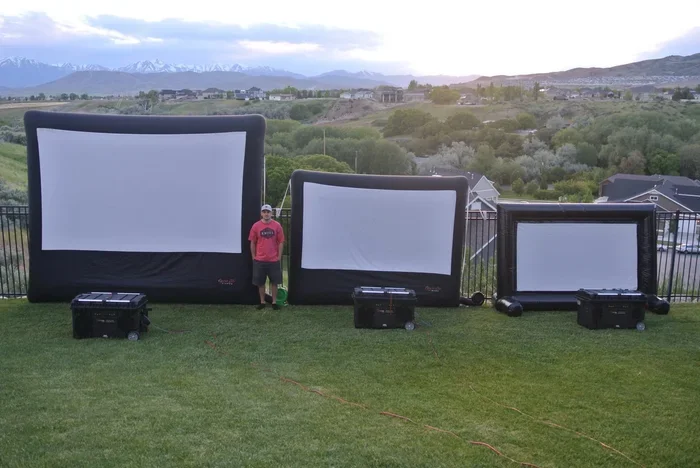
An inflatable outdoor screen is a portable display setup that uses air pressure to hold a large screen surface taut. You blow it up with a fan, and it stays upright on its own. These screens come in many sizes, from small backyard models to large ones that can fill a whole field.
They are popular for outdoor movie nights, sports viewing parties, and community events. The setup is simple. You unpack it, plug in the fan, and wait a few minutes. Then you connect your projector and speakers, and you are ready to go.
Most inflatable screens use a PVC or polyester material stretched over a frame. The frame is held open by continuous airflow from the fan. This means the screen needs power the whole time it is in use. That fan running nonstop is the first thing to think about when asking, “Are inflatable outdoor screens loud?”
How Do They Work?
The basic idea is simple. A motor spins a fan that pushes air into the screen walls. The air pressure keeps the surface stretched and ready for projection. Some models use a single fan, while others have two or more for larger screens.
The screen material is usually white or silver. These colors reflect light well, which makes the image from your projector look bright and clear. The material also plays a role in how much noise the screen makes. Thicker materials tend to flap less in the wind, which means less rustling sound.
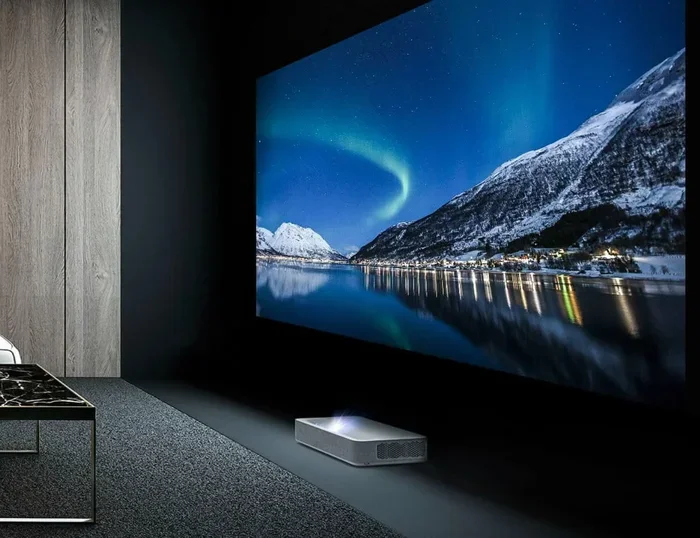
Many people also connect a portable projector screen with a sound system. The projector displays the movie, and speakers play the audio. Together, these components create your outdoor cinema. But each part brings its own noise level to the table.
How Loud Are Inflatable Outdoor Screens?
This is the big question. The short answer is: it depends. Most inflatable screens produce noise between 50 and 70 decibels. To put that in perspective, 50 decibels is about the level of a quiet conversation. 70 decibels is similar to a vacuum cleaner running in another room.
The fan motor is the main source of sound. Smaller screens with weaker fans tend to be quieter. Larger screens need bigger fans, which naturally make more noise. The brand and model of your screen matter a lot here.
Some modern inflatable outdoor screen units are designed specifically with noise reduction in mind. They use slower-speed fans or better insulation around the motor. These premium models can run as quietly as 45 decibels. That is about the level of a quiet library.
Understanding Decibel Levels
Decibels, or dB, measure how loud a sound is. Here is a simple way to think about common noise levels:
- 30 dB: Whispering
- 50 dB: Quiet conversation
- 60 dB:Normal conversation
- 70 dB: Vacuum cleaner
- 80 dB: Loud traffic
Most inflatable screens fall in the 50 to 70 dB range. That means they are noticeable but not overwhelming. If you set up your screen a good distance from your seating area, the noise becomes even less of an issue.
Also, keep in mind that once the movie starts, the sound from your speakers will be much louder than the screen fan. So the fan noise often fades into the background. This is especially true if you are watching an action movie with a good surround sound setup.
What Causes Noise in Inflatable Screens?
Understanding the sources of noise helps you fix the problem. There are three main reasons an inflatable outdoor screen might make sound. Let us look at each one.
1. The Fan Motor
The fan is the engine of your screen. It runs constantly while the screen is inflated. The motor spins the blades, and that creates a humming or whirring sound. Cheaper models often use basic motors that are not very quiet. Higher-end models use brushless motors that run much smoother and softer.
The size of the fan matters too. A small screen might have a fan the size of a dinner plate. A large screen might need a fan the size of a dinner table. Bigger fans move more air but also create more noise.
One quick tip: place the fan unit on a soft surface like a rug or foam pad. This can reduce vibrations that travel through the ground and make the noise louder.
2. Wind and Flapping
Even without a fan running, wind can make your screen noisy. The material flaps in the breeze, creating a rhythmic rustling or thumping sound. This is especially common on breezy evenings.
Thinner materials are worse for this problem. They catch the wind easily and vibrate. Heavier, thicker materials hold their shape better and resist flapping. If you live in a windy area, look for a screen with a heavier-gauge fabric.
You can also reduce wind noise by positioning the screen so it faces away from the prevailing wind direction. Setting up a fence or hedge as a windbreak can help too. These simple steps can make your outdoor movie night much more peaceful.
3. Projector and Speaker Noise
Do not forget about your other equipment. Projectors have internal fans that cool the lamp or LED. These fans can be surprisingly loud, especially in cheaper projectors. Some projectors are practically silent, while others sound like a small desk fan.
Speakers with built-in amplifiers also generate some noise. Active speakers need power, and that power supply can produce a faint hum. Passive speakers connected to a separate amplifier are usually quieter.
When you add up all the noise sources, the total sound level can be higher than you expect. But here is the good news: most of this noise is easily managed with the right choices and setup.
Inflatable Outdoor Screens vs. Traditional Screens: Noise Comparison
How do inflatable screens compare to other types of outdoor screens? Let us look at the noise factor side by side.
| Screen Type | Noise Level (dB) | Main Noise Source | Quietest Option? |
|---|---|---|---|
| Inflatable Outdoor Screen | 50 – 70 dB | Fan motor, wind flapping | No |
| Frame-Based Outdoor Screen | 0 – 10 dB | None (no fan needed) | Yes |
| Pull-Down Portable Screen | 0 dB | None | Yes |
| DIY Sheet on Frame | 5 – 15 dB | Wind flapping only | Yes |
As you can see, inflatable screens are louder than frame-based or pull-down screens. The trade-off is convenience. Inflatable screens are the easiest to set up and take down. You do not need tools or extra hands. Just unpack, plug in, and go.
If noise is your top concern, a frame-based screen might be a better choice. But if you value quick setup and portability, the slight extra noise from an inflatable outdoor screen is a fair trade-off for most people.
Also, remember that the movie audio from your speakers will be much louder than the screen noise. Once the film starts, you will barely notice the fan. This is why many people do not mind the extra noise at all.
Tips to Reduce Noise From Your Outdoor Screen
Want a quieter setup? Here are some practical tips that really work. These are simple things you can do before your next outdoor movie night.
Choose a Low-Noise Fan Model
When buying an inflatable screen, check the product specs for noise level information. Some brands list the decibel rating of the fan. Look for models under 55 dB for the quietest experience. Brands that focus on premium outdoor entertainment often invest in quieter motor technology.
You can also buy replacement fans with lower noise ratings. If your screen uses a standard fan connector, you might be able to swap in a quieter model. Just make sure the airflow is strong enough to keep your screen fully inflated.
Use a Wind Break or Barrier
A simple windbreak can cut down on flapping noise dramatically. You can use a garden fence, a row of bushes, or even a temporary tarp. Position the barrier between the screen and the direction of the wind.
This also helps with the projector. Wind can cool your projector unevenly, which sometimes makes the fan work harder. A sheltered setup keeps everything running smoothly and quietly.
Place the Screen Far From Seating
Sound gets quieter as it travels. Set your screen at least 15 to 20 feet away from your seating area. The fan noise will drop significantly over that distance. Your guests will hear the movie audio clearly and barely notice the screen fan.
This trick works especially well for large backyard setups. Use a long HDMI cable to connect your media player to the projector, and you can place the screen wherever you want.
Add Weight to the Screen Base
Some inflatable screens come with sand pockets or weight anchors. Use them. Extra weight stabilizes the screen and reduces vibration. Less vibration means less noise. It also keeps the screen from swaying in the wind, which cuts down on flapping sounds.
If your screen did not come with weight anchors, you can use sandbags or water weights. Just attach them to the base loops. This is one of the easiest and cheapest ways to quiet down your setup.
Turn Down the Projector Fan
Some projectors allow you to adjust the fan speed. If yours does, set it to the lowest setting that still keeps the unit cool. This can reduce projector noise by several decibels.
For the quietest setup, look into laser projectors. They run much cooler than traditional lamp projectors and often have near-silent fans. The image quality is also excellent, which makes them a great choice for outdoor entertainment.
Expert Insights on Outdoor Screen Noise
We asked a few outdoor entertainment experts about their thoughts on inflatable screen noise. Here is what they had to say.
“Most of our customers worry about noise before they buy,” says a popular outdoor cinema gear reviewer. “But after their first setup, they almost always say the fan was not a problem at all. The movie audio drowns it out completely.”
Another expert adds that placement is key. “Where you put the screen matters more than the screen itself. A well-placed inflatable screen in a sheltered area can be nearly silent. The same screen in an open field with wind will make more noise.”
The technology behind these screens has improved a lot in recent years. The same digital computing advances that power everything from medical imaging to smartphones now drive better, quieter projection systems. In fact, the digital display technology used in modern projectors shares principles explored in 10 Ways Computers Are Used In Medicine, where precise visual displays are critical for diagnostics and research.
“I recommend investing in a quality screen with a good fan,” the reviewer concludes. “You will get a clearer picture, less noise, and many more nights of outdoor fun.”
Common Mistakes That Make Inflatable Screens Louder
Avoid these common mistakes to keep your setup as quiet as possible.
- Skipping the user manual: Every screen model has specific setup instructions. Following them ensures the fan runs at its quietest setting.
- Over-inflating the screen: Too much air pressure puts extra strain on the fan, making it louder. Inflate to the recommended level only.
- Ignoring weather forecasts: Setting up on a windy night guarantees flapping noise. Check the wind speed before you start.
- Placing the fan on a hard surface: Hard floors amplify vibrations. Use a soft mat or grass surface whenever possible.
- Using an old or worn fan: Fans with worn bearings or dirty blades make more noise. Clean and maintain your equipment regularly.
- Forgetting to secure the base: A loose screen sways more and makes more noise. Anchor it properly every time.
By avoiding these mistakes, you can enjoy a much quieter outdoor movie night with your family and friends. Small changes make a big difference.
Quick Tips for the Quietest Setup
- Choose a screen with a fan rated under 55 dB.
- Set up in a sheltered or wind-protected area.
- Place the screen at least 15 feet from seating.
- Use sandbags or water weights to stabilize the base.
- Connect a quiet laser projector for the best experience.
- Run the movie audio at a comfortable level to mask fan noise.
- Check and clean your fan blades before each use.
These quick tips take just a few minutes to implement. But they can transform your outdoor setup from noisy to nearly silent. Your neighbors will thank you, and your guests will enjoy the movie without distraction.
Frequently Asked Questions
Are inflatable outdoor screens loud enough to disturb neighbors?
Usually, no. The fan noise from most inflatable screens is around 50 to 65 decibels. At that level, the sound is noticeable but not disruptive at normal distances. If you set the screen at least 15 feet from your property line and use a good speaker system, the movie audio will easily mask the fan noise. Most neighbors will not even notice it.
Can I use an inflatable outdoor screen indoors to reduce noise?
Yes, you can use an inflatable screen indoors, and the fan noise will be less noticeable because walls and ceilings absorb sound. Indoor setups also protect the screen from wind, which eliminates flapping noise. Just make sure you have enough ceiling height and ventilation. The projector will also run cooler indoors, which can reduce its fan noise.
What is the quietest inflatable outdoor screen on the market?
Premium models from brands like Screenity and SEWINCH tend to have the lowest noise ratings, often around 45 to 50 decibels. These screens use advanced brushless motors and thicker materials that resist wind noise. They also cost more, but if quiet operation is a priority for your outdoor entertainment setup, they are worth the investment.
Does weather affect how loud an inflatable screen is?
Yes, weather has a big impact. Windy conditions cause the screen material to flap, which adds significant noise. Cold temperatures can also make the fan motor work harder. On calm, mild evenings, your screen will be at its quietest. Always check the weather before setting up, and try to schedule your movie night on a still evening for the best experience.
How can I make my inflatable screen quieter without buying new equipment?
There are several free or low-cost tricks. Place the screen on a soft surface to reduce vibrations. Add sandbags or weights to the base for stability. Position the screen facing away from the wind. Use a longer HDMI cable so you can move the screen farther from your seating area. These simple steps can drop the perceived noise level significantly.
Is the projector louder than the inflatable screen itself?
Often, yes. Many projectors have cooling fans that produce 40 to 60 decibels of noise. Cheap projectors tend to be the loudest. If you want a truly quiet setup, consider a laser projector. These run much cooler and have near-silent fans. When combined with a well-chosen inflatable screen, you can create a peaceful outdoor cinema experience.
Conclusion
So, are inflatable outdoor screens loud? The answer is: not really. Most models produce a gentle hum that is easy to live with. The fan noise is manageable, especially when you follow a few simple setup tips.
The key to a great outdoor movie experience is choosing the right equipment, placing your screen thoughtfully, and managing the sound from your speakers. When you do all of this, the noise from your inflatable outdoor screen fades into the background. What stays front and center is the movie, the laughter, and the memories you create with the people you care about.
Outdoor entertainment has come a long way. Modern screens are lighter, easier to set up, and quieter than ever before. You do not need to sacrifice peace and quiet for a big, beautiful display. With the right approach, you can have the best of both worlds.
So go ahead. Set up your screen. Pick a great movie. Invite your friends. And enjoy a wonderful evening under the stars. Your quiet, comfortable backyard cinema is just a few steps away.