Advantages And Disadvantages Of The Light Pen Explained
The light pen is a pointing device that has been around for decades. It offers unique benefits for digital drawing and precise input tasks. However, it also comes with notable limitations that users should understand. In this guide, we break down both sides so you can make an informed choice.
Key Takeaways
- Precision Input: The light pen provides highly accurate pointing and drawing on compatible screens.
- Historical Significance: It was one of the earliest input devices used in computing and graphics work.
- Limited Compatibility: Modern LCD and LED screens are not naturally compatible with light pen technology.
- Ergonomic Benefits: Using a light pen feels natural and can reduce wrist strain compared to a mouse.
- Niche Uses Today: It still has value in specific fields like design, education, and industrial settings.
- Not Ideal for General Use: For everyday computing, modern alternatives like touchscreens and styluses are more practical.
- Cost and Availability: Light pens are less common now, and finding quality options can be challenging.
📑 Table of Contents
What Is a Light Pen and How Does It Work?
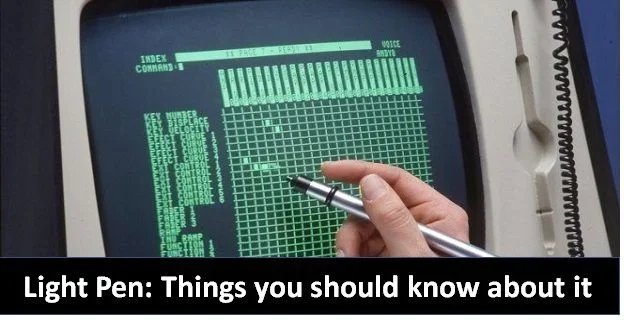
A light pen is a pointing device that you hold like a pen. It detects light on a screen and sends that information back to the computer. The concept dates back to the early 1950s. It became popular during the era of CRT displays.
The pen works by sensing the brief flash of light that happens when a screen pixel refreshes. When you touch the pen to the screen, the device detects which pixel is lighting up. The computer then calculates the exact position. This process is called light detection. It is simple but effective.
The light pen technology was groundbreaking at the time. It allowed users to interact directly with what was on screen. Before this, input relied mostly on keyboards and punch cards. The light pen opened the door to digital drawing, design work, and interactive computing.
Today, the technology feels almost antique. But it still has a place in certain fields. Understanding how it works helps you appreciate both its strengths and its limits.
Advantages of the Light Pen
Precision and Accuracy
The biggest advantage of a light pen is its accuracy. You can point to a single pixel on the screen. This level of precision is hard to match with a standard mouse. For tasks that require exact positioning, the light pen excels.
Light pen accuracy makes it ideal for detailed work. Designers and artists can draw fine lines with ease. Architects and engineers also benefit from this precision. When every pixel matters, the light pen delivers.
Natural and Intuitive Handling
Using a light pen feels like drawing with a real pen. You hold it, point it, and draw. This natural grip reduces the learning curve. Even beginners can pick it up and start working quickly.
The light pen design encourages a more relaxed hand position. Your wrist stays in a neutral position. This can reduce strain during long sessions. Compared to using a mouse for hours, it feels much more comfortable.
Direct Screen Interaction
With a light pen, you interact directly with what you see. There is no cursor floating separately from your action. The point of contact on the screen is exactly where the pen touches. This direct connection makes the experience feel more immediate.
This benefit is especially clear in light pen graphics work. You see your strokes appear right under the pen tip. The feedback loop is fast and satisfying. It makes the creative process feel more fluid.
Compact and Portable
A light pen is small and lightweight. It does not need a large pad or surface to work. You just attach it to or hold it near the screen. This makes it easy to carry and store.
For light pen uses in fieldwork or on-site tasks, portability is a big plus. You can bring it anywhere a compatible display is available. It does not take up much space in a bag or toolbox.
Low Latency and Fast Response
The light pen input response time is very fast. The pen detects the screen refresh instantly. There is almost no delay between the physical touch and the on-screen result. This low latency is crucial for real-time work.
In fast-paced environments like quality control or interactive displays, speed matters. The light pen delivers. Users can work quickly without waiting for the system to catch up.
Cost-Effective for Specialized Tasks
Compared to high-end graphics tablets or touch-screen displays, a basic light pen can be affordable. For organizations that need precise input on existing CRT monitors, it is a budget-friendly option.
The light pen computer setup does not require expensive upgrades. You just need a compatible screen and the pen itself. This simplicity keeps costs down.
Disadvantages of the Light Pen
Limited Compatibility with Modern Screens
This is the biggest drawback. Most modern screens use LCD, LED, or OLED technology. These screens do not emit the same type of refresh signal as old CRT monitors. As a result, a traditional light pen does not work well with them.
The light pen vs mouse comparison becomes irrelevant if the pen does not work on your display. Compatibility is the first thing to check before buying one. For most people today, this alone is a dealbreaker.
Ergonomic Strain for Extended Use
While the light pen feels natural at first, holding your arm up to a screen for hours is tiring. The light pen sensitivity requires you to keep the pen in contact with or very close to the screen. This posture can cause shoulder and neck fatigue.
Unlike a mouse that stays on a desk, the pen forces you to reach toward the display. Over time, this repetitive motion can lead to discomfort. It is not ideal for long work sessions.
Obsolete Technology and Limited Availability
Finding a quality light pen today is difficult. Most manufacturers have stopped producing them. The technology is considered outdated in the mainstream market. This means fewer options and higher prices for remaining stock.
If you need a replacement part or accessory, you may struggle to find one. The pen computing market has shifted toward touchscreens and digital styluses. The light pen has been left behind in most cases.
No Multi-Touch or Gesture Support
A light pen can only do one thing at a time: point or draw. It does not support multi-touch gestures like pinch-to-zoom or swipe. These gestures are now standard on modern devices.
For users who rely on gesture-based navigation, the light pen feels very limited. It cannot replace the versatility of a touchscreen or trackpad. The light pen advantages in precision do not extend to gesture control.
Screen Glare and Ambient Light Issues
Since the light pen works by detecting screen light, bright environments can interfere. Screen glare or strong ambient lighting can confuse the sensor. This leads to inaccurate pointing or missed detections.
Users in bright offices or workshops may find the pen unreliable. The light pen screen interaction depends heavily on controlled lighting. This limits where and when you can use it effectively.
Limited Software Support
Most modern software is not designed with light pens in mind. Operating systems and applications assume mouse, touch, or keyboard input. Finding programs that fully support a light pen input device can be a challenge.
Even if a program runs, it may not recognize the pen correctly. You might need special drivers or configurations. This lack of support makes the light pen impractical for everyday computing tasks.
Light Pen vs Modern Alternatives
To understand where the light pen stands today, it helps to compare it with modern alternatives. Each input method has its own strengths. The right choice depends on your needs.
| Feature | Light Pen | Stylus / Digital Pen | Mouse | Touchscreen |
|---|---|---|---|---|
| Precision | Very High | High | Medium | Low to Medium |
| Screen Compatibility | CRT Only | Most Screens | Any | Built-In |
| Ergonomics | Moderate | Good | Good | Excellent |
| Gesture Support | None | Limited | Limited | Full |
| Portability | Good | Good | Good | Built-In |
| Modern Software Support | Poor | Excellent | Excellent | Excellent |
| Cost | Low to Medium | Medium to High | Low | Varies |
The table shows that the light pen still wins on raw precision. But in almost every other category, modern alternatives pull ahead. The stylus and touchscreen have largely replaced the light pen in practical use.
If you need precision on a CRT monitor, the light pen is still a solid choice. For everything else, a stylus or touch-based input is more versatile. The light pen disadvantages are mostly about compatibility and modern expectations.
Current Uses of the Light Pen
Industrial and Manufacturing Settings
Some factories still use CRT-based control panels. In these environments, the light pen remains a practical tool. Workers use it to select options on machinery interfaces. The pen allows quick and accurate input without a keyboard.
The light pen technology is reliable in these controlled settings. The screens are often older CRT models that the pen works with perfectly. It is a simple and effective solution for specific industrial tasks.
Education and Training
Some schools and training centers still have CRT-based equipment. In these cases, a light pen can be a useful teaching tool. Students learn about early computing and input methods hands-on.
The pen also helps illustrate how digital drawing evolved. It shows the progression from early input devices to modern touchscreens. This educational value should not be overlooked.
Retro Computing and Hobbyist Projects
A growing community of retro computing enthusiasts keeps the light pen alive. They restore old systems and use them for fun and learning. The light pen is a key part of the original computing experience.
Hobbyists enjoy the nostalgic feel of using a light pen on a CRT monitor. It connects them to the early days of interactive computing. For these users, the light pen advantages outweigh the practical drawbacks.
Niche Graphic Design Work
A few designers still prefer the light pen for specific tasks. The direct screen interaction and pixel-level accuracy are hard to replicate. In controlled environments with CRT displays, the pen offers a unique workflow.
However, this is a very small niche. Most professional designers have moved to digital tablets and styluses. The light pen is not practical for mainstream design work today.
Quick Tips for Using a Light Pen
- Check your screen type first. A light pen only works well with CRT displays. If you have an LCD or LED screen, look for a compatible stylus instead.
- Control ambient lighting. Work in a dimmer environment to reduce glare. This improves the pen’s detection accuracy.
- Take breaks. Holding your arm up to the screen for long periods causes fatigue. Rest your hand every 20 to 30 minutes.
- Keep the pen tip clean. Dirt or damage on the tip can affect performance. Wipe it gently before each use.
- Update drivers if available. Some light pens need specific drivers to work with certain systems. Check the manufacturer’s website for support files.
- Pair it with the right software. Use applications that support light pen input for the best experience. Generic programs may not recognize the device properly.
Common Mistakes to Avoid
Mistake 1: Buying a light pen for a modern flat-screen monitor. This is the most common error. Most flat screens will not work with a traditional light pen. Always verify compatibility before purchasing.
Mistake 2: Ignoring ergonomic setup. Placing the screen too high or too far away forces an awkward posture. Set up your workspace so the screen is at a comfortable reach.
Mistake 3: Expecting modern software support. Most apps today are not built for light pens. Do not assume every program will work with the device. Test with compatible software first.
Mistake 4: Using the pen in bright environments. As mentioned, ambient light can interfere with the sensor. Use the pen in controlled lighting conditions for reliable results.
Mistake 5: Overlooking alternatives. If your goal is precision input, a digital stylus or graphics tablet may serve you better. Do not limit yourself to the light pen just because it is available.
Expert Insights on the Light Pen
According to computing historians, the light pen was a game-changer in the 1950s and 1960s. It was one of the first ways humans could directly interact with a screen. Before the mouse became popular, the light pen was the go-to pointing device for many early computer users.
Experts also note that the technology paved the way for modern input devices. The concepts behind the light pen influenced the development of touchscreens and digital styluses. The idea of direct screen interaction is now everywhere, from smartphones to tablets.
However, technology experts agree that the light pen has a very limited role today. The shift from CRT to flat-panel displays made the technology largely obsolete. For most users, there are better and more versatile options available now.
Dr. Ivan Sutherland, a pioneer in computer graphics, once highlighted the importance of direct input devices like the light pen. He believed that the way humans interact with machines shapes the future of computing. While the light pen may not dominate today, its legacy lives on in every touchscreen and stylus we use.
The Future of Direct Screen Input
Even though the traditional light pen is fading, direct screen input is thriving. Touchscreens are now standard on phones, tablets, and laptops. Styluses have evolved into sophisticated tools with pressure sensitivity and tilt detection.
The light pen technology of the past inspired these innovations. The core idea remains the same: let the user interact directly with the display. What has changed is the technology behind it. Modern screens use capacitive or resistive sensors instead of light detection.
Some researchers are exploring new forms of direct input. Haptic feedback pens and AI-assisted styluses are on the horizon. These tools combine the precision of the old light pen with modern technology. The future of screen input is bright and evolving.
So while the light pen may not be the future, it is an important part of computing history. Understanding its pros and cons gives you a deeper appreciation for the tools you use today.
Conclusion
The light pen is a fascinating piece of computing history. It brought precision, simplicity, and direct interaction to early computer users. Its advantages include high accuracy, natural handling, and fast response times. For specific tasks on CRT displays, it remains a reliable tool.
However, the disadvantages are significant. Limited compatibility with modern screens, ergonomic challenges, and poor software support make it impractical for most users today. The technology has been largely replaced by touchscreens, styluses, and advanced pointing devices.
If you work with legacy systems or retro computing setups, the light pen still has value. For everyday use, modern alternatives are far more practical and versatile. The key is to understand your needs and choose the right tool accordingly.
The light pen taught us something important: the way we interact with technology matters. That lesson continues to shape the devices and tools we use every day. Remember that as you explore new input technologies, the principles behind the light pen are still at work.
Frequently Asked Questions
What is a light pen used for?
A light pen is used for pointing, selecting, and drawing directly on a computer screen. It works best with CRT displays and is often used in design, industrial control, and retro computing setups. It allows users to interact with on-screen elements by simply touching the screen with the pen tip.
Can a light pen work on modern LCD or LED screens?
No, a traditional light pen cannot work on modern LCD or LED screens. These screens do not emit the same refresh signal that the pen relies on to detect position. Some modern styluses mimic the concept but use entirely different technology like capacitive sensing.
Is a light pen better than a mouse for drawing?
For precision drawing on a compatible CRT screen, a light pen can feel more natural than a mouse. It allows direct interaction with the drawing surface. However, for most modern users, a digital stylus and graphics tablet offer better precision, compatibility, and features.
Why did the light pen become obsolete?
The light pen became obsolete because CRT monitors were phased out in favor of LCD, LED, and OLED screens. These modern displays do not support the light detection method that the pen relies on. Additionally, touchscreens and advanced styluses replaced most of the use cases the light pen served.
Are there any light pens still being manufactured today?
Very few light pens are still being manufactured. Most production has ceased because demand is extremely low. Some specialty or retro computing suppliers may still carry them, but they are not widely available. The market has shifted entirely to modern input devices.
What are the main advantages of using a light pen?
The main advantages include high precision, direct screen interaction, natural handling, fast response time, and compact portability. It is also cost-effective for use with existing CRT monitors. These benefits made it a valuable tool in early computing and specialized fields.
=== KEY TAKEAWAYS ===
Key Takeaways
- Precision Input: The light pen provides highly accurate pointing and drawing on compatible screens.
- Historical Significance: It was one of the earliest input devices used in computing and graphics work.
- Limited Compatibility: Modern LCD and LED screens are not naturally compatible with light pen technology.
- Ergonomic Benefits: Using a light pen feels natural and can reduce wrist strain compared to a mouse.
- Niche Uses Today: It still has value in specific fields like design, education, and industrial settings.
- Not Ideal for General Use: For everyday computing, modern alternatives like touchscreens and styluses are more practical.
- Cost and Availability: Light pens are less common now, and finding quality options can be challenging.