Aperture Settings For The Nikon D70 Everything You Need
Aperture settings for the Nikon D70 unlock creative control over depth of field and exposure. This guide covers everything from basic f-stop concepts to the best lens sweet spots for sharp images. You’ll learn how to dial in the perfect aperture for portraits, landscapes, and low-light scenes.
Key Takeaways
- Know your f-stops: A wider aperture (smaller f-number) blurs backgrounds; a narrow aperture (larger f-number) keeps more in focus.
- Find your lens sweet spot: Most lenses on the Nikon D70 are sharpest around f/5.6 to f/8.
- Use aperture priority mode: The D70’s A mode lets you control aperture while the camera handles shutter speed.
- Watch for diffraction: Stopping down too far (f/16+) can soften images.
- Depth of field is your friend: Combine aperture with focal length and distance to control what stays sharp.
- Low-light needs wide apertures: Use f/1.8–f/2.8 to let in more light and keep ISO low.
- Practice with the depth of field preview: The D70’s button helps you see exactly what will be in focus.
📑 Table of Contents
What Is Aperture and Why Does It Matter?
Aperture is one of the three pillars of exposure, right alongside shutter speed and ISO. It controls how much light reaches your camera sensor. On the Nikon D70, understanding aperture opens up a world of creative possibilities. You can blur backgrounds to isolate a subject or keep everything sharp from front to back. The aperture settings for the Nikon D70 are easy to master once you grasp the basics.
Think of aperture like the pupil of your eye. In bright light, the pupil shrinks to let in less light. In dim light, it widens to gather more. The same principle applies to your camera lens. A wide aperture (small f-number) lets in lots of light. A narrow aperture (large f-number) restricts the light. This simple concept drives every shot you take with the D70.
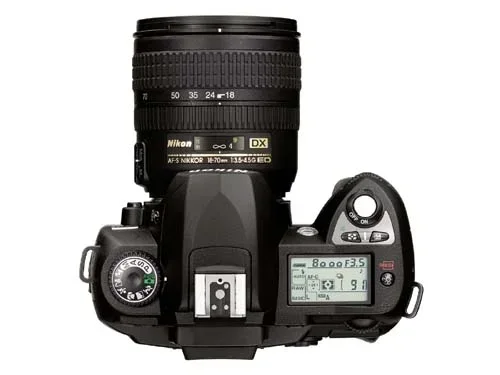
The Nikon D70 is a classic digital SLR with a 6.1-megapixel sensor and a sturdy build. It offers full manual control and several semi-automatic modes. You can choose exactly how your images look. Mastering aperture settings for the Nikon D70 means you stop relying on auto and start creating intentionally. Whether you shoot portraits, landscapes, or indoor events, aperture is your most powerful creative tool.
The Science of Light and the F-Stop
The f-stop number is the language of aperture. You see numbers like f/1.4, f/2.8, f/5.6, and f/16 on your D70. A lower number means a wider opening. A higher number means a smaller opening. This can feel backwards at first, but it becomes second nature quickly.
Each full f-stop halves or doubles the amount of light. Moving from f/2.8 to f/4 cuts the light in half. Moving from f/5.6 to f/8 does the same. The Nikon D70 allows you to adjust in 1/3-stop increments for finer control. This precision helps you nail exposure in tricky lighting. You can fine-tune your images without guessing.
Your lens also has a maximum and minimum aperture. Kit lenses often open to f/3.5 or f/4.5 at their widest. Prime lenses can go as wide as f/1.4 or f/1.8. The lens aperture range is printed on the lens barrel. Knowing your lens limits helps you choose the right aperture settings for the Nikon D70 in any situation. A 50mm f/1.8 prime lens, for example, gives you a much wider opening than an 18-55mm kit zoom at f/3.5.
How the Nikon D70 Handles Aperture
The D70 features a command dial that changes aperture quickly. In Aperture Priority mode (A), you set the f-stop and the camera picks the shutter speed. This is the best mode for learning how aperture affects your images. You focus on composition while the D70 handles exposure.
You can also use Manual mode (M) to set both aperture and shutter speed. Shutter Priority (S) lets you control motion blur while the camera handles aperture. The D70 also has a Creative Mode with scene presets like Portrait, Landscape, and Night. But for true control, stick with A or M. These modes give you the freedom to explore aperture settings for the Nikon D70 without limits.
The D70 has a depth of field preview button on the camera body. Pressing it stops down the lens to your chosen aperture. This lets you see exactly how much of the scene will be sharp. It is a powerful tool for planning your shots. Use it often. Many photographers miss this feature and rely on the bright aperture display in the viewfinder, which shows the lens wide open and does not represent the actual depth of field.
Understanding Depth of Field on the Nikon D70
Depth of field determines what stays sharp in your photo. It is the zone of acceptable focus in front of and behind your subject. Aperture settings for the Nikon D70 directly control depth of field. A wide aperture creates a shallow depth of field. A narrow aperture creates a deep depth of field.
Shallow depth of field isolates your subject. The background melts into soft, creamy bokeh. This is perfect for portraits and close-ups. Deep depth of field keeps the entire scene sharp. This is essential for landscapes and group photos. The Nikon D70 captures both styles beautifully when you use the right f-stop.
Wide Aperture for Beautiful Bokeh
When you open your lens to f/1.8 or f/2.8, the background becomes a blur of color and light. The D70 captures this beautifully. The 6.1-megapixel resolution still produces smooth, pleasing bokeh. You can separate your subject from distracting backgrounds with ease.
To maximize bokeh, get closer to your subject. Use a longer focal length if your lens allows. Place your subject far from the background. These steps combine with a wide aperture to create stunning separation. Try this: Set your D70 to f/2.8, focus on a flower, and shoot. The petals will pop while the leaves behind turn soft. This technique works wonders for portraits too.
Narrow Aperture for Sharp Landscapes
For sweeping landscapes, you want everything from the foreground to the horizon sharp. Use a narrow aperture like f/11 or f/16. This gives you a deep depth of field. The aperture settings for the Nikon D70 in landscape mode often fall in this range.
But there is a limit. Stopping down too far introduces diffraction. Diffraction softens the image as light bends around the small opening. On the D70, diffraction becomes noticeable around f/16 and beyond. The lens sweet spot for most kit lenses is between f/5.6 and f/8. This is where sharpness peaks. If you need maximum sharpness, stay in that range.
| Aperture | Depth of Field | Best For | Watch Out For |
|---|---|---|---|
| f/1.4 – f/2.8 | Very shallow | Portraits, low light, bokeh | Very narrow focus plane |
| f/4 – f/5.6 | Moderate | Street photography, events | Slightly less background blur |
| f/8 – f/11 | Deep | Landscapes, group shots | Near peak sharpness |
| f/16 – f/22 | Very deep | Architecture, front-to-back sharpness | Diffraction softening |
This table shows the trade-offs. The Nikon D70 performs well across all apertures. But understanding the balance helps you choose wisely. Always consider what you want sharp and what you want soft.
Quick Tips for Depth of Field
- Get closer to your subject to reduce depth of field.
- Use a longer focal length (like 70mm or 105mm) for shallower focus.
- Increase subject-to-background distance to make bokeh more pronounced.
- Use the depth of field preview button on the D70 to see the real focus zone.
The Best Aperture Settings for Different Scenes
Different scenes demand different aperture settings for the Nikon D70. There is no single magic number. Instead, you adjust based on your creative goal. Below are practical recommendations for common shooting situations. These examples will help you build a mental map for your next photo outing.
Portraits and People
For portraits, you want the subject sharp and the background soft. A wide aperture works best. Set your D70 to f/1.8 if your lens allows. If you are using a kit lens, try f/2.8 or f/3.5 at the wide end. Get close to fill the frame. The shallow depth of field will smooth skin tones and remove distracting details.
Quick Tip: Focus on the eyes. The eyes must be sharp. Use single-point autofocus on the D70 to place the focus point precisely. The D70’s autofocus system is center-weighted, so placing the focus point on the eye ensures critical sharpness. If you are shooting a group, try f/5.6 to keep everyone in focus while still softening the background.
Landscapes and Architecture
Landscapes need front-to-back sharpness. Start at f/8 and check results. If you need more depth, move to f/11. Avoid f/16 unless absolutely necessary because of diffraction. Use a tripod to keep the camera steady at narrow apertures. The Nikon D70 benefits from a stable base for maximum sharpness. Even slight camera shake at f/11 can soften your images.
For architecture, you often want everything sharp. f/8 to f/11 is the sweet spot. If you are shooting interior spaces, a slightly wider aperture like f/5.6 can help if light is limited. The D70’s evaluative metering mode works well for landscapes, balancing the bright sky and darker foreground.
Low-Light and Indoor Photography
Indoor and low-light scenes challenge your aperture settings for the Nikon D70. You need more light to hit the sensor. Open your aperture as wide as possible. Use f/1.8 or f/2.8 if you have a fast lens. The D70 performs well at higher ISOs, so you can keep shutter speeds reasonable and avoid blur.
If you are using the kit lens at its widest aperture (f/3.5 or f/4.5), you may need to raise ISO. The D70 handles ISO 800 and even 1600 with acceptable noise. Combine a wide aperture with a higher ISO to freeze motion and avoid camera shake. In dim restaurants or parties, aperture settings for the Nikon D70 at f/2.8 or wider can make the difference between a usable shot and a blurry mess.
Macro and Close-Up Photography
Macro photography has an extremely shallow depth of field even at narrow apertures. Many macro shooters prefer f/8 or f/11 as a starting point. You may need to focus stack for full sharpness. The D70’s depth of field preview button is invaluable here. It shows you the exact focus zone at your chosen aperture.
When shooting insects or small objects, try f/11 first. If the depth is still too thin, move to f/16. But remember diffraction. The D70’s 6.1-megapixel sensor can handle some softness, but you want to keep it minimal. Use a tripod and a remote release to eliminate vibration.
Expert Insight: Balancing Aperture with the Exposure Triangle
Aperture does not work alone. It is part of the exposure triangle alongside ISO and shutter speed. On the D70, you can set ISO manually or use auto ISO. In low light, open your aperture and raise ISO to maintain a fast shutter speed. In bright light, stop down your aperture and lower ISO to preserve detail and minimize noise. The D70’s histogram is your best friend here. A well-exposed image should not clip the highlights or crush the shadows. Adjust aperture, ISO, or shutter speed until the histogram looks balanced.
Common Aperture Mistakes and How to Fix Them
Even experienced photographers make aperture mistakes. The Nikon D70 rewards careful technique. Here are the most common errors and how to avoid them. Learning from these mistakes will save you hours of frustration.
Diffraction and the Lens Sweet Spot
One of the biggest mistakes is stopping down too far. Photographers often think smaller aperture equals sharper everywhere. But beyond a certain point, diffraction kicks in. The image becomes globally softer. On the D70, the lens sweet spot is usually two to three stops down from maximum aperture. For a lens that opens to f/3.5, the sweet spot is around f/5.6 to f/8.
Common Mistake: Using f/22 for landscapes because you want everything sharp. The result is a soft, mushy image. Instead, use f/11 or f/13 and rely on a wide-angle lens for depth. The D70 kit lens at 18mm already provides deep depth of field at f/11. You do not need f/22.
Ignoring the Depth of Field Preview
The D70 has a dedicated depth of field preview button on the camera body. Many photographers never use it. They rely on the bright aperture display in the viewfinder. But that display shows the lens wide open. The actual depth of field at your chosen aperture is different. Press the preview button to see the true focus zone.
Quick Tip: Practice with a tripod. Set your aperture to f/11 and look through the preview button. You will see the scene darken as the lens stops down. The sharp areas will expand. This visual feedback builds intuition. It is one of the best ways to understand how aperture settings for the Nikon D70 actually affect your final image.
Forgetting About Shutter Speed
Aperture does not work alone. It is part of the exposure triangle. A wide aperture lets in more light, so your shutter speed can be faster. A narrow aperture lets in less light, so you need a slower shutter speed or higher ISO. On the D70, the camera’s meter balances these automatically in Aperture Priority mode.
Expert Insight: Always check your shutter speed after changing aperture. If it drops too low, you risk camera shake. The D70’s image stabilization (if using an VR lens) helps, but a general rule is to keep the shutter speed at least 1/focal length seconds. For a 50mm lens, that means 1/50th of a second or faster. If your shutter speed falls below that, raise ISO or open your aperture further.
Overlooking Focal Length and Subject Distance
Aperture alone does not determine depth of field. Focal length and subject distance also play a role. A longer focal length (like 200mm) creates shallower depth of field at the same aperture. A closer subject distance also reduces depth of field. The Nikon D70 with an 18-70mm zoom lens at 70mm and f/4 will have much less depth of field than at 18mm and f/4.
Quick Tip: To maximize depth of field, use a wide-angle lens, set a narrow aperture, and focus about one-third into the scene. This hyperfocal technique ensures sharpness from near foreground to infinity. The D70’s depth of field scale on the lens helps you estimate this.
Expert Tips to Master Aperture on the Nikon D70
These professional techniques will elevate your aperture settings for the Nikon D70 game. They are simple to apply and make a big difference. Even seasoned photographers revisit these fundamentals.
Use Aperture Priority Mode for Real-World Shooting
Aperture Priority (A) is the go-to mode for many D70 users. You control depth of field. The camera handles the rest. This mode is perfect for events, travel, and everyday shooting. You can focus on composition while the D70 maintains proper exposure.
To use it, set the mode dial to A. Choose your f-stop with the command dial. The D70 displays the chosen aperture in the viewfinder and on the top LCD. Watch the shutter speed it selects. If it gets too slow, consider using a tripod or raising ISO. This mode gives you creative control without the complexity of full manual exposure.
Combine Aperture with ISO and Shutter Speed
The exposure triangle connects aperture, ISO, and shutter speed. On the D70, you can set ISO manually or use auto ISO. In low light, open your aperture and raise ISO to maintain a fast shutter speed. In bright light, stop down your aperture and lower ISO to preserve detail and minimize noise.
Quick Tip: Use the D70’s histogram to check exposure. A well-exposed image should not clip the highlights or crush the shadows. Adjust aperture, ISO, or shutter speed until the histogram looks balanced. The D70’s RGB histogram is a powerful tool for avoiding clipped highlights and blocked-up shadows.
Experiment with the Hyperfocal Distance
Hyperfocal distance is a technique for maximizing depth of field. You focus at a specific distance so that everything from half that distance to infinity appears sharp. The Nikon D70 can achieve this with a narrow aperture. The depth of field scale on your lens helps you estimate hyperfocal focus.
To use it, set your aperture to f/11 or f/16. Look at the distance scale on the lens. Align the infinity symbol with the f-stop mark. Focus manually at that distance. This technique is a game-changer for landscape photographers. It ensures maximum sharpness from near foreground to the far horizon without needing to focus stack.
Control Bokeh with Aperture Shape
The shape of the bokeh highlights depends on the aperture blade count. The D70 works with various lenses. Some lenses have 5 blade elements, others have 7 or 9. More blades create rounder, smoother bokeh. Prime lenses with 7 or 9 blades produce the most pleasing background blur. The D70’s 6.1-megapixel images still render bokeh beautifully.
When shooting wide open at f/1.4 or f/1.8, the aperture is fully circular. As you stop down, the blades create a polygonal shape. For the softest, most natural bokeh, stay at or near maximum aperture. This is especially important for night photography where lights turn into smooth orbs.
Aperture and Autofocus Performance
The D70’s autofocus system works best with lenses that have a maximum aperture of f/5.6 or wider. Lenses with slower maximum apertures (like f/6.3) may cause the autofocus to hunt or fail. When using aperture settings for the Nikon D70, keep this in mind. If you are using a teleconverter, it reduces the effective aperture and can impact autofocus performance.
Expert Insight: The D70 has 5 focus points. Use the center point for precision. In low light, the autofocus needs contrast and light. A wide aperture (f/1.8 or f/2.8) provides more light to the focus sensor, helping the D70 lock on faster. This is another reason to use fast lenses in dim conditions.
Conclusion: Your Aperture Journey Starts Now
Aperture settings for the Nikon D70 are the key to unlocking creative photography. You now know how to control depth of field, blur backgrounds, and keep landscapes sharp. You understand the lens sweet spot and the dangers of diffraction. You can choose the right f-stop for any scene.
The Nikon D70 is a capable tool. It rewards photographers who take the time to learn its manual controls. Start with Aperture Priority mode. Experiment with different f-stops. Review your images and learn from them. The more you practice, the more intuitive aperture settings for the Nikon D70 become. You will start seeing the world in terms of depth and light.
Grab your D70, attach your lens, and go shoot. Try a portrait at f/2.8. Try a landscape at f/8. Try a low-light scene at f/1.8. Notice how the world changes as you adjust the aperture. You are no longer just taking pictures. You are creating them with intention. Master your aperture settings for the Nikon D70 and watch your photography transform. The creative possibilities are endless.
Frequently Asked Questions
What is the best aperture for portraits on the Nikon D70?
For portraits, use a wide aperture like f/1.8 or f/2.8 if your lens allows. If you are using a kit lens, try f/2.8 or f/3.5. This creates a shallow depth of field that blurs the background and keeps the subject sharp.
Can I use f/22 on the Nikon D70 for landscapes?
You can, but it is not recommended. f/22 introduces diffraction, which softens the overall image. Stick to f/11 or f/13 for landscapes. These apertures give you deep depth of field without sacrificing sharpness.
How do I find the lens sweet spot for my Nikon D70?
The sweet spot is typically two to three stops down from the maximum aperture. For a lens that opens to f/3.5, the sweet spot is around f/5.6 to f/8. Test your specific lens at different apertures to see where it is sharpest.
Does the Nikon D70 have a depth of field preview button?
Yes, the D70 has a dedicated depth of field preview button on the camera body. Press it to stop down the lens and see the actual focus zone. This is a great way to visualize how your aperture choice affects the image.
What aperture should I use for low-light indoor photography?
Open your aperture as wide as possible, such as f/1.8 or f/2.8. If your lens is slower, raise the ISO to compensate. The D70 handles ISO 800 and 1600 well, helping you keep shutter speeds fast enough to avoid blur.
How does focal length affect depth of field on the Nikon D70?
A longer focal length (like 70mm or 200mm) creates shallower depth of field at the same aperture compared to a wide-angle lens (like 18mm). Combine this with a wide aperture for maximum background blur.