A Clicking Noise On The Sony LCD TV Screen Fix Now
A clicking noise on your Sony LCD TV can be annoying and worrying, but it is usually fixable at home. This guide covers the top causes, from loose internal parts to capacitor issues, and gives you clear steps to solve the problem. You will learn how to troubleshoot, when to call a pro, and how to prevent future clicking sounds on your Sony LCD TV.
Have you ever settled in for a movie night and heard a strange clicking noise on the Sony LCD TV screen? It is enough to make anyone pause and wonder what is going on inside the TV. The good news is that a clicking noise on the Sony LCD is a common issue, and it is almost always fixable.
Whether the sound happens when you turn the TV on, during playback, or randomly in the middle of a show, this guide has you covered. We will walk through every likely cause, give you practical fixes, and help you decide when to call in a pro. By the end, you will know exactly what to do about that Sony TV clicking sound and how to keep your TV running quietly for years.
Let us start by understanding what that clicking noise actually means. Once you know the cause, the fix becomes much clearer.
Key Takeaways
- Loose internal components: Small parts inside the TV can vibrate and create a clicking sound.
- Capacitor or power supply issues: Faulty capacitors often cause rhythmic clicking on Sony LCD TVs.
- Speaker or audio board problems: A clicking noise may come from the TV’s internal speakers or audio circuit.
- Cooling fan malfunctions: A stuck or dirty fan can produce regular clicking as it spins.
- DIY fixes work for most cases: Many clicking issues can be resolved with simple tools and basic steps.
- Know when to seek help: Some problems require a professional Sony TV repair technician.
- Prevention saves money: Regular cleaning and proper ventilation reduce clicking noise risks.
📑 Table of Contents
- Why Does Your Sony LCD TV Make a Clicking Noise?
- How to Diagnose the Source of the Clicking Noise
- Common Causes of a Clicking Noise on Sony LCD TVs
- Step-by-Step Fixes for a Clicking Noise on the Sony LCD
- When to Call a Professional for Sony LCD TV Repair
- How to Prevent Clicking Noises on Your Sony LCD TV
- Understanding Your Sony LCD TV Model and Common Issues
- Key Takeaways
- Conclusion
Why Does Your Sony LCD TV Make a Clicking Noise?
A clicking noise on the Sony LCD TV can come from many places. The TV has lots of small parts inside, and any one of them can start clicking. Let us look at the most common reasons this happens.
Loose Internal Components
Sony LCD TVs have many small screws, brackets, and circuit boards inside the housing. Over time, vibrations from the TV can loosen these parts. When something shifts even slightly, it may tap against the frame or other components. This creates a clicking sound from the TV that can be steady or intermittent.
You might notice the clicking gets louder when the TV is on a high volume or when the picture changes quickly. This is a strong clue that a loose part inside is vibrating with the sound or movement on screen.
Power Supply and Capacitor Problems
The power supply board is one of the most common culprits behind a Sony TV making a clicking noise. Inside this board, capacitors store and release electrical energy. When a capacitor starts to fail, it can cause a rhythmic clicking sound from TV that matches the power cycling.
You might see this happen when you first turn on the TV. The TV clicks a few times, then either starts working or shuts off again. This pattern is a classic sign of a TV power supply clicking issue. It is also one of the most common Sony LCD TV repair problems technicians see.
Speaker and Audio Board Issues
Sometimes the clicking noise on the Sony LCD comes directly from the audio system. The TV speakers or the audio processing board can develop a clicking sound. This often happens when the volume is turned up or when you switch between inputs.
A Sony Bravia clicking sound from the speakers might sound like a rapid tapping. It can be confused with a problem in the picture, but it is really an audio issue. If the clicking stops when you mute the TV, you have found your source.
Cooling Fan Malfunctions
Sony LCD TVs use internal fans to keep the electronics cool. When a fan blade gets dusty or the motor starts to wear out, it can produce a regular clicking noise from TV. You might hear this clicking come and go as the TV heats up and cools down.
This type of clicking often speeds up or slows down depending on how hard the TV is working. If you are watching a bright, fast-moving scene, the fan works harder and the clicking may get faster too.
How to Diagnose the Source of the Clicking Noise
Before you try any fix, you need to figure out where the clicking sound from TV is coming from. A little detective work saves a lot of time and effort.
Step 1: Listen Carefully
Turn off all other sounds in the room. Play something on your Sony TV and just listen. Is the clicking constant or does it come and go? Does it change when you adjust the volume? These clues help narrow down the cause.
Try these quick checks:
- Mute the TV: If the clicking stops, the audio system is likely the source.
- Change the input: Switch from HDMI to a different source. If the clicking changes, the issue may be tied to signal processing.
- Watch the pattern: A steady click might point to a fan. A rhythmic click often points to the power supply.
Step 2: Check the Back Panel
Run your hand along the back and sides of the TV while it is on. You might feel a slight vibration that matches the clicking. This tells you the sound is coming from the outer shell, which usually means a loose internal part.
Step 3: Note When It Happens
Does the Sony TV clicking sound happen only when the TV first turns on? Or does it happen during specific scenes? Writing down when you hear the click helps you and any repair person figure out the problem faster.
Common Causes of a Clicking Noise on Sony LCD TVs
Let us break down the most frequent causes of Sony LCD TV repair needs related to clicking noises. Understanding these helps you decide on the right fix.
| Cause | Sound Pattern | Severity | DIY Fix Possible? |
|---|---|---|---|
| Loose internal part | Random tapping, gets louder with vibration | Low | Yes |
| Failing capacitor | Rhythmic clicking, often at startup | Medium | Maybe |
| Speaker issue | Clicking changes with volume | Low | Yes |
| Fan malfunction | Steady click, speeds up with heat | Medium | Yes |
| Audio board failure | Clicking during input changes | Medium-High | Professional help |
| Power supply board fault | Repeated clicking, TV may not turn on | High | Professional help |
Use this table as a starting point. It gives you a clear picture of what might be going on and whether you can handle the fix yourself or need a Sony TV repair expert.
Step-by-Step Fixes for a Clicking Noise on the Sony LCD
Now let us get into the solutions. These steps are ordered from the simplest fixes to the more involved ones. Start at the top and work your way down.
Fix 1: Tighten Loose Internal Screws and Parts
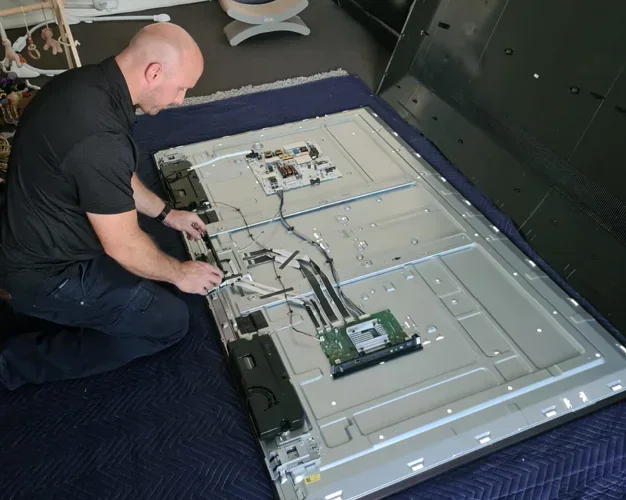
If you suspect a loose part, the first step is to open the back panel of the TV. Unplug the TV first and wait at least 10 minutes for any stored electricity to discharge. Use a screwdriver to carefully remove the screws holding the back panel on.
Once inside, look for anything that looks out of place. A loose screw, a bracket that has shifted, or a cable that is not seated properly can all cause a clicking noise on the Sony LCD. Tighten any loose screws and push any loose cables firmly into their connectors.
Quick Tip: Take a photo of the inside of your TV before you start. This makes it much easier to put everything back in the right place.
Fix 2: Clean the Cooling Fan
Dust buildup is the number one enemy of TV fans. Over months and years, dust collects on the fan blades and motor. This can cause the fan to wobble and click.
To clean the fan, use a can of compressed air or a soft brush. Gently hold the fan blade still while you blow air through it. This prevents damage to the motor bearing. Work slowly and avoid using liquids inside the TV.
After cleaning, plug the TV back in and test it. Many people are surprised how much a simple cleaning reduces the clicking sound from TV.
Fix 3: Check the Speakers
If muting the TV stops the clicking, the speakers are your likely source. Sony LCD TVs have small speakers mounted inside the housing. Over time, the speaker cone can loosen or the voice coil can develop a fault.
Try reducing the volume to see if the clicking stops. If it does, the speaker is under too much stress. You can try replacing the speaker with a compatible part from an electronics supplier. This is a moderate DIY fix for people comfortable with basic electronics.
If you are not comfortable opening the TV, take it to a local Sony TV repair shop. Replacing a speaker is usually an affordable repair.
Fix 4: Replace a Faulty Capacitor
A failing capacitor on the power supply board can cause a persistent TV making clicking noise. This repair is more involved and requires some electronics knowledge.
You will need to identify the bulging or leaking capacitor on the power supply board. Look for a cylinder that is swollen on top or has brown residue leaking from it. Once you find it, you can desolder the old capacitor and solder in a replacement with matching specifications.
Important: If you have never worked with electronics before, this is not a job to try at home. The power supply board carries high voltage even when the TV is unplugged. A professional Sony LCD TV repair technician can handle this safely and quickly.
Fix 5: Reset or Update the TV Software
Sometimes a Sony TV clicking sound is caused by a software glitch. Sony releases firmware updates that fix bugs, including audio and power issues. Check your TV settings for a software update option.
You can also try a factory reset. Go to Settings, then System, then Reset Options. Choose Factory Reset. This wipes all your settings and returns the TV to its original state. Make sure you have your login information handy before you do this.
When to Call a Professional for Sony LCD TV Repair
Not every clicking noise on the Sony LCD can be fixed at home. Knowing when to call a professional saves you time, money, and frustration.
Call a technician if you notice any of these signs:
- The TV clicks repeatedly and will not turn on at all.
- You smell burning or see smoke from the TV.
- The screen flashes or shows lines along with the clicking.
- The clicking gets louder over time despite your fixes.
- You are not comfortable working with electronics or opening the TV.
A qualified Sony TV repair expert has the tools, parts, and experience to diagnose and fix complex issues. Many repair shops offer free estimates, so you will know the cost before any work begins. The average LCD TV repair cost for a clicking noise issue ranges from $50 to $200, depending on the cause.
Expert Insight: Always check your Sony TV warranty before paying for repairs. Many Sony TV warranty claims cover clicking noise issues, especially if the TV is less than a year old. Contact Sony support with your model number and a description of the problem.
How to Prevent Clicking Noises on Your Sony LCD TV
Prevention is always better than repair. A few simple habits can keep your Sony LCD TV running quietly and smoothly.
Keep the TV Clean
Dust the back and sides of your TV every few months. Use a soft, dry cloth to wipe down the exterior. For the vents, use compressed air to blow out dust buildup. Clean vents mean better airflow, which means a cooler, quieter TV.
Give Your TV Room to Breathe
Do not push your TV flush against a wall or wedge it into a tight cabinet. The back and sides of the TV need space for air to circulate. A few inches of clearance on all sides makes a big difference for cooling and noise reduction.
Use a Surge Protector
Power surges can damage internal components, including capacitors and the power supply board. Plugging your Sony LCD TV into a quality surge protector helps prevent electrical damage that can lead to TV power supply clicking and other issues.
Avoid Extreme Temperatures
Heat and cold are tough on electronics. Keep your TV in a room with stable temperatures. Avoid placing it near heaters, radiators, or air conditioning vents. A stable environment keeps all the internal parts working as they should.
Understanding Your Sony LCD TV Model and Common Issues
Different Sony LCD TV models have their own quirks. Some models from certain production years are more prone to Sony TV troubleshooting issues than others. If you own a Sony Bravia model, you are not alone in experiencing a Sony Bravia clicking sound.
Popular models like the Sony XBR series, Sony KD series, and Sony X800H series have all had reports of clicking noises. The causes are usually the same as we discussed above. Check online forums and Sony support pages for your specific model to see if other owners have found solutions.
Knowing your Sony LCD TV model helps you find the right parts and repair guides. The model number is usually on a sticker on the back of the TV or in the Settings menu under Product Information.
Key Takeaways
- Loose parts cause common clicking: Vibrations over time can loosen screws and brackets inside the TV, creating a clicking sound from the TV.
- Capacitor failure is a top cause: A failing capacitor on the power supply board often causes rhythmic TV power supply clicking at startup.
- Check the speakers first: If muting the TV stops the clicking noise on the Sony LCD, the audio system is the source.
- Clean the fan regularly: Dust buildup on the cooling fan is an easy fix and prevents many noise issues.
- DIY fixes work for simple problems: Tightening screws, cleaning dust, and resetting software can solve most clicking issues.
- Call a pro for complex repairs: Capacitor replacement and power supply board repairs are best left to a Sony TV repair professional.
- Prevention keeps your TV quiet: Regular cleaning, proper ventilation, and surge protection extend your TV’s life and reduce noise.
Conclusion
A clicking noise on the Sony LCD TV screen does not have to ruin your viewing experience. Most causes are simple and fixable, whether it is a loose screw, a dusty fan, or a speaker issue. With the steps in this guide, you can diagnose the problem and apply the right fix with confidence.
Start with the easiest solutions and work your way up. Listen carefully to the pattern of the clicking, and use the tips we shared to narrow down the cause. If the problem is beyond your comfort level, do not hesitate to reach out to a Sony LCD TV repair professional. They can get your TV running quietly again in no time.
Take action today. Your Sony LCD TV deserves to deliver clear picture and sound without any annoying distractions. Apply what you have learned here, and enjoy your favorite shows and movies in peace and quiet.
Frequently Asked Questions
Why does my Sony LCD TV make a clicking noise when I turn it on?
A clicking noise when turning on the TV is often caused by the power supply board cycling. A TV capacitor problem or a loose internal relay can create this sound. Try unplugging the TV for 30 seconds and plugging it back in. If the clicking persists, check the power supply board or call a Sony TV repair professional.
Is a clicking noise on the Sony LCD TV screen dangerous?
Most of the time, a clicking sound from TV is not dangerous. However, if you smell burning, see smoke, or notice sparking, turn off the TV immediately and unplug it. Electrical issues inside a TV can become hazardous if ignored. Always prioritize safety when troubleshooting.
Can I fix the clicking noise myself?
Yes, many Sony LCD TV repair issues can be fixed at home. Start by tightening loose screws and cleaning dust from the fan. If the clicking comes from the speakers, adjusting the volume or replacing the speaker may help. For power supply or capacitor issues, it is best to seek professional Sony TV troubleshooting help.
How much does it cost to repair a Sony LCD TV with a clicking noise?
The LCD TV repair cost varies depending on the cause. Simple fixes like tightening a loose part or cleaning a fan are usually free or very low cost. Replacing a capacitor might cost $50 to $150 in parts and labor. A power supply board replacement can range from $100 to $250. Always get a quote before authorizing any repair work.
Does the Sony TV warranty cover clicking noise repairs?
It depends on your warranty terms and the cause of the clicking noise from TV. Manufacturing defects like a faulty capacitor are usually covered. Damage from wear, misuse, or environmental factors may not be. Check your warranty documentation or contact Sony support with your Sony LCD TV model number for specific coverage details.
How can I stop my Sony Bravia TV from making a clicking sound?
Start by checking the volume and input settings. A Sony Bravia clicking sound at high volume often points to a speaker issue. Try reducing the volume and see if the clicking stops. Clean the cooling fan and check for loose internal parts. If these steps do not work, a Sony TV repair technician can diagnose the exact cause and provide a lasting fix.