Can A Camera Have Its Own Wi Fi And Connect To Your Phone
Yes, a camera can have its own Wi-Fi and connect directly to your phone. Many modern wireless cameras build in Wi-Fi chips that let you connect camera to phone without a router. You can transfer photos, stream live views, and control settings right from your smartphone. This guide covers how it works, the different types, setup steps, and practical tips to get the best camera WiFi experience.
Key Takeaways
- Built-In Wi-Fi Is Standard: Most modern Wi-Fi enabled cameras come with wireless features right out of the box.
- Direct Phone Connection: A camera hotspot lets your phone connect without needing a home network.
- Easy Setup: Connecting a wireless camera to your phone usually takes just a few minutes.
- Limited Range: Camera WiFi range is typically shorter than a router-based connection.
- Battery Impact: Using wireless camera features drains battery faster than offline shooting.
- Mobile App Control: Most brands offer free apps for mobile app control and wireless photo transfer.
- Multiple Connection Options: Some cameras support both WiFi direct and Bluetooth for flexible smartphone connection.
📑 Table of Contents
- Can A Camera Have Its Own Wi-Fi And Connect To Your Phone?
- How Does A Camera Create Its Own Wi-Fi Network?
- Types Of Cameras With Built-In Wi-Fi
- How To Connect Your Camera To Your Phone
- Benefits Of Having Wi-Fi On Your Camera
- Limitations And Things To Watch Out For
- Tips For Getting The Best Camera Wi-Fi Performance
- Comparison: Cameras With And Without Built-In Wi-Fi
- Expert Insights On Camera Wi-Fi
- Common Mistakes People Make With Camera Wi-Fi
- Frequently Asked Questions
- Conclusion
Can A Camera Have Its Own Wi-Fi And Connect To Your Phone?
The short answer is yes. Can a camera have its own Wi-Fi and connect to your phone? Absolutely. In today’s world, most cameras come with built-in wireless technology. You no longer need cables, memory card readers, or a computer to get your photos onto your phone.
A Wi-Fi enabled camera creates its own small wireless network. Your phone can join that network directly. From there, you can view live previews, snap remote shots, and transfer files wirelessly. It is a game changer for photographers, travelers, and anyone who wants quick sharing.
This article breaks down everything you need to know. We will cover how the technology works, the types of cameras that support it, setup steps, and real-world tips. By the end, you will know exactly what to look for and how to get the most out of your wireless camera.
Why Does Camera Wi-Fi Matter?
Camera Wi-Fi has changed the way people share moments. Think about a family gathering or a hiking trip. In the past, you would take photos, wait until you got home, plug in a cable, and then share them. That process took hours or even days.
Now, with a wireless camera, you can transfer images to your phone in seconds. You can post them on social media right away. You can send them to friends and family while the event is still happening. The ability to connect camera to phone instantly adds a lot of value to your shooting experience.
Also, many cameras now offer live streaming through wireless streaming. You can broadcast what your camera sees in real time. This is useful for vloggers, content creators, and even remote monitoring situations. The wireless camera features available today go far beyond simple file transfer.
How Does A Camera Create Its Own Wi-Fi Network?
Understanding how camera WiFi works helps you use it better. A Wi-Fi enabled camera has a small wireless chip inside. This chip can act as a host, much like a tiny router. It broadcasts a signal that your phone can detect and join.
This is different from connecting to your home network. When your camera joins your home wireless network, it uses your router as a middleman. But when it creates its own network, it works independently. This is called WiFi direct or camera hotspot mode.
WiFi Direct vs. Camera Hotspot Mode
These two modes work a bit differently. Let us break them down.
WiFi Direct allows your camera and phone to talk directly. No router is needed. The camera acts as a wireless access point. Your phone connects to it just like it would connect to a router.
Camera Hotspot Mode is very similar. The camera broadcasts its own SSID, which is the network name. You find it in your phone’s WiFi settings and tap to connect. Both modes achieve the same goal: wireless photo transfer and remote control.
Some cameras also use Bluetooth as a helper. Bluetooth uses less power and can handle small data tasks. Then, when you need to transfer larger files, the camera switches to WiFi direct for faster speeds. This combo saves battery and improves performance.
Types Of Cameras With Built-In Wi-Fi
Not all cameras are the same. Different types of cameras offer wireless camera features in different ways. Here is a look at the main categories.
Point-and-Shoot Cameras
Many compact point-and-shoot cameras now include built-in Wi-Fi. Brands like Canon, Sony, and Nikon offer models in this category. These cameras are great for casual shooters and travelers. They are small, easy to carry, and let you wireless photo transfer on the go.
A battery powered WiFi camera in this category can last a full day of shooting. Just remember that using Wi-Fi drains the battery faster. Bring a spare charger or a portable power bank if you plan to shoot all day.
Mirrorless Cameras
Mirrorless cameras are hugely popular right now. Most mid-range and high-end models come with Wi-Fi enabled camera technology. These cameras offer excellent image quality and full wireless control.
You can use your phone as a viewfinder. You can adjust exposure and focus remotely. You can even trigger the shutter from across the room. The smart camera ecosystem makes all of this possible through companion apps.
DSLR Cameras
Even many DSLR models now include built-in Wi-Fi or offer optional WiFi adapters. Canon’s EOS series and Nikon’s DSLR lineup have several models with wireless network camera support. These are ideal for professionals who need fast file transfers in the field.
Older DSLR models may not have Wi-Fi built in. But you can buy external WiFi camera adapters that plug into the hot shoe or USB port. These adapters add wireless capability to almost any camera.
Action Cameras and Security Cameras
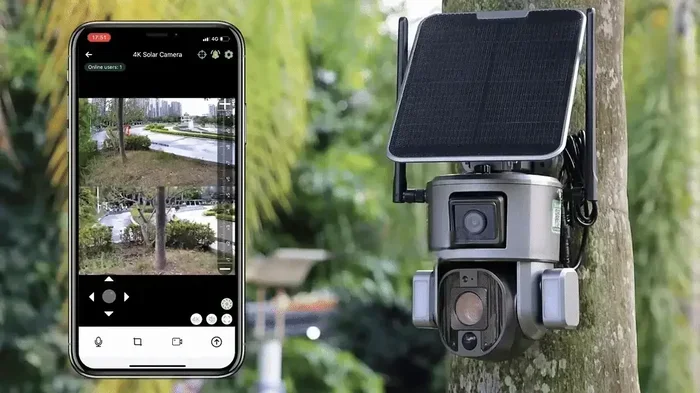
Action cameras like GoPro and security cameras like Arlo are built with wireless connectivity in mind. They rely heavily on smartphone connection for setup and control. A wireless security camera often streams live video to your phone over WiFi direct or through a cloud service.
How To Connect Your Camera To Your Phone
Setting up a camera WiFi setup is straightforward. Follow these steps and you will be connected in no time.
Step 1: Turn On Wi-Fi on Your Camera
Go to your camera’s menu and find the Wi-Fi or Network setting. Turn it on. Most cameras will ask you to choose a mode. Pick WiFi direct or Smart Device Connection. The camera will start broadcasting its own network.
Step 2: Find the Network on Your Phone
Open your phone’s WiFi settings. Look for a network name that matches your camera brand. It might say something like “Canon_WiFi” or “Sony_AccessPoint.” Tap on it to connect.
Step 3: Download the Companion App
Most brands require you to use their official app. Canon uses Canon Camera Connect. Sony uses Imaging Edge. Nikon uses SnapBridge. These apps handle the mobile app control and file transfer process.
Step 4: Pair the Devices
Open the app and follow the on-screen prompts. The app will guide you through pairing. Once paired, your phone will remember the camera. Future connections should be quick and automatic.
Step 5: Start Using Wireless Features
Once connected, you can do many things. You can browse photos on the camera’s SD card. You can transfer images to your phone. You can use your phone as a remote shutter. Some apps even let you adjust settings like aperture and ISO from your phone screen.
Quick Tip: If your camera and phone will not connect, try turning Wi-Fi off and on again on both devices. Also make sure your phone is not connected to a different network at the same time. Camera WiFi range works best when the devices are within about 15 to 30 feet of each other.
Benefits Of Having Wi-Fi On Your Camera
There are many reasons to want a Wi-Fi enabled camera. Let us look at the biggest advantages.
- Instant Sharing: You can share photos and videos the moment you capture them. No waiting, no cables.
- Remote Control: Use your phone as a remote. This is perfect for group photos, long exposures, and time-lapses.
- Wireless Photo Transfer: Move files to your phone or tablet without removing the memory card.
- GPS Tagging: Some apps use your phone’s GPS to tag your photos with location data automatically.
- Cloud Backup: Many apps let you back up images to the cloud directly from the camera.
- Live View Streaming: See what your camera sees on your phone in real time. Great for tricky angles.
Real-World Example
Imagine you are at a birthday party. You are taking photos with a wireless camera. While the kids are opening presents, you transfer the best shots to your phone. You post a few on Instagram right away. The parents love it. The birthday kid feels special. All of this happens without you ever touching a computer.
That is the power of camera WiFi in action. It turns your camera into a connected device that fits right into your digital life.
Limitations And Things To Watch Out For
Camera Wi-Fi is not perfect. There are some limitations you should know about before you rely on it completely.
Limited Range
Camera WiFi range is usually shorter than a standard router connection. Most cameras work well within 15 to 30 feet. Walls, furniture, and other obstacles can reduce that range. If you are trying to control your camera from across a large room, you may lose the signal.
Battery Drain
Running a wireless radio takes power. A battery powered WiFi camera will drain its battery faster when Wi-Fi is active. If you are on a long shoot, bring extra batteries or turn Wi-Fi off when you are not using it.
Transfer Speed
Camera WiFi speed is usually slower than a wired connection or a home network. Transferring a batch of high-resolution RAW files can take several minutes. For quick JPEG transfers, the speed is usually fine. For large video files, you may need to be patient.
Security Concerns
A camera hotspot is not as secure as your home network. The signal is unencrypted in most cases. Anyone nearby could potentially detect your camera’s network. For most everyday use, this is not a big deal. But if you are shooting sensitive events, keep it in mind.
App Compatibility
Not all camera apps work perfectly with every phone. Some apps have bugs. Some work better on Android than iOS, or vice versa. Before buying a camera, check that its companion app is compatible with your phone model.
Tips For Getting The Best Camera Wi-Fi Performance
Want to get the most out of your wireless camera features? Follow these practical tips.
- Keep Your Camera and Phone Close: Stay within 15 to 30 feet for the strongest signal. Camera WiFi range improves when there are fewer obstacles between the devices.
- Use the Official App: Third-party apps may not work as well. The manufacturer’s app is always the most reliable for smartphone connection and mobile app control.
- Turn Off Wi-Fi When Not in Use: This saves battery and keeps your camera responsive. Only turn it on when you need to transfer files or use remote control.
- Update Your Camera Firmware: Manufacturers often release updates that improve wireless camera performance. Check for updates regularly.
- Use a High-Speed SD Card: Fast file transfers depend on a quick memory card. Look for UHS-I or UHS-II rated cards for the best wireless photo transfer speeds.
- Restart Both Devices If Needed: A simple restart fixes most connection issues. Turn off both the camera and phone, then power them back on.
- Consider a WiFi Adapter for Older Cameras: If your camera does not have built-in Wi-Fi, a hot shoe WiFi adapter or USB WiFi dongle can add the feature. This is a budget-friendly way to get wireless network camera capability.
Comparison: Cameras With And Without Built-In Wi-Fi
Here is a quick look at how cameras compare when it comes to wireless features.
- With Built-In Wi-Fi: Instant setup, no extra accessories needed, seamless connect camera to phone experience, remote control, file transfer, and live streaming all built in.
- Without Built-In Wi-Fi: Lower cost, potentially better battery life, but requires external adapters or card readers for file transfer. No remote control or live view on your phone.
For most users today, a Wi-Fi enabled camera is the better choice. The convenience of wireless sharing and remote control adds real value. The price difference between WiFi and non-WiFi models has shrunk significantly in recent years.
Expert Insights On Camera Wi-Fi
Professional photographers often use wireless camera features on every shoot. They know that the ability to review images on a phone and share them instantly is incredibly powerful. Wedding photographers, for example, can send preview shots to clients on the spot.
Wildlife photographers use remote control apps to capture shots from a hidden position without disturbing animals. Travel photographers share content on social media in real time, building their audience while still on the road.
The key takeaway from experts is this: wireless camera technology has matured. It is reliable, fast enough for most tasks, and incredibly convenient. If you are buying a new camera, Wi-Fi should be a standard feature, not a luxury add-on.
Common Mistakes People Make With Camera Wi-Fi
- Leaving Wi-Fi On All Day: This drains your battery fast. Turn it off between uses.
- Ignoring Firmware Updates: Updates often fix connection bugs and improve camera WiFi speed.
- Using the Wrong App: Stick with the official brand app for the smoothest smartphone connection.
- Standing Too Far Away: Camera WiFi range is limited. Stay close for the best performance.
- Not Reading the Manual: Every camera has slightly different steps for enabling WiFi direct. A quick read of the manual saves time and frustration.
Frequently Asked Questions
Can any camera connect to a phone via Wi-Fi?
Not all cameras can. Most modern Wi-Fi enabled cameras support phone connections. But older or budget models may lack wireless features. Check the specs before buying if connect camera to phone is important to you.
Do I need an internet connection to use camera Wi-Fi?
No. WiFi direct and camera hotspot modes work without internet. Your phone connects directly to the camera’s local network. Internet access is only needed if you want to upload photos to the cloud or share them online.
Is camera Wi-Fi secure?
Most wireless camera features use open connections without encryption. This is fine for personal use. If you are shooting sensitive content, avoid connecting to public networks and turn off Wi-Fi when not in use.
Can I control my camera remotely using my phone?
Yes. Most companion apps let you use your phone as a remote control. You can adjust settings, trigger the shutter, and even review images on your phone screen from a distance.
Does Wi-Fi drain a camera battery quickly?
It can. Using wireless camera features consumes more power than shooting offline. To extend battery life, turn Wi-Fi off when you are not actively transferring files or using remote control.
Can I transfer videos wirelessly from my camera to my phone?
Yes. Most camera WiFi setup processes support both photo and video transfer. However, large video files take longer to transfer due to camera WiFi speed limitations. Use a card reader for very large video files.
Conclusion
Can a camera have its own Wi-Fi and connect to your phone? The answer is a clear yes. Wireless cameras have become a standard feature across nearly all camera types and price ranges. Whether you use a compact point-and-shoot, a mirrorless body, or a DSLR, there is a good chance your camera supports wireless photo transfer and remote control.
The setup process is simple. Download the right app, turn on Wi-Fi on your camera, and connect your phone. From there, you can control your camera remotely, share images instantly, and streamline your entire shooting workflow.
Keep the limitations in mind. Camera WiFi range is limited. Battery life drops when the wireless radio is active. Transfer speeds are slower than wired options. But for everyday use, the benefits far outweigh the drawbacks.
Take some time to explore the wireless camera features on your device. Experiment with remote shooting, try live view streaming, and get comfortable with mobile app control. Once you experience the convenience of a wireless network camera, you will wonder how you ever shot without it.
Embrace the technology. Stay connected. Share your moments faster and smarter with a camera that has its own Wi-Fi.