Are Wi Fi Door Locks Safe Everything You Should Know
Are Wi Fi door locks safe? The short answer is yes, but with important caveats. WiFi door locks offer great convenience and remote access, but they also introduce digital security risks that every homeowner should understand. This guide covers everything from encryption protocols to common door lock vulnerabilities, so you can make a smart, informed choice for your home automation setup.
You have probably seen those sleek WiFi door locks at your local hardware store or online. They promise keyless entry, remote control, and total convenience. But there is one question that keeps popping up in forums and comment sections. Are Wi Fi door locks safe?
The honest answer is not a simple yes or no. WiFi door locks safe use depends on several factors. These include the brand you choose, how you set it up, and the strength of your home network. In this guide, we will walk through everything you need to know about smart lock security. You will learn about real risks, proven solutions, and practical tips to keep your home protected.
Whether you are a tech enthusiast or a homeowner who is just curious about home automation, this article has you covered. We will break down complex topics into plain language. By the end, you will feel confident making a decision about your wireless door lock setup.
Key Takeaways
- WiFi door locks are generally safe: Most reputable brands use strong encryption protocols and regular firmware updates to keep your lock secure.
- Your home network is the weak link: A weak Wi-Fi password or outdated router can expose your wireless door lock to cyber attacks.
- Two-factor authentication adds a critical layer: Enabling 2FA makes it much harder for unauthorized users to access your lock remotely.
- Physical security still matters: Even the best smart lock can be defeated by lock picking or forced entry if the deadbolt is weak.
- Regular maintenance is essential: Keep your firmware updated, change default passwords, and monitor access logs frequently.
- WiFi locks are not the only option: Bluetooth door locks and Z-Wave locks offer different security trade-offs worth considering.
📑 Table of Contents
What Are Wi Fi Door Locks?
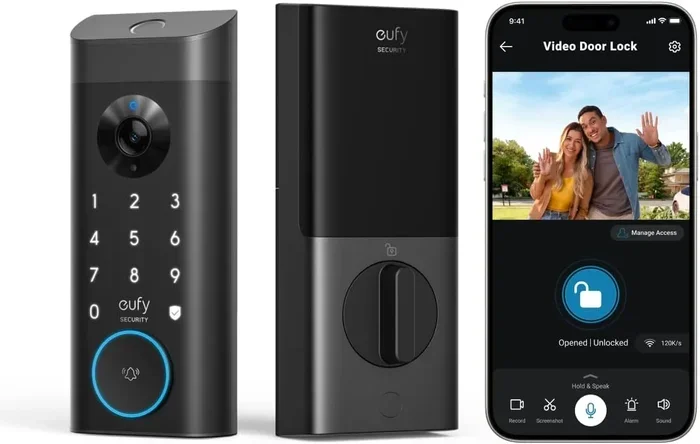
Before we dive into safety, let us quickly cover the basics. A WiFi door lock is a smart lock that connects directly to your home Wi-Fi network. Unlike traditional locks, it lets you lock and unlock your door using a smartphone app. You can also grant access to guests, monitor entry logs, and integrate the lock with other smart home devices.
Most WiFi door locks use a keypad entry system, a mobile app, or both. Some models also support voice commands through assistants like Alexa or Google Home. The lock replaces or sits on top of your existing deadbolt lock. This means the physical mechanism is still doing the heavy lifting.
How Do They Connect?
Here is how it works in simple terms. Your WiFi door lock connects to your home router. The router links the lock to the internet. From anywhere in the world, you can use your phone to send a command to the lock. The lock receives the signal and either locks or unlocks the door.
This remote access feature is what makes WiFi locks so appealing. You can let a delivery person in while you are at work. You can check whether you locked the door before a flight. But this same connectivity is also what creates potential door lock vulnerabilities.
Quick Tip: Check Compatibility First
Not every door and lock system works with every smart lock. Before buying a WiFi door lock, check that your door thickness, backset, and deadbolt type are compatible. Most brands list compatible door specs on their product pages. Taking five minutes to verify this can save you a lot of headaches later.
How Secure Are Wi Fi Door Locks?
This is the big question, and it deserves a detailed answer. The security of your WiFi door lock depends on multiple layers. Let us break them down one by one.
Encryption and Authentication
Good smart lock security starts with encryption. Most quality WiFi door locks use AES-128 or AES-256 encryption. This is the same type of encryption used by banks and government agencies. It scrambles the data sent between your phone and the lock so that hackers cannot read it.
Beyond encryption, look for locks that offer two-factor authentication. This means that even if someone gets your password, they still need a second form of verification to unlock your door. Some locks send a one-time code to your phone. Others require a fingerprint scan alongside the app command.
Encryption protocols are constantly evolving. A lock that uses modern encryption today will be much safer than one that relies on older, outdated methods. Always check what security standards a lock meets before you buy it.
Firmware Updates and Patch Management
One of the most overlooked aspects of Wi Fi door locks safe is firmware. Just like your phone or laptop, a smart lock runs on software. Manufacturers release firmware updates to fix bugs and patch security holes.
If a lock manufacturer stops updating its firmware, that lock becomes a growing risk over time. Before purchasing, check how often the brand releases updates and how long they support their products. A smart lock with active, ongoing support is always a safer bet.
Expert Insights on WiFi Security
Cybersecurity experts agree that WiFi door locks are safe when used correctly. The real danger comes from user error. For example, leaving your home Wi-Fi network unprotected is like leaving your front door wide open. A strong, unique password for your router is the single most important step you can take.
Experts also recommend creating a separate guest network for your smart home devices. This keeps your lock on its own network, isolated from computers and phones that might be more vulnerable to cyber attacks. It is a simple step that adds a powerful layer of protection.
Common Security Risks of WiFi Door Locks
No technology is completely risk-free. Understanding the risks helps you defend against them. Here are the most common door lock vulnerabilities you should know about.
Network-Based Attacks
Because your WiFi door lock connects to the internet, it is potentially exposed to remote attacks. A hacker who gains access to your Wi-Fi network could, in theory, try to communicate with your lock. This is called a network-based attack.
The risk is higher if your Wi-Fi network uses weak encryption like WEP instead of WPA3. It is also higher if your router has default login credentials that never get changed. These are the kinds of gaps that experienced hackers look for.
Physical Tampering Risks
Digital security is not the only concern. WiFi door locks are still physical devices attached to your door. A determined intruder can attempt lock picking, brute force, or other physical methods to bypass the lock.
This is why it is important to choose a WiFi door lock that has a solid deadbolt lock mechanism built in. The smart features add convenience, but the physical hardware is your last line of defense. Look for locks rated by ANSI (American National Standards Institute) for grade 1 or grade 2 security.
Common Mistakes Homeowners Make
Many people unknowingly weaken their smart lock security through simple habits. Here are the most common mistakes:
- Using default passwords: Many locks ship with generic usernames and passwords. Never keep these unchanged.
- Ignoring firmware updates: Skipping updates leaves known vulnerabilities exposed.
- Connecting to public Wi-Fi: Never control your lock from an unsecured public network.
- Sharing access codes carelessly: Do not give out your digital keys to people you do not trust completely.
- Not enabling auto-lock: Forgetting to lock your door manually defeats the purpose of a smart lock.
Avoiding these mistakes puts you ahead of most WiFi door lock users. It takes just a few minutes to set up proper security habits.
How to Make Your Wi Fi Door Lock Safer
The good news is that making your WiFi door lock more secure is not difficult. It mostly comes down to a few smart habits and settings. Here is a step-by-step guide.
Step 1: Secure Your Home Network
Start with your router. Change the default admin username and password. Use WPA3 encryption if your router supports it. Create a strong Wi-Fi password that is at least 16 characters long and includes a mix of letters, numbers, and symbols.
Consider setting up a separate network just for your smart home devices. Most modern routers allow you to create a guest network. This keeps your lock isolated from your main devices, reducing the attack surface significantly.
Step 2: Configure Your Lock Properly
Once your lock is installed, go through the app settings carefully. Enable two-factor authentication if the lock supports it. Set up auto-lock so the door locks itself after a set time. Review the access logs regularly to spot any unusual activity.
Also, create unique access codes for each person who needs entry. Avoid shared codes whenever possible. This way, if a code is compromised, you can change just that one code without affecting everyone else.
Step 3: Keep Everything Updated
Make it a habit to check for firmware updates at least once a month. Most smart lock apps will notify you when an update is available. Do not ignore these notifications. They often contain critical security patches.
Similarly, keep your phone’s operating system and the lock’s app up to date. Outdated software on your phone can create a pathway for attackers to reach your lock through the app.
Quick Tips for Ongoing Safety
- Enable push notifications so you get alerts every time the door is locked or unlocked.
- Use a battery backup to ensure your lock keeps working during power outages.
- Test your lock regularly to make sure it is functioning properly.
- Remove access for former housemates, cleaners, or guests as soon as they no longer need it.
- Consider adding a physical backup key in a secure location, just in case the smart features fail.
Comparing WiFi Door Locks with Other Smart Locks
Not all smart locks use WiFi. Understanding how different wireless door lock technologies compare helps you make a better decision.
WiFi vs Bluetooth vs Z-Wave
Each connection type has its strengths and weaknesses. Here is a quick comparison:
- WiFi locks connect directly to your home network. They offer the best remote access but use more power and can be more exposed to internet-based threats.
- Bluetooth locks connect only to your phone when you are nearby. They are more secure from remote attacks but lack true remote control.
- Z-Wave locks use a dedicated low-power network. They are very secure and energy-efficient but require a Z-Wave hub to connect to the internet.
| Feature | WiFi Lock | Bluetooth Lock | Z-Wave Lock |
|---|---|---|---|
| Remote Access | Yes | No | Yes (with hub) |
| Security Level | Medium-High | High | High |
| Power Usage | Higher | Lower | Low |
| Internet Dependency | Direct | None | Via Hub |
| Installation Difficulty | Easy | Easy | Moderate |
Which One Is Right for You?
If you want full remote access and do not mind taking extra security steps, a WiFi door lock is a great choice. If you prioritize maximum security and do not need remote access, a Bluetooth door lock might be better. For a balance of both, a Z-Wave lock with a dedicated hub offers strong smart lock security without direct internet exposure.
Many homeowners now use a combination. They might have a WiFi door lock on the front door for convenience and a Bluetooth lock on a secondary door for added security. This layered approach is one of the smartest strategies in access control.
Final Thoughts on Wi Fi Door Locks Safe
So, are Wi Fi door locks safe? The answer is a reassuring yes, as long as you take the right precautions. The technology behind modern WiFi door locks has come a long way. Strong encryption protocols, two-factor authentication, and regular firmware updates make them a viable option for most homes.
The key is to treat your WiFi door lock as part of a broader home security system. Secure your network, configure your lock properly, and stay vigilant about updates. Do these things, and you will enjoy the convenience of keyless entry without putting your home at risk.
Remember, no security system is 100% perfect. But with the right knowledge and habits, you can dramatically reduce your risk of door lock hacking or unauthorized access. Take charge of your smart home devices today, and enjoy the peace of mind that comes with a well-protected home.
Frequently Asked Questions
Can someone hack a WiFi door lock remotely?
It is possible but unlikely if you follow basic security practices. A strong Wi-Fi password, updated firmware, and enabled two-factor authentication make remote hacking extremely difficult. Most door lock hacking incidents happen due to user error, not flaws in the lock itself.
Do WiFi door locks work during a power outage?
Yes, most WiFi door locks run on batteries and continue to work during power outages. Many models also include a battery backup and a physical key override. You can always unlock the door manually if the smart features are temporarily unavailable.
Are Bluetooth door locks safer than WiFi door locks?
Bluetooth locks are generally safer from remote internet-based attacks because they do not connect directly to the web. However, they lack the remote access convenience of WiFi locks. The safest choice depends on your needs and how you configure your home automation setup.
How often should I update my WiFi door lock firmware?
Check for firmware updates at least once a month. Most smart lock apps will send you a notification when an update is available. Keeping your lock updated is one of the simplest and most effective ways to maintain smart lock security.
What should I do if I suspect my WiFi door lock has been compromised?
First, change your lock password immediately. Then check the access logs in your app for any unfamiliar activity. Update your firmware, enable two-factor authentication, and consider resetting the lock to factory settings if needed. If the issue persists, contact the manufacturer’s support team.
Is a WiFi door lock worth the investment?
For most homeowners, yes. The convenience of keyless entry, remote access, and guest management is hard to beat. When paired with proper Wi-Fi network security and regular maintenance, a WiFi door lock adds both comfort and an extra layer of access control to your home.