Are Kvm Switches A Security Risk What You Need To Know
KVM switches offer convenience but can introduce serious security risks if not properly secured. From cross-communication leakage to firmware vulnerabilities, these devices expose your systems to unauthorized access and data theft. Understanding these risks helps you make informed decisions about your setup.
This is a comprehensive guide about Are Kvm Switches A Security Risk.
Key Takeaways
- KVM switches can create security vulnerabilities that expose multiple computers to shared peripheral-based attacks.
- Cross-communication leakage is a real threat where data from one system can bleed into another through the switch.
- Firmware vulnerabilities in KVM switches are often overlooked but can be exploited by attackers.
- Secure KVM switches with tamper detection offer significantly better protection for sensitive environments.
- Proper configuration and regular updates reduce most KVM-related security risks dramatically.
- USB security concerns extend beyond the switch itself to connected peripherals and cables.
- Not all KVM switches are equal — consumer-grade models lag far behind enterprise-grade in security features.
[FEATURED_IMAGE_PLACEHOLDER]
Are KVM Switches a Security Risk What You Need to Know
KVM switches let you control multiple computers with one keyboard, monitor, and mouse. They are popular in offices, data centers, and home setups. But here is the question many people ignore — are KVM switches a security risk? The short answer is yes, they can be. The longer answer is that the risk depends on the type of switch you use, how you configure it, and what kind of data passes through it.
If you run multiple computers from a single desk, you probably rely on a KVM switch every day. It is convenient. It saves space. It reduces cable clutter. But convenience often comes at a cost. That cost might be your data security. In this guide, we break down every major risk, explain how attackers exploit KVM vulnerabilities, and show you exactly how to protect yourself.
Keyboard video mouse switch security is not something most people think about. You plug it in, switch between computers, and go about your day. But underneath that simple surface lies a complex web of potential threats. Firmware backdoors, cross-communication leakage, USB-based attacks, and unauthorized access are all real dangers. Let us explore them together.
Whether you are a home user or managing an enterprise network, understanding these risks matters. A single compromised switch can give an attacker access to every computer connected to it. That is not a drill. That is a genuine cybersecurity threat that affects thousands of organizations worldwide. So let us dive in and make sure you are not caught off guard.
What Is a KVM Switch and How Does It Work
A KVM switch stands for keyboard, video, and mouse switch. It is a hardware device that lets you control two or more computers from a single set of peripherals. Instead of buying four keyboards and four monitors for four computers, you use one set and a switch to toggle between them.
The basic idea is simple. You connect your keyboard, mouse, and monitor to the KVM box. Then you connect each computer to the box using USB and HDMI or VGA cables. A button or keyboard shortcut lets you switch control from one computer to another. It is clean. It is efficient. And for many people, it is essential.
But here is where things get interesting from a security standpoint. The switch acts as a central hub. Every signal from your keyboard, every pixel on your screen, every click of your mouse passes through that single device. If that device is compromised, every computer connected to it is at risk. Think of it like a single key that opens every door in a building. If someone copies that key, every room is exposed.
KVM switches come in different sizes and configurations. Small consumer models handle two computers. Large enterprise-grade units can manage dozens or even hundreds of servers in a data center. The bigger the setup, the bigger the potential attack surface. This is why data security professionals take KVM switch risks seriously.
Common Security Risks Associated with KVM Switches
Cross-Communication Leakage
One of the most concerning risks is cross-communication leakage. This happens when signals from one computer accidentally reach another computer through the KVM switch. It sounds like something from a spy movie, but it is a documented problem in cybersecurity research.
Here is how it works. When you switch from Computer A to Computer B, residual electrical signals can linger in the switch’s circuitry. A skilled attacker with the right equipment could potentially intercept keystrokes, screen data, or USB commands meant for one system and read them on another. This is especially dangerous in environments where sensitive information leakage could have serious consequences.
Consumer-grade KVM switches are most vulnerable to this issue. They often lack proper signal isolation between ports. Enterprise-grade switches use dedicated isolation circuits, but even those are not perfect. The risk is lower, but it is not zero.
Firmware Vulnerabilities
Every KVM switch runs firmware. That is the software baked into the device’s hardware. Just like any other software, firmware can contain bugs, flaws, and even intentional backdoors. Firmware vulnerability is a growing concern in hardware security across all device categories, and KVM switches are no exception.
Most users never think about updating their KVM switch firmware. The device just sits on a desk and works. But outdated firmware can contain known exploits that attackers have already documented. In some cases, manufacturers have shipped switches with hardcoded passwords or unsecured management interfaces right out of the box.
The problem is compounded in enterprise environments. IT teams manage hundreds of switches across multiple locations. Keeping firmware updated on every single device is a massive logistical challenge. Meanwhile, attackers know this and target KVM firmware as an easy entry point into secure networks.
USB-Based Attacks Through Shared Peripherals
KVM switches share USB peripherals between computers. This creates a unique attack vector. A compromised USB device — like a keyboard or flash drive — connected to the KVM can potentially reach every computer that uses that peripheral through the switch.
Think about it. You plug in a USB keyboard into the KVM switch. That keyboard communicates with every computer you switch to. If someone has tampered with that keyboard or replaced it with a malicious one, they now have a foothold on every system you access. This is a form of USB security threat that many organizations underestimate.
BadUSB attacks are a prime example. Researchers have demonstrated how USB devices can be reprogrammed to act as malicious peripherals. When those devices pass through a KVM switch, the attack spreads to every connected computer. It is fast, it is silent, and it is devastating.
Unauthorized Physical Access
A KVM switch sitting on a desk is a physical security concern. Anyone with physical access to the switch can press the button to switch computers, reset the device, or in some cases, access a management interface. In shared office spaces or public areas, this risk is amplified.
Unauthorized access through a KVM switch can lead to credential theft, screen viewing, or even complete system takeover. An attacker does not need to be a hacker with sophisticated tools. They just need a few minutes of physical proximity to the switch.
This is why many secure facilities restrict physical access to KVM infrastructure. Server rooms and government facilities often use locked cabinets and access control systems specifically to protect KVM switches from tampering.
How KVM Switches Can Expose Your Data
Side-Channel Attacks
Side-channel attacks exploit the physical implementation of a system rather than its software. In the context of KVM switches, this means attackers can analyze electromagnetic emissions, power consumption patterns, or timing information to extract sensitive data.
KVM switches handle sensitive signals every second. Your keystrokes, screen content, and peripheral commands all flow through the device. Electromagnetic emanations from the switch could theoretically be captured by a nearby receiver. While this requires sophisticated equipment and proximity, it is a real attack vector that has been demonstrated in laboratory settings.
Supply Chain Compromise
Supply chain attack is a term that has become all too common in recent years. It refers to compromising a product before it reaches the end user. KVM switches are no exception. A malicious actor could tamper with a switch during manufacturing, shipping, or retail handling.
Imagine purchasing a KVM switch from an online marketplace. What if someone had already modified the firmware to include a backdoor? You would have no way of knowing. The device would work perfectly — except it would also be quietly sending your data to an attacker somewhere in the world.
This is why purchasing KVM switches from reputable manufacturers and authorized distributors is so important. The supply chain risk applies to all hardware, but KVM switches occupy a unique position because they sit at the intersection of multiple systems.
Credential Harvesting
Every time you type a username and password on a KVM-connected computer, those credentials pass through the switch. In a compromised or poorly secured switch, those credentials could be logged, stored, or transmitted to an attacker.
Credential theft is one of the most common outcomes of KVM-related security breaches. Attackers harvest login information from one system and use it to pivot into other systems on the network. The KVM switch becomes the initial foothold in a broader attack chain.
This risk is especially high in environments where the same credentials are used across multiple systems. If a KVM switch logs your admin password for one server, and that password also works on other servers, the damage multiplies quickly.
Types of KVM Switches and Their Security Levels
Not all KVM switches are created equal. The security risk varies dramatically depending on the type and quality of the switch you use. Here is a breakdown of the main categories.
| Type | Security Level | Best For | Key Risk |
|---|---|---|---|
| Consumer-Grade | Low | Home users, basic setups | Minimal isolation, no encryption |
| Prosumer-Grade | Medium | Small offices, home labs | Basic firmware, limited updates |
| Enterprise-Grade | High | Data centers, corporate offices | Complex management, update dependency |
| Secure/SCADA-Grade | Very High | Government, military, healthcare | Cost, complexity |
Consumer-Grade KVM Switches
Consumer-grade switches are the ones you find on Amazon for under fifty dollars. They work fine for casual use. But from a security standpoint, they are the weakest link in your setup. They typically lack signal isolation, firmware update mechanisms, and any form of encryption. If you are using one of these switches for anything involving sensitive data, you should seriously reconsider.
These switches are fine for switching between a gaming PC and a work laptop where no sensitive data is involved. But even then, a compromised peripheral could spread malware between the two machines.
Enterprise-Grade KVM Switches
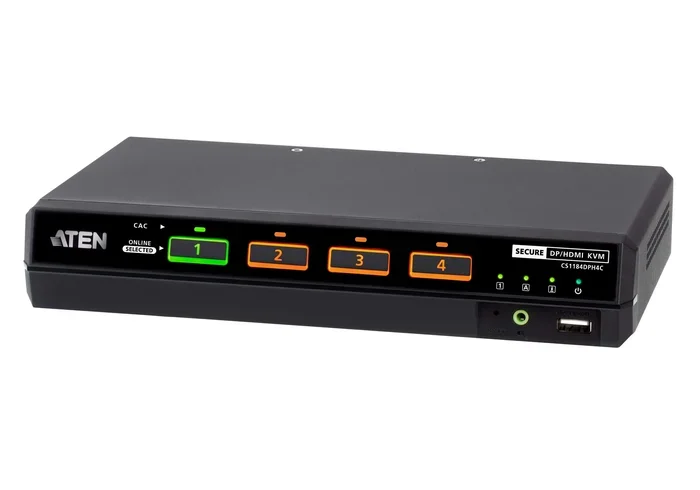
Enterprise-grade switches are built for network isolation and multi-computer setups in professional environments. They include features like dedicated isolation circuits, encrypted communication channels, and regular firmware updates. Brands like ATEN, Raritan, and Avocent dominate this space.
These switches are designed with security in mind from the ground up. They often include tamper detection, audit logging, and role-based access control. The trade-off is cost and complexity. An enterprise-grade secure KVM switch can cost hundreds or even thousands of dollars.
Secure KVM Switches
Secure KVM switches are the gold standard for hardware security. They are specifically designed to prevent cross-communication leakage, USB-based attacks, and firmware tampering. These switches undergo rigorous testing and often carry certifications like NIAP, Common Criteria, or FedRAMP.
Secure KVM switches are commonly used in government, military, and healthcare environments where data protection is non-negotiable. They enforce strict access control policies and ensure that signals from one system never reach another. If you handle classified or highly sensitive information, this is the only type of switch you should consider.
In fact, computers are used in medicine extensively, and secure KVM switches play a vital role in hospital IT infrastructure where patient data protection is critical. Medical facilities often use these switches to manage multiple systems handling sensitive health records.
Best Practices for Securing Your KVM Setup
Choose the Right Switch for Your Needs
The single most important step is selecting a KVM switch that matches your security requirements. If you handle sensitive data, invest in a secure or enterprise-grade model. Do not cheap out on hardware that sits at the crossroads of your entire computing setup.
Look for switches that offer:
- Signal isolation between ports
- Firmware update capabilities
- Tamper detection features
- Encrypted communication channels
- USB device filtering
Keep Firmware Updated
Check for firmware updates regularly. Manufacturers release patches to address newly discovered vulnerabilities. An outdated KVM switch is an open door for attackers. Set a calendar reminder to check for updates every month or two.
Use Dedicated, Trusted Peripherals
Do not share USB peripherals between the KVM switch and your computers directly. Use only peripherals that are connected exclusively through the KVM switch. Avoid plugging unknown USB devices into the switch at all costs.
Consider using USB port disabling features if your switch supports them. This prevents unauthorized devices from connecting through the switch’s USB ports.
Limit Physical Access
Place your KVM switch in a secure location. Lock it in a cabinet if possible. In shared office environments, consider switches with physical port locks that prevent unauthorized devices from being connected.
Monitor and Audit
If your switch supports logging, enable it. Review logs regularly for unusual activity. Look for unexpected switch events, unauthorized access attempts, or firmware changes. Monitoring turns your KVM switch from a blind spot into a visible part of your security posture.
When to Avoid KVM Switches Entirely
Sometimes the safest choice is to avoid a KVM switch altogether. If you are working with highly classified data, running critical infrastructure, or handling financial records that demand the highest level of protection, a dedicated set of peripherals for each computer is the most secure option.
Yes, it means more clutter and more cables. But it also means each computer operates in complete isolation. There is no shared hub, no cross-communication risk, and no single point of failure. For the most security-conscious users, this trade-off is absolutely worth it.
Consider your threat model. What are you protecting? Who are you protecting it from? If the answer is nation-state actors or sophisticated criminal organizations, a KVM switch — even a secure one — might introduce unnecessary risk. For everyday office work and home use, a quality enterprise-grade switch is more than sufficient.
Conclusion
So, are KVM switches a security risk? The honest answer is that they can be, but the risk is manageable. With the right switch, proper configuration, and good security habits, you can enjoy the convenience of a KVM switch without putting your data in danger.
The key is awareness. Most people never think about KVM switch security until something goes wrong. By understanding the risks — cross-communication leakage, firmware vulnerabilities, USB attacks, and supply chain compromise — you can take proactive steps to protect yourself. Choose secure hardware, keep it updated, limit physical access, and monitor your setup regularly.
KVM switch security is not a topic that gets enough attention. But in a world where cyber threats are growing more sophisticated every day, ignoring it is not an option. Take the time to evaluate your setup today. Your future self will thank you when you avoid a costly data breach tomorrow.
Whether you are a home user managing two computers or an IT administrator overseeing hundreds of servers, the principles remain the same. Know your risks, choose your hardware wisely, and never assume that a convenient device is also a secure one. Security and convenience do not always go hand in hand, but with the right approach, you can have both.
Frequently Asked Questions
Can a KVM switch be hacked remotely?
Yes, if the switch has network management features or outdated firmware, it can be targeted remotely. Attackers can exploit firmware vulnerabilities to gain access to the switch and potentially reach every connected computer. Always disable remote management if you do not need it, and keep firmware updated.
Are secure KVM switches worth the extra cost?
Absolutely. Secure KVM switches include features like signal isolation, tamper detection, and encrypted channels that consumer-grade models lack. If you handle sensitive data or operate in a regulated industry, the extra cost is a small price compared to the cost of a data breach.
What is cross-communication leakage in KVM switches?
Cross-communication leakage occurs when signals from one computer accidentally reach another through the KVM switch. This can happen due to electrical residue in the switch’s circuitry. It is a documented security concern that can lead to unauthorized data exposure between systems.
How often should I update my KVM switch firmware?
You should check for firmware updates at least once a month. Manufacturers release patches regularly to address security vulnerabilities. Setting a recurring reminder ensures you never miss an update that could close a critical security gap.
Can a malicious USB device affect all computers through a KVM switch?
Yes. Since the KVM switch shares USB peripherals between computers, a compromised device can potentially reach every system connected to the switch. This makes USB security a critical consideration when using any KVM switch in a multi-computer environment.
Do KVM switches work with wireless peripherals safely?
Wireless peripherals introduce additional attack surfaces. While convenient, wireless keyboards and mice can be intercepted or spoofed. If you use wireless peripherals with a KVM switch, ensure they use encrypted connections and are from reputable manufacturers with strong security practices.
=== INTERNAL LINKING ===
KVM switches are widely used across many industries, including healthcare. In medical environments, computers play a crucial role in patient care, diagnostics, and record management. To understand the broader picture of how computers serve critical functions, you can explore 10 Ways Computers Are Used In Medicine. This article highlights the diverse applications of computing technology in healthcare settings.
Similarly, secure KVM switches are essential in medical IT infrastructure where data security and hardware security are paramount. Understanding how computers are used in medicine helps contextualize why protecting every device in the chain — including KVM switches — matters so much.
For organizations that rely on computers for sensitive operations, whether in healthcare or enterprise environments, the cybersecurity threat posed by poorly secured peripheral-sharing devices like KVM switches should never be underestimated. Learn more about how computers support critical infrastructure by reading 10 Ways Computers Are Used In Medicine and understanding the broader ecosystem of connected systems.