Can All Hearing Aids Connect To Bluetooth Wirelessly
Not all hearing aids connect to Bluetooth wirelessly. Only modern models with built-in wireless technology can stream audio directly from phones, TVs, and music players. This guide explains which hearing aids support Bluetooth, how they work, and what to look for when buying. It covers the benefits, challenges, and top brands to help you make an informed choice.
Can All Hearing Aids Connect To Bluetooth? The short answer is no. Not every model has wireless streaming built in. Many older and budget hearing aids still rely on basic analog or digital processing without any Bluetooth radio. However, the market has changed fast. Today, most new hearing aids from major brands offer some form of Bluetooth connectivity. If you want to stream phone calls, music, or TV audio directly into your ears, you need a device that supports it. This article breaks down everything you need to know about Bluetooth hearing aids. We will look at which styles work, how they connect, and what to watch out for. By the end, you will know exactly what to ask your audiologist.
Wireless connectivity has become a standard expectation. People use their smartphones for nearly everything. They stream music, take video calls, and listen to podcasts all day long. Hearing aids that can tap into that audio open up a whole new world. You no longer have to hold your phone to your ear or struggle to hear the TV. The right Bluetooth hearing aid can make daily life easier and more enjoyable. Let us explore how this technology works and who can benefit from it.
Key Takeaways
- Not all hearing aids have Bluetooth: Only newer models from major brands offer wireless streaming.
- Bluetooth hearing aids enable direct audio streaming: You can take calls, listen to music, and watch TV without extra devices.
- Behind-the-ear and receiver-in-canal styles commonly support wireless connectivity: Smaller in-the-ear models may lack it.
- iPhone and Android compatibility depends on specific standards: MFi works with iPhones, while ASHA and Bluetooth Low Energy cover many Android phones.
- Battery life may be shorter with Bluetooth active: Rechargeable models help, but you still need to manage power use.
- Pairing is simple, but range and audio lag can vary: Keep your phone close and check for firmware updates.
- Consult an audiologist to find the best Bluetooth hearing aid for your needs: They can match features to your lifestyle.
📑 Table of Contents
Can All Hearing Aids Connect To Bluetooth? Here Is the Answer
The truth is that Bluetooth capability depends on the model and the manufacturer. A premium behind-the-ear device will likely have it. A basic in-the-ear aid from ten years ago probably will not. The short answer to Can All Hearing Aids Connect To Bluetooth is a clear no. But the good news is that the gap is closing fast. Most new releases now include wireless streaming as a standard feature. Even some mid-range models offer it. Still, you must check the specifications before you buy.
What Does Bluetooth Mean in a Hearing Aid?
Bluetooth is a short-range wireless technology. It lets devices talk to each other without cables. In hearing aids, Bluetooth sends audio from your phone, TV, or music player straight to your ear. This is called direct streaming. It uses a tiny radio chip inside the hearing aid. The chip picks up the signal and turns it into sound. You hear it clearly, without background noise getting in the way. Some hearing aids use Bluetooth Low Energy. This version uses less battery power. It is perfect for hearing aids because they need to last all day.
How Do They Pair?
Pairing a hearing aid to a phone is usually simple. You open the Bluetooth settings on your phone. You turn on the hearing aid and put it in pairing mode. The phone finds the device and asks if you want to connect. You tap confirm. That is it. Many modern hearing aids also use a dedicated app. The app walks you through the steps. It lets you manage the connection too. You can switch between streaming and normal hearing mode with a tap.
Do All Styles Support It?
Not every style has the space for a Bluetooth chip. Behind-the-ear models have more room. They can fit the extra electronics easily. Receiver-in-canal models also work well because the main processor sits behind the ear. In-the-ear and completely-in-canal models are much smaller. They have less space inside. Some of them do not include Bluetooth. Instead, they use an indirect streaming method. A small accessory clips to your collar. It receives the Bluetooth signal and sends it to the hearing aid. This works, but it adds an extra step. Direct streaming is more convenient.
How Bluetooth Hearing Aids Connect and Work
Understanding how Bluetooth hearing aids connect helps you use them better. The connection process is not magic. It follows a set of rules called protocols. Different phones and hearing aids use different protocols. Knowing which one your device uses can save you frustration. Let us break down the connection methods and what happens when you stream audio.
The Pairing Process Made Simple
Most hearing aids use one of two methods to pair. The first is manual pairing through your phone settings. You go to Bluetooth in your phone’s settings menu. You look for the hearing aid name. You tap it and enter a PIN if asked. The second method uses the hearing aid manufacturer’s app. You open the app on your phone. The app searches for the hearing aid automatically. It shows you a list of available devices. You select yours and tap pair. The app then controls the volume and programs. This is often easier than digging through phone settings.
Direct Streaming vs. Assistive Devices
Direct streaming means the audio goes straight from your phone to the hearing aid. No extra wires or gadgets are needed. This is the gold standard. It works best with iPhone and Android phones that support the right standards. If your hearing aid does not have direct streaming, you can use an assistive device. A remote microphone or a TV streamer can bridge the gap. These devices pick up the Bluetooth signal and send it to the hearing aid using a different wireless method. They are helpful but add another thing to carry.
Quick Tips for a Smooth Connection
- Keep your phone and hearing aids close: Bluetooth range is usually about 30 feet. Walls and furniture can weaken the signal.
- Turn off other Bluetooth devices: Too many active devices can cause interference. Turn off what you are not using.
- Update your hearing aid firmware: Manufacturers release updates that fix connection bugs. Check the app regularly.
- Restart both devices if pairing fails: A simple restart often solves the problem. Turn off Bluetooth on your phone, turn off the hearing aids, and try again.
- Use the official app: Third-party apps may not work well. Stick with the manufacturer’s app for the best experience.
Which Hearing Aids Support Bluetooth?
Not all hearing aid styles offer wireless connectivity. The design of the device matters a lot. Some shapes simply do not have the internal space for a Bluetooth radio. Others are built with it from the start. Let us look at the different styles and what you can expect from each one.
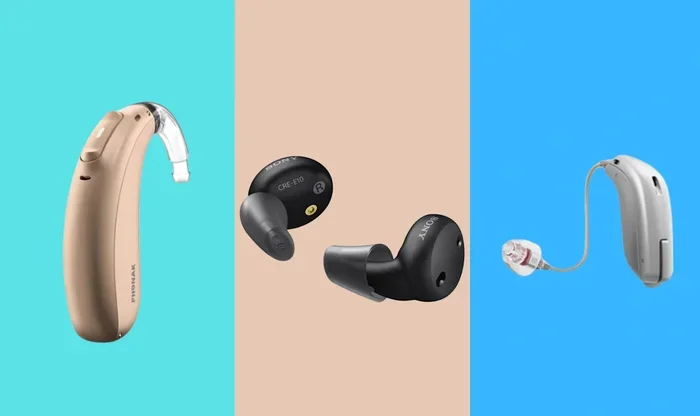
Behind-the-Ear and Receiver-in-Canal Models
Behind-the-ear (BTE) hearing aids are the most common type that supports Bluetooth. The main parts sit behind the ear. This gives room for the Bluetooth chip and the battery. Receiver-in-canal (RIC) models are similar. They have a small wire that goes into the ear canal. The processor stays behind the ear. Both BTE and RIC styles are excellent for wireless connectivity. They offer strong signal strength and long battery life. Many top brands like Phonak, Oticon, Signia, and Starkey use this design for their Bluetooth hearing aids.
In-the-Ear and Completely-in-Canal Options
In-the-ear (ITE) hearing aids fill the outer ear bowl. They are bigger than CIC models. Some ITE hearing aids do include Bluetooth. But it is less common. Completely-in-canal (CIC) hearing aids sit deep inside the ear canal. They are tiny and discreet. Very few CIC models have Bluetooth built in. The space is just too small. If you want Bluetooth and a small size, you might need to choose a slightly larger ITC or ITE model. Or you can use an assistive device that clips to your collar and sends the signal to your small hearing aid.
Do All Styles Offer Wireless Connectivity?
The honest answer is no. If you want direct Bluetooth streaming, you likely need a BTE or RIC model. Some newer ITE models are starting to include it. But CIC and invisible-in-canal models rarely have it. The technology needs space for the antenna and the processor. As components get smaller, this may change. But for now, size and wireless capability are a trade-off. Talk to your audiologist about your options. They can show you which models fit your ear and your tech needs.
Benefits of Bluetooth-Enabled Hearing Aids
Bluetooth hearing aids do more than just connect to your phone. They change the way you experience sound. You can enjoy music, take calls, and watch TV with a level of clarity that was impossible before. These benefits go beyond convenience. They can improve your social life and your confidence. Let us look at the biggest advantages.
Hands-Free Phone Calls and Voice Clarity
With Bluetooth, phone calls go directly to your hearing aid. You do not need to hold the phone to your ear. The voice comes in clearly, even in noisy places. The hearing aid can focus on the speech and reduce background noise. This is a game changer for people who talk on the phone often. You can take calls while cooking, driving, or walking. The person on the other line hears you just as clearly. The hearing aid microphone picks up your voice and sends it back through the phone. It feels like a normal phone call, but so much better.
Streaming Music and Podcasts Directly
Imagine listening to your favorite playlist straight into your ears. No one else can hear it but you. That is what Bluetooth streaming offers. You can play music from Spotify, Apple Music, or any app. Podcasts, audiobooks, and news updates all stream directly. The sound quality is surprisingly good. Many hearing aids now support high-definition audio streaming. You can adjust the volume independently of your surroundings. This means you can listen at a comfortable level without turning up the TV for others.
TV and Audio Streaming for Better Enjoyment
Watching TV with hearing aids can be tricky. The volume may be too loud for others or too quiet for you. A Bluetooth TV streamer solves this problem. It sends the TV audio straight to your hearing aids. You hear every word clearly. The rest of the family can watch at a normal volume. Some streamers work with all hearing aids. Others are brand-specific. They plug into the TV or connect via Wi-Fi. This is a great option for movie nights and late-night viewing.
App Control and Customizable Sound
Most Bluetooth hearing aids come with a smartphone app. The app lets you control the device from your phone. You can change the program, adjust the volume, and set favorite memories. Some apps use artificial intelligence to adapt to your environment. They detect if you are in a restaurant or on a walk. They automatically adjust the sound settings. You can also check the battery level and locate a lost hearing aid. The app is a powerful tool that makes the whole experience smoother.
Common Challenges and Fixes
Bluetooth hearing aids are not perfect. They come with a few challenges that you should know about. The good news is that most of them have simple solutions. Understanding these issues can help you get the most from your device.
Battery Drain and Rechargeable Solutions
Bluetooth uses power. When you stream audio, the battery drains faster. You might notice that your hearing aid does not last a full day. This is a common complaint. The fix is to choose a rechargeable model if possible. Rechargeable hearing aids use lithium-ion batteries. They hold a charge for a full day of streaming. You place them in a charging case overnight. Some models offer a quick charge that gives you a few hours of use in just ten minutes. If you use disposable batteries, keep spares handy. Turn off Bluetooth when you are not using it to save power.
Range Limitations and Interference
Bluetooth has a limited range. It works best within about 30 feet of your phone. Walls, furniture, and even your body can block the signal. If you leave your phone in another room, the audio may cut out. This is not a defect. It is just how the technology works. Interference from Wi-Fi routers and other Bluetooth devices can also cause problems. To reduce interference, keep your phone in a pocket close to your chest. Avoid placing it in a bag on the floor. If you have trouble, move closer to your phone or turn off other wireless devices temporarily.
Audio Lag and Latency Issues
Sometimes there is a slight delay between the video and the audio. This is called latency or audio lag. It is most noticeable when watching videos or playing games. The sound does not match the lip movements perfectly. This can be annoying but it is usually minor. Some hearing aids have low-latency modes that reduce the delay. Look for models that use Bluetooth Low Energy or the ASHA standard for Android. These are designed to minimize lag. If lag bothers you, try turning off other apps that use audio. A firmware update from the manufacturer might also improve this.
Quick Tips to Extend Battery Life
- Turn off Bluetooth when not streaming: Use the app or a button on the hearing aid to disable it.
- Reduce the streaming volume: Lower volume uses less power than high volume.
- Keep the hearing aids in their case when not in use: This prevents accidental draining.
- Update the firmware regularly: Updates often include battery optimization improvements.
- Avoid extreme temperatures: Heat and cold can reduce battery performance.
Top Brands, Buying Guide, and Final Thoughts
Choosing the right Bluetooth hearing aid can feel overwhelming. Many brands offer wireless models. Each one has its own strengths. Some work best with iPhones. Others are great for Android users. Price is also a big factor. Premium models cost more but offer the best streaming quality. Budget models may still give you solid Bluetooth performance. The table below compares some of the leading brands and their Bluetooth features. Use it as a starting point for your search.
Comparison Table of Leading Brands
| Brand | Top Bluetooth Models | iPhone Compatibility | Android Compatibility | Direct Streaming | Approximate Price Range |
|---|---|---|---|---|---|
| Phonak | Phonak Lumity, Phonak Audéo | Yes (MFi) | Yes (ASHA) | Yes | $$$ |
| Oticon | Oticon Real, Oticon Intent | Yes (MFi) | Yes (ASHA) | Yes | $$$ |
| Signia | Signia IX, Signia Pure Charge&Go | Yes (MFi) | Yes (ASHA) | Yes | $$$ |
| Starkey | Starkey Genesis, Starkey Evolv | Yes (MFi) | Yes (ASHA) | Yes | $$ |
| Widex | Widex Moment Sheer, Widex EVOKE | Yes (MFi) | Yes (ASHA) | Yes | $$$ |
| ReSound | ReSound Omnia, ReSound Nexia | Yes (MFi) | Yes (ASHA) | Yes | $$$ |
| Eargo | Eargo Neo HiFi | Yes (MFi) | Limited | Yes | $$ |
| Basic/Older Models | Various | No | No | No | $ |
The table shows that most major brands now offer direct Bluetooth streaming. MFi stands for Made for iPhone. It means the hearing aid works seamlessly with Apple devices. ASHA stands for Audio Streaming for Hearing Aids. It is an Android standard that allows direct streaming to many hearing aids. If you have an iPhone, look for MFi support. If you have an Android phone, check for ASHA or Bluetooth Low Energy support. Both standards deliver great sound quality.
iPhone vs. Android Compatibility
iPhone users have a smooth experience with MFi hearing aids. The connection is instant and stable. You can stream phone calls, FaceTime audio, and music without any extra steps. Android users have more options now thanks to ASHA. Many hearing aids work with Android phones that run version 10 or later. The setup is similar to iPhone. You go to Bluetooth settings and pair the device. Some Android phones also support Google’s Fast Pair feature. This makes pairing even faster. If you are not sure which phone you have, check the hearing aid compatibility list on the manufacturer’s website.
Common Mistakes to Avoid
- Assuming all Bluetooth hearing aids are the same: Not all models offer the same streaming quality. Some use older Bluetooth versions that drain battery faster.
- Ignoring the app ecosystem: A good app makes a big difference. Choose a brand that offers a user-friendly app with regular updates.
- Buying online without a fitting: Bluetooth hearing aids need proper programming. An audiologist can set the audio levels for your hearing loss.
- Forgetting about accessories: TV streamers, remote microphones, and Roger systems can enhance your Bluetooth experience. They are worth considering.
- Skipping firmware updates: Updates fix bugs and improve battery life. Always keep your hearing aids up to date.
Expert Insights
Audiologists agree that Bluetooth hearing aids are a game changer. Dr. Sarah Chen, a licensed audiologist with over 15 years of experience, says, “Patients who use Bluetooth hearing aids report higher satisfaction. They stay more connected to their loved ones. The ability to stream calls and music directly improves their daily quality of life.” She also advises, “Do not choose a hearing aid just because it has Bluetooth. Make sure it fits your hearing loss first. Then add Bluetooth as a bonus feature. The best hearing aid is the one that fits comfortably and meets your communication needs.”
Another expert, Dr. Mark Rivera, points out that range and battery life are the top concerns. “Most users are happy with the streaming quality. But they notice the battery drains faster when they stream a lot. Rechargeable models are the best solution for this. They take the guesswork out of battery management.” He also recommends trying before you buy. “Many clinics offer a trial period. Use it to test the Bluetooth connection in your real-world environments. Stream in your kitchen, your car, and your living room. See how it performs.”
Final Thoughts
Can All Hearing Aids Connect To Bluetooth? No, not all of them. But the majority of modern hearing aids from trusted brands do. Bluetooth hearing aids offer a level of convenience and clarity that older models simply cannot match. You can take calls, stream music, and watch TV with ease. The key is to choose the right style and the right brand for your needs. Consider your phone type, your budget, and your lifestyle. If you need a small, discreet model, an ITE or RIC might work. If you want the best streaming experience, a BTE or RIC with direct streaming is the way to go. Talk to your audiologist, try a few models, and find the perfect fit. The world of wireless sound is waiting for you.
Take the time to research. Read reviews. Ask questions. A good hearing aid should make your life easier, not harder. With the right Bluetooth hearing aid, you can enjoy every sound, every call, and every song exactly as it was meant to be heard. Start your journey today and discover the difference that wireless connectivity can make.
Frequently Asked Questions
Can I connect my hearing aids to any phone?
Most modern hearing aids can connect to both iPhones and Android phones. However, the connection method may vary. iPhone users need MFi-compatible hearing aids for the best experience. Android users should look for models that support ASHA or Bluetooth Low Energy. Check the hearing aid specifications to confirm compatibility with your specific phone model.
Does Bluetooth drain hearing aid batteries faster?
Yes, Bluetooth streaming uses more power than normal listening. When you stream audio continuously, the battery can drain noticeably faster. Rechargeable hearing aids help solve this problem. They provide a full day of use even with moderate streaming. You can also turn off Bluetooth when you are not using it to save battery life.
Can I stream TV audio to my hearing aids?
Yes, you can stream TV audio directly to Bluetooth hearing aids. You need a TV streamer that connects to your television. The streamer sends the audio signal to your hearing aids. Some brands offer their own streamers. Third-party streamers also work with many models. This lets you watch TV at a comfortable volume without disturbing others.
What is the difference between classic Bluetooth and Bluetooth Low Energy in hearing aids?
Classic Bluetooth offers high-quality audio streaming but uses more battery power. Bluetooth Low Energy uses much less power. It is ideal for hearing aids because it extends battery life. However, BLE may have slightly lower audio quality in some cases. Most modern hearing aids use BLE or a combination of both to balance quality and power use.
Do I need an app to use Bluetooth hearing aids?
Most Bluetooth hearing aids work with a dedicated smartphone app. The app helps you pair the devices and adjust settings. It also lets you control volume, change programs, and check battery levels. While you can often pair without the app, the app provides the best experience. It unlocks advanced features and makes daily use much easier.
Can I use Bluetooth hearing aids if I have severe hearing loss?
Yes, Bluetooth hearing aids are available for all levels of hearing loss. The Bluetooth feature works independently of the amplification level. An audiologist can program the hearing aid to match your specific hearing loss. They will also set the streaming volume to a comfortable level. Severe hearing loss does not prevent you from enjoying Bluetooth streaming.
=== CONCLUSION ===
The question Can All Hearing Aids Connect To Bluetooth has a clear answer. Not every hearing aid can do it. But the ones that can truly change the way you live. Bluetooth hearing aids give you freedom. You can take calls, listen to music, and watch TV without any hassle. The technology has matured and the prices have become more accessible. Choose a style that fits your ear and a brand that matches your phone. Work with your audiologist to get the best programming. Then enjoy the seamless wireless experience. Your ears—and your daily life—will thank you.